| prod/dynamiteintegration-pa-v1 | | dictionary_item_added | |
|---|
| values_changed | | root['baseUrl'] | | new_value | https://chat.googleapis.com/ |
|---|
| old_value | https://dynamiteintegration-pa.googleapis.com/ |
|---|
|
|---|
| root['canonicalName'] | | new_value | Hangouts Chat |
|---|
| old_value | Dynamite Integration Private API |
|---|
|
|---|
| root['description'] | | new_value | The Google Chat API lets you build Chat apps to integrate your services with Google Chat and manage Chat resources such as spaces, members, and messages. |
|---|
| old_value | Enables first party clients to access private Integration service endpoints. |
|---|
|
|---|
| root['documentationLink'] | | new_value | https://developers.google.com/hangouts/chat |
|---|
| old_value | go/dynamite-integration |
|---|
|
|---|
| root['id'] | | new_value | chat:v1 |
|---|
| old_value | dynamiteintegration_pa:v1 |
|---|
|
|---|
| root['mtlsRootUrl'] | | new_value | https://chat.mtls.googleapis.com/ |
|---|
| old_value | https://dynamiteintegration-pa.mtls.googleapis.com/ |
|---|
|
|---|
| root['name'] | | new_value | chat |
|---|
| old_value | dynamiteintegration_pa |
|---|
|
|---|
| root['resources'] | | new_value | | customEmojis | | methods | | create | | description | Creates a custom emoji. Custom emojis are only available for Google Workspace accounts, and the administrator must turn custom emojis on for the organization. For more information, see [Learn about custom emojis in Google Chat](https://support.google.com/chat/answer/12800149) and [Manage custom emoji permissions](https://support.google.com/a/answer/12850085). Requires [user authentication](https://developers.google.com/workspace/chat/authenticate-authorize-chat-user) with the [authorization scope](https://developers.google.com/workspace/chat/authenticate-authorize#chat-api-scopes): - `https://www.googleapis.com/auth/chat.customemojis` |
|---|
| flatPath | v1/customEmojis |
|---|
| httpMethod | POST |
|---|
| id | chat.customEmojis.create |
|---|
| parameterOrder | |
|---|
| parameters | |
|---|
| path | v1/customEmojis |
|---|
| request | |
|---|
| response | |
|---|
| scopes | - https://www.googleapis.com/auth/chat.customemojis
|
|---|
|
|---|
| delete | | description | Deletes a custom emoji. By default, users can only delete custom emoji they created. [Emoji managers](https://support.google.com/a/answer/12850085) assigned by the administrator can delete any custom emoji in the organization. See [Learn about custom emojis in Google Chat](https://support.google.com/chat/answer/12800149). Custom emojis are only available for Google Workspace accounts, and the administrator must turn custom emojis on for the organization. For more information, see [Learn about custom emojis in Google Chat](https://support.google.com/chat/answer/12800149) and [Manage custom emoji permissions](https://support.google.com/a/answer/12850085). Requires [user authentication](https://developers.google.com/workspace/chat/authenticate-authorize-chat-user) with the [authorization scope](https://developers.google.com/workspace/chat/authenticate-authorize#chat-api-scopes): - `https://www.googleapis.com/auth/chat.customemojis` |
|---|
| flatPath | v1/customEmojis/{customEmojisId} |
|---|
| httpMethod | DELETE |
|---|
| id | chat.customEmojis.delete |
|---|
| parameterOrder | |
|---|
| parameters | | name | | description | Required. Resource name of the custom emoji to delete. Format: `customEmojis/{customEmoji}` You can use the emoji name as an alias for `{customEmoji}`. For example, `customEmojis/:example-emoji:` where `:example-emoji:` is the emoji name for a custom emoji. |
|---|
| location | path |
|---|
| pattern | ^customEmojis/[^/]+$ |
|---|
| required | True |
|---|
| type | string |
|---|
|
|---|
|
|---|
| path | v1/{+name} |
|---|
| response | |
|---|
| scopes | - https://www.googleapis.com/auth/chat.customemojis
|
|---|
|
|---|
| get | | description | Returns details about a custom emoji. Custom emojis are only available for Google Workspace accounts, and the administrator must turn custom emojis on for the organization. For more information, see [Learn about custom emojis in Google Chat](https://support.google.com/chat/answer/12800149) and [Manage custom emoji permissions](https://support.google.com/a/answer/12850085). Requires [user authentication](https://developers.google.com/workspace/chat/authenticate-authorize-chat-user) with one of the following [authorization scopes](https://developers.google.com/workspace/chat/authenticate-authorize#chat-api-scopes): - `https://www.googleapis.com/auth/chat.customemojis.readonly` - `https://www.googleapis.com/auth/chat.customemojis` |
|---|
| flatPath | v1/customEmojis/{customEmojisId} |
|---|
| httpMethod | GET |
|---|
| id | chat.customEmojis.get |
|---|
| parameterOrder | |
|---|
| parameters | | name | | description | Required. Resource name of the custom emoji. Format: `customEmojis/{customEmoji}` You can use the emoji name as an alias for `{customEmoji}`. For example, `customEmojis/:example-emoji:` where `:example-emoji:` is the emoji name for a custom emoji. |
|---|
| location | path |
|---|
| pattern | ^customEmojis/[^/]+$ |
|---|
| required | True |
|---|
| type | string |
|---|
|
|---|
|
|---|
| path | v1/{+name} |
|---|
| response | |
|---|
| scopes | - https://www.googleapis.com/auth/chat.customemojis
- https://www.googleapis.com/auth/chat.customemojis.readonly
|
|---|
|
|---|
| list | | description | Lists custom emojis visible to the authenticated user. Custom emojis are only available for Google Workspace accounts, and the administrator must turn custom emojis on for the organization. For more information, see [Learn about custom emojis in Google Chat](https://support.google.com/chat/answer/12800149) and [Manage custom emoji permissions](https://support.google.com/a/answer/12850085). Requires [user authentication](https://developers.google.com/workspace/chat/authenticate-authorize-chat-user) with one of the following [authorization scopes](https://developers.google.com/workspace/chat/authenticate-authorize#chat-api-scopes): - `https://www.googleapis.com/auth/chat.customemojis.readonly` - `https://www.googleapis.com/auth/chat.customemojis` |
|---|
| flatPath | v1/customEmojis |
|---|
| httpMethod | GET |
|---|
| id | chat.customEmojis.list |
|---|
| parameterOrder | |
|---|
| parameters | | filter | | description | Optional. A query filter. Supports filtering by creator. To filter by creator, you must specify a valid value. Currently only `creator("users/me")` and `NOT creator("users/me")` are accepted to filter custom emojis by whether they were created by the calling user or not. For example, the following query returns custom emojis created by the caller: ``` creator("users/me") ``` Invalid queries are rejected with an `INVALID_ARGUMENT` error. |
|---|
| location | query |
|---|
| type | string |
|---|
|
|---|
| pageSize | | description | Optional. The maximum number of custom emojis returned. The service can return fewer custom emojis than this value. If unspecified, the default value is 25. The maximum value is 200; values above 200 are changed to 200. |
|---|
| format | int32 |
|---|
| location | query |
|---|
| type | integer |
|---|
|
|---|
| pageToken | | description | Optional. (If resuming from a previous query.) A page token received from a previous list custom emoji call. Provide this to retrieve the subsequent page. When paginating, the filter value should match the call that provided the page token. Passing a different value might lead to unexpected results. |
|---|
| location | query |
|---|
| type | string |
|---|
|
|---|
|
|---|
| path | v1/customEmojis |
|---|
| response | | $ref | ListCustomEmojisResponse |
|---|
|
|---|
| scopes | - https://www.googleapis.com/auth/chat.customemojis
- https://www.googleapis.com/auth/chat.customemojis.readonly
|
|---|
|
|---|
|
|---|
|
|---|
| media | | methods | | download | | description | Downloads media. Download is supported on the URI `/v1/media/{+name}?alt=media`. |
|---|
| flatPath | v1/media/{mediaId} |
|---|
| httpMethod | GET |
|---|
| id | chat.media.download |
|---|
| parameterOrder | |
|---|
| parameters | | resourceName | | description | Name of the media that is being downloaded. See ReadRequest.resource_name. |
|---|
| location | path |
|---|
| pattern | ^.*$ |
|---|
| required | True |
|---|
| type | string |
|---|
|
|---|
|
|---|
| path | v1/media/{+resourceName} |
|---|
| response | |
|---|
| scopes | - https://www.googleapis.com/auth/chat.bot
- https://www.googleapis.com/auth/chat.messages
- https://www.googleapis.com/auth/chat.messages.readonly
|
|---|
| supportsMediaDownload | True |
|---|
|
|---|
| upload | | description | Uploads an attachment. For an example, see [Upload media as a file attachment](https://developers.google.com/workspace/chat/upload-media-attachments). Requires user [authentication](https://developers.google.com/workspace/chat/authenticate-authorize-chat-user) with one of the following [authorization scopes](https://developers.google.com/workspace/chat/authenticate-authorize#chat-api-scopes): - `https://www.googleapis.com/auth/chat.messages.create` - `https://www.googleapis.com/auth/chat.messages` - `https://www.googleapis.com/auth/chat.import` (import mode spaces only) You can upload attachments up to 200 MB. Certain file types aren't supported. For details, see [File types blocked by Google Chat](https://support.google.com/chat/answer/7651457?&co=GENIE.Platform%3DDesktop#File%20types%20blocked%20in%20Google%20Chat). |
|---|
| flatPath | v1/spaces/{spacesId}/attachments:upload |
|---|
| httpMethod | POST |
|---|
| id | chat.media.upload |
|---|
| mediaUpload | | accept | |
|---|
| maxSize | 209715200 |
|---|
| protocols | | resumable | | multipart | True |
|---|
| path | /resumable/upload/v1/{+parent}/attachments:upload |
|---|
|
|---|
| simple | | multipart | True |
|---|
| path | /upload/v1/{+parent}/attachments:upload |
|---|
|
|---|
|
|---|
|
|---|
| parameterOrder | |
|---|
| parameters | | parent | | description | Required. Resource name of the Chat space in which the attachment is uploaded. Format "spaces/{space}". |
|---|
| location | path |
|---|
| pattern | ^spaces/[^/]+$ |
|---|
| required | True |
|---|
| type | string |
|---|
|
|---|
|
|---|
| path | v1/{+parent}/attachments:upload |
|---|
| request | | $ref | UploadAttachmentRequest |
|---|
|
|---|
| response | | $ref | UploadAttachmentResponse |
|---|
|
|---|
| scopes | - https://www.googleapis.com/auth/chat.import
- https://www.googleapis.com/auth/chat.messages
- https://www.googleapis.com/auth/chat.messages.create
|
|---|
| supportsMediaUpload | True |
|---|
|
|---|
|
|---|
|
|---|
| spaces | | methods | | completeImport | | description | Completes the [import process](https://developers.google.com/workspace/chat/import-data) for the specified space and makes it visible to users. Requires [user authentication](https://developers.google.com/workspace/chat/authenticate-authorize-chat-user) and domain-wide delegation with the [authorization scope](https://developers.google.com/workspace/chat/authenticate-authorize#chat-api-scopes): - `https://www.googleapis.com/auth/chat.import` For more information, see [Authorize Google Chat apps to import data](https://developers.google.com/workspace/chat/authorize-import). |
|---|
| flatPath | v1/spaces/{spacesId}:completeImport |
|---|
| httpMethod | POST |
|---|
| id | chat.spaces.completeImport |
|---|
| parameterOrder | |
|---|
| parameters | | name | | description | Required. Resource name of the import mode space. Format: `spaces/{space}` |
|---|
| location | path |
|---|
| pattern | ^spaces/[^/]+$ |
|---|
| required | True |
|---|
| type | string |
|---|
|
|---|
|
|---|
| path | v1/{+name}:completeImport |
|---|
| request | | $ref | CompleteImportSpaceRequest |
|---|
|
|---|
| response | | $ref | CompleteImportSpaceResponse |
|---|
|
|---|
| scopes | - https://www.googleapis.com/auth/chat.import
|
|---|
|
|---|
| create | | description | Creates a space. Can be used to create a named space, or a group chat in `Import mode`. For an example, see [Create a space](https://developers.google.com/workspace/chat/create-spaces). Supports the following types of [authentication](https://developers.google.com/workspace/chat/authenticate-authorize): - [App authentication](https://developers.google.com/workspace/chat/authenticate-authorize-chat-app) with [administrator approval](https://support.google.com/a?p=chat-app-auth) in [Developer Preview](https://developers.google.com/workspace/preview) and one of the following authorization scopes: - `https://www.googleapis.com/auth/chat.app.spaces.create` - `https://www.googleapis.com/auth/chat.app.spaces` - [User authentication](https://developers.google.com/workspace/chat/authenticate-authorize-chat-user) with one of the following authorization scopes: - `https://www.googleapis.com/auth/chat.spaces.create` - `https://www.googleapis.com/auth/chat.spaces` - `https://www.googleapis.com/auth/chat.import` (import mode spaces only) When authenticating as an app, the `space.customer` field must be set in the request. When authenticating as an app, the Chat app is added as a member of the space. However, unlike human authentication, the Chat app is not added as a space manager. By default, the Chat app can be removed from the space by all space members. To allow only space managers to remove the app from a space, set `space.permission_settings.manage_apps` to `managers_allowed`. Space membership upon creation depends on whether the space is created in `Import mode`: * **Import mode:** No members are created. * **All other modes:** The calling user is added as a member. This is: * The app itself when using app authentication. * The human user when using user authentication. If you receive the error message `ALREADY_EXISTS` when creating a space, try a different `displayName`. An existing space within the Google Workspace organization might already use this display name. |
|---|
| flatPath | v1/spaces |
|---|
| httpMethod | POST |
|---|
| id | chat.spaces.create |
|---|
| parameterOrder | |
|---|
| parameters | | requestId | | description | Optional. A unique identifier for this request. A random UUID is recommended. Specifying an existing request ID returns the space created with that ID instead of creating a new space. Specifying an existing request ID from the same Chat app with a different authenticated user returns an error. |
|---|
| location | query |
|---|
| type | string |
|---|
|
|---|
|
|---|
| path | v1/spaces |
|---|
| request | |
|---|
| response | |
|---|
| scopes | - https://www.googleapis.com/auth/chat.app.spaces
- https://www.googleapis.com/auth/chat.app.spaces.create
- https://www.googleapis.com/auth/chat.import
- https://www.googleapis.com/auth/chat.spaces
- https://www.googleapis.com/auth/chat.spaces.create
|
|---|
|
|---|
| delete | | description | Deletes a named space. Always performs a cascading delete, which means that the space's child resources—like messages posted in the space and memberships in the space—are also deleted. For an example, see [Delete a space](https://developers.google.com/workspace/chat/delete-spaces). Supports the following types of [authentication](https://developers.google.com/workspace/chat/authenticate-authorize): - [App authentication](https://developers.google.com/workspace/chat/authenticate-authorize-chat-app) with [administrator approval](https://support.google.com/a?p=chat-app-auth) in [Developer Preview](https://developers.google.com/workspace/preview) and the authorization scope: - `https://www.googleapis.com/auth/chat.app.delete` (only in spaces the app created) - [User authentication](https://developers.google.com/workspace/chat/authenticate-authorize-chat-user) with one of the following authorization scopes: - `https://www.googleapis.com/auth/chat.delete` - `https://www.googleapis.com/auth/chat.import` (import mode spaces only) - User authentication grants administrator privileges when an administrator account authenticates, `use_admin_access` is `true`, and the following authorization scope is used: - `https://www.googleapis.com/auth/chat.admin.delete` |
|---|
| flatPath | v1/spaces/{spacesId} |
|---|
| httpMethod | DELETE |
|---|
| id | chat.spaces.delete |
|---|
| parameterOrder | |
|---|
| parameters | | name | | description | Required. Resource name of the space to delete. Format: `spaces/{space}` |
|---|
| location | path |
|---|
| pattern | ^spaces/[^/]+$ |
|---|
| required | True |
|---|
| type | string |
|---|
|
|---|
| useAdminAccess | | description | Optional. When `true`, the method runs using the user's Google Workspace administrator privileges. The calling user must be a Google Workspace administrator with the [manage chat and spaces conversations privilege](https://support.google.com/a/answer/13369245). Requires the `chat.admin.delete` [OAuth 2.0 scope](https://developers.google.com/workspace/chat/authenticate-authorize#chat-api-scopes). |
|---|
| location | query |
|---|
| type | boolean |
|---|
|
|---|
|
|---|
| path | v1/{+name} |
|---|
| response | |
|---|
| scopes | - https://www.googleapis.com/auth/chat.admin.delete
- https://www.googleapis.com/auth/chat.app.delete
- https://www.googleapis.com/auth/chat.delete
- https://www.googleapis.com/auth/chat.import
|
|---|
|
|---|
| findDirectMessage | | description | Returns the existing direct message with the specified user. If no direct message space is found, returns a `404 NOT_FOUND` error. For an example, see [Find a direct message](/chat/api/guides/v1/spaces/find-direct-message). With [app authentication](https://developers.google.com/workspace/chat/authenticate-authorize-chat-app), returns the direct message space between the specified user and the calling Chat app. With [user authentication](https://developers.google.com/workspace/chat/authenticate-authorize-chat-user), returns the direct message space between the specified user and the authenticated user. Supports the following types of [authentication](https://developers.google.com/workspace/chat/authenticate-authorize): - [App authentication](https://developers.google.com/workspace/chat/authenticate-authorize-chat-app) with the authorization scope: - `https://www.googleapis.com/auth/chat.bot` - [User authentication](https://developers.google.com/workspace/chat/authenticate-authorize-chat-user) with one of the following authorization scopes: - `https://www.googleapis.com/auth/chat.spaces.readonly` - `https://www.googleapis.com/auth/chat.spaces` |
|---|
| flatPath | v1/spaces:findDirectMessage |
|---|
| httpMethod | GET |
|---|
| id | chat.spaces.findDirectMessage |
|---|
| parameterOrder | |
|---|
| parameters | | name | | description | Required. Resource name of the user to find direct message with. Format: `users/{user}`, where `{user}` is either the `id` for the [person](https://developers.google.com/people/api/rest/v1/people) from the People API, or the `id` for the [user](https://developers.google.com/admin-sdk/directory/reference/rest/v1/users) in the Directory API. For example, if the People API profile ID is `123456789`, you can find a direct message with that person by using `users/123456789` as the `name`. When [authenticated as a user](https://developers.google.com/workspace/chat/authenticate-authorize-chat-user), you can use the email as an alias for `{user}`. For example, `users/example@gmail.com` where `example@gmail.com` is the email of the Google Chat user. |
|---|
| location | query |
|---|
| type | string |
|---|
|
|---|
|
|---|
| path | v1/spaces:findDirectMessage |
|---|
| response | |
|---|
| scopes | - https://www.googleapis.com/auth/chat.bot
- https://www.googleapis.com/auth/chat.spaces
- https://www.googleapis.com/auth/chat.spaces.readonly
|
|---|
|
|---|
| get | | description | Returns details about a space. For an example, see [Get details about a space](https://developers.google.com/workspace/chat/get-spaces). Supports the following types of [authentication](https://developers.google.com/workspace/chat/authenticate-authorize): - [App authentication](https://developers.google.com/workspace/chat/authenticate-authorize-chat-app) with one of the following authorization scopes: - `https://www.googleapis.com/auth/chat.bot` - `https://www.googleapis.com/auth/chat.app.spaces` with [administrator approval](https://support.google.com/a?p=chat-app-auth) - [User authentication](https://developers.google.com/workspace/chat/authenticate-authorize-chat-user) with one of the following authorization scopes: - `https://www.googleapis.com/auth/chat.spaces.readonly` - `https://www.googleapis.com/auth/chat.spaces` - User authentication grants administrator privileges when an administrator account authenticates, `use_admin_access` is `true`, and one of the following authorization scopes is used: - `https://www.googleapis.com/auth/chat.admin.spaces.readonly` - `https://www.googleapis.com/auth/chat.admin.spaces` App authentication has the following limitations: - `space.access_settings` is only populated when using the `chat.app.spaces` scope. - `space.predefind_permission_settings` and `space.permission_settings` are only populated when using the `chat.app.spaces` scope, and only for spaces the app created. |
|---|
| flatPath | v1/spaces/{spacesId} |
|---|
| httpMethod | GET |
|---|
| id | chat.spaces.get |
|---|
| parameterOrder | |
|---|
| parameters | | name | | description | Required. Resource name of the space, in the form `spaces/{space}`. Format: `spaces/{space}` |
|---|
| location | path |
|---|
| pattern | ^spaces/[^/]+$ |
|---|
| required | True |
|---|
| type | string |
|---|
|
|---|
| useAdminAccess | | description | Optional. When `true`, the method runs using the user's Google Workspace administrator privileges. The calling user must be a Google Workspace administrator with the [manage chat and spaces conversations privilege](https://support.google.com/a/answer/13369245). Requires the `chat.admin.spaces` or `chat.admin.spaces.readonly` [OAuth 2.0 scopes](https://developers.google.com/workspace/chat/authenticate-authorize#chat-api-scopes). |
|---|
| location | query |
|---|
| type | boolean |
|---|
|
|---|
|
|---|
| path | v1/{+name} |
|---|
| response | |
|---|
| scopes | - https://www.googleapis.com/auth/chat.admin.spaces
- https://www.googleapis.com/auth/chat.admin.spaces.readonly
- https://www.googleapis.com/auth/chat.app.spaces
- https://www.googleapis.com/auth/chat.bot
- https://www.googleapis.com/auth/chat.spaces
- https://www.googleapis.com/auth/chat.spaces.readonly
|
|---|
|
|---|
| list | | description | Lists spaces the caller is a member of. Group chats and DMs aren't listed until the first message is sent. For an example, see [List spaces](https://developers.google.com/workspace/chat/list-spaces). Supports the following types of [authentication](https://developers.google.com/workspace/chat/authenticate-authorize): - [App authentication](https://developers.google.com/workspace/chat/authenticate-authorize-chat-app) with the authorization scope: - `https://www.googleapis.com/auth/chat.bot` - [User authentication](https://developers.google.com/workspace/chat/authenticate-authorize-chat-user) with one of the following authorization scopes: - `https://www.googleapis.com/auth/chat.spaces.readonly` - `https://www.googleapis.com/auth/chat.spaces` To list all named spaces by Google Workspace organization, use the [`spaces.search()`](https://developers.google.com/workspace/chat/api/reference/rest/v1/spaces/search) method using Workspace administrator privileges instead. |
|---|
| flatPath | v1/spaces |
|---|
| httpMethod | GET |
|---|
| id | chat.spaces.list |
|---|
| parameterOrder | |
|---|
| parameters | | filter | | description | Optional. A query filter. You can filter spaces by the space type ([`space_type`](https://developers.google.com/workspace/chat/api/reference/rest/v1/spaces#spacetype)). To filter by space type, you must specify valid enum value, such as `SPACE` or `GROUP_CHAT` (the `space_type` can't be `SPACE_TYPE_UNSPECIFIED`). To query for multiple space types, use the `OR` operator. For example, the following queries are valid: ``` space_type = "SPACE" spaceType = "GROUP_CHAT" OR spaceType = "DIRECT_MESSAGE" ``` Invalid queries are rejected by the server with an `INVALID_ARGUMENT` error. |
|---|
| location | query |
|---|
| type | string |
|---|
|
|---|
| pageSize | | description | Optional. The maximum number of spaces to return. The service might return fewer than this value. If unspecified, at most 100 spaces are returned. The maximum value is 1000. If you use a value more than 1000, it's automatically changed to 1000. Negative values return an `INVALID_ARGUMENT` error. |
|---|
| format | int32 |
|---|
| location | query |
|---|
| type | integer |
|---|
|
|---|
| pageToken | | description | Optional. A page token, received from a previous list spaces call. Provide this parameter to retrieve the subsequent page. When paginating, the filter value should match the call that provided the page token. Passing a different value may lead to unexpected results. |
|---|
| location | query |
|---|
| type | string |
|---|
|
|---|
|
|---|
| path | v1/spaces |
|---|
| response | |
|---|
| scopes | - https://www.googleapis.com/auth/chat.bot
- https://www.googleapis.com/auth/chat.spaces
- https://www.googleapis.com/auth/chat.spaces.readonly
|
|---|
|
|---|
| patch | | description | Updates a space. For an example, see [Update a space](https://developers.google.com/workspace/chat/update-spaces). If you're updating the `displayName` field and receive the error message `ALREADY_EXISTS`, try a different display name.. An existing space within the Google Workspace organization might already use this display name. Supports the following types of [authentication](https://developers.google.com/workspace/chat/authenticate-authorize): - [App authentication](https://developers.google.com/workspace/chat/authenticate-authorize-chat-app) with [administrator approval](https://support.google.com/a?p=chat-app-auth) in [Developer Preview](https://developers.google.com/workspace/preview) and one of the following authorization scopes: - `https://www.googleapis.com/auth/chat.app.spaces` - [User authentication](https://developers.google.com/workspace/chat/authenticate-authorize-chat-user) with one of the following authorization scopes: - `https://www.googleapis.com/auth/chat.spaces` - `https://www.googleapis.com/auth/chat.import` (import mode spaces only) - User authentication grants administrator privileges when an administrator account authenticates, `use_admin_access` is `true`, and the following authorization scopes is used: - `https://www.googleapis.com/auth/chat.admin.spaces` App authentication has the following limitations: - To update either `space.predefined_permission_settings` or `space.permission_settings`, the app must be the space creator. - Updating the `space.access_settings.audience` is not supported for app authentication. |
|---|
| flatPath | v1/spaces/{spacesId} |
|---|
| httpMethod | PATCH |
|---|
| id | chat.spaces.patch |
|---|
| parameterOrder | |
|---|
| parameters | | name | | description | Identifier. Resource name of the space. Format: `spaces/{space}` Where `{space}` represents the system-assigned ID for the space. You can obtain the space ID by calling the [`spaces.list()`](https://developers.google.com/workspace/chat/api/reference/rest/v1/spaces/list) method or from the space URL. For example, if the space URL is `https://mail.google.com/mail/u/0/#chat/space/AAAAAAAAA`, the space ID is `AAAAAAAAA`. |
|---|
| location | path |
|---|
| pattern | ^spaces/[^/]+$ |
|---|
| required | True |
|---|
| type | string |
|---|
|
|---|
| updateMask | | description | Required. The updated field paths, comma separated if there are multiple. You can update the following fields for a space: `space_details`: Updates the space's description. Supports up to 150 characters. `display_name`: Only supports updating the display name for spaces where `spaceType` field is `SPACE`. If you receive the error message `ALREADY_EXISTS`, try a different value. An existing space within the Google Workspace organization might already use this display name. `space_type`: Only supports changing a `GROUP_CHAT` space type to `SPACE`. Include `display_name` together with `space_type` in the update mask and ensure that the specified space has a non-empty display name and the `SPACE` space type. Including the `space_type` mask and the `SPACE` type in the specified space when updating the display name is optional if the existing space already has the `SPACE` type. Trying to update the space type in other ways results in an invalid argument error. `space_type` is not supported with `useAdminAccess`. `space_history_state`: Updates [space history settings](https://support.google.com/chat/answer/7664687) by turning history on or off for the space. Only supported if history settings are enabled for the Google Workspace organization. To update the space history state, you must omit all other field masks in your request. `space_history_state` is not supported with `useAdminAccess`. `access_settings.audience`: Updates the [access setting](https://support.google.com/chat/answer/11971020) of who can discover the space, join the space, and preview the messages in named space where `spaceType` field is `SPACE`. If the existing space has a target audience, you can remove the audience and restrict space access by omitting a value for this field mask. To update access settings for a space, the authenticating user must be a space manager and omit all other field masks in your request. You can't update this field if the space is in [import mode](https://developers.google.com/workspace/chat/import-data-overview). To learn more, see [Make a space discoverable to specific users](https://developers.google.com/workspace/chat/space-target-audience). `access_settings.audience` is not supported with `useAdminAccess`. `permission_settings`: Supports changing the [permission settings](https://support.google.com/chat/answer/13340792) of a space. When updating permission settings, you can only specify `permissionSettings` field masks; you cannot update other field masks at the same time. `permissionSettings` is not supported with `useAdminAccess`. The supported field masks include: - `permission_settings.manageMembersAndGroups` - `permission_settings.modifySpaceDetails` - `permission_settings.toggleHistory` - `permission_settings.useAtMentionAll` - `permission_settings.manageApps` - `permission_settings.manageWebhooks` - `permission_settings.replyMessages` |
|---|
| format | google-fieldmask |
|---|
| location | query |
|---|
| type | string |
|---|
|
|---|
| useAdminAccess | | description | Optional. When `true`, the method runs using the user's Google Workspace administrator privileges. The calling user must be a Google Workspace administrator with the [manage chat and spaces conversations privilege](https://support.google.com/a/answer/13369245). Requires the `chat.admin.spaces` [OAuth 2.0 scope](https://developers.google.com/workspace/chat/authenticate-authorize#chat-api-scopes). Some `FieldMask` values are not supported using admin access. For details, see the description of `update_mask`. |
|---|
| location | query |
|---|
| type | boolean |
|---|
|
|---|
|
|---|
| path | v1/{+name} |
|---|
| request | |
|---|
| response | |
|---|
| scopes | - https://www.googleapis.com/auth/chat.admin.spaces
- https://www.googleapis.com/auth/chat.app.spaces
- https://www.googleapis.com/auth/chat.import
- https://www.googleapis.com/auth/chat.spaces
|
|---|
|
|---|
| search | | description | Returns a list of spaces in a Google Workspace organization based on an administrator's search. Requires [user authentication with administrator privileges](https://developers.google.com/workspace/chat/authenticate-authorize-chat-user#admin-privileges) and one of the following [authorization scopes](https://developers.google.com/workspace/chat/authenticate-authorize#chat-api-scopes): - `https://www.googleapis.com/auth/chat.admin.spaces.readonly` - `https://www.googleapis.com/auth/chat.admin.spaces` In the request, set `use_admin_access` to `true`. |
|---|
| flatPath | v1/spaces:search |
|---|
| httpMethod | GET |
|---|
| id | chat.spaces.search |
|---|
| parameterOrder | |
|---|
| parameters | | orderBy | | description | Optional. How the list of spaces is ordered. Supported attributes to order by are: - `membership_count.joined_direct_human_user_count` — Denotes the count of human users that have directly joined a space. - `last_active_time` — Denotes the time when last eligible item is added to any topic of this space. - `create_time` — Denotes the time of the space creation. Valid ordering operation values are: - `ASC` for ascending. Default value. - `DESC` for descending. The supported syntax are: - `membership_count.joined_direct_human_user_count DESC` - `membership_count.joined_direct_human_user_count ASC` - `last_active_time DESC` - `last_active_time ASC` - `create_time DESC` - `create_time ASC` |
|---|
| location | query |
|---|
| type | string |
|---|
|
|---|
| pageSize | | description | The maximum number of spaces to return. The service may return fewer than this value. If unspecified, at most 100 spaces are returned. The maximum value is 1000. If you use a value more than 1000, it's automatically changed to 1000. |
|---|
| format | int32 |
|---|
| location | query |
|---|
| type | integer |
|---|
|
|---|
| pageToken | | description | A token, received from the previous search spaces call. Provide this parameter to retrieve the subsequent page. When paginating, all other parameters provided should match the call that provided the page token. Passing different values to the other parameters might lead to unexpected results. |
|---|
| location | query |
|---|
| type | string |
|---|
|
|---|
| query | | description | Required. A search query. You can search by using the following parameters: - `create_time` - `customer` - `display_name` - `external_user_allowed` - `last_active_time` - `space_history_state` - `space_type` `create_time` and `last_active_time` accept a timestamp in [RFC-3339](https://www.rfc-editor.org/rfc/rfc3339) format and the supported comparison operators are: `=`, `<`, `>`, `<=`, `>=`. `customer` is required and is used to indicate which customer to fetch spaces from. `customers/my_customer` is the only supported value. `display_name` only accepts the `HAS` (`:`) operator. The text to match is first tokenized into tokens and each token is prefix-matched case-insensitively and independently as a substring anywhere in the space's `display_name`. For example, `Fun Eve` matches `Fun event` or `The evening was fun`, but not `notFun event` or `even`. `external_user_allowed` accepts either `true` or `false`. `space_history_state` only accepts values from the [`historyState`] (https://developers.google.com/workspace/chat/api/reference/rest/v1/spaces#Space.HistoryState) field of a `space` resource. `space_type` is required and the only valid value is `SPACE`. Across different fields, only `AND` operators are supported. A valid example is `space_type = "SPACE" AND display_name:"Hello"` and an invalid example is `space_type = "SPACE" OR display_name:"Hello"`. Among the same field, `space_type` doesn't support `AND` or `OR` operators. `display_name`, 'space_history_state', and 'external_user_allowed' only support `OR` operators. `last_active_time` and `create_time` support both `AND` and `OR` operators. `AND` can only be used to represent an interval, such as `last_active_time < "2022-01-01T00:00:00+00:00" AND last_active_time > "2023-01-01T00:00:00+00:00"`. The following example queries are valid: ``` customer = "customers/my_customer" AND space_type = "SPACE" customer = "customers/my_customer" AND space_type = "SPACE" AND display_name:"Hello World" customer = "customers/my_customer" AND space_type = "SPACE" AND (last_active_time < "2020-01-01T00:00:00+00:00" OR last_active_time > "2022-01-01T00:00:00+00:00") customer = "customers/my_customer" AND space_type = "SPACE" AND (display_name:"Hello World" OR display_name:"Fun event") AND (last_active_time > "2020-01-01T00:00:00+00:00" AND last_active_time < "2022-01-01T00:00:00+00:00") customer = "customers/my_customer" AND space_type = "SPACE" AND (create_time > "2019-01-01T00:00:00+00:00" AND create_time < "2020-01-01T00:00:00+00:00") AND (external_user_allowed = "true") AND (space_history_state = "HISTORY_ON" OR space_history_state = "HISTORY_OFF") ``` |
|---|
| location | query |
|---|
| type | string |
|---|
|
|---|
| useAdminAccess | | description | When `true`, the method runs using the user's Google Workspace administrator privileges. The calling user must be a Google Workspace administrator with the [manage chat and spaces conversations privilege](https://support.google.com/a/answer/13369245). Requires either the `chat.admin.spaces.readonly` or `chat.admin.spaces` [OAuth 2.0 scope](https://developers.google.com/workspace/chat/authenticate-authorize#chat-api-scopes). This method currently only supports admin access, thus only `true` is accepted for this field. |
|---|
| location | query |
|---|
| type | boolean |
|---|
|
|---|
|
|---|
| path | v1/spaces:search |
|---|
| response | |
|---|
| scopes | - https://www.googleapis.com/auth/chat.admin.spaces
- https://www.googleapis.com/auth/chat.admin.spaces.readonly
|
|---|
|
|---|
| setup | | description | Creates a space and adds specified users to it. The calling user is automatically added to the space, and shouldn't be specified as a membership in the request. For an example, see [Set up a space with initial members](https://developers.google.com/workspace/chat/set-up-spaces). To specify the human members to add, add memberships with the appropriate `membership.member.name`. To add a human user, use `users/{user}`, where `{user}` can be the email address for the user. For users in the same Workspace organization `{user}` can also be the `id` for the person from the People API, or the `id` for the user in the Directory API. For example, if the People API Person profile ID for `user@example.com` is `123456789`, you can add the user to the space by setting the `membership.member.name` to `users/user@example.com` or `users/123456789`. To specify the Google groups to add, add memberships with the appropriate `membership.group_member.name`. To add or invite a Google group, use `groups/{group}`, where `{group}` is the `id` for the group from the Cloud Identity Groups API. For example, you can use [Cloud Identity Groups lookup API](https://cloud.google.com/identity/docs/reference/rest/v1/groups/lookup) to retrieve the ID `123456789` for group email `group@example.com`, then you can add the group to the space by setting the `membership.group_member.name` to `groups/123456789`. Group email is not supported, and Google groups can only be added as members in named spaces. For a named space or group chat, if the caller blocks, or is blocked by some members, or doesn't have permission to add some members, then those members aren't added to the created space. To create a direct message (DM) between the calling user and another human user, specify exactly one membership to represent the human user. If one user blocks the other, the request fails and the DM isn't created. To create a DM between the calling user and the calling app, set `Space.singleUserBotDm` to `true` and don't specify any memberships. You can only use this method to set up a DM with the calling app. To add the calling app as a member of a space or an existing DM between two human users, see [Invite or add a user or app to a space](https://developers.google.com/workspace/chat/create-members). If a DM already exists between two users, even when one user blocks the other at the time a request is made, then the existing DM is returned. Spaces with threaded replies aren't supported. If you receive the error message `ALREADY_EXISTS` when setting up a space, try a different `displayName`. An existing space within the Google Workspace organization might already use this display name. Requires [user authentication](https://developers.google.com/workspace/chat/authenticate-authorize-chat-user) with one of the following [authorization scopes](https://developers.google.com/workspace/chat/authenticate-authorize#chat-api-scopes): - `https://www.googleapis.com/auth/chat.spaces.create` - `https://www.googleapis.com/auth/chat.spaces` |
|---|
| flatPath | v1/spaces:setup |
|---|
| httpMethod | POST |
|---|
| id | chat.spaces.setup |
|---|
| parameterOrder | |
|---|
| parameters | |
|---|
| path | v1/spaces:setup |
|---|
| request | |
|---|
| response | |
|---|
| scopes | - https://www.googleapis.com/auth/chat.spaces
- https://www.googleapis.com/auth/chat.spaces.create
|
|---|
|
|---|
|
|---|
| resources | | members | | methods | | create | | description | Creates a membership for the calling Chat app, a user, or a Google Group. Creating memberships for other Chat apps isn't supported. When creating a membership, if the specified member has their auto-accept policy turned off, then they're invited, and must accept the space invitation before joining. Otherwise, creating a membership adds the member directly to the specified space. Supports the following types of [authentication](https://developers.google.com/workspace/chat/authenticate-authorize): - [App authentication](https://developers.google.com/workspace/chat/authenticate-authorize-chat-app) with [administrator approval](https://support.google.com/a?p=chat-app-auth) in [Developer Preview](https://developers.google.com/workspace/preview) and the authorization scope: - `https://www.googleapis.com/auth/chat.app.memberships` - [User authentication](https://developers.google.com/workspace/chat/authenticate-authorize-chat-user) with one of the following authorization scopes: - `https://www.googleapis.com/auth/chat.memberships` - `https://www.googleapis.com/auth/chat.memberships.app` (to add the calling app to the space) - `https://www.googleapis.com/auth/chat.import` (import mode spaces only) - User authentication grants administrator privileges when an administrator account authenticates, `use_admin_access` is `true`, and the following authorization scope is used: - `https://www.googleapis.com/auth/chat.admin.memberships` App authentication is not supported for the following use cases: - Inviting users external to the Workspace organization that owns the space. - Adding a Google Group to a space. - Adding a Chat app to a space. For example usage, see: - [Invite or add a user to a space](https://developers.google.com/workspace/chat/create-members#create-user-membership). - [Invite or add a Google Group to a space](https://developers.google.com/workspace/chat/create-members#create-group-membership). - [Add the Chat app to a space](https://developers.google.com/workspace/chat/create-members#create-membership-calling-api). |
|---|
| flatPath | v1/spaces/{spacesId}/members |
|---|
| httpMethod | POST |
|---|
| id | chat.spaces.members.create |
|---|
| parameterOrder | |
|---|
| parameters | | parent | | description | Required. The resource name of the space for which to create the membership. Format: spaces/{space} |
|---|
| location | path |
|---|
| pattern | ^spaces/[^/]+$ |
|---|
| required | True |
|---|
| type | string |
|---|
|
|---|
| useAdminAccess | | description | Optional. When `true`, the method runs using the user's Google Workspace administrator privileges. The calling user must be a Google Workspace administrator with the [manage chat and spaces conversations privilege](https://support.google.com/a/answer/13369245). Requires the `chat.admin.memberships` [OAuth 2.0 scope](https://developers.google.com/workspace/chat/authenticate-authorize#chat-api-scopes). Creating app memberships or creating memberships for users outside the administrator's Google Workspace organization isn't supported using admin access. |
|---|
| location | query |
|---|
| type | boolean |
|---|
|
|---|
|
|---|
| path | v1/{+parent}/members |
|---|
| request | |
|---|
| response | |
|---|
| scopes | - https://www.googleapis.com/auth/chat.admin.memberships
- https://www.googleapis.com/auth/chat.app.memberships
- https://www.googleapis.com/auth/chat.import
- https://www.googleapis.com/auth/chat.memberships
- https://www.googleapis.com/auth/chat.memberships.app
|
|---|
|
|---|
| delete | | description | Deletes a membership. For an example, see [Remove a user or a Google Chat app from a space](https://developers.google.com/workspace/chat/delete-members). Supports the following types of [authentication](https://developers.google.com/workspace/chat/authenticate-authorize): - [App authentication](https://developers.google.com/workspace/chat/authenticate-authorize-chat-app) with [administrator approval](https://support.google.com/a?p=chat-app-auth) in [Developer Preview](https://developers.google.com/workspace/preview) and the authorization scope: - `https://www.googleapis.com/auth/chat.app.memberships` - [User authentication](https://developers.google.com/workspace/chat/authenticate-authorize-chat-user) with one of the following authorization scopes: - `https://www.googleapis.com/auth/chat.memberships` - `https://www.googleapis.com/auth/chat.memberships.app` (to remove the calling app from the space) - `https://www.googleapis.com/auth/chat.import` (import mode spaces only) - User authentication grants administrator privileges when an administrator account authenticates, `use_admin_access` is `true`, and the following authorization scope is used: - `https://www.googleapis.com/auth/chat.admin.memberships` App authentication is not supported for the following use cases: - Removing a Google Group from a space. - Removing a Chat app from a space. To delete memberships for space managers, the requester must be a space manager. If you're using [app authentication](https://developers.google.com/workspace/chat/authenticate-authorize-chat-app) the Chat app must be the space creator. |
|---|
| flatPath | v1/spaces/{spacesId}/members/{membersId} |
|---|
| httpMethod | DELETE |
|---|
| id | chat.spaces.members.delete |
|---|
| parameterOrder | |
|---|
| parameters | | name | | description | Required. Resource name of the membership to delete. Chat apps can delete human users' or their own memberships. Chat apps can't delete other apps' memberships. When deleting a human membership, requires the `chat.memberships` scope with [user authentication](https://developers.google.com/workspace/chat/authenticate-authorize-chat-user) or the `chat.memberships.app` scope with [app authentication](https://developers.google.com/workspace/chat/authenticate-authorize-chat-app) and the `spaces/{space}/members/{member}` format. You can use the email as an alias for `{member}`. For example, `spaces/{space}/members/example@gmail.com` where `example@gmail.com` is the email of the Google Chat user. When deleting an app membership, requires the `chat.memberships.app` scope and `spaces/{space}/members/app` format. Format: `spaces/{space}/members/{member}` or `spaces/{space}/members/app`. |
|---|
| location | path |
|---|
| pattern | ^spaces/[^/]+/members/[^/]+$ |
|---|
| required | True |
|---|
| type | string |
|---|
|
|---|
| useAdminAccess | | description | Optional. When `true`, the method runs using the user's Google Workspace administrator privileges. The calling user must be a Google Workspace administrator with the [manage chat and spaces conversations privilege](https://support.google.com/a/answer/13369245). Requires the `chat.admin.memberships` [OAuth 2.0 scope](https://developers.google.com/workspace/chat/authenticate-authorize#chat-api-scopes). Deleting app memberships in a space isn't supported using admin access. |
|---|
| location | query |
|---|
| type | boolean |
|---|
|
|---|
|
|---|
| path | v1/{+name} |
|---|
| response | |
|---|
| scopes | - https://www.googleapis.com/auth/chat.admin.memberships
- https://www.googleapis.com/auth/chat.app.memberships
- https://www.googleapis.com/auth/chat.import
- https://www.googleapis.com/auth/chat.memberships
- https://www.googleapis.com/auth/chat.memberships.app
|
|---|
|
|---|
| get | | description | Returns details about a membership. For an example, see [Get details about a user's or Google Chat app's membership](https://developers.google.com/workspace/chat/get-members). Supports the following types of [authentication](https://developers.google.com/workspace/chat/authenticate-authorize): - [App authentication](https://developers.google.com/workspace/chat/authenticate-authorize-chat-app) with the authorization scope: - `https://www.googleapis.com/auth/chat.bot` - [User authentication](https://developers.google.com/workspace/chat/authenticate-authorize-chat-user) with one of the following authorization scopes: - `https://www.googleapis.com/auth/chat.memberships.readonly` - `https://www.googleapis.com/auth/chat.memberships` - User authentication grants administrator privileges when an administrator account authenticates, `use_admin_access` is `true`, and one of the following authorization scopes is used: - `https://www.googleapis.com/auth/chat.admin.memberships.readonly` - `https://www.googleapis.com/auth/chat.admin.memberships` |
|---|
| flatPath | v1/spaces/{spacesId}/members/{membersId} |
|---|
| httpMethod | GET |
|---|
| id | chat.spaces.members.get |
|---|
| parameterOrder | |
|---|
| parameters | | name | | description | Required. Resource name of the membership to retrieve. To get the app's own membership [by using user authentication](https://developers.google.com/workspace/chat/authenticate-authorize-chat-user), you can optionally use `spaces/{space}/members/app`. Format: `spaces/{space}/members/{member}` or `spaces/{space}/members/app` You can use the user's email as an alias for `{member}`. For example, `spaces/{space}/members/example@gmail.com` where `example@gmail.com` is the email of the Google Chat user. |
|---|
| location | path |
|---|
| pattern | ^spaces/[^/]+/members/[^/]+$ |
|---|
| required | True |
|---|
| type | string |
|---|
|
|---|
| useAdminAccess | | description | Optional. When `true`, the method runs using the user's Google Workspace administrator privileges. The calling user must be a Google Workspace administrator with the [manage chat and spaces conversations privilege](https://support.google.com/a/answer/13369245). Requires the `chat.admin.memberships` or `chat.admin.memberships.readonly` [OAuth 2.0 scopes](https://developers.google.com/workspace/chat/authenticate-authorize#chat-api-scopes). Getting app memberships in a space isn't supported when using admin access. |
|---|
| location | query |
|---|
| type | boolean |
|---|
|
|---|
|
|---|
| path | v1/{+name} |
|---|
| response | |
|---|
| scopes | - https://www.googleapis.com/auth/chat.admin.memberships
- https://www.googleapis.com/auth/chat.admin.memberships.readonly
- https://www.googleapis.com/auth/chat.bot
- https://www.googleapis.com/auth/chat.memberships
- https://www.googleapis.com/auth/chat.memberships.readonly
|
|---|
|
|---|
| list | | description | Lists memberships in a space. For an example, see [List users and Google Chat apps in a space](https://developers.google.com/workspace/chat/list-members). Listing memberships with [app authentication](https://developers.google.com/workspace/chat/authenticate-authorize-chat-app) lists memberships in spaces that the Chat app has access to, but excludes Chat app memberships, including its own. Listing memberships with [User authentication](https://developers.google.com/workspace/chat/authenticate-authorize-chat-user) lists memberships in spaces that the authenticated user has access to. Supports the following types of [authentication](https://developers.google.com/workspace/chat/authenticate-authorize): - [App authentication](https://developers.google.com/workspace/chat/authenticate-authorize-chat-app) with the authorization scope: - `https://www.googleapis.com/auth/chat.bot` - [User authentication](https://developers.google.com/workspace/chat/authenticate-authorize-chat-user) with one of the following authorization scopes: - `https://www.googleapis.com/auth/chat.memberships.readonly` - `https://www.googleapis.com/auth/chat.memberships` - `https://www.googleapis.com/auth/chat.import` (import mode spaces only) - User authentication grants administrator privileges when an administrator account authenticates, `use_admin_access` is `true`, and one of the following authorization scopes is used: - `https://www.googleapis.com/auth/chat.admin.memberships.readonly` - `https://www.googleapis.com/auth/chat.admin.memberships` |
|---|
| flatPath | v1/spaces/{spacesId}/members |
|---|
| httpMethod | GET |
|---|
| id | chat.spaces.members.list |
|---|
| parameterOrder | |
|---|
| parameters | | filter | | description | Optional. A query filter. You can filter memberships by a member's role ([`role`](https://developers.google.com/workspace/chat/api/reference/rest/v1/spaces.members#membershiprole)) and type ([`member.type`](https://developers.google.com/workspace/chat/api/reference/rest/v1/User#type)). To filter by role, set `role` to `ROLE_MEMBER` or `ROLE_MANAGER`. To filter by type, set `member.type` to `HUMAN` or `BOT`. You can also filter for `member.type` using the `!=` operator. To filter by both role and type, use the `AND` operator. To filter by either role or type, use the `OR` operator. Either `member.type = "HUMAN"` or `member.type != "BOT"` is required when `use_admin_access` is set to true. Other member type filters will be rejected. For example, the following queries are valid: ``` role = "ROLE_MANAGER" OR role = "ROLE_MEMBER" member.type = "HUMAN" AND role = "ROLE_MANAGER" member.type != "BOT" ``` The following queries are invalid: ``` member.type = "HUMAN" AND member.type = "BOT" role = "ROLE_MANAGER" AND role = "ROLE_MEMBER" ``` Invalid queries are rejected by the server with an `INVALID_ARGUMENT` error. |
|---|
| location | query |
|---|
| type | string |
|---|
|
|---|
| pageSize | | description | Optional. The maximum number of memberships to return. The service might return fewer than this value. If unspecified, at most 100 memberships are returned. The maximum value is 1000. If you use a value more than 1000, it's automatically changed to 1000. Negative values return an `INVALID_ARGUMENT` error. |
|---|
| format | int32 |
|---|
| location | query |
|---|
| type | integer |
|---|
|
|---|
| pageToken | | description | Optional. A page token, received from a previous call to list memberships. Provide this parameter to retrieve the subsequent page. When paginating, all other parameters provided should match the call that provided the page token. Passing different values to the other parameters might lead to unexpected results. |
|---|
| location | query |
|---|
| type | string |
|---|
|
|---|
| parent | | description | Required. The resource name of the space for which to fetch a membership list. Format: spaces/{space} |
|---|
| location | path |
|---|
| pattern | ^spaces/[^/]+$ |
|---|
| required | True |
|---|
| type | string |
|---|
|
|---|
| showGroups | | description | Optional. When `true`, also returns memberships associated with a Google Group, in addition to other types of memberships. If a filter is set, Google Group memberships that don't match the filter criteria aren't returned. |
|---|
| location | query |
|---|
| type | boolean |
|---|
|
|---|
| showInvited | | description | Optional. When `true`, also returns memberships associated with invited members, in addition to other types of memberships. If a filter is set, invited memberships that don't match the filter criteria aren't returned. Currently requires [user authentication](https://developers.google.com/workspace/chat/authenticate-authorize-chat-user). |
|---|
| location | query |
|---|
| type | boolean |
|---|
|
|---|
| useAdminAccess | | description | Optional. When `true`, the method runs using the user's Google Workspace administrator privileges. The calling user must be a Google Workspace administrator with the [manage chat and spaces conversations privilege](https://support.google.com/a/answer/13369245). Requires either the `chat.admin.memberships.readonly` or `chat.admin.memberships` [OAuth 2.0 scope](https://developers.google.com/workspace/chat/authenticate-authorize#chat-api-scopes). Listing app memberships in a space isn't supported when using admin access. |
|---|
| location | query |
|---|
| type | boolean |
|---|
|
|---|
|
|---|
| path | v1/{+parent}/members |
|---|
| response | | $ref | ListMembershipsResponse |
|---|
|
|---|
| scopes | - https://www.googleapis.com/auth/chat.admin.memberships
- https://www.googleapis.com/auth/chat.admin.memberships.readonly
- https://www.googleapis.com/auth/chat.bot
- https://www.googleapis.com/auth/chat.import
- https://www.googleapis.com/auth/chat.memberships
- https://www.googleapis.com/auth/chat.memberships.readonly
|
|---|
|
|---|
| patch | | description | Updates a membership. For an example, see [Update a user's membership in a space](https://developers.google.com/workspace/chat/update-members). Supports the following types of [authentication](https://developers.google.com/workspace/chat/authenticate-authorize): - [App authentication](https://developers.google.com/workspace/chat/authenticate-authorize-chat-app) with [administrator approval](https://support.google.com/a?p=chat-app-auth) in [Developer Preview](https://developers.google.com/workspace/preview) and the authorization scope: - `https://www.googleapis.com/auth/chat.app.memberships` (only in spaces the app created) - [User authentication](https://developers.google.com/workspace/chat/authenticate-authorize-chat-user) with one of the following authorization scopes: - `https://www.googleapis.com/auth/chat.memberships` - `https://www.googleapis.com/auth/chat.import` (import mode spaces only) - User authentication grants administrator privileges when an administrator account authenticates, `use_admin_access` is `true`, and the following authorization scope is used: - `https://www.googleapis.com/auth/chat.admin.memberships` |
|---|
| flatPath | v1/spaces/{spacesId}/members/{membersId} |
|---|
| httpMethod | PATCH |
|---|
| id | chat.spaces.members.patch |
|---|
| parameterOrder | |
|---|
| parameters | | name | | description | Identifier. Resource name of the membership, assigned by the server. Format: `spaces/{space}/members/{member}` |
|---|
| location | path |
|---|
| pattern | ^spaces/[^/]+/members/[^/]+$ |
|---|
| required | True |
|---|
| type | string |
|---|
|
|---|
| updateMask | | description | Required. The field paths to update. Separate multiple values with commas or use `*` to update all field paths. Currently supported field paths: - `role` |
|---|
| format | google-fieldmask |
|---|
| location | query |
|---|
| type | string |
|---|
|
|---|
| useAdminAccess | | description | Optional. When `true`, the method runs using the user's Google Workspace administrator privileges. The calling user must be a Google Workspace administrator with the [manage chat and spaces conversations privilege](https://support.google.com/a/answer/13369245). Requires the `chat.admin.memberships` [OAuth 2.0 scope](https://developers.google.com/workspace/chat/authenticate-authorize#chat-api-scopes). |
|---|
| location | query |
|---|
| type | boolean |
|---|
|
|---|
|
|---|
| path | v1/{+name} |
|---|
| request | |
|---|
| response | |
|---|
| scopes | - https://www.googleapis.com/auth/chat.admin.memberships
- https://www.googleapis.com/auth/chat.app.memberships
- https://www.googleapis.com/auth/chat.import
- https://www.googleapis.com/auth/chat.memberships
|
|---|
|
|---|
|
|---|
|
|---|
| messages | | methods | | create | | description | Creates a message in a Google Chat space. For an example, see [Send a message](https://developers.google.com/workspace/chat/create-messages). Supports the following types of [authentication](https://developers.google.com/workspace/chat/authenticate-authorize): - [App authentication](https://developers.google.com/workspace/chat/authenticate-authorize-chat-app) with the authorization scope: - `https://www.googleapis.com/auth/chat.bot` - [User authentication](https://developers.google.com/workspace/chat/authenticate-authorize-chat-user) with one of the following authorization scopes: - `https://www.googleapis.com/auth/chat.messages.create` - `https://www.googleapis.com/auth/chat.messages` - `https://www.googleapis.com/auth/chat.import` (import mode spaces only) Chat attributes the message sender differently depending on the type of authentication that you use in your request. The following image shows how Chat attributes a message when you use app authentication. Chat displays the Chat app as the message sender. The content of the message can contain text (`text`), cards (`cardsV2`), and accessory widgets (`accessoryWidgets`). 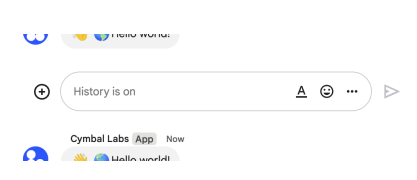 The following image shows how Chat attributes a message when you use user authentication. Chat displays the user as the message sender and attributes the Chat app to the message by displaying its name. The content of message can only contain text (`text`). 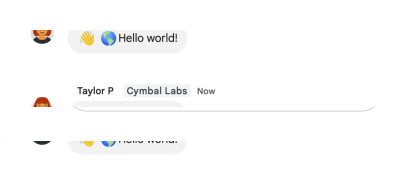 The maximum message size, including the message contents, is 32,000 bytes. For [webhook](https://developers.google.com/workspace/chat/quickstart/webhooks) requests, the response doesn't contain the full message. The response only populates the `name` and `thread.name` fields in addition to the information that was in the request. |
|---|
| flatPath | v1/spaces/{spacesId}/messages |
|---|
| httpMethod | POST |
|---|
| id | chat.spaces.messages.create |
|---|
| parameterOrder | |
|---|
| parameters | | messageId | | description | Optional. A custom ID for a message. Lets Chat apps get, update, or delete a message without needing to store the system-assigned ID in the message's resource name (represented in the message `name` field). The value for this field must meet the following requirements: * Begins with `client-`. For example, `client-custom-name` is a valid custom ID, but `custom-name` is not. * Contains up to 63 characters and only lowercase letters, numbers, and hyphens. * Is unique within a space. A Chat app can't use the same custom ID for different messages. For details, see [Name a message](https://developers.google.com/workspace/chat/create-messages#name_a_created_message). |
|---|
| location | query |
|---|
| type | string |
|---|
|
|---|
| messageReplyOption | | description | Optional. Specifies whether a message starts a thread or replies to one. Only supported in named spaces. When [responding to user interactions](https://developers.google.com/workspace/chat/receive-respond-interactions), this field is ignored. For interactions within a thread, the reply is created in the same thread. Otherwise, the reply is created as a new thread. |
|---|
| enum | - MESSAGE_REPLY_OPTION_UNSPECIFIED
- REPLY_MESSAGE_FALLBACK_TO_NEW_THREAD
- REPLY_MESSAGE_OR_FAIL
|
|---|
| enumDescriptions | - Default. Starts a new thread. Using this option ignores any thread ID or `thread_key` that's included.
- Creates the message as a reply to the thread specified by thread ID or `thread_key`. If it fails, the message starts a new thread instead.
- Creates the message as a reply to the thread specified by thread ID or `thread_key`. If a new `thread_key` is used, a new thread is created. If the message creation fails, a `NOT_FOUND` error is returned instead.
|
|---|
| location | query |
|---|
| type | string |
|---|
|
|---|
| parent | | description | Required. The resource name of the space in which to create a message. Format: `spaces/{space}` |
|---|
| location | path |
|---|
| pattern | ^spaces/[^/]+$ |
|---|
| required | True |
|---|
| type | string |
|---|
|
|---|
| requestId | | description | Optional. A unique request ID for this message. Specifying an existing request ID returns the message created with that ID instead of creating a new message. |
|---|
| location | query |
|---|
| type | string |
|---|
|
|---|
| threadKey | | deprecated | True |
|---|
| description | Optional. Deprecated: Use thread.thread_key instead. ID for the thread. Supports up to 4000 characters. To start or add to a thread, create a message and specify a `threadKey` or the thread.name. For example usage, see [Start or reply to a message thread](https://developers.google.com/workspace/chat/create-messages#create-message-thread). |
|---|
| location | query |
|---|
| type | string |
|---|
|
|---|
|
|---|
| path | v1/{+parent}/messages |
|---|
| request | |
|---|
| response | |
|---|
| scopes | - https://www.googleapis.com/auth/chat.bot
- https://www.googleapis.com/auth/chat.import
- https://www.googleapis.com/auth/chat.messages
- https://www.googleapis.com/auth/chat.messages.create
|
|---|
|
|---|
| delete | | description | Deletes a message. For an example, see [Delete a message](https://developers.google.com/workspace/chat/delete-messages). Supports the following types of [authentication](https://developers.google.com/workspace/chat/authenticate-authorize): - [App authentication](https://developers.google.com/workspace/chat/authenticate-authorize-chat-app) with the authorization scope: - `https://www.googleapis.com/auth/chat.bot` - [User authentication](https://developers.google.com/workspace/chat/authenticate-authorize-chat-user) with one of the following authorization scopes: - `https://www.googleapis.com/auth/chat.messages` - `https://www.googleapis.com/auth/chat.import` (import mode spaces only) When using app authentication, requests can only delete messages created by the calling Chat app. |
|---|
| flatPath | v1/spaces/{spacesId}/messages/{messagesId} |
|---|
| httpMethod | DELETE |
|---|
| id | chat.spaces.messages.delete |
|---|
| parameterOrder | |
|---|
| parameters | | force | | description | Optional. When `true`, deleting a message also deletes its threaded replies. When `false`, if a message has threaded replies, deletion fails. Only applies when [authenticating as a user](https://developers.google.com/workspace/chat/authenticate-authorize-chat-user). Has no effect when [authenticating as a Chat app] (https://developers.google.com/workspace/chat/authenticate-authorize-chat-app). |
|---|
| location | query |
|---|
| type | boolean |
|---|
|
|---|
| name | | description | Required. Resource name of the message. Format: `spaces/{space}/messages/{message}` If you've set a custom ID for your message, you can use the value from the `clientAssignedMessageId` field for `{message}`. For details, see [Name a message] (https://developers.google.com/workspace/chat/create-messages#name_a_created_message). |
|---|
| location | path |
|---|
| pattern | ^spaces/[^/]+/messages/[^/]+$ |
|---|
| required | True |
|---|
| type | string |
|---|
|
|---|
|
|---|
| path | v1/{+name} |
|---|
| response | |
|---|
| scopes | - https://www.googleapis.com/auth/chat.bot
- https://www.googleapis.com/auth/chat.import
- https://www.googleapis.com/auth/chat.messages
|
|---|
|
|---|
| get | | description | Returns details about a message. For an example, see [Get details about a message](https://developers.google.com/workspace/chat/get-messages). Supports the following types of [authentication](https://developers.google.com/workspace/chat/authenticate-authorize): - [App authentication](https://developers.google.com/workspace/chat/authenticate-authorize-chat-app) with the authorization scope: - `https://www.googleapis.com/auth/chat.bot` - [User authentication](https://developers.google.com/workspace/chat/authenticate-authorize-chat-user) with one of the following authorization scopes: - `https://www.googleapis.com/auth/chat.messages.readonly` - `https://www.googleapis.com/auth/chat.messages` Note: Might return a message from a blocked member or space. |
|---|
| flatPath | v1/spaces/{spacesId}/messages/{messagesId} |
|---|
| httpMethod | GET |
|---|
| id | chat.spaces.messages.get |
|---|
| parameterOrder | |
|---|
| parameters | | name | | description | Required. Resource name of the message. Format: `spaces/{space}/messages/{message}` If you've set a custom ID for your message, you can use the value from the `clientAssignedMessageId` field for `{message}`. For details, see [Name a message] (https://developers.google.com/workspace/chat/create-messages#name_a_created_message). |
|---|
| location | path |
|---|
| pattern | ^spaces/[^/]+/messages/[^/]+$ |
|---|
| required | True |
|---|
| type | string |
|---|
|
|---|
|
|---|
| path | v1/{+name} |
|---|
| response | |
|---|
| scopes | - https://www.googleapis.com/auth/chat.bot
- https://www.googleapis.com/auth/chat.messages
- https://www.googleapis.com/auth/chat.messages.readonly
|
|---|
|
|---|
| list | | description | Lists messages in a space that the caller is a member of, including messages from blocked members and spaces. If you list messages from a space with no messages, the response is an empty object. When using a REST/HTTP interface, the response contains an empty JSON object, `{}`. For an example, see [List messages](https://developers.google.com/workspace/chat/api/guides/v1/messages/list). Requires [user authentication](https://developers.google.com/workspace/chat/authenticate-authorize-chat-user) with one of the following [authorization scopes](https://developers.google.com/workspace/chat/authenticate-authorize#chat-api-scopes): - `https://www.googleapis.com/auth/chat.messages.readonly` - `https://www.googleapis.com/auth/chat.messages` - `https://www.googleapis.com/auth/chat.import` (import mode spaces only) |
|---|
| flatPath | v1/spaces/{spacesId}/messages |
|---|
| httpMethod | GET |
|---|
| id | chat.spaces.messages.list |
|---|
| parameterOrder | |
|---|
| parameters | | filter | | description | Optional. A query filter. You can filter messages by date (`create_time`) and thread (`thread.name`). To filter messages by the date they were created, specify the `create_time` with a timestamp in [RFC-3339](https://www.rfc-editor.org/rfc/rfc3339) format and double quotation marks. For example, `"2023-04-21T11:30:00-04:00"`. You can use the greater than operator `>` to list messages that were created after a timestamp, or the less than operator `<` to list messages that were created before a timestamp. To filter messages within a time interval, use the `AND` operator between two timestamps. To filter by thread, specify the `thread.name`, formatted as `spaces/{space}/threads/{thread}`. You can only specify one `thread.name` per query. To filter by both thread and date, use the `AND` operator in your query. For example, the following queries are valid: ``` create_time > "2012-04-21T11:30:00-04:00" create_time > "2012-04-21T11:30:00-04:00" AND thread.name = spaces/AAAAAAAAAAA/threads/123 create_time > "2012-04-21T11:30:00+00:00" AND create_time < "2013-01-01T00:00:00+00:00" AND thread.name = spaces/AAAAAAAAAAA/threads/123 thread.name = spaces/AAAAAAAAAAA/threads/123 ``` Invalid queries are rejected by the server with an `INVALID_ARGUMENT` error. |
|---|
| location | query |
|---|
| type | string |
|---|
|
|---|
| orderBy | | description | Optional. How the list of messages is ordered. Specify a value to order by an ordering operation. Valid ordering operation values are as follows: - `ASC` for ascending. - `DESC` for descending. The default ordering is `create_time ASC`. |
|---|
| location | query |
|---|
| type | string |
|---|
|
|---|
| pageSize | | description | Optional. The maximum number of messages returned. The service might return fewer messages than this value. If unspecified, at most 25 are returned. The maximum value is 1000. If you use a value more than 1000, it's automatically changed to 1000. Negative values return an `INVALID_ARGUMENT` error. |
|---|
| format | int32 |
|---|
| location | query |
|---|
| type | integer |
|---|
|
|---|
| pageToken | | description | Optional. A page token received from a previous list messages call. Provide this parameter to retrieve the subsequent page. When paginating, all other parameters provided should match the call that provided the page token. Passing different values to the other parameters might lead to unexpected results. |
|---|
| location | query |
|---|
| type | string |
|---|
|
|---|
| parent | | description | Required. The resource name of the space to list messages from. Format: `spaces/{space}` |
|---|
| location | path |
|---|
| pattern | ^spaces/[^/]+$ |
|---|
| required | True |
|---|
| type | string |
|---|
|
|---|
| showDeleted | | description | Optional. Whether to include deleted messages. Deleted messages include deleted time and metadata about their deletion, but message content is unavailable. |
|---|
| location | query |
|---|
| type | boolean |
|---|
|
|---|
|
|---|
| path | v1/{+parent}/messages |
|---|
| response | |
|---|
| scopes | - https://www.googleapis.com/auth/chat.import
- https://www.googleapis.com/auth/chat.messages
- https://www.googleapis.com/auth/chat.messages.readonly
|
|---|
|
|---|
| patch | | description | Updates a message. There's a difference between the `patch` and `update` methods. The `patch` method uses a `patch` request while the `update` method uses a `put` request. We recommend using the `patch` method. For an example, see [Update a message](https://developers.google.com/workspace/chat/update-messages). Supports the following types of [authentication](https://developers.google.com/workspace/chat/authenticate-authorize): - [App authentication](https://developers.google.com/workspace/chat/authenticate-authorize-chat-app) with the authorization scope: - `https://www.googleapis.com/auth/chat.bot` - [User authentication](https://developers.google.com/workspace/chat/authenticate-authorize-chat-user) with one of the following authorization scopes: - `https://www.googleapis.com/auth/chat.messages` - `https://www.googleapis.com/auth/chat.import` (import mode spaces only) When using app authentication, requests can only update messages created by the calling Chat app. |
|---|
| flatPath | v1/spaces/{spacesId}/messages/{messagesId} |
|---|
| httpMethod | PATCH |
|---|
| id | chat.spaces.messages.patch |
|---|
| parameterOrder | |
|---|
| parameters | | allowMissing | | description | Optional. If `true` and the message isn't found, a new message is created and `updateMask` is ignored. The specified message ID must be [client-assigned](https://developers.google.com/workspace/chat/create-messages#name_a_created_message) or the request fails. |
|---|
| location | query |
|---|
| type | boolean |
|---|
|
|---|
| name | | description | Identifier. Resource name of the message. Format: `spaces/{space}/messages/{message}` Where `{space}` is the ID of the space where the message is posted and `{message}` is a system-assigned ID for the message. For example, `spaces/AAAAAAAAAAA/messages/BBBBBBBBBBB.BBBBBBBBBBB`. If you set a custom ID when you create a message, you can use this ID to specify the message in a request by replacing `{message}` with the value from the `clientAssignedMessageId` field. For example, `spaces/AAAAAAAAAAA/messages/client-custom-name`. For details, see [Name a message](https://developers.google.com/workspace/chat/create-messages#name_a_created_message). |
|---|
| location | path |
|---|
| pattern | ^spaces/[^/]+/messages/[^/]+$ |
|---|
| required | True |
|---|
| type | string |
|---|
|
|---|
| updateMask | | description | Required. The field paths to update. Separate multiple values with commas or use `*` to update all field paths. Currently supported field paths: - `text` - `attachment` - `cards` (Requires [app authentication](/chat/api/guides/auth/service-accounts).) - `cards_v2` (Requires [app authentication](/chat/api/guides/auth/service-accounts).) - `accessory_widgets` (Requires [app authentication](/chat/api/guides/auth/service-accounts).) |
|---|
| format | google-fieldmask |
|---|
| location | query |
|---|
| type | string |
|---|
|
|---|
|
|---|
| path | v1/{+name} |
|---|
| request | |
|---|
| response | |
|---|
| scopes | - https://www.googleapis.com/auth/chat.bot
- https://www.googleapis.com/auth/chat.import
- https://www.googleapis.com/auth/chat.messages
|
|---|
|
|---|
| update | | description | Updates a message. There's a difference between the `patch` and `update` methods. The `patch` method uses a `patch` request while the `update` method uses a `put` request. We recommend using the `patch` method. For an example, see [Update a message](https://developers.google.com/workspace/chat/update-messages). Supports the following types of [authentication](https://developers.google.com/workspace/chat/authenticate-authorize): - [App authentication](https://developers.google.com/workspace/chat/authenticate-authorize-chat-app) with the authorization scope: - `https://www.googleapis.com/auth/chat.bot` - [User authentication](https://developers.google.com/workspace/chat/authenticate-authorize-chat-user) with one of the following authorization scopes: - `https://www.googleapis.com/auth/chat.messages` - `https://www.googleapis.com/auth/chat.import` (import mode spaces only) When using app authentication, requests can only update messages created by the calling Chat app. |
|---|
| flatPath | v1/spaces/{spacesId}/messages/{messagesId} |
|---|
| httpMethod | PUT |
|---|
| id | chat.spaces.messages.update |
|---|
| parameterOrder | |
|---|
| parameters | | allowMissing | | description | Optional. If `true` and the message isn't found, a new message is created and `updateMask` is ignored. The specified message ID must be [client-assigned](https://developers.google.com/workspace/chat/create-messages#name_a_created_message) or the request fails. |
|---|
| location | query |
|---|
| type | boolean |
|---|
|
|---|
| name | | description | Identifier. Resource name of the message. Format: `spaces/{space}/messages/{message}` Where `{space}` is the ID of the space where the message is posted and `{message}` is a system-assigned ID for the message. For example, `spaces/AAAAAAAAAAA/messages/BBBBBBBBBBB.BBBBBBBBBBB`. If you set a custom ID when you create a message, you can use this ID to specify the message in a request by replacing `{message}` with the value from the `clientAssignedMessageId` field. For example, `spaces/AAAAAAAAAAA/messages/client-custom-name`. For details, see [Name a message](https://developers.google.com/workspace/chat/create-messages#name_a_created_message). |
|---|
| location | path |
|---|
| pattern | ^spaces/[^/]+/messages/[^/]+$ |
|---|
| required | True |
|---|
| type | string |
|---|
|
|---|
| updateMask | | description | Required. The field paths to update. Separate multiple values with commas or use `*` to update all field paths. Currently supported field paths: - `text` - `attachment` - `cards` (Requires [app authentication](/chat/api/guides/auth/service-accounts).) - `cards_v2` (Requires [app authentication](/chat/api/guides/auth/service-accounts).) - `accessory_widgets` (Requires [app authentication](/chat/api/guides/auth/service-accounts).) |
|---|
| format | google-fieldmask |
|---|
| location | query |
|---|
| type | string |
|---|
|
|---|
|
|---|
| path | v1/{+name} |
|---|
| request | |
|---|
| response | |
|---|
| scopes | - https://www.googleapis.com/auth/chat.bot
- https://www.googleapis.com/auth/chat.import
- https://www.googleapis.com/auth/chat.messages
|
|---|
|
|---|
|
|---|
| resources | | attachments | | methods | | get | | description | Gets the metadata of a message attachment. The attachment data is fetched using the [media API](https://developers.google.com/workspace/chat/api/reference/rest/v1/media/download). For an example, see [Get metadata about a message attachment](https://developers.google.com/workspace/chat/get-media-attachments). Requires [app authentication](https://developers.google.com/workspace/chat/authenticate-authorize-chat-app) with the [authorization scope](https://developers.google.com/workspace/chat/authenticate-authorize#chat-api-scopes): - `https://www.googleapis.com/auth/chat.bot` |
|---|
| flatPath | v1/spaces/{spacesId}/messages/{messagesId}/attachments/{attachmentsId} |
|---|
| httpMethod | GET |
|---|
| id | chat.spaces.messages.attachments.get |
|---|
| parameterOrder | |
|---|
| parameters | | name | | description | Required. Resource name of the attachment, in the form `spaces/{space}/messages/{message}/attachments/{attachment}`. |
|---|
| location | path |
|---|
| pattern | ^spaces/[^/]+/messages/[^/]+/attachments/[^/]+$ |
|---|
| required | True |
|---|
| type | string |
|---|
|
|---|
|
|---|
| path | v1/{+name} |
|---|
| response | |
|---|
| scopes | - https://www.googleapis.com/auth/chat.bot
|
|---|
|
|---|
|
|---|
|
|---|
| reactions | | methods | | create | | description | Creates a reaction and adds it to a message. For an example, see [Add a reaction to a message](https://developers.google.com/workspace/chat/create-reactions). Requires [user authentication](https://developers.google.com/workspace/chat/authenticate-authorize-chat-user) with one of the following [authorization scopes](https://developers.google.com/workspace/chat/authenticate-authorize#chat-api-scopes): - `https://www.googleapis.com/auth/chat.messages.reactions.create` - `https://www.googleapis.com/auth/chat.messages.reactions` - `https://www.googleapis.com/auth/chat.messages` - `https://www.googleapis.com/auth/chat.import` (import mode spaces only) |
|---|
| flatPath | v1/spaces/{spacesId}/messages/{messagesId}/reactions |
|---|
| httpMethod | POST |
|---|
| id | chat.spaces.messages.reactions.create |
|---|
| parameterOrder | |
|---|
| parameters | | parent | | description | Required. The message where the reaction is created. Format: `spaces/{space}/messages/{message}` |
|---|
| location | path |
|---|
| pattern | ^spaces/[^/]+/messages/[^/]+$ |
|---|
| required | True |
|---|
| type | string |
|---|
|
|---|
|
|---|
| path | v1/{+parent}/reactions |
|---|
| request | |
|---|
| response | |
|---|
| scopes | - https://www.googleapis.com/auth/chat.import
- https://www.googleapis.com/auth/chat.messages
- https://www.googleapis.com/auth/chat.messages.reactions
- https://www.googleapis.com/auth/chat.messages.reactions.create
|
|---|
|
|---|
| delete | | description | Deletes a reaction to a message. For an example, see [Delete a reaction](https://developers.google.com/workspace/chat/delete-reactions). Requires [user authentication](https://developers.google.com/workspace/chat/authenticate-authorize-chat-user) with one of the following [authorization scopes](https://developers.google.com/workspace/chat/authenticate-authorize#chat-api-scopes): - `https://www.googleapis.com/auth/chat.messages.reactions` - `https://www.googleapis.com/auth/chat.messages` - `https://www.googleapis.com/auth/chat.import` (import mode spaces only) |
|---|
| flatPath | v1/spaces/{spacesId}/messages/{messagesId}/reactions/{reactionsId} |
|---|
| httpMethod | DELETE |
|---|
| id | chat.spaces.messages.reactions.delete |
|---|
| parameterOrder | |
|---|
| parameters | | name | | description | Required. Name of the reaction to delete. Format: `spaces/{space}/messages/{message}/reactions/{reaction}` |
|---|
| location | path |
|---|
| pattern | ^spaces/[^/]+/messages/[^/]+/reactions/[^/]+$ |
|---|
| required | True |
|---|
| type | string |
|---|
|
|---|
|
|---|
| path | v1/{+name} |
|---|
| response | |
|---|
| scopes | - https://www.googleapis.com/auth/chat.import
- https://www.googleapis.com/auth/chat.messages
- https://www.googleapis.com/auth/chat.messages.reactions
|
|---|
|
|---|
| list | | description | Lists reactions to a message. For an example, see [List reactions for a message](https://developers.google.com/workspace/chat/list-reactions). Requires [user authentication](https://developers.google.com/workspace/chat/authenticate-authorize-chat-user) with one of the following [authorization scopes](https://developers.google.com/workspace/chat/authenticate-authorize#chat-api-scopes): - `https://www.googleapis.com/auth/chat.messages.reactions.readonly` - `https://www.googleapis.com/auth/chat.messages.reactions` - `https://www.googleapis.com/auth/chat.messages.readonly` - `https://www.googleapis.com/auth/chat.messages` |
|---|
| flatPath | v1/spaces/{spacesId}/messages/{messagesId}/reactions |
|---|
| httpMethod | GET |
|---|
| id | chat.spaces.messages.reactions.list |
|---|
| parameterOrder | |
|---|
| parameters | | filter | | description | Optional. A query filter. You can filter reactions by [emoji](https://developers.google.com/workspace/chat/api/reference/rest/v1/Emoji) (either `emoji.unicode` or `emoji.custom_emoji.uid`) and [user](https://developers.google.com/workspace/chat/api/reference/rest/v1/User) (`user.name`). To filter reactions for multiple emojis or users, join similar fields with the `OR` operator, such as `emoji.unicode = "🙂" OR emoji.unicode = "👍"` and `user.name = "users/AAAAAA" OR user.name = "users/BBBBBB"`. To filter reactions by emoji and user, use the `AND` operator, such as `emoji.unicode = "🙂" AND user.name = "users/AAAAAA"`. If your query uses both `AND` and `OR`, group them with parentheses. For example, the following queries are valid: ``` user.name = "users/{user}" emoji.unicode = "🙂" emoji.custom_emoji.uid = "{uid}" emoji.unicode = "🙂" OR emoji.unicode = "👍" emoji.unicode = "🙂" OR emoji.custom_emoji.uid = "{uid}" emoji.unicode = "🙂" AND user.name = "users/{user}" (emoji.unicode = "🙂" OR emoji.custom_emoji.uid = "{uid}") AND user.name = "users/{user}" ``` The following queries are invalid: ``` emoji.unicode = "🙂" AND emoji.unicode = "👍" emoji.unicode = "🙂" AND emoji.custom_emoji.uid = "{uid}" emoji.unicode = "🙂" OR user.name = "users/{user}" emoji.unicode = "🙂" OR emoji.custom_emoji.uid = "{uid}" OR user.name = "users/{user}" emoji.unicode = "🙂" OR emoji.custom_emoji.uid = "{uid}" AND user.name = "users/{user}" ``` Invalid queries are rejected with an `INVALID_ARGUMENT` error. |
|---|
| location | query |
|---|
| type | string |
|---|
|
|---|
| pageSize | | description | Optional. The maximum number of reactions returned. The service can return fewer reactions than this value. If unspecified, the default value is 25. The maximum value is 200; values above 200 are changed to 200. |
|---|
| format | int32 |
|---|
| location | query |
|---|
| type | integer |
|---|
|
|---|
| pageToken | | description | Optional. (If resuming from a previous query.) A page token received from a previous list reactions call. Provide this to retrieve the subsequent page. When paginating, the filter value should match the call that provided the page token. Passing a different value might lead to unexpected results. |
|---|
| location | query |
|---|
| type | string |
|---|
|
|---|
| parent | | description | Required. The message users reacted to. Format: `spaces/{space}/messages/{message}` |
|---|
| location | path |
|---|
| pattern | ^spaces/[^/]+/messages/[^/]+$ |
|---|
| required | True |
|---|
| type | string |
|---|
|
|---|
|
|---|
| path | v1/{+parent}/reactions |
|---|
| response | | $ref | ListReactionsResponse |
|---|
|
|---|
| scopes | - https://www.googleapis.com/auth/chat.messages
- https://www.googleapis.com/auth/chat.messages.reactions
- https://www.googleapis.com/auth/chat.messages.reactions.readonly
- https://www.googleapis.com/auth/chat.messages.readonly
|
|---|
|
|---|
|
|---|
|
|---|
|
|---|
|
|---|
| spaceEvents | | methods | | get | | description | Returns an event from a Google Chat space. The [event payload](https://developers.google.com/workspace/chat/api/reference/rest/v1/spaces.spaceEvents#SpaceEvent.FIELDS.oneof_payload) contains the most recent version of the resource that changed. For example, if you request an event about a new message but the message was later updated, the server returns the updated `Message` resource in the event payload. Note: The `permissionSettings` field is not returned in the Space object of the Space event data for this request. Requires [user authentication](https://developers.google.com/workspace/chat/authenticate-authorize-chat-user) with an [authorization scope](https://developers.google.com/workspace/chat/authenticate-authorize#chat-api-scopes) appropriate for reading the requested data: - `https://www.googleapis.com/auth/chat.spaces.readonly` - `https://www.googleapis.com/auth/chat.spaces` - `https://www.googleapis.com/auth/chat.messages.readonly` - `https://www.googleapis.com/auth/chat.messages` - `https://www.googleapis.com/auth/chat.messages.reactions.readonly` - `https://www.googleapis.com/auth/chat.messages.reactions` - `https://www.googleapis.com/auth/chat.memberships.readonly` - `https://www.googleapis.com/auth/chat.memberships` To get an event, the authenticated user must be a member of the space. For an example, see [Get details about an event from a Google Chat space](https://developers.google.com/workspace/chat/get-space-event). |
|---|
| flatPath | v1/spaces/{spacesId}/spaceEvents/{spaceEventsId} |
|---|
| httpMethod | GET |
|---|
| id | chat.spaces.spaceEvents.get |
|---|
| parameterOrder | |
|---|
| parameters | | name | | description | Required. The resource name of the space event. Format: `spaces/{space}/spaceEvents/{spaceEvent}` |
|---|
| location | path |
|---|
| pattern | ^spaces/[^/]+/spaceEvents/[^/]+$ |
|---|
| required | True |
|---|
| type | string |
|---|
|
|---|
|
|---|
| path | v1/{+name} |
|---|
| response | |
|---|
| scopes | - https://www.googleapis.com/auth/chat.app.memberships
- https://www.googleapis.com/auth/chat.app.spaces
- https://www.googleapis.com/auth/chat.memberships
- https://www.googleapis.com/auth/chat.memberships.readonly
- https://www.googleapis.com/auth/chat.messages
- https://www.googleapis.com/auth/chat.messages.reactions
- https://www.googleapis.com/auth/chat.messages.reactions.readonly
- https://www.googleapis.com/auth/chat.messages.readonly
- https://www.googleapis.com/auth/chat.spaces
- https://www.googleapis.com/auth/chat.spaces.readonly
|
|---|
|
|---|
| list | | description | Lists events from a Google Chat space. For each event, the [payload](https://developers.google.com/workspace/chat/api/reference/rest/v1/spaces.spaceEvents#SpaceEvent.FIELDS.oneof_payload) contains the most recent version of the Chat resource. For example, if you list events about new space members, the server returns `Membership` resources that contain the latest membership details. If new members were removed during the requested period, the event payload contains an empty `Membership` resource. Requires [user authentication](https://developers.google.com/workspace/chat/authenticate-authorize-chat-user) with an [authorization scope](https://developers.google.com/workspace/chat/authenticate-authorize#chat-api-scopes) appropriate for reading the requested data: - `https://www.googleapis.com/auth/chat.spaces.readonly` - `https://www.googleapis.com/auth/chat.spaces` - `https://www.googleapis.com/auth/chat.messages.readonly` - `https://www.googleapis.com/auth/chat.messages` - `https://www.googleapis.com/auth/chat.messages.reactions.readonly` - `https://www.googleapis.com/auth/chat.messages.reactions` - `https://www.googleapis.com/auth/chat.memberships.readonly` - `https://www.googleapis.com/auth/chat.memberships` To list events, the authenticated user must be a member of the space. For an example, see [List events from a Google Chat space](https://developers.google.com/workspace/chat/list-space-events). |
|---|
| flatPath | v1/spaces/{spacesId}/spaceEvents |
|---|
| httpMethod | GET |
|---|
| id | chat.spaces.spaceEvents.list |
|---|
| parameterOrder | |
|---|
| parameters | | filter | | description | Required. A query filter. You must specify at least one event type (`event_type`) using the has `:` operator. To filter by multiple event types, use the `OR` operator. Omit batch event types in your filter. The request automatically returns any related batch events. For example, if you filter by new reactions (`google.workspace.chat.reaction.v1.created`), the server also returns batch new reactions events (`google.workspace.chat.reaction.v1.batchCreated`). For a list of supported event types, see the [`SpaceEvents` reference documentation](https://developers.google.com/workspace/chat/api/reference/rest/v1/spaces.spaceEvents#SpaceEvent.FIELDS.event_type). Optionally, you can also filter by start time (`start_time`) and end time (`end_time`): * `start_time`: Exclusive timestamp from which to start listing space events. You can list events that occurred up to 28 days ago. If unspecified, lists space events from the past 28 days. * `end_time`: Inclusive timestamp until which space events are listed. If unspecified, lists events up to the time of the request. To specify a start or end time, use the equals `=` operator and format in [RFC-3339](https://www.rfc-editor.org/rfc/rfc3339). To filter by both `start_time` and `end_time`, use the `AND` operator. For example, the following queries are valid: ``` start_time="2023-08-23T19:20:33+00:00" AND end_time="2023-08-23T19:21:54+00:00" ``` ``` start_time="2023-08-23T19:20:33+00:00" AND (event_types:"google.workspace.chat.space.v1.updated" OR event_types:"google.workspace.chat.message.v1.created") ``` The following queries are invalid: ``` start_time="2023-08-23T19:20:33+00:00" OR end_time="2023-08-23T19:21:54+00:00" ``` ``` event_types:"google.workspace.chat.space.v1.updated" AND event_types:"google.workspace.chat.message.v1.created" ``` Invalid queries are rejected by the server with an `INVALID_ARGUMENT` error. |
|---|
| location | query |
|---|
| type | string |
|---|
|
|---|
| pageSize | | description | Optional. The maximum number of space events returned. The service might return fewer than this value. Negative values return an `INVALID_ARGUMENT` error. |
|---|
| format | int32 |
|---|
| location | query |
|---|
| type | integer |
|---|
|
|---|
| pageToken | | description | Optional. A page token, received from a previous list space events call. Provide this to retrieve the subsequent page. When paginating, all other parameters provided to list space events must match the call that provided the page token. Passing different values to the other parameters might lead to unexpected results. |
|---|
| location | query |
|---|
| type | string |
|---|
|
|---|
| parent | | description | Required. Resource name of the [Google Chat space](https://developers.google.com/workspace/chat/api/reference/rest/v1/spaces) where the events occurred. Format: `spaces/{space}`. |
|---|
| location | path |
|---|
| pattern | ^spaces/[^/]+$ |
|---|
| required | True |
|---|
| type | string |
|---|
|
|---|
|
|---|
| path | v1/{+parent}/spaceEvents |
|---|
| response | | $ref | ListSpaceEventsResponse |
|---|
|
|---|
| scopes | - https://www.googleapis.com/auth/chat.app.memberships
- https://www.googleapis.com/auth/chat.app.spaces
- https://www.googleapis.com/auth/chat.memberships
- https://www.googleapis.com/auth/chat.memberships.readonly
- https://www.googleapis.com/auth/chat.messages
- https://www.googleapis.com/auth/chat.messages.reactions
- https://www.googleapis.com/auth/chat.messages.reactions.readonly
- https://www.googleapis.com/auth/chat.messages.readonly
- https://www.googleapis.com/auth/chat.spaces
- https://www.googleapis.com/auth/chat.spaces.readonly
|
|---|
|
|---|
|
|---|
|
|---|
|
|---|
|
|---|
| users | | resources | | spaces | | methods | | getSpaceReadState | | description | Returns details about a user's read state within a space, used to identify read and unread messages. For an example, see [Get details about a user's space read state](https://developers.google.com/workspace/chat/get-space-read-state). Requires [user authentication](https://developers.google.com/workspace/chat/authenticate-authorize-chat-user) with one of the following [authorization scopes](https://developers.google.com/workspace/chat/authenticate-authorize#chat-api-scopes): - `https://www.googleapis.com/auth/chat.users.readstate.readonly` - `https://www.googleapis.com/auth/chat.users.readstate` |
|---|
| flatPath | v1/users/{usersId}/spaces/{spacesId}/spaceReadState |
|---|
| httpMethod | GET |
|---|
| id | chat.users.spaces.getSpaceReadState |
|---|
| parameterOrder | |
|---|
| parameters | | name | | description | Required. Resource name of the space read state to retrieve. Only supports getting read state for the calling user. To refer to the calling user, set one of the following: - The `me` alias. For example, `users/me/spaces/{space}/spaceReadState`. - Their Workspace email address. For example, `users/user@example.com/spaces/{space}/spaceReadState`. - Their user id. For example, `users/123456789/spaces/{space}/spaceReadState`. Format: users/{user}/spaces/{space}/spaceReadState |
|---|
| location | path |
|---|
| pattern | ^users/[^/]+/spaces/[^/]+/spaceReadState$ |
|---|
| required | True |
|---|
| type | string |
|---|
|
|---|
|
|---|
| path | v1/{+name} |
|---|
| response | |
|---|
| scopes | - https://www.googleapis.com/auth/chat.users.readstate
- https://www.googleapis.com/auth/chat.users.readstate.readonly
|
|---|
|
|---|
| updateSpaceReadState | | description | Updates a user's read state within a space, used to identify read and unread messages. For an example, see [Update a user's space read state](https://developers.google.com/workspace/chat/update-space-read-state). Requires [user authentication](https://developers.google.com/workspace/chat/authenticate-authorize-chat-user) with the [authorization scope](https://developers.google.com/workspace/chat/authenticate-authorize#chat-api-scopes): - `https://www.googleapis.com/auth/chat.users.readstate` |
|---|
| flatPath | v1/users/{usersId}/spaces/{spacesId}/spaceReadState |
|---|
| httpMethod | PATCH |
|---|
| id | chat.users.spaces.updateSpaceReadState |
|---|
| parameterOrder | |
|---|
| parameters | | name | | description | Resource name of the space read state. Format: `users/{user}/spaces/{space}/spaceReadState` |
|---|
| location | path |
|---|
| pattern | ^users/[^/]+/spaces/[^/]+/spaceReadState$ |
|---|
| required | True |
|---|
| type | string |
|---|
|
|---|
| updateMask | | description | Required. The field paths to update. Currently supported field paths: - `last_read_time` When the `last_read_time` is before the latest message create time, the space appears as unread in the UI. To mark the space as read, set `last_read_time` to any value later (larger) than the latest message create time. The `last_read_time` is coerced to match the latest message create time. Note that the space read state only affects the read state of messages that are visible in the space's top-level conversation. Replies in threads are unaffected by this timestamp, and instead rely on the thread read state. |
|---|
| format | google-fieldmask |
|---|
| location | query |
|---|
| type | string |
|---|
|
|---|
|
|---|
| path | v1/{+name} |
|---|
| request | |
|---|
| response | |
|---|
| scopes | - https://www.googleapis.com/auth/chat.users.readstate
|
|---|
|
|---|
|
|---|
| resources | | spaceNotificationSetting | | methods | | get | | description | Gets the space notification setting. For an example, see [Get the caller's space notification setting](https://developers.google.com/workspace/chat/get-space-notification-setting). Requires [user authentication](https://developers.google.com/workspace/chat/authenticate-authorize-chat-user) with the [authorization scope](https://developers.google.com/workspace/chat/authenticate-authorize#chat-api-scopes): - `https://www.googleapis.com/auth/chat.users.spacesettings` |
|---|
| flatPath | v1/users/{usersId}/spaces/{spacesId}/spaceNotificationSetting |
|---|
| httpMethod | GET |
|---|
| id | chat.users.spaces.spaceNotificationSetting.get |
|---|
| parameterOrder | |
|---|
| parameters | | name | | description | Required. Format: users/{user}/spaces/{space}/spaceNotificationSetting - `users/me/spaces/{space}/spaceNotificationSetting`, OR - `users/user@example.com/spaces/{space}/spaceNotificationSetting`, OR - `users/123456789/spaces/{space}/spaceNotificationSetting`. Note: Only the caller's user id or email is allowed in the path. |
|---|
| location | path |
|---|
| pattern | ^users/[^/]+/spaces/[^/]+/spaceNotificationSetting$ |
|---|
| required | True |
|---|
| type | string |
|---|
|
|---|
|
|---|
| path | v1/{+name} |
|---|
| response | | $ref | SpaceNotificationSetting |
|---|
|
|---|
| scopes | - https://www.googleapis.com/auth/chat.users.spacesettings
|
|---|
|
|---|
| patch | | description | Updates the space notification setting. For an example, see [Update the caller's space notification setting](https://developers.google.com/workspace/chat/update-space-notification-setting). Requires [user authentication](https://developers.google.com/workspace/chat/authenticate-authorize-chat-user) with the [authorization scope](https://developers.google.com/workspace/chat/authenticate-authorize#chat-api-scopes): - `https://www.googleapis.com/auth/chat.users.spacesettings` |
|---|
| flatPath | v1/users/{usersId}/spaces/{spacesId}/spaceNotificationSetting |
|---|
| httpMethod | PATCH |
|---|
| id | chat.users.spaces.spaceNotificationSetting.patch |
|---|
| parameterOrder | |
|---|
| parameters | | name | | description | Identifier. The resource name of the space notification setting. Format: `users/{user}/spaces/{space}/spaceNotificationSetting`. |
|---|
| location | path |
|---|
| pattern | ^users/[^/]+/spaces/[^/]+/spaceNotificationSetting$ |
|---|
| required | True |
|---|
| type | string |
|---|
|
|---|
| updateMask | | description | Required. Supported field paths: - `notification_setting` - `mute_setting` |
|---|
| format | google-fieldmask |
|---|
| location | query |
|---|
| type | string |
|---|
|
|---|
|
|---|
| path | v1/{+name} |
|---|
| request | | $ref | SpaceNotificationSetting |
|---|
|
|---|
| response | | $ref | SpaceNotificationSetting |
|---|
|
|---|
| scopes | - https://www.googleapis.com/auth/chat.users.spacesettings
|
|---|
|
|---|
|
|---|
|
|---|
| threads | | methods | | getThreadReadState | | description | Returns details about a user's read state within a thread, used to identify read and unread messages. For an example, see [Get details about a user's thread read state](https://developers.google.com/workspace/chat/get-thread-read-state). Requires [user authentication](https://developers.google.com/workspace/chat/authenticate-authorize-chat-user) with one of the following [authorization scopes](https://developers.google.com/workspace/chat/authenticate-authorize#chat-api-scopes): - `https://www.googleapis.com/auth/chat.users.readstate.readonly` - `https://www.googleapis.com/auth/chat.users.readstate` |
|---|
| flatPath | v1/users/{usersId}/spaces/{spacesId}/threads/{threadsId}/threadReadState |
|---|
| httpMethod | GET |
|---|
| id | chat.users.spaces.threads.getThreadReadState |
|---|
| parameterOrder | |
|---|
| parameters | | name | | description | Required. Resource name of the thread read state to retrieve. Only supports getting read state for the calling user. To refer to the calling user, set one of the following: - The `me` alias. For example, `users/me/spaces/{space}/threads/{thread}/threadReadState`. - Their Workspace email address. For example, `users/user@example.com/spaces/{space}/threads/{thread}/threadReadState`. - Their user id. For example, `users/123456789/spaces/{space}/threads/{thread}/threadReadState`. Format: users/{user}/spaces/{space}/threads/{thread}/threadReadState |
|---|
| location | path |
|---|
| pattern | ^users/[^/]+/spaces/[^/]+/threads/[^/]+/threadReadState$ |
|---|
| required | True |
|---|
| type | string |
|---|
|
|---|
|
|---|
| path | v1/{+name} |
|---|
| response | |
|---|
| scopes | - https://www.googleapis.com/auth/chat.users.readstate
- https://www.googleapis.com/auth/chat.users.readstate.readonly
|
|---|
|
|---|
|
|---|
|
|---|
|
|---|
|
|---|
|
|---|
|
|---|
|
|---|
| old_value | | create_document_message | | methods | | create | | description | Creates a new document and posts a message with it attached as a Drive annotation. |
|---|
| flatPath | v1/create_document_message |
|---|
| httpMethod | POST |
|---|
| id | dynamiteintegration_pa.create_document_message.create |
|---|
| parameterOrder | |
|---|
| parameters | |
|---|
| path | v1/create_document_message |
|---|
| request | | $ref | CreateDocumentMessageRequest |
|---|
|
|---|
| response | | $ref | CreateDocumentMessageResponse |
|---|
|
|---|
|
|---|
|
|---|
|
|---|
| v1 | | methods | | get_integration_menu_apps | | description | Gets a list of bots and their slash commands for the integration menu. |
|---|
| flatPath | v1/get_integration_menu_apps |
|---|
| httpMethod | POST |
|---|
| id | dynamiteintegration_pa.get_integration_menu_apps |
|---|
| parameterOrder | |
|---|
| parameters | |
|---|
| path | v1/get_integration_menu_apps |
|---|
| request | | $ref | GetIntegrationMenuAppsRequest |
|---|
|
|---|
| response | | $ref | GetIntegrationMenuAppsResponse |
|---|
|
|---|
|
|---|
| handle_app_suggestion | | description | Supports a list of actions related to app suggestion. It includes adding an app to an room from a suggestion, opt-out from app suggestion temporarily and opt-out from app suggestion permanently. |
|---|
| flatPath | v1/handle_app_suggestion |
|---|
| httpMethod | POST |
|---|
| id | dynamiteintegration_pa.handle_app_suggestion |
|---|
| parameterOrder | |
|---|
| parameters | |
|---|
| path | v1/handle_app_suggestion |
|---|
| request | |
|---|
| response | | $ref | AppSuggestionResponse |
|---|
|
|---|
|
|---|
| invoke_dialog | | description | Invokes a dialog from a specified bot. |
|---|
| flatPath | v1/invoke_dialog |
|---|
| httpMethod | POST |
|---|
| id | dynamiteintegration_pa.invoke_dialog |
|---|
| parameterOrder | |
|---|
| parameters | |
|---|
| path | v1/invoke_dialog |
|---|
| request | |
|---|
| response | |
|---|
|
|---|
| submit_form_action | | description | Calls a bot after a user has performed an action on a card/form. In the future we intend to utilize this for bot owned form actions through Dynamite. |
|---|
| flatPath | v1/submit_form_action |
|---|
| httpMethod | POST |
|---|
| id | dynamiteintegration_pa.submit_form_action |
|---|
| parameterOrder | |
|---|
| parameters | |
|---|
| path | v1/submit_form_action |
|---|
| request | | $ref | SubmitFormActionRequest |
|---|
|
|---|
| response | | $ref | SubmitFormActionResponse |
|---|
|
|---|
|
|---|
|
|---|
|
|---|
|
|---|
|
|---|
| root['revision'] | | new_value | 20250608 |
|---|
| old_value | 20250529 |
|---|
|
|---|
| root['rootUrl'] | | new_value | https://chat.googleapis.com/ |
|---|
| old_value | https://dynamiteintegration-pa.googleapis.com/ |
|---|
|
|---|
| root['schemas'] | | new_value | | AccessSettings | | description | Represents the [access setting](https://support.google.com/chat/answer/11971020) of the space. |
|---|
| id | AccessSettings |
|---|
| properties | | accessState | | description | Output only. Indicates the access state of the space. |
|---|
| enum | - ACCESS_STATE_UNSPECIFIED
- PRIVATE
- DISCOVERABLE
|
|---|
| enumDescriptions | - Access state is unknown or not supported in this API.
- Only users or Google Groups that have been individually added or invited by other users or Google Workspace administrators can discover and access the space.
- A space manager has granted a target audience access to the space. Users or Google Groups that have been individually added or invited to the space can also discover and access the space. To learn more, see [Make a space discoverable to specific users](https://developers.google.com/workspace/chat/space-target-audience). Creating discoverable spaces requires [user authentication](https://developers.google.com/workspace/chat/authenticate-authorize-chat-user).
|
|---|
| readOnly | True |
|---|
| type | string |
|---|
|
|---|
| audience | | description | Optional. The resource name of the [target audience](https://support.google.com/a/answer/9934697) who can discover the space, join the space, and preview the messages in the space. If unset, only users or Google Groups who have been individually invited or added to the space can access it. For details, see [Make a space discoverable to a target audience](https://developers.google.com/workspace/chat/space-target-audience). Format: `audiences/{audience}` To use the default target audience for the Google Workspace organization, set to `audiences/default`. Reading the target audience supports: - [User authentication](https://developers.google.com/workspace/chat/authenticate-authorize-chat-user) - [App authentication](https://developers.google.com/workspace/chat/authenticate-authorize-chat-app) with [administrator approval](https://support.google.com/a?p=chat-app-auth) with the `chat.app.spaces` scope in [Developer Preview](https://developers.google.com/workspace/preview). This field is not populated when using the `chat.bot` scope with [app authentication](https://developers.google.com/workspace/chat/authenticate-authorize-chat-app). Setting the target audience requires [user authentication](https://developers.google.com/workspace/chat/authenticate-authorize-chat-user). |
|---|
| type | string |
|---|
|
|---|
|
|---|
| type | object |
|---|
|
|---|
| AccessoryWidget | | description | One or more interactive widgets that appear at the bottom of a message. For details, see [Add interactive widgets at the bottom of a message](https://developers.google.com/workspace/chat/create-messages#add-accessory-widgets). |
|---|
| id | AccessoryWidget |
|---|
| properties | | buttonList | | $ref | GoogleAppsCardV1ButtonList |
|---|
| description | A list of buttons. |
|---|
|
|---|
|
|---|
| type | object |
|---|
|
|---|
| ActionParameter | | description | List of string parameters to supply when the action method is invoked. For example, consider three snooze buttons: snooze now, snooze one day, snooze next week. You might use `action method = snooze()`, passing the snooze type and snooze time in the list of string parameters. |
|---|
| id | ActionParameter |
|---|
| properties | | key | | description | The name of the parameter for the action script. |
|---|
| type | string |
|---|
|
|---|
| value | | description | The value of the parameter. |
|---|
| type | string |
|---|
|
|---|
|
|---|
| type | object |
|---|
|
|---|
| ActionResponse | | description | Parameters that a Chat app can use to configure how its response is posted. |
|---|
| id | ActionResponse |
|---|
| properties | | dialogAction | | $ref | DialogAction |
|---|
| description | Input only. A response to an interaction event related to a [dialog](https://developers.google.com/workspace/chat/dialogs). Must be accompanied by `ResponseType.Dialog`. |
|---|
|
|---|
| type | | description | Input only. The type of Chat app response. |
|---|
| enum | - TYPE_UNSPECIFIED
- NEW_MESSAGE
- UPDATE_MESSAGE
- UPDATE_USER_MESSAGE_CARDS
- REQUEST_CONFIG
- DIALOG
- UPDATE_WIDGET
|
|---|
| enumDescriptions | - Default type that's handled as `NEW_MESSAGE`.
- Post as a new message in the topic.
- Update the Chat app's message. This is only permitted on a `CARD_CLICKED` event where the message sender type is `BOT`.
- Update the cards on a user's message. This is only permitted as a response to a `MESSAGE` event with a matched url, or a `CARD_CLICKED` event where the message sender type is `HUMAN`. Text is ignored.
- Privately ask the user for additional authentication or configuration.
- Presents a [dialog](https://developers.google.com/workspace/chat/dialogs).
- Widget text autocomplete options query.
|
|---|
| type | string |
|---|
|
|---|
| updatedWidget | | $ref | UpdatedWidget |
|---|
| description | Input only. The response of the updated widget. |
|---|
|
|---|
| url | | description | Input only. URL for users to authenticate or configure. (Only for `REQUEST_CONFIG` response types.) |
|---|
| type | string |
|---|
|
|---|
|
|---|
| type | object |
|---|
|
|---|
| ActionStatus | | description | Represents the status for a request to either invoke or submit a [dialog](https://developers.google.com/workspace/chat/dialogs). |
|---|
| id | ActionStatus |
|---|
| properties | | statusCode | | description | The status code. |
|---|
| enum | - OK
- CANCELLED
- UNKNOWN
- INVALID_ARGUMENT
- DEADLINE_EXCEEDED
- NOT_FOUND
- ALREADY_EXISTS
- PERMISSION_DENIED
- UNAUTHENTICATED
- RESOURCE_EXHAUSTED
- FAILED_PRECONDITION
- ABORTED
- OUT_OF_RANGE
- UNIMPLEMENTED
- INTERNAL
- UNAVAILABLE
- DATA_LOSS
|
|---|
| enumDescriptions | - Not an error; returned on success. HTTP Mapping: 200 OK
- The operation was cancelled, typically by the caller. HTTP Mapping: 499 Client Closed Request
- Unknown error. For example, this error may be returned when a `Status` value received from another address space belongs to an error space that is not known in this address space. Also errors raised by APIs that do not return enough error information may be converted to this error. HTTP Mapping: 500 Internal Server Error
- The client specified an invalid argument. Note that this differs from `FAILED_PRECONDITION`. `INVALID_ARGUMENT` indicates arguments that are problematic regardless of the state of the system (e.g., a malformed file name). HTTP Mapping: 400 Bad Request
- The deadline expired before the operation could complete. For operations that change the state of the system, this error may be returned even if the operation has completed successfully. For example, a successful response from a server could have been delayed long enough for the deadline to expire. HTTP Mapping: 504 Gateway Timeout
- Some requested entity (e.g., file or directory) was not found. Note to server developers: if a request is denied for an entire class of users, such as gradual feature rollout or undocumented allowlist, `NOT_FOUND` may be used. If a request is denied for some users within a class of users, such as user-based access control, `PERMISSION_DENIED` must be used. HTTP Mapping: 404 Not Found
- The entity that a client attempted to create (e.g., file or directory) already exists. HTTP Mapping: 409 Conflict
- The caller does not have permission to execute the specified operation. `PERMISSION_DENIED` must not be used for rejections caused by exhausting some resource (use `RESOURCE_EXHAUSTED` instead for those errors). `PERMISSION_DENIED` must not be used if the caller can not be identified (use `UNAUTHENTICATED` instead for those errors). This error code does not imply the request is valid or the requested entity exists or satisfies other pre-conditions. HTTP Mapping: 403 Forbidden
- The request does not have valid authentication credentials for the operation. HTTP Mapping: 401 Unauthorized
- Some resource has been exhausted, perhaps a per-user quota, or perhaps the entire file system is out of space. HTTP Mapping: 429 Too Many Requests
- The operation was rejected because the system is not in a state required for the operation's execution. For example, the directory to be deleted is non-empty, an rmdir operation is applied to a non-directory, etc. Service implementors can use the following guidelines to decide between `FAILED_PRECONDITION`, `ABORTED`, and `UNAVAILABLE`: (a) Use `UNAVAILABLE` if the client can retry just the failing call. (b) Use `ABORTED` if the client should retry at a higher level. For example, when a client-specified test-and-set fails, indicating the client should restart a read-modify-write sequence. (c) Use `FAILED_PRECONDITION` if the client should not retry until the system state has been explicitly fixed. For example, if an "rmdir" fails because the directory is non-empty, `FAILED_PRECONDITION` should be returned since the client should not retry unless the files are deleted from the directory. HTTP Mapping: 400 Bad Request
- The operation was aborted, typically due to a concurrency issue such as a sequencer check failure or transaction abort. See the guidelines above for deciding between `FAILED_PRECONDITION`, `ABORTED`, and `UNAVAILABLE`. HTTP Mapping: 409 Conflict
- The operation was attempted past the valid range. E.g., seeking or reading past end-of-file. Unlike `INVALID_ARGUMENT`, this error indicates a problem that may be fixed if the system state changes. For example, a 32-bit file system will generate `INVALID_ARGUMENT` if asked to read at an offset that is not in the range [0,2^32-1], but it will generate `OUT_OF_RANGE` if asked to read from an offset past the current file size. There is a fair bit of overlap between `FAILED_PRECONDITION` and `OUT_OF_RANGE`. We recommend using `OUT_OF_RANGE` (the more specific error) when it applies so that callers who are iterating through a space can easily look for an `OUT_OF_RANGE` error to detect when they are done. HTTP Mapping: 400 Bad Request
- The operation is not implemented or is not supported/enabled in this service. HTTP Mapping: 501 Not Implemented
- Internal errors. This means that some invariants expected by the underlying system have been broken. This error code is reserved for serious errors. HTTP Mapping: 500 Internal Server Error
- The service is currently unavailable. This is most likely a transient condition, which can be corrected by retrying with a backoff. Note that it is not always safe to retry non-idempotent operations. See the guidelines above for deciding between `FAILED_PRECONDITION`, `ABORTED`, and `UNAVAILABLE`. HTTP Mapping: 503 Service Unavailable
- Unrecoverable data loss or corruption. HTTP Mapping: 500 Internal Server Error
|
|---|
| type | string |
|---|
|
|---|
| userFacingMessage | | description | The message to send users about the status of their request. If unset, a generic message based on the `status_code` is sent. |
|---|
| type | string |
|---|
|
|---|
|
|---|
| type | object |
|---|
|
|---|
| Annotation | | description | Output only. Annotations associated with the plain-text body of the message. To add basic formatting to a text message, see [Format text messages](https://developers.google.com/workspace/chat/format-messages). Example plain-text message body: ``` Hello @FooBot how are you!" ``` The corresponding annotations metadata: ``` "annotations":[{ "type":"USER_MENTION", "startIndex":6, "length":7, "userMention": { "user": { "name":"users/{user}", "displayName":"FooBot", "avatarUrl":"https://goo.gl/aeDtrS", "type":"BOT" }, "type":"MENTION" } }] ``` |
|---|
| id | Annotation |
|---|
| properties | | customEmojiMetadata | | $ref | CustomEmojiMetadata |
|---|
| description | The metadata for a custom emoji. |
|---|
|
|---|
| length | | description | Length of the substring in the plain-text message body this annotation corresponds to. |
|---|
| format | int32 |
|---|
| type | integer |
|---|
|
|---|
| richLinkMetadata | | $ref | RichLinkMetadata |
|---|
| description | The metadata for a rich link. |
|---|
|
|---|
| slashCommand | | $ref | SlashCommandMetadata |
|---|
| description | The metadata for a slash command. |
|---|
|
|---|
| startIndex | | description | Start index (0-based, inclusive) in the plain-text message body this annotation corresponds to. |
|---|
| format | int32 |
|---|
| type | integer |
|---|
|
|---|
| type | | description | The type of this annotation. |
|---|
| enum | - ANNOTATION_TYPE_UNSPECIFIED
- USER_MENTION
- SLASH_COMMAND
- RICH_LINK
- CUSTOM_EMOJI
|
|---|
| enumDescriptions | - Default value for the enum. Don't use.
- A user is mentioned.
- A slash command is invoked.
- A rich link annotation.
- A custom emoji annotation.
|
|---|
| type | string |
|---|
|
|---|
| userMention | | $ref | UserMentionMetadata |
|---|
| description | The metadata of user mention. |
|---|
|
|---|
|
|---|
| type | object |
|---|
|
|---|
| AppCommandMetadata | | description | Metadata about a [Chat app command](https://developers.google.com/workspace/chat/commands). |
|---|
| id | AppCommandMetadata |
|---|
| properties | | appCommandId | | description | The ID for the command specified in the Chat API configuration. |
|---|
| format | int32 |
|---|
| type | integer |
|---|
|
|---|
| appCommandType | | description | The type of Chat app command. |
|---|
| enum | - APP_COMMAND_TYPE_UNSPECIFIED
- SLASH_COMMAND
- QUICK_COMMAND
|
|---|
| enumDescriptions | - Default value. Unspecified.
- A slash command. The user sends the command in a Chat message.
- A quick command. The user selects the command from the Chat menu in the message reply area.
|
|---|
| type | string |
|---|
|
|---|
|
|---|
| type | object |
|---|
|
|---|
| AttachedGif | | description | A GIF image that's specified by a URL. |
|---|
| id | AttachedGif |
|---|
| properties | | uri | | description | Output only. The URL that hosts the GIF image. |
|---|
| readOnly | True |
|---|
| type | string |
|---|
|
|---|
|
|---|
| type | object |
|---|
|
|---|
| Attachment | | description | An attachment in Google Chat. |
|---|
| id | Attachment |
|---|
| properties | | attachmentDataRef | | $ref | AttachmentDataRef |
|---|
| description | Optional. A reference to the attachment data. This field is used to create or update messages with attachments, or with the media API to download the attachment data. |
|---|
|
|---|
| contentName | | description | Output only. The original file name for the content, not the full path. |
|---|
| readOnly | True |
|---|
| type | string |
|---|
|
|---|
| contentType | | description | Output only. The content type (MIME type) of the file. |
|---|
| readOnly | True |
|---|
| type | string |
|---|
|
|---|
| downloadUri | | description | Output only. The download URL which should be used to allow a human user to download the attachment. Chat apps shouldn't use this URL to download attachment content. |
|---|
| readOnly | True |
|---|
| type | string |
|---|
|
|---|
| driveDataRef | | $ref | DriveDataRef |
|---|
| description | Output only. A reference to the Google Drive attachment. This field is used with the Google Drive API. |
|---|
| readOnly | True |
|---|
|
|---|
| name | | description | Optional. Resource name of the attachment, in the form `spaces/{space}/messages/{message}/attachments/{attachment}`. |
|---|
| type | string |
|---|
|
|---|
| source | | description | Output only. The source of the attachment. |
|---|
| enum | - SOURCE_UNSPECIFIED
- DRIVE_FILE
- UPLOADED_CONTENT
|
|---|
| enumDescriptions | - Reserved.
- The file is a Google Drive file.
- The file is uploaded to Chat.
|
|---|
| readOnly | True |
|---|
| type | string |
|---|
|
|---|
| thumbnailUri | | description | Output only. The thumbnail URL which should be used to preview the attachment to a human user. Chat apps shouldn't use this URL to download attachment content. |
|---|
| readOnly | True |
|---|
| type | string |
|---|
|
|---|
|
|---|
| type | object |
|---|
|
|---|
| AttachmentDataRef | | description | A reference to the attachment data. |
|---|
| id | AttachmentDataRef |
|---|
| properties | | attachmentUploadToken | | description | Optional. Opaque token containing a reference to an uploaded attachment. Treated by clients as an opaque string and used to create or update Chat messages with attachments. |
|---|
| type | string |
|---|
|
|---|
| resourceName | | description | Optional. The resource name of the attachment data. This field is used with the media API to download the attachment data. |
|---|
| type | string |
|---|
|
|---|
|
|---|
| type | object |
|---|
|
|---|
| Button | | description | A button. Can be a text button or an image button. |
|---|
| id | Button |
|---|
| properties | | imageButton | | $ref | ImageButton |
|---|
| description | A button with image and `onclick` action. |
|---|
|
|---|
| textButton | | $ref | TextButton |
|---|
| description | A button with text and `onclick` action. |
|---|
|
|---|
|
|---|
| type | object |
|---|
|
|---|
| Card | | description | A card is a UI element that can contain UI widgets such as text and images. |
|---|
| id | Card |
|---|
| properties | | cardActions | | description | The actions of this card. |
|---|
| items | |
|---|
| type | array |
|---|
|
|---|
| header | | $ref | CardHeader |
|---|
| description | The header of the card. A header usually contains a title and an image. |
|---|
|
|---|
| name | | description | Name of the card. |
|---|
| type | string |
|---|
|
|---|
| sections | | description | Sections are separated by a line divider. |
|---|
| items | |
|---|
| type | array |
|---|
|
|---|
|
|---|
| type | object |
|---|
|
|---|
| CardAction | | description | A card action is the action associated with the card. For an invoice card, a typical action would be: delete invoice, email invoice or open the invoice in browser. Not supported by Google Chat apps. |
|---|
| id | CardAction |
|---|
| properties | | actionLabel | | description | The label used to be displayed in the action menu item. |
|---|
| type | string |
|---|
|
|---|
| onClick | | $ref | OnClick |
|---|
| description | The onclick action for this action item. |
|---|
|
|---|
|
|---|
| type | object |
|---|
|
|---|
| CardHeader | | id | CardHeader |
|---|
| properties | | imageStyle | | description | The image's type (for example, square border or circular border). |
|---|
| enum | - IMAGE_STYLE_UNSPECIFIED
- IMAGE
- AVATAR
|
|---|
| enumDescriptions | - Square border.
- Circular border.
|
|---|
| type | string |
|---|
|
|---|
| imageUrl | | description | The URL of the image in the card header. |
|---|
| type | string |
|---|
|
|---|
| subtitle | | description | The subtitle of the card header. |
|---|
| type | string |
|---|
|
|---|
| title | | description | The title must be specified. The header has a fixed height: if both a title and subtitle is specified, each takes up one line. If only the title is specified, it takes up both lines. |
|---|
| type | string |
|---|
|
|---|
|
|---|
| type | object |
|---|
|
|---|
| CardWithId | | description | A [card](https://developers.google.com/workspace/chat/api/reference/rest/v1/cards) in a Google Chat message. Only Chat apps can create cards. If your Chat app [authenticates as a user](https://developers.google.com/workspace/chat/authenticate-authorize-chat-user), the message can't contain cards. [Card builder](https://addons.gsuite.google.com/uikit/builder) |
|---|
| id | CardWithId |
|---|
| properties | | card | | $ref | GoogleAppsCardV1Card |
|---|
| description | A card. Maximum size is 32 KB. |
|---|
|
|---|
| cardId | | description | Required if the message contains multiple cards. A unique identifier for a card in a message. |
|---|
| type | string |
|---|
|
|---|
|
|---|
| type | object |
|---|
|
|---|
| ChatAppLogEntry | | description | JSON payload of error messages. If the Cloud Logging API is enabled, these error messages are logged to [Google Cloud Logging](https://cloud.google.com/logging/docs). |
|---|
| id | ChatAppLogEntry |
|---|
| properties | | deployment | | description | The deployment that caused the error. For Chat apps built in Apps Script, this is the deployment ID defined by Apps Script. |
|---|
| type | string |
|---|
|
|---|
| deploymentFunction | | description | The unencrypted `callback_method` name that was running when the error was encountered. |
|---|
| type | string |
|---|
|
|---|
| error | | $ref | Status |
|---|
| description | The error code and message. |
|---|
|
|---|
|
|---|
| type | object |
|---|
|
|---|
| ChatClientDataSourceMarkup | | description | For a `SelectionInput` widget that uses a multiselect menu, a data source from Google Chat. The data source populates selection items for the multiselect menu. For example, a user can select Google Chat spaces that they're a member of. [Google Chat apps](https://developers.google.com/workspace/chat): |
|---|
| id | ChatClientDataSourceMarkup |
|---|
| properties | | spaceDataSource | | $ref | SpaceDataSource |
|---|
| description | Google Chat spaces that the user is a member of. |
|---|
|
|---|
|
|---|
| type | object |
|---|
|
|---|
| ChatSpaceLinkData | | description | Data for Chat space links. |
|---|
| id | ChatSpaceLinkData |
|---|
| properties | | message | | description | The message of the linked Chat space resource. Format: `spaces/{space}/messages/{message}` |
|---|
| type | string |
|---|
|
|---|
| space | | description | The space of the linked Chat space resource. Format: `spaces/{space}` |
|---|
| type | string |
|---|
|
|---|
| thread | | description | The thread of the linked Chat space resource. Format: `spaces/{space}/threads/{thread}` |
|---|
| type | string |
|---|
|
|---|
|
|---|
| type | object |
|---|
|
|---|
| Color | | description | Represents a color in the RGBA color space. This representation is designed for simplicity of conversion to and from color representations in various languages over compactness. For example, the fields of this representation can be trivially provided to the constructor of `java.awt.Color` in Java; it can also be trivially provided to UIColor's `+colorWithRed:green:blue:alpha` method in iOS; and, with just a little work, it can be easily formatted into a CSS `rgba()` string in JavaScript. This reference page doesn't have information about the absolute color space that should be used to interpret the RGB value—for example, sRGB, Adobe RGB, DCI-P3, and BT.2020. By default, applications should assume the sRGB color space. When color equality needs to be decided, implementations, unless documented otherwise, treat two colors as equal if all their red, green, blue, and alpha values each differ by at most `1e-5`. Example (Java): import com.google.type.Color; // ... public static java.awt.Color fromProto(Color protocolor) { float alpha = protocolor.hasAlpha() ? protocolor.getAlpha().getValue() : 1.0; return new java.awt.Color( protocolor.getRed(), protocolor.getGreen(), protocolor.getBlue(), alpha); } public static Color toProto(java.awt.Color color) { float red = (float) color.getRed(); float green = (float) color.getGreen(); float blue = (float) color.getBlue(); float denominator = 255.0; Color.Builder resultBuilder = Color .newBuilder() .setRed(red / denominator) .setGreen(green / denominator) .setBlue(blue / denominator); int alpha = color.getAlpha(); if (alpha != 255) { result.setAlpha( FloatValue .newBuilder() .setValue(((float) alpha) / denominator) .build()); } return resultBuilder.build(); } // ... Example (iOS / Obj-C): // ... static UIColor* fromProto(Color* protocolor) { float red = [protocolor red]; float green = [protocolor green]; float blue = [protocolor blue]; FloatValue* alpha_wrapper = [protocolor alpha]; float alpha = 1.0; if (alpha_wrapper != nil) { alpha = [alpha_wrapper value]; } return [UIColor colorWithRed:red green:green blue:blue alpha:alpha]; } static Color* toProto(UIColor* color) { CGFloat red, green, blue, alpha; if (![color getRed:&red green:&green blue:&blue alpha:&alpha]) { return nil; } Color* result = [[Color alloc] init]; [result setRed:red]; [result setGreen:green]; [result setBlue:blue]; if (alpha <= 0.9999) { [result setAlpha:floatWrapperWithValue(alpha)]; } [result autorelease]; return result; } // ... Example (JavaScript): // ... var protoToCssColor = function(rgb_color) { var redFrac = rgb_color.red || 0.0; var greenFrac = rgb_color.green || 0.0; var blueFrac = rgb_color.blue || 0.0; var red = Math.floor(redFrac * 255); var green = Math.floor(greenFrac * 255); var blue = Math.floor(blueFrac * 255); if (!('alpha' in rgb_color)) { return rgbToCssColor(red, green, blue); } var alphaFrac = rgb_color.alpha.value || 0.0; var rgbParams = [red, green, blue].join(','); return ['rgba(', rgbParams, ',', alphaFrac, ')'].join(''); }; var rgbToCssColor = function(red, green, blue) { var rgbNumber = new Number((red << 16) | (green << 8) | blue); var hexString = rgbNumber.toString(16); var missingZeros = 6 - hexString.length; var resultBuilder = ['#']; for (var i = 0; i < missingZeros; i++) { resultBuilder.push('0'); } resultBuilder.push(hexString); return resultBuilder.join(''); }; // ... |
|---|
| id | Color |
|---|
| properties | | alpha | | description | The fraction of this color that should be applied to the pixel. That is, the final pixel color is defined by the equation: `pixel color = alpha * (this color) + (1.0 - alpha) * (background color)` This means that a value of 1.0 corresponds to a solid color, whereas a value of 0.0 corresponds to a completely transparent color. This uses a wrapper message rather than a simple float scalar so that it is possible to distinguish between a default value and the value being unset. If omitted, this color object is rendered as a solid color (as if the alpha value had been explicitly given a value of 1.0). |
|---|
| format | float |
|---|
| type | number |
|---|
|
|---|
| blue | | description | The amount of blue in the color as a value in the interval [0, 1]. |
|---|
| format | float |
|---|
| type | number |
|---|
|
|---|
| green | | description | The amount of green in the color as a value in the interval [0, 1]. |
|---|
| format | float |
|---|
| type | number |
|---|
|
|---|
| red | | description | The amount of red in the color as a value in the interval [0, 1]. |
|---|
| format | float |
|---|
| type | number |
|---|
|
|---|
|
|---|
| type | object |
|---|
|
|---|
| CommonEventObject | | description | Represents information about the user's client, such as locale, host app, and platform. For Chat apps, `CommonEventObject` includes data submitted by users interacting with cards, like data entered in [dialogs](https://developers.google.com/chat/how-tos/dialogs). |
|---|
| id | CommonEventObject |
|---|
| properties | | formInputs | | additionalProperties | |
|---|
| description | A map containing the values that a user inputs in a widget from a card or dialog. The map keys are the string IDs assigned to each widget, and the values represent inputs to the widget. For details, see [Process information inputted by users](https://developers.google.com/chat/ui/read-form-data). |
|---|
| type | object |
|---|
|
|---|
| hostApp | | description | The hostApp enum which indicates the app the add-on is invoked from. Always `CHAT` for Chat apps. |
|---|
| enum | - UNSPECIFIED_HOST_APP
- GMAIL
- CALENDAR
- DRIVE
- DEMO
- DOCS
- MEET
- SHEETS
- SLIDES
- DRAWINGS
- CHAT
|
|---|
| enumDescriptions | - Google can't identify a host app.
- The add-on launches from Gmail.
- The add-on launches from Google Calendar.
- The add-on launches from Google Drive.
- Not used.
- The add-on launches from Google Docs.
- The add-on launches from Google Meet.
- The add-on launches from Google Sheets.
- The add-on launches from Google Slides.
- The add-on launches from Google Drawings.
- A Google Chat app. Not used for Google Workspace add-ons.
|
|---|
| type | string |
|---|
|
|---|
| invokedFunction | | description | Name of the invoked function associated with the widget. Only set for Chat apps. |
|---|
| type | string |
|---|
|
|---|
| parameters | | additionalProperties | |
|---|
| description | Custom [parameters](/chat/api/reference/rest/v1/cards#ActionParameter) passed to the invoked function. Both keys and values must be strings. |
|---|
| type | object |
|---|
|
|---|
| platform | | description | The platform enum which indicates the platform where the event originates (`WEB`, `IOS`, or `ANDROID`). Not supported by Chat apps. |
|---|
| enum | - UNKNOWN_PLATFORM
- WEB
- IOS
- ANDROID
|
|---|
| enumDescriptions | |
|---|
| type | string |
|---|
|
|---|
| timeZone | | $ref | TimeZone |
|---|
| description | The timezone ID and offset from Coordinated Universal Time (UTC). Only supported for the event types [`CARD_CLICKED`](https://developers.google.com/chat/api/reference/rest/v1/EventType#ENUM_VALUES.CARD_CLICKED) and [`SUBMIT_DIALOG`](https://developers.google.com/chat/api/reference/rest/v1/DialogEventType#ENUM_VALUES.SUBMIT_DIALOG). |
|---|
|
|---|
| userLocale | | description | The full `locale.displayName` in the format of [ISO 639 language code]-[ISO 3166 country/region code] such as "en-US". |
|---|
| type | string |
|---|
|
|---|
|
|---|
| type | object |
|---|
|
|---|
| CompleteImportSpaceRequest | | description | Request message for completing the import process for a space. |
|---|
| id | CompleteImportSpaceRequest |
|---|
| properties | |
|---|
| type | object |
|---|
|
|---|
| CompleteImportSpaceResponse | | description | Response message for completing the import process for a space. |
|---|
| id | CompleteImportSpaceResponse |
|---|
| properties | | space | | $ref | Space |
|---|
| description | The import mode space. |
|---|
|
|---|
|
|---|
| type | object |
|---|
|
|---|
| CustomEmoji | | description | Represents a [custom emoji](https://support.google.com/chat/answer/12800149). |
|---|
| id | CustomEmoji |
|---|
| properties | | emojiName | | description | Optional. Immutable. User-provided name for the custom emoji, which is unique within the organization. Required when the custom emoji is created, output only otherwise. Emoji names must start and end with colons, must be lowercase and can only contain alphanumeric characters, hyphens, and underscores. Hyphens and underscores should be used to separate words and cannot be used consecutively. Example: `:valid-emoji-name:` |
|---|
| type | string |
|---|
|
|---|
| name | | description | Identifier. The resource name of the custom emoji, assigned by the server. Format: `customEmojis/{customEmoji}` |
|---|
| type | string |
|---|
|
|---|
| payload | | $ref | CustomEmojiPayload |
|---|
| description | Optional. Input only. Payload data. Required when the custom emoji is created. |
|---|
|
|---|
| temporaryImageUri | | description | Output only. A temporary image URL for the custom emoji, valid for at least 10 minutes. Note that this is not populated in the response when the custom emoji is created. |
|---|
| readOnly | True |
|---|
| type | string |
|---|
|
|---|
| uid | | description | Output only. Unique key for the custom emoji resource. |
|---|
| readOnly | True |
|---|
| type | string |
|---|
|
|---|
|
|---|
| type | object |
|---|
|
|---|
| CustomEmojiMetadata | | description | Annotation metadata for custom emoji. |
|---|
| id | CustomEmojiMetadata |
|---|
| properties | | customEmoji | | $ref | CustomEmoji |
|---|
| description | The custom emoji. |
|---|
|
|---|
|
|---|
| type | object |
|---|
|
|---|
| CustomEmojiPayload | | description | Payload data for the custom emoji. |
|---|
| id | CustomEmojiPayload |
|---|
| properties | | fileContent | | description | Required. Input only. The image used for the custom emoji. The payload must be under 256 KB and the dimension of the image must be square and between 64 and 500 pixels. The restrictions are subject to change. |
|---|
| format | byte |
|---|
| type | string |
|---|
|
|---|
| filename | | description | Required. Input only. The image file name. Supported file extensions: `.png`, `.jpg`, `.gif`. |
|---|
| type | string |
|---|
|
|---|
|
|---|
| type | object |
|---|
|
|---|
| DateInput | | description | Date input values. |
|---|
| id | DateInput |
|---|
| properties | | msSinceEpoch | | description | Time since epoch time, in milliseconds. |
|---|
| format | int64 |
|---|
| type | string |
|---|
|
|---|
|
|---|
| type | object |
|---|
|
|---|
| DateTimeInput | | description | Date and time input values. |
|---|
| id | DateTimeInput |
|---|
| properties | | hasDate | | description | Whether the `datetime` input includes a calendar date. |
|---|
| type | boolean |
|---|
|
|---|
| hasTime | | description | Whether the `datetime` input includes a timestamp. |
|---|
| type | boolean |
|---|
|
|---|
| msSinceEpoch | | description | Time since epoch time, in milliseconds. |
|---|
| format | int64 |
|---|
| type | string |
|---|
|
|---|
|
|---|
| type | object |
|---|
|
|---|
| DeletionMetadata | | description | Information about a deleted message. A message is deleted when `delete_time` is set. |
|---|
| id | DeletionMetadata |
|---|
| properties | | deletionType | | description | Indicates who deleted the message. |
|---|
| enum | - DELETION_TYPE_UNSPECIFIED
- CREATOR
- SPACE_OWNER
- ADMIN
- APP_MESSAGE_EXPIRY
- CREATOR_VIA_APP
- SPACE_OWNER_VIA_APP
- SPACE_MEMBER
|
|---|
| enumDescriptions | - This value is unused.
- User deleted their own message.
- A space manager deleted the message.
- A Google Workspace administrator deleted the message. Administrators can delete any message in the space, including messages sent by any space member or Chat app.
- A Chat app deleted its own message when it expired.
- A Chat app deleted the message on behalf of the creator (using user authentication).
- A Chat app deleted the message on behalf of a space manager (using user authentication).
- A member of the space deleted the message. Users can delete messages sent by apps.
|
|---|
| type | string |
|---|
|
|---|
|
|---|
| type | object |
|---|
|
|---|
| DeprecatedEvent | | description | A Google Chat app interaction event that represents and contains data about a user's interaction with a Chat app. To configure your Chat app to receive interaction events, see [Receive and respond to user interactions](https://developers.google.com/workspace/chat/receive-respond-interactions). In addition to receiving events from user interactions, Chat apps can receive events about changes to spaces, such as when a new member is added to a space. To learn about space events, see [Work with events from Google Chat](https://developers.google.com/workspace/chat/events-overview). |
|---|
| id | DeprecatedEvent |
|---|
| properties | | action | | $ref | FormAction |
|---|
| description | For `CARD_CLICKED` interaction events, the form action data associated when a user clicks a card or dialog. To learn more, see [Read form data input by users on cards](https://developers.google.com/workspace/chat/read-form-data). |
|---|
|
|---|
| appCommandMetadata | | $ref | AppCommandMetadata |
|---|
| description | Metadata about a Chat app command. |
|---|
|
|---|
| common | | $ref | CommonEventObject |
|---|
| description | Represents information about the user's client, such as locale, host app, and platform. For Chat apps, `CommonEventObject` includes information submitted by users interacting with [dialogs](https://developers.google.com/workspace/chat/dialogs), like data entered on a card. |
|---|
|
|---|
| configCompleteRedirectUrl | | description | This URL is populated for `MESSAGE`, `ADDED_TO_SPACE`, and `APP_COMMAND` interaction events. After completing an authorization or configuration flow outside of Google Chat, users must be redirected to this URL to signal to Google Chat that the authorization or configuration flow was successful. For more information, see [Connect a Chat app with other services and tools](https://developers.google.com/workspace/chat/connect-web-services-tools). |
|---|
| type | string |
|---|
|
|---|
| dialogEventType | | description | The type of [dialog](https://developers.google.com/workspace/chat/dialogs) interaction event received. |
|---|
| enum | - TYPE_UNSPECIFIED
- REQUEST_DIALOG
- SUBMIT_DIALOG
- CANCEL_DIALOG
|
|---|
| enumDescriptions | - Default value. Unspecified.
- A user opens a dialog.
- A user clicks an interactive element of a dialog. For example, a user fills out information in a dialog and clicks a button to submit the information.
- A user closes a dialog without submitting information. The Chat app only receives this interaction event when users click the close icon in the top right corner of the dialog. When the user closes the dialog by other means (such as refreshing the browser, clicking outside the dialog box, or pressing the escape key), no event is sent.
|
|---|
| type | string |
|---|
|
|---|
| eventTime | | description | The timestamp indicating when the interaction event occurred. |
|---|
| format | google-datetime |
|---|
| type | string |
|---|
|
|---|
| isDialogEvent | | description | For `CARD_CLICKED` and `MESSAGE` interaction events, whether the user is interacting with or about to interact with a [dialog](https://developers.google.com/workspace/chat/dialogs). |
|---|
| type | boolean |
|---|
|
|---|
| message | | $ref | Message |
|---|
| description | For `ADDED_TO_SPACE`, `CARD_CLICKED`, and `MESSAGE` interaction events, the message that triggered the interaction event, if applicable. |
|---|
|
|---|
| space | | $ref | Space |
|---|
| description | The space in which the user interacted with the Chat app. |
|---|
|
|---|
| thread | | $ref | Thread |
|---|
| description | The thread in which the user interacted with the Chat app. This could be in a new thread created by a newly sent message. This field is populated if the interaction event is associated with a specific message or thread. |
|---|
|
|---|
| threadKey | | description | The Chat app-defined key for the thread related to the interaction event. See [`spaces.messages.thread.threadKey`](/chat/api/reference/rest/v1/spaces.messages#Thread.FIELDS.thread_key) for more information. |
|---|
| type | string |
|---|
|
|---|
| token | | description | A secret value that legacy Chat apps can use to verify if a request is from Google. Google randomly generates the token, and its value remains static. You can obtain, revoke, or regenerate the token from the [Chat API configuration page](https://console.cloud.google.com/apis/api/chat.googleapis.com/hangouts-chat) in the Google Cloud Console. Modern Chat apps don't use this field. It is absent from API responses and the [Chat API configuration page](https://console.cloud.google.com/apis/api/chat.googleapis.com/hangouts-chat). |
|---|
| type | string |
|---|
|
|---|
| type | | description | The [type](/workspace/chat/api/reference/rest/v1/EventType) of user interaction with the Chat app, such as `MESSAGE` or `ADDED_TO_SPACE`. |
|---|
| enum | - UNSPECIFIED
- MESSAGE
- ADDED_TO_SPACE
- REMOVED_FROM_SPACE
- CARD_CLICKED
- WIDGET_UPDATED
- APP_COMMAND
|
|---|
| enumDescriptions | - Default value for the enum. DO NOT USE.
- A user sends the Chat app a message, or invokes the Chat app in a space, such as any of the following examples: * Any message in a direct message (DM) space with the Chat app. * A message in a multi-person space where a person @mentions the Chat app, or uses one of its [slash commands](https://developers.google.com/workspace/chat/commands#types). * If you've configured link previews for your Chat app, a user posts a message that contains a link that matches the configured URL pattern.
- A user adds the Chat app to a space, or a Google Workspace administrator installs the Chat app in direct message spaces for users in their organization. Chat apps typically respond to this interaction event by posting a welcome message in the space. When administrators install Chat apps, the `space.adminInstalled` field is set to `true` and users can't uninstall them. To learn about Chat apps installed by administrators, see Google Workspace Admin Help's documentation, [Install Marketplace apps in your domain](https://support.google.com/a/answer/172482).
- A user removes the Chat app from a space, or a Google Workspace administrator uninstalls the Chat app for a user in their organization. Chat apps can't respond with messages to this event, because they have already been removed. When administrators uninstall Chat apps, the `space.adminInstalled` field is set to `false`. If a user installed the Chat app before the administrator, the Chat app remains installed for the user and the Chat app doesn't receive a `REMOVED_FROM_SPACE` interaction event.
- A user clicks an interactive element of a card or dialog from a Chat app, such as a button. To receive an interaction event, the button must trigger another interaction with the Chat app. For example, a Chat app doesn't receive a `CARD_CLICKED` interaction event if a user clicks a button that opens a link to a website, but receives interaction events in the following examples: * The user clicks a `Send feedback` button on a card, which opens a dialog for the user to input information. * The user clicks a `Submit` button after inputting information into a card or dialog. If a user clicks a button to open, submit, or cancel a dialog, the `CARD_CLICKED` interaction event's `isDialogEvent` field is set to `true` and includes a [`DialogEventType`](https://developers.google.com/workspace/chat/api/reference/rest/v1/DialogEventType).
- A user updates a widget in a card message or dialog.
- A user uses a Chat app [quick command](https://developers.google.com/workspace/chat/commands#types).
|
|---|
| type | string |
|---|
|
|---|
| user | | $ref | User |
|---|
| description | The user that interacted with the Chat app. |
|---|
|
|---|
|
|---|
| type | object |
|---|
|
|---|
| Dialog | | description | Wrapper around the card body of the dialog. |
|---|
| id | Dialog |
|---|
| properties | | body | | $ref | GoogleAppsCardV1Card |
|---|
| description | Input only. Body of the dialog, which is rendered in a modal. Google Chat apps don't support the following card entities: `DateTimePicker`, `OnChangeAction`. |
|---|
|
|---|
|
|---|
| type | object |
|---|
|
|---|
| DialogAction | | description | Contains a [dialog](https://developers.google.com/workspace/chat/dialogs) and request status code. |
|---|
| id | DialogAction |
|---|
| properties | | actionStatus | | $ref | ActionStatus |
|---|
| description | Input only. Status for a request to either invoke or submit a [dialog](https://developers.google.com/workspace/chat/dialogs). Displays a status and message to users, if necessary. For example, in case of an error or success. |
|---|
|
|---|
| dialog | | $ref | Dialog |
|---|
| description | Input only. [Dialog](https://developers.google.com/workspace/chat/dialogs) for the request. |
|---|
|
|---|
|
|---|
| type | object |
|---|
|
|---|
| DriveDataRef | | description | A reference to the data of a drive attachment. |
|---|
| id | DriveDataRef |
|---|
| properties | | driveFileId | | description | The ID for the drive file. Use with the Drive API. |
|---|
| type | string |
|---|
|
|---|
|
|---|
| type | object |
|---|
|
|---|
| DriveLinkData | | description | Data for Google Drive links. |
|---|
| id | DriveLinkData |
|---|
| properties | | driveDataRef | | $ref | DriveDataRef |
|---|
| description | A [DriveDataRef](https://developers.google.com/workspace/chat/api/reference/rest/v1/spaces.messages.attachments#drivedataref) which references a Google Drive file. |
|---|
|
|---|
| mimeType | | description | The mime type of the linked Google Drive resource. |
|---|
| type | string |
|---|
|
|---|
|
|---|
| type | object |
|---|
|
|---|
| Emoji | | description | An emoji that is used as a reaction to a message. |
|---|
| id | Emoji |
|---|
| properties | | customEmoji | | $ref | CustomEmoji |
|---|
| description | A custom emoji. |
|---|
|
|---|
| unicode | | description | Optional. A basic emoji represented by a unicode string. |
|---|
| type | string |
|---|
|
|---|
|
|---|
| type | object |
|---|
|
|---|
| EmojiReactionSummary | | description | The number of people who reacted to a message with a specific emoji. |
|---|
| id | EmojiReactionSummary |
|---|
| properties | | emoji | | $ref | Emoji |
|---|
| description | Output only. Emoji associated with the reactions. |
|---|
| readOnly | True |
|---|
|
|---|
| reactionCount | | description | Output only. The total number of reactions using the associated emoji. |
|---|
| format | int32 |
|---|
| readOnly | True |
|---|
| type | integer |
|---|
|
|---|
|
|---|
| type | object |
|---|
|
|---|
| Empty | | description | A generic empty message that you can re-use to avoid defining duplicated empty messages in your APIs. A typical example is to use it as the request or the response type of an API method. For instance: service Foo { rpc Bar(google.protobuf.Empty) returns (google.protobuf.Empty); } |
|---|
| id | Empty |
|---|
| properties | |
|---|
| type | object |
|---|
|
|---|
| FormAction | | description | A form action describes the behavior when the form is submitted. For example, you can invoke Apps Script to handle the form. |
|---|
| id | FormAction |
|---|
| properties | | actionMethodName | | description | The method name is used to identify which part of the form triggered the form submission. This information is echoed back to the Chat app as part of the card click event. You can use the same method name for several elements that trigger a common behavior. |
|---|
| type | string |
|---|
|
|---|
| parameters | | description | List of action parameters. |
|---|
| items | |
|---|
| type | array |
|---|
|
|---|
|
|---|
| type | object |
|---|
|
|---|
| GoogleAppsCardV1Action | | description | An action that describes the behavior when the form is submitted. For example, you can invoke an Apps Script script to handle the form. If the action is triggered, the form values are sent to the server. [Google Workspace add-ons and Chat apps](https://developers.google.com/workspace/extend): |
|---|
| id | GoogleAppsCardV1Action |
|---|
| properties | | allWidgetsAreRequired | | description | Optional. If this is true, then all widgets are considered required by this action. [Google Workspace add-ons and Chat apps](https://developers.google.com/workspace/extend): |
|---|
| type | boolean |
|---|
|
|---|
| function | | description | A custom function to invoke when the containing element is clicked or otherwise activated. For example usage, see [Read form data](https://developers.google.com/workspace/chat/read-form-data). |
|---|
| type | string |
|---|
|
|---|
| interaction | | description | Optional. Required when opening a [dialog](https://developers.google.com/workspace/chat/dialogs). What to do in response to an interaction with a user, such as a user clicking a button in a card message. If unspecified, the app responds by executing an `action`—like opening a link or running a function—as normal. By specifying an `interaction`, the app can respond in special interactive ways. For example, by setting `interaction` to `OPEN_DIALOG`, the app can open a [dialog](https://developers.google.com/workspace/chat/dialogs). When specified, a loading indicator isn't shown. If specified for an add-on, the entire card is stripped and nothing is shown in the client. [Google Chat apps](https://developers.google.com/workspace/chat): |
|---|
| enum | - INTERACTION_UNSPECIFIED
- OPEN_DIALOG
|
|---|
| enumDescriptions | - Default value. The `action` executes as normal.
- Opens a [dialog](https://developers.google.com/workspace/chat/dialogs), a windowed, card-based interface that Chat apps use to interact with users. Only supported by Chat apps in response to button-clicks on card messages. If specified for an add-on, the entire card is stripped and nothing is shown in the client. [Google Chat apps](https://developers.google.com/workspace/chat):
|
|---|
| type | string |
|---|
|
|---|
| loadIndicator | | description | Specifies the loading indicator that the action displays while making the call to the action. |
|---|
| enum | |
|---|
| enumDescriptions | - Displays a spinner to indicate that content is loading.
- Nothing is displayed.
|
|---|
| type | string |
|---|
|
|---|
| parameters | | description | List of action parameters. |
|---|
| items | | $ref | GoogleAppsCardV1ActionParameter |
|---|
|
|---|
| type | array |
|---|
|
|---|
| persistValues | | description | Indicates whether form values persist after the action. The default value is `false`. If `true`, form values remain after the action is triggered. To let the user make changes while the action is being processed, set [`LoadIndicator`](https://developers.google.com/workspace/add-ons/reference/rpc/google.apps.card.v1#loadindicator) to `NONE`. For [card messages](https://developers.google.com/workspace/chat/api/guides/v1/messages/create#create) in Chat apps, you must also set the action's [`ResponseType`](https://developers.google.com/workspace/chat/api/reference/rest/v1/spaces.messages#responsetype) to `UPDATE_MESSAGE` and use the same [`card_id`](https://developers.google.com/workspace/chat/api/reference/rest/v1/spaces.messages#CardWithId) from the card that contained the action. If `false`, the form values are cleared when the action is triggered. To prevent the user from making changes while the action is being processed, set [`LoadIndicator`](https://developers.google.com/workspace/add-ons/reference/rpc/google.apps.card.v1#loadindicator) to `SPINNER`. |
|---|
| type | boolean |
|---|
|
|---|
| requiredWidgets | | description | Optional. Fill this list with the names of widgets that this Action needs for a valid submission. If the widgets listed here don't have a value when this Action is invoked, the form submission is aborted. [Google Workspace add-ons and Chat apps](https://developers.google.com/workspace/extend): |
|---|
| items | |
|---|
| type | array |
|---|
|
|---|
|
|---|
| type | object |
|---|
|
|---|
| GoogleAppsCardV1ActionParameter | | description | List of string parameters to supply when the action method is invoked. For example, consider three snooze buttons: snooze now, snooze one day, or snooze next week. You might use `action method = snooze()`, passing the snooze type and snooze time in the list of string parameters. To learn more, see [`CommonEventObject`](https://developers.google.com/workspace/chat/api/reference/rest/v1/Event#commoneventobject). [Google Workspace add-ons and Chat apps](https://developers.google.com/workspace/extend): |
|---|
| id | GoogleAppsCardV1ActionParameter |
|---|
| properties | | key | | description | The name of the parameter for the action script. |
|---|
| type | string |
|---|
|
|---|
| value | | description | The value of the parameter. |
|---|
| type | string |
|---|
|
|---|
|
|---|
| type | object |
|---|
|
|---|
| GoogleAppsCardV1BorderStyle | | description | The style options for the border of a card or widget, including the border type and color. [Google Workspace add-ons and Chat apps](https://developers.google.com/workspace/extend): |
|---|
| id | GoogleAppsCardV1BorderStyle |
|---|
| properties | | cornerRadius | | description | The corner radius for the border. |
|---|
| format | int32 |
|---|
| type | integer |
|---|
|
|---|
| strokeColor | | $ref | Color |
|---|
| description | The colors to use when the type is `BORDER_TYPE_STROKE`. To set the stroke color, specify a value for the `red`, `green`, and `blue` fields. The value must be a float number between 0 and 1 based on the RGB color value, where `0` (0/255) represents the absence of color and `1` (255/255) represents the maximum intensity of the color. For example, the following sets the color to red at its maximum intensity: ``` "color": { "red": 1, "green": 0, "blue": 0, } ``` The `alpha` field is unavailable for stroke color. If specified, this field is ignored. |
|---|
|
|---|
| type | | description | The border type. |
|---|
| enum | - BORDER_TYPE_UNSPECIFIED
- NO_BORDER
- STROKE
|
|---|
| enumDescriptions | - Don't use. Unspecified.
- No border.
- Default value. Outline.
|
|---|
| type | string |
|---|
|
|---|
|
|---|
| type | object |
|---|
|
|---|
| GoogleAppsCardV1Button | | description | A text, icon, or text and icon button that users can click. For an example in Google Chat apps, see [Add a button](https://developers.google.com/workspace/chat/design-interactive-card-dialog#add_a_button). To make an image a clickable button, specify an `Image` (not an `ImageComponent`) and set an `onClick` action. [Google Workspace add-ons and Chat apps](https://developers.google.com/workspace/extend): |
|---|
| id | GoogleAppsCardV1Button |
|---|
| properties | | altText | | description | The alternative text that's used for accessibility. Set descriptive text that lets users know what the button does. For example, if a button opens a hyperlink, you might write: "Opens a new browser tab and navigates to the Google Chat developer documentation at https://developers.google.com/workspace/chat". |
|---|
| type | string |
|---|
|
|---|
| color | | $ref | Color |
|---|
| description | Optional. The color of the button. If set, the button `type` is set to `FILLED` and the color of `text` and `icon` fields are set to a contrasting color for readability. For example, if the button color is set to blue, any text or icons in the button are set to white. To set the button color, specify a value for the `red`, `green`, and `blue` fields. The value must be a float number between 0 and 1 based on the RGB color value, where `0` (0/255) represents the absence of color and `1` (255/255) represents the maximum intensity of the color. For example, the following sets the color to red at its maximum intensity: ``` "color": { "red": 1, "green": 0, "blue": 0, } ``` The `alpha` field is unavailable for button color. If specified, this field is ignored. |
|---|
|
|---|
| disabled | | description | If `true`, the button is displayed in an inactive state and doesn't respond to user actions. |
|---|
| type | boolean |
|---|
|
|---|
| icon | | $ref | GoogleAppsCardV1Icon |
|---|
| description | An icon displayed inside the button. If both `icon` and `text` are set, then the icon appears before the text. |
|---|
|
|---|
| onClick | | $ref | GoogleAppsCardV1OnClick |
|---|
| description | Required. The action to perform when a user clicks the button, such as opening a hyperlink or running a custom function. |
|---|
|
|---|
| text | | description | The text displayed inside the button. |
|---|
| type | string |
|---|
|
|---|
| type | | description | Optional. The type of a button. If unset, button type defaults to `OUTLINED`. If the `color` field is set, the button type is forced to `FILLED` and any value set for this field is ignored. |
|---|
| enum | - TYPE_UNSPECIFIED
- OUTLINED
- FILLED
- FILLED_TONAL
- BORDERLESS
|
|---|
| enumDescriptions | - Don't use. Unspecified.
- Outlined buttons are medium-emphasis buttons. They usually contain actions that are important, but aren’t the primary action in a Chat app or an add-on.
- A filled button has a container with a solid color. It has the most visual impact and is recommended for the important and primary action in a Chat app or an add-on.
- A filled tonal button is an alternative middle ground between filled and outlined buttons. They’re useful in contexts where a lower-priority button requires slightly more emphasis than an outline button would give.
- A button does not have an invisible container in its default state. It is often used for the lowest priority actions, especially when presenting multiple options.
|
|---|
| type | string |
|---|
|
|---|
|
|---|
| type | object |
|---|
|
|---|
| GoogleAppsCardV1ButtonList | | description | A list of buttons layed out horizontally. For an example in Google Chat apps, see [Add a button](https://developers.google.com/workspace/chat/design-interactive-card-dialog#add_a_button). [Google Workspace add-ons and Chat apps](https://developers.google.com/workspace/extend): |
|---|
| id | GoogleAppsCardV1ButtonList |
|---|
| properties | | buttons | | description | An array of buttons. |
|---|
| items | | $ref | GoogleAppsCardV1Button |
|---|
|
|---|
| type | array |
|---|
|
|---|
|
|---|
| type | object |
|---|
|
|---|
| GoogleAppsCardV1Card | | description | A card interface displayed in a Google Chat message or Google Workspace add-on. Cards support a defined layout, interactive UI elements like buttons, and rich media like images. Use cards to present detailed information, gather information from users, and guide users to take a next step. [Card builder](https://addons.gsuite.google.com/uikit/builder) To learn how to build cards, see the following documentation: * For Google Chat apps, see [Design the components of a card or dialog](https://developers.google.com/workspace/chat/design-components-card-dialog). * For Google Workspace add-ons, see [Card-based interfaces](https://developers.google.com/apps-script/add-ons/concepts/cards). Note: You can add up to 100 widgets per card. Any widgets beyond this limit are ignored. This limit applies to both card messages and dialogs in Google Chat apps, and to cards in Google Workspace add-ons. **Example: Card message for a Google Chat app**  To create the sample card message in Google Chat, use the following JSON: ``` { "cardsV2": [ { "cardId": "unique-card-id", "card": { "header": { "title": "Sasha", "subtitle": "Software Engineer", "imageUrl": "https://developers.google.com/workspace/chat/images/quickstart-app-avatar.png", "imageType": "CIRCLE", "imageAltText": "Avatar for Sasha" }, "sections": [ { "header": "Contact Info", "collapsible": true, "uncollapsibleWidgetsCount": 1, "widgets": [ { "decoratedText": { "startIcon": { "knownIcon": "EMAIL" }, "text": "sasha@example.com" } }, { "decoratedText": { "startIcon": { "knownIcon": "PERSON" }, "text": "Online" } }, { "decoratedText": { "startIcon": { "knownIcon": "PHONE" }, "text": "+1 (555) 555-1234" } }, { "buttonList": { "buttons": [ { "text": "Share", "onClick": { "openLink": { "url": "https://example.com/share" } } }, { "text": "Edit", "onClick": { "action": { "function": "goToView", "parameters": [ { "key": "viewType", "value": "EDIT" } ] } } } ] } } ] } ] } } ] } ``` |
|---|
| id | GoogleAppsCardV1Card |
|---|
| properties | | cardActions | | description | The card's actions. Actions are added to the card's toolbar menu. [Google Workspace add-ons](https://developers.google.com/workspace/add-ons): For example, the following JSON constructs a card action menu with `Settings` and `Send Feedback` options: ``` "card_actions": [ { "actionLabel": "Settings", "onClick": { "action": { "functionName": "goToView", "parameters": [ { "key": "viewType", "value": "SETTING" } ], "loadIndicator": "LoadIndicator.SPINNER" } } }, { "actionLabel": "Send Feedback", "onClick": { "openLink": { "url": "https://example.com/feedback" } } } ] ``` |
|---|
| items | | $ref | GoogleAppsCardV1CardAction |
|---|
|
|---|
| type | array |
|---|
|
|---|
| displayStyle | | description | In Google Workspace add-ons, sets the display properties of the `peekCardHeader`. [Google Workspace add-ons](https://developers.google.com/workspace/add-ons): |
|---|
| enum | - DISPLAY_STYLE_UNSPECIFIED
- PEEK
- REPLACE
|
|---|
| enumDescriptions | - Don't use. Unspecified.
- The header of the card appears at the bottom of the sidebar, partially covering the current top card of the stack. Clicking the header pops the card into the card stack. If the card has no header, a generated header is used instead.
- Default value. The card is shown by replacing the view of the top card in the card stack.
|
|---|
| type | string |
|---|
|
|---|
| fixedFooter | | $ref | GoogleAppsCardV1CardFixedFooter |
|---|
| description | The fixed footer shown at the bottom of this card. Setting `fixedFooter` without specifying a `primaryButton` or a `secondaryButton` causes an error. For Chat apps, you can use fixed footers in [dialogs](https://developers.google.com/workspace/chat/dialogs), but not [card messages](https://developers.google.com/workspace/chat/create-messages#create). [Google Workspace add-ons and Chat apps](https://developers.google.com/workspace/extend): |
|---|
|
|---|
| header | | $ref | GoogleAppsCardV1CardHeader |
|---|
| description | The header of the card. A header usually contains a leading image and a title. Headers always appear at the top of a card. |
|---|
|
|---|
| name | | description | Name of the card. Used as a card identifier in card navigation. [Google Workspace add-ons](https://developers.google.com/workspace/add-ons): |
|---|
| type | string |
|---|
|
|---|
| peekCardHeader | | $ref | GoogleAppsCardV1CardHeader |
|---|
| description | When displaying contextual content, the peek card header acts as a placeholder so that the user can navigate forward between the homepage cards and the contextual cards. [Google Workspace add-ons](https://developers.google.com/workspace/add-ons): |
|---|
|
|---|
| sectionDividerStyle | | description | The divider style between the header, sections and footer. |
|---|
| enum | - DIVIDER_STYLE_UNSPECIFIED
- SOLID_DIVIDER
- NO_DIVIDER
|
|---|
| enumDescriptions | - Don't use. Unspecified.
- Default option. Render a solid divider.
- If set, no divider is rendered. This style completely removes the divider from the layout. The result is equivalent to not adding a divider at all.
|
|---|
| type | string |
|---|
|
|---|
| sections | | description | Contains a collection of widgets. Each section has its own, optional header. Sections are visually separated by a line divider. For an example in Google Chat apps, see [Define a section of a card](https://developers.google.com/workspace/chat/design-components-card-dialog#define_a_section_of_a_card). |
|---|
| items | | $ref | GoogleAppsCardV1Section |
|---|
|
|---|
| type | array |
|---|
|
|---|
|
|---|
| type | object |
|---|
|
|---|
| GoogleAppsCardV1CardAction | | description | A card action is the action associated with the card. For example, an invoice card might include actions such as delete invoice, email invoice, or open the invoice in a browser. [Google Workspace add-ons](https://developers.google.com/workspace/add-ons): |
|---|
| id | GoogleAppsCardV1CardAction |
|---|
| properties | | actionLabel | | description | The label that displays as the action menu item. |
|---|
| type | string |
|---|
|
|---|
| onClick | | $ref | GoogleAppsCardV1OnClick |
|---|
| description | The `onClick` action for this action item. |
|---|
|
|---|
|
|---|
| type | object |
|---|
|
|---|
| GoogleAppsCardV1CardFixedFooter | | description | A persistent (sticky) footer that that appears at the bottom of the card. Setting `fixedFooter` without specifying a `primaryButton` or a `secondaryButton` causes an error. For Chat apps, you can use fixed footers in [dialogs](https://developers.google.com/workspace/chat/dialogs), but not [card messages](https://developers.google.com/workspace/chat/create-messages#create). For an example in Google Chat apps, see [Add a persistent footer](https://developers.google.com/workspace/chat/design-components-card-dialog#add_a_persistent_footer). [Google Workspace add-ons and Chat apps](https://developers.google.com/workspace/extend): |
|---|
| id | GoogleAppsCardV1CardFixedFooter |
|---|
| properties | | primaryButton | | $ref | GoogleAppsCardV1Button |
|---|
| description | The primary button of the fixed footer. The button must be a text button with text and color set. |
|---|
|
|---|
| secondaryButton | | $ref | GoogleAppsCardV1Button |
|---|
| description | The secondary button of the fixed footer. The button must be a text button with text and color set. If `secondaryButton` is set, you must also set `primaryButton`. |
|---|
|
|---|
|
|---|
| type | object |
|---|
|
|---|
| GoogleAppsCardV1CardHeader | | description | Represents a card header. For an example in Google Chat apps, see [Add a header](https://developers.google.com/workspace/chat/design-components-card-dialog#add_a_header). [Google Workspace add-ons and Chat apps](https://developers.google.com/workspace/extend): |
|---|
| id | GoogleAppsCardV1CardHeader |
|---|
| properties | | imageAltText | | description | The alternative text of this image that's used for accessibility. |
|---|
| type | string |
|---|
|
|---|
| imageType | | description | The shape used to crop the image. [Google Workspace add-ons and Chat apps](https://developers.google.com/workspace/extend): |
|---|
| enum | |
|---|
| enumDescriptions | - Default value. Applies a square mask to the image. For example, a 4x3 image becomes 3x3.
- Applies a circular mask to the image. For example, a 4x3 image becomes a circle with a diameter of 3.
|
|---|
| type | string |
|---|
|
|---|
| imageUrl | | description | The HTTPS URL of the image in the card header. |
|---|
| type | string |
|---|
|
|---|
| subtitle | | description | The subtitle of the card header. If specified, appears on its own line below the `title`. |
|---|
| type | string |
|---|
|
|---|
| title | | description | Required. The title of the card header. The header has a fixed height: if both a title and subtitle are specified, each takes up one line. If only the title is specified, it takes up both lines. |
|---|
| type | string |
|---|
|
|---|
|
|---|
| type | object |
|---|
|
|---|
| GoogleAppsCardV1Carousel | | description | [Developer Preview](https://developers.google.com/workspace/preview): A carousel, also known as a slider, rotates and displays a list of widgets in a slideshow format, with buttons navigating to the previous or next widget. For example, this is a JSON representation of a carousel that contains three text paragraph widgets. ``` { "carouselCards": [ { "widgets": [ { "textParagraph": { "text": "First text paragraph in carousel", } } ] }, { "widgets": [ { "textParagraph": { "text": "Second text paragraph in carousel", } } ] }, { "widgets": [ { "textParagraph": { "text": "Third text paragraph in carousel", } } ] } ] } ``` [Google Chat apps](https://developers.google.com/workspace/chat): |
|---|
| id | GoogleAppsCardV1Carousel |
|---|
| properties | | carouselCards | | description | A list of cards included in the carousel. |
|---|
| items | | $ref | GoogleAppsCardV1CarouselCard |
|---|
|
|---|
| type | array |
|---|
|
|---|
|
|---|
| type | object |
|---|
|
|---|
| GoogleAppsCardV1CarouselCard | | description | [Developer Preview](https://developers.google.com/workspace/preview): A card that can be displayed as a carousel item. [Google Chat apps](https://developers.google.com/workspace/chat): |
|---|
| id | GoogleAppsCardV1CarouselCard |
|---|
| properties | | footerWidgets | | description | A list of widgets displayed at the bottom of the carousel card. The widgets are displayed in the order that they are specified. |
|---|
| items | | $ref | GoogleAppsCardV1NestedWidget |
|---|
|
|---|
| type | array |
|---|
|
|---|
| widgets | | description | A list of widgets displayed in the carousel card. The widgets are displayed in the order that they are specified. |
|---|
| items | | $ref | GoogleAppsCardV1NestedWidget |
|---|
|
|---|
| type | array |
|---|
|
|---|
|
|---|
| type | object |
|---|
|
|---|
| GoogleAppsCardV1Chip | | description | A text, icon, or text and icon chip that users can click. [Google Workspace add-ons and Chat apps](https://developers.google.com/workspace/extend): |
|---|
| id | GoogleAppsCardV1Chip |
|---|
| properties | | altText | | description | The alternative text that's used for accessibility. Set descriptive text that lets users know what the chip does. For example, if a chip opens a hyperlink, write: "Opens a new browser tab and navigates to the Google Chat developer documentation at https://developers.google.com/workspace/chat". |
|---|
| type | string |
|---|
|
|---|
| disabled | | description | Whether the chip is in an inactive state and ignores user actions. Defaults to `false`. |
|---|
| type | boolean |
|---|
|
|---|
| enabled | | deprecated | True |
|---|
| description | Whether the chip is in an active state and responds to user actions. Defaults to `true`. Deprecated. Use `disabled` instead. |
|---|
| type | boolean |
|---|
|
|---|
| icon | | $ref | GoogleAppsCardV1Icon |
|---|
| description | The icon image. If both `icon` and `text` are set, then the icon appears before the text. |
|---|
|
|---|
| label | | description | The text displayed inside the chip. |
|---|
| type | string |
|---|
|
|---|
| onClick | | $ref | GoogleAppsCardV1OnClick |
|---|
| description | Optional. The action to perform when a user clicks the chip, such as opening a hyperlink or running a custom function. |
|---|
|
|---|
|
|---|
| type | object |
|---|
|
|---|
| GoogleAppsCardV1ChipList | | description | A list of chips layed out horizontally, which can either scroll horizontally or wrap to the next line. [Google Workspace add-ons and Chat apps](https://developers.google.com/workspace/extend): |
|---|
| id | GoogleAppsCardV1ChipList |
|---|
| properties | | chips | | description | An array of chips. |
|---|
| items | |
|---|
| type | array |
|---|
|
|---|
| layout | | description | Specified chip list layout. |
|---|
| enum | - LAYOUT_UNSPECIFIED
- WRAPPED
- HORIZONTAL_SCROLLABLE
|
|---|
| enumDescriptions | - Don't use. Unspecified.
- Default value. The chip list wraps to the next line if there isn't enough horizontal space.
- The chips scroll horizontally if they don't fit in the available space.
|
|---|
| type | string |
|---|
|
|---|
|
|---|
| type | object |
|---|
|
|---|
| GoogleAppsCardV1CollapseControl | | description | Represent an expand and collapse control. [Google Workspace add-ons and Chat apps](https://developers.google.com/workspace/extend): |
|---|
| id | GoogleAppsCardV1CollapseControl |
|---|
| properties | | collapseButton | | $ref | GoogleAppsCardV1Button |
|---|
| description | Optional. Define a customizable button to collapse the section. Both expand_button and collapse_button field must be set. Only one field set will not take into effect. If this field isn't set, the default button is used. |
|---|
|
|---|
| expandButton | | $ref | GoogleAppsCardV1Button |
|---|
| description | Optional. Define a customizable button to expand the section. Both expand_button and collapse_button field must be set. Only one field set will not take into effect. If this field isn't set, the default button is used. |
|---|
|
|---|
| horizontalAlignment | | description | The horizontal alignment of the expand and collapse button. |
|---|
| enum | - HORIZONTAL_ALIGNMENT_UNSPECIFIED
- START
- CENTER
- END
|
|---|
| enumDescriptions | - Don't use. Unspecified.
- Default value. Aligns widgets to the start position of the column. For left-to-right layouts, aligns to the left. For right-to-left layouts, aligns to the right.
- Aligns widgets to the center of the column.
- Aligns widgets to the end position of the column. For left-to-right layouts, aligns widgets to the right. For right-to-left layouts, aligns widgets to the left.
|
|---|
| type | string |
|---|
|
|---|
|
|---|
| type | object |
|---|
|
|---|
| GoogleAppsCardV1Column | | description | A column. [Google Workspace add-ons and Chat apps](https://developers.google.com/workspace/extend) |
|---|
| id | GoogleAppsCardV1Column |
|---|
| properties | | horizontalAlignment | | description | Specifies whether widgets align to the left, right, or center of a column. |
|---|
| enum | - HORIZONTAL_ALIGNMENT_UNSPECIFIED
- START
- CENTER
- END
|
|---|
| enumDescriptions | - Don't use. Unspecified.
- Default value. Aligns widgets to the start position of the column. For left-to-right layouts, aligns to the left. For right-to-left layouts, aligns to the right.
- Aligns widgets to the center of the column.
- Aligns widgets to the end position of the column. For left-to-right layouts, aligns widgets to the right. For right-to-left layouts, aligns widgets to the left.
|
|---|
| type | string |
|---|
|
|---|
| horizontalSizeStyle | | description | Specifies how a column fills the width of the card. |
|---|
| enum | - HORIZONTAL_SIZE_STYLE_UNSPECIFIED
- FILL_AVAILABLE_SPACE
- FILL_MINIMUM_SPACE
|
|---|
| enumDescriptions | - Don't use. Unspecified.
- Default value. Column fills the available space, up to 70% of the card's width. If both columns are set to `FILL_AVAILABLE_SPACE`, each column fills 50% of the space.
- Column fills the least amount of space possible and no more than 30% of the card's width.
|
|---|
| type | string |
|---|
|
|---|
| verticalAlignment | | description | Specifies whether widgets align to the top, bottom, or center of a column. |
|---|
| enum | - VERTICAL_ALIGNMENT_UNSPECIFIED
- CENTER
- TOP
- BOTTOM
|
|---|
| enumDescriptions | - Don't use. Unspecified.
- Default value. Aligns widgets to the center of a column.
- Aligns widgets to the top of a column.
- Aligns widgets to the bottom of a column.
|
|---|
| type | string |
|---|
|
|---|
| widgets | | description | An array of widgets included in a column. Widgets appear in the order that they are specified. |
|---|
| items | | $ref | GoogleAppsCardV1Widgets |
|---|
|
|---|
| type | array |
|---|
|
|---|
|
|---|
| type | object |
|---|
|
|---|
| GoogleAppsCardV1Columns | | description | The `Columns` widget displays up to 2 columns in a card or dialog. You can add widgets to each column; the widgets appear in the order that they are specified. For an example in Google Chat apps, see [Display cards and dialogs in columns](https://developers.google.com/workspace/chat/format-structure-card-dialog#display_cards_and_dialogs_in_columns). The height of each column is determined by the taller column. For example, if the first column is taller than the second column, both columns have the height of the first column. Because each column can contain a different number of widgets, you can't define rows or align widgets between the columns. Columns are displayed side-by-side. You can customize the width of each column using the `HorizontalSizeStyle` field. If the user's screen width is too narrow, the second column wraps below the first: * On web, the second column wraps if the screen width is less than or equal to 480 pixels. * On iOS devices, the second column wraps if the screen width is less than or equal to 300 pt. * On Android devices, the second column wraps if the screen width is less than or equal to 320 dp. To include more than two columns, or to use rows, use the `Grid` widget. [Google Workspace add-ons and Chat apps](https://developers.google.com/workspace/extend): The add-on UIs that support columns include: * The dialog displayed when users open the add-on from an email draft. * The dialog displayed when users open the add-on from the **Add attachment** menu in a Google Calendar event. |
|---|
| id | GoogleAppsCardV1Columns |
|---|
| properties | | columnItems | | description | An array of columns. You can include up to 2 columns in a card or dialog. |
|---|
| items | | $ref | GoogleAppsCardV1Column |
|---|
|
|---|
| type | array |
|---|
|
|---|
|
|---|
| type | object |
|---|
|
|---|
| GoogleAppsCardV1DateTimePicker | | description | Lets users input a date, a time, or both a date and a time. Supports form submission validation. When `Action.all_widgets_are_required` is set to `true` or this widget is specified in `Action.required_widgets`, the submission action is blocked unless a value is selected. For an example in Google Chat apps, see [Let a user pick a date and time](https://developers.google.com/workspace/chat/design-interactive-card-dialog#let_a_user_pick_a_date_and_time). Users can input text or use the picker to select dates and times. If users input an invalid date or time, the picker shows an error that prompts users to input the information correctly. [Google Workspace add-ons and Chat apps](https://developers.google.com/workspace/extend): |
|---|
| id | GoogleAppsCardV1DateTimePicker |
|---|
| properties | | label | | description | The text that prompts users to input a date, a time, or a date and time. For example, if users are scheduling an appointment, use a label such as `Appointment date` or `Appointment date and time`. |
|---|
| type | string |
|---|
|
|---|
| name | | description | The name by which the `DateTimePicker` is identified in a form input event. For details about working with form inputs, see [Receive form data](https://developers.google.com/workspace/chat/read-form-data). |
|---|
| type | string |
|---|
|
|---|
| onChangeAction | | $ref | GoogleAppsCardV1Action |
|---|
| description | Triggered when the user clicks **Save** or **Clear** from the `DateTimePicker` interface. |
|---|
|
|---|
| timezoneOffsetDate | | description | The number representing the time zone offset from UTC, in minutes. If set, the `value_ms_epoch` is displayed in the specified time zone. If unset, the value defaults to the user's time zone setting. |
|---|
| format | int32 |
|---|
| type | integer |
|---|
|
|---|
| type | | description | Whether the widget supports inputting a date, a time, or the date and time. |
|---|
| enum | - DATE_AND_TIME
- DATE_ONLY
- TIME_ONLY
|
|---|
| enumDescriptions | - Users input a date and time.
- Users input a date.
- Users input a time.
|
|---|
| type | string |
|---|
|
|---|
| valueMsEpoch | | description | The default value displayed in the widget, in milliseconds since [Unix epoch time](https://en.wikipedia.org/wiki/Unix_time). Specify the value based on the type of picker (`DateTimePickerType`): * `DATE_AND_TIME`: a calendar date and time in UTC. For example, to represent January 1, 2023 at 12:00 PM UTC, use `1672574400000`. * `DATE_ONLY`: a calendar date at 00:00:00 UTC. For example, to represent January 1, 2023, use `1672531200000`. * `TIME_ONLY`: a time in UTC. For example, to represent 12:00 PM, use `43200000` (or `12 * 60 * 60 * 1000`). |
|---|
| format | int64 |
|---|
| type | string |
|---|
|
|---|
|
|---|
| type | object |
|---|
|
|---|
| GoogleAppsCardV1DecoratedText | | description | A widget that displays text with optional decorations such as a label above or below the text, an icon in front of the text, a selection widget, or a button after the text. For an example in Google Chat apps, see [Display text with decorative text](https://developers.google.com/workspace/chat/add-text-image-card-dialog#display_text_with_decorative_elements). [Google Workspace add-ons and Chat apps](https://developers.google.com/workspace/extend): |
|---|
| id | GoogleAppsCardV1DecoratedText |
|---|
| properties | | bottomLabel | | description | The text that appears below `text`. Always wraps. |
|---|
| type | string |
|---|
|
|---|
| button | | $ref | GoogleAppsCardV1Button |
|---|
| description | A button that a user can click to trigger an action. |
|---|
|
|---|
| endIcon | | $ref | GoogleAppsCardV1Icon |
|---|
| description | An icon displayed after the text. Supports [built-in](https://developers.google.com/workspace/chat/format-messages#builtinicons) and [custom](https://developers.google.com/workspace/chat/format-messages#customicons) icons. |
|---|
|
|---|
| icon | | $ref | GoogleAppsCardV1Icon |
|---|
| deprecated | True |
|---|
| description | Deprecated in favor of `startIcon`. |
|---|
|
|---|
| onClick | | $ref | GoogleAppsCardV1OnClick |
|---|
| description | This action is triggered when users click `topLabel` or `bottomLabel`. |
|---|
|
|---|
| startIcon | | $ref | GoogleAppsCardV1Icon |
|---|
| description | The icon displayed in front of the text. |
|---|
|
|---|
| switchControl | | $ref | GoogleAppsCardV1SwitchControl |
|---|
| description | A switch widget that a user can click to change its state and trigger an action. |
|---|
|
|---|
| text | | description | Required. The primary text. Supports simple formatting. For more information about formatting text, see [Formatting text in Google Chat apps](https://developers.google.com/workspace/chat/format-messages#card-formatting) and [Formatting text in Google Workspace add-ons](https://developers.google.com/apps-script/add-ons/concepts/widgets#text_formatting). |
|---|
| type | string |
|---|
|
|---|
| topLabel | | description | The text that appears above `text`. Always truncates. |
|---|
| type | string |
|---|
|
|---|
| wrapText | | description | The wrap text setting. If `true`, the text wraps and displays on multiple lines. Otherwise, the text is truncated. Only applies to `text`, not `topLabel` and `bottomLabel`. |
|---|
| type | boolean |
|---|
|
|---|
|
|---|
| type | object |
|---|
|
|---|
| GoogleAppsCardV1Divider | | description | Displays a divider between widgets as a horizontal line. For an example in Google Chat apps, see [Add a horizontal divider between widgets](https://developers.google.com/workspace/chat/format-structure-card-dialog#add_a_horizontal_divider_between_widgets). [Google Workspace add-ons and Chat apps](https://developers.google.com/workspace/extend): For example, the following JSON creates a divider: ``` "divider": {} ``` |
|---|
| id | GoogleAppsCardV1Divider |
|---|
| properties | |
|---|
| type | object |
|---|
|
|---|
| GoogleAppsCardV1Grid | | description | Displays a grid with a collection of items. Items can only include text or images. For responsive columns, or to include more than text or images, use `Columns`. For an example in Google Chat apps, see [Display a Grid with a collection of items](https://developers.google.com/workspace/chat/format-structure-card-dialog#display_a_grid_with_a_collection_of_items). A grid supports any number of columns and items. The number of rows is determined by items divided by columns. A grid with 10 items and 2 columns has 5 rows. A grid with 11 items and 2 columns has 6 rows. [Google Workspace add-ons and Chat apps](https://developers.google.com/workspace/extend): For example, the following JSON creates a 2 column grid with a single item: ``` "grid": { "title": "A fine collection of items", "columnCount": 2, "borderStyle": { "type": "STROKE", "cornerRadius": 4 }, "items": [ { "image": { "imageUri": "https://www.example.com/image.png", "cropStyle": { "type": "SQUARE" }, "borderStyle": { "type": "STROKE" } }, "title": "An item", "textAlignment": "CENTER" } ], "onClick": { "openLink": { "url": "https://www.example.com" } } } ``` |
|---|
| id | GoogleAppsCardV1Grid |
|---|
| properties | | borderStyle | | $ref | GoogleAppsCardV1BorderStyle |
|---|
| description | The border style to apply to each grid item. |
|---|
|
|---|
| columnCount | | description | The number of columns to display in the grid. A default value is used if this field isn't specified, and that default value is different depending on where the grid is shown (dialog versus companion). |
|---|
| format | int32 |
|---|
| type | integer |
|---|
|
|---|
| items | | description | The items to display in the grid. |
|---|
| items | | $ref | GoogleAppsCardV1GridItem |
|---|
|
|---|
| type | array |
|---|
|
|---|
| onClick | | $ref | GoogleAppsCardV1OnClick |
|---|
| description | This callback is reused by each individual grid item, but with the item's identifier and index in the items list added to the callback's parameters. |
|---|
|
|---|
| title | | description | The text that displays in the grid header. |
|---|
| type | string |
|---|
|
|---|
|
|---|
| type | object |
|---|
|
|---|
| GoogleAppsCardV1GridItem | | description | Represents an item in a grid layout. Items can contain text, an image, or both text and an image. [Google Workspace add-ons and Chat apps](https://developers.google.com/workspace/extend): |
|---|
| id | GoogleAppsCardV1GridItem |
|---|
| properties | | id | | description | A user-specified identifier for this grid item. This identifier is returned in the parent grid's `onClick` callback parameters. |
|---|
| type | string |
|---|
|
|---|
| image | | $ref | GoogleAppsCardV1ImageComponent |
|---|
| description | The image that displays in the grid item. |
|---|
|
|---|
| layout | | description | The layout to use for the grid item. |
|---|
| enum | - GRID_ITEM_LAYOUT_UNSPECIFIED
- TEXT_BELOW
- TEXT_ABOVE
|
|---|
| enumDescriptions | - Don't use. Unspecified.
- The title and subtitle are shown below the grid item's image.
- The title and subtitle are shown above the grid item's image.
|
|---|
| type | string |
|---|
|
|---|
| subtitle | | description | The grid item's subtitle. |
|---|
| type | string |
|---|
|
|---|
| title | | description | The grid item's title. |
|---|
| type | string |
|---|
|
|---|
|
|---|
| type | object |
|---|
|
|---|
| GoogleAppsCardV1Icon | | description | An icon displayed in a widget on a card. For an example in Google Chat apps, see [Add an icon](https://developers.google.com/workspace/chat/add-text-image-card-dialog#add_an_icon). Supports [built-in](https://developers.google.com/workspace/chat/format-messages#builtinicons) and [custom](https://developers.google.com/workspace/chat/format-messages#customicons) icons. [Google Workspace add-ons and Chat apps](https://developers.google.com/workspace/extend): |
|---|
| id | GoogleAppsCardV1Icon |
|---|
| properties | | altText | | description | Optional. A description of the icon used for accessibility. If unspecified, the default value `Button` is provided. As a best practice, you should set a helpful description for what the icon displays, and if applicable, what it does. For example, `A user's account portrait`, or `Opens a new browser tab and navigates to the Google Chat developer documentation at https://developers.google.com/workspace/chat`. If the icon is set in a `Button`, the `altText` appears as helper text when the user hovers over the button. However, if the button also sets `text`, the icon's `altText` is ignored. |
|---|
| type | string |
|---|
|
|---|
| iconUrl | | description | Display a custom icon hosted at an HTTPS URL. For example: ``` "iconUrl": "https://developers.google.com/workspace/chat/images/quickstart-app-avatar.png" ``` Supported file types include `.png` and `.jpg`. |
|---|
| type | string |
|---|
|
|---|
| imageType | | description | The crop style applied to the image. In some cases, applying a `CIRCLE` crop causes the image to be drawn larger than a built-in icon. |
|---|
| enum | |
|---|
| enumDescriptions | - Default value. Applies a square mask to the image. For example, a 4x3 image becomes 3x3.
- Applies a circular mask to the image. For example, a 4x3 image becomes a circle with a diameter of 3.
|
|---|
| type | string |
|---|
|
|---|
| knownIcon | | description | Display one of the built-in icons provided by Google Workspace. For example, to display an airplane icon, specify `AIRPLANE`. For a bus, specify `BUS`. For a full list of supported icons, see [built-in icons](https://developers.google.com/workspace/chat/format-messages#builtinicons). |
|---|
| type | string |
|---|
|
|---|
| materialIcon | | $ref | GoogleAppsCardV1MaterialIcon |
|---|
| description | Display one of the [Google Material Icons](https://fonts.google.com/icons). For example, to display a [checkbox icon](https://fonts.google.com/icons?selected=Material%20Symbols%20Outlined%3Acheck_box%3AFILL%400%3Bwght%40400%3BGRAD%400%3Bopsz%4048), use ``` "material_icon": { "name": "check_box" } ``` [Google Chat apps](https://developers.google.com/workspace/chat): |
|---|
|
|---|
|
|---|
| type | object |
|---|
|
|---|
| GoogleAppsCardV1Image | | description | An image that is specified by a URL and can have an `onClick` action. For an example, see [Add an image](https://developers.google.com/workspace/chat/add-text-image-card-dialog#add_an_image). [Google Workspace add-ons and Chat apps](https://developers.google.com/workspace/extend): |
|---|
| id | GoogleAppsCardV1Image |
|---|
| properties | | altText | | description | The alternative text of this image that's used for accessibility. |
|---|
| type | string |
|---|
|
|---|
| imageUrl | | description | The HTTPS URL that hosts the image. For example: ``` https://developers.google.com/workspace/chat/images/quickstart-app-avatar.png ``` |
|---|
| type | string |
|---|
|
|---|
| onClick | | $ref | GoogleAppsCardV1OnClick |
|---|
| description | When a user clicks the image, the click triggers this action. |
|---|
|
|---|
|
|---|
| type | object |
|---|
|
|---|
| GoogleAppsCardV1ImageComponent | | description | Represents an image. [Google Workspace add-ons and Chat apps](https://developers.google.com/workspace/extend): |
|---|
| id | GoogleAppsCardV1ImageComponent |
|---|
| properties | | altText | | description | The accessibility label for the image. |
|---|
| type | string |
|---|
|
|---|
| borderStyle | | $ref | GoogleAppsCardV1BorderStyle |
|---|
| description | The border style to apply to the image. |
|---|
|
|---|
| cropStyle | | $ref | GoogleAppsCardV1ImageCropStyle |
|---|
| description | The crop style to apply to the image. |
|---|
|
|---|
| imageUri | | description | The image URL. |
|---|
| type | string |
|---|
|
|---|
|
|---|
| type | object |
|---|
|
|---|
| GoogleAppsCardV1ImageCropStyle | | description | Represents the crop style applied to an image. [Google Workspace add-ons and Chat apps](https://developers.google.com/workspace/extend): For example, here's how to apply a 16:9 aspect ratio: ``` cropStyle { "type": "RECTANGLE_CUSTOM", "aspectRatio": 16/9 } ``` |
|---|
| id | GoogleAppsCardV1ImageCropStyle |
|---|
| properties | | aspectRatio | | description | The aspect ratio to use if the crop type is `RECTANGLE_CUSTOM`. For example, here's how to apply a 16:9 aspect ratio: ``` cropStyle { "type": "RECTANGLE_CUSTOM", "aspectRatio": 16/9 } ``` |
|---|
| format | double |
|---|
| type | number |
|---|
|
|---|
| type | | description | The crop type. |
|---|
| enum | - IMAGE_CROP_TYPE_UNSPECIFIED
- SQUARE
- CIRCLE
- RECTANGLE_CUSTOM
- RECTANGLE_4_3
|
|---|
| enumDescriptions | - Don't use. Unspecified.
- Default value. Applies a square crop.
- Applies a circular crop.
- Applies a rectangular crop with a custom aspect ratio. Set the custom aspect ratio with `aspectRatio`.
- Applies a rectangular crop with a 4:3 aspect ratio.
|
|---|
| type | string |
|---|
|
|---|
|
|---|
| type | object |
|---|
|
|---|
| GoogleAppsCardV1MaterialIcon | | description | A [Google Material Icon](https://fonts.google.com/icons), which includes over 2500+ options. For example, to display a [checkbox icon](https://fonts.google.com/icons?selected=Material%20Symbols%20Outlined%3Acheck_box%3AFILL%400%3Bwght%40400%3BGRAD%400%3Bopsz%4048) with customized weight and grade, write the following: ``` { "name": "check_box", "fill": true, "weight": 300, "grade": -25 } ``` [Google Chat apps](https://developers.google.com/workspace/chat): |
|---|
| id | GoogleAppsCardV1MaterialIcon |
|---|
| properties | | fill | | description | Whether the icon renders as filled. Default value is false. To preview different icon settings, go to [Google Font Icons](https://fonts.google.com/icons) and adjust the settings under **Customize**. |
|---|
| type | boolean |
|---|
|
|---|
| grade | | description | Weight and grade affect a symbol’s thickness. Adjustments to grade are more granular than adjustments to weight and have a small impact on the size of the symbol. Choose from {-25, 0, 200}. If absent, default value is 0. If any other value is specified, the default value is used. To preview different icon settings, go to [Google Font Icons](https://fonts.google.com/icons) and adjust the settings under **Customize**. |
|---|
| format | int32 |
|---|
| type | integer |
|---|
|
|---|
| name | | description | The icon name defined in the [Google Material Icon](https://fonts.google.com/icons), for example, `check_box`. Any invalid names are abandoned and replaced with empty string and results in the icon failing to render. |
|---|
| type | string |
|---|
|
|---|
| weight | | description | The stroke weight of the icon. Choose from {100, 200, 300, 400, 500, 600, 700}. If absent, default value is 400. If any other value is specified, the default value is used. To preview different icon settings, go to [Google Font Icons](https://fonts.google.com/icons) and adjust the settings under **Customize**. |
|---|
| format | int32 |
|---|
| type | integer |
|---|
|
|---|
|
|---|
| type | object |
|---|
|
|---|
| GoogleAppsCardV1NestedWidget | | description | [Developer Preview](https://developers.google.com/workspace/preview): A list of widgets that can be displayed in a containing layout, such as a `CarouselCard`. [Google Chat apps](https://developers.google.com/workspace/chat): |
|---|
| id | GoogleAppsCardV1NestedWidget |
|---|
| properties | | buttonList | | $ref | GoogleAppsCardV1ButtonList |
|---|
| description | A button list widget. |
|---|
|
|---|
| image | | $ref | GoogleAppsCardV1Image |
|---|
| description | An image widget. |
|---|
|
|---|
| textParagraph | | $ref | GoogleAppsCardV1TextParagraph |
|---|
| description | A text paragraph widget. |
|---|
|
|---|
|
|---|
| type | object |
|---|
|
|---|
| GoogleAppsCardV1OnClick | | description | Represents how to respond when users click an interactive element on a card, such as a button. [Google Workspace add-ons and Chat apps](https://developers.google.com/workspace/extend): |
|---|
| id | GoogleAppsCardV1OnClick |
|---|
| properties | | action | | $ref | GoogleAppsCardV1Action |
|---|
| description | If specified, an action is triggered by this `onClick`. |
|---|
|
|---|
| card | | $ref | GoogleAppsCardV1Card |
|---|
| description | A new card is pushed to the card stack after clicking if specified. [Google Workspace add-ons](https://developers.google.com/workspace/add-ons): |
|---|
|
|---|
| openDynamicLinkAction | | $ref | GoogleAppsCardV1Action |
|---|
| description | An add-on triggers this action when the action needs to open a link. This differs from the `open_link` above in that this needs to talk to server to get the link. Thus some preparation work is required for web client to do before the open link action response comes back. [Google Workspace add-ons](https://developers.google.com/workspace/add-ons): |
|---|
|
|---|
| openLink | | $ref | GoogleAppsCardV1OpenLink |
|---|
| description | If specified, this `onClick` triggers an open link action. |
|---|
|
|---|
| overflowMenu | | $ref | GoogleAppsCardV1OverflowMenu |
|---|
| description | If specified, this `onClick` opens an overflow menu. |
|---|
|
|---|
|
|---|
| type | object |
|---|
|
|---|
| GoogleAppsCardV1OpenLink | | description | Represents an `onClick` event that opens a hyperlink. [Google Workspace add-ons and Chat apps](https://developers.google.com/workspace/extend): |
|---|
| id | GoogleAppsCardV1OpenLink |
|---|
| properties | | onClose | | description | Whether the client forgets about a link after opening it, or observes it until the window closes. [Google Workspace add-ons](https://developers.google.com/workspace/add-ons): |
|---|
| enum | |
|---|
| enumDescriptions | - Default value. The card doesn't reload; nothing happens.
- Reloads the card after the child window closes. If used in conjunction with [`OpenAs.OVERLAY`](https://developers.google.com/workspace/add-ons/reference/rpc/google.apps.card.v1#openas), the child window acts as a modal dialog and the parent card is blocked until the child window closes.
|
|---|
| type | string |
|---|
|
|---|
| openAs | | description | How to open a link. [Google Workspace add-ons](https://developers.google.com/workspace/add-ons): |
|---|
| enum | |
|---|
| enumDescriptions | - The link opens as a full-size window (if that's the frame used by the client).
- The link opens as an overlay, such as a pop-up.
|
|---|
| type | string |
|---|
|
|---|
| url | | description | The URL to open. |
|---|
| type | string |
|---|
|
|---|
|
|---|
| type | object |
|---|
|
|---|
| GoogleAppsCardV1OverflowMenu | | description | A widget that presents a pop-up menu with one or more actions that users can invoke. For example, showing non-primary actions in a card. You can use this widget when actions don't fit in the available space. To use, specify this widget in the `OnClick` action of widgets that support it. For example, in a `Button`. [Google Workspace add-ons and Chat apps](https://developers.google.com/workspace/extend): |
|---|
| id | GoogleAppsCardV1OverflowMenu |
|---|
| properties | | items | | description | Required. The list of menu options. |
|---|
| items | | $ref | GoogleAppsCardV1OverflowMenuItem |
|---|
|
|---|
| type | array |
|---|
|
|---|
|
|---|
| type | object |
|---|
|
|---|
| GoogleAppsCardV1OverflowMenuItem | | description | An option that users can invoke in an overflow menu. [Google Workspace add-ons and Chat apps](https://developers.google.com/workspace/extend): |
|---|
| id | GoogleAppsCardV1OverflowMenuItem |
|---|
| properties | | disabled | | description | Whether the menu option is disabled. Defaults to false. |
|---|
| type | boolean |
|---|
|
|---|
| onClick | | $ref | GoogleAppsCardV1OnClick |
|---|
| description | Required. The action invoked when a menu option is selected. This `OnClick` cannot contain an `OverflowMenu`, any specified `OverflowMenu` is dropped and the menu item disabled. |
|---|
|
|---|
| startIcon | | $ref | GoogleAppsCardV1Icon |
|---|
| description | The icon displayed in front of the text. |
|---|
|
|---|
| text | | description | Required. The text that identifies or describes the item to users. |
|---|
| type | string |
|---|
|
|---|
|
|---|
| type | object |
|---|
|
|---|
| GoogleAppsCardV1PlatformDataSource | | description | For a `SelectionInput` widget that uses a multiselect menu, a data source from Google Workspace. Used to populate items in a multiselect menu. [Google Chat apps](https://developers.google.com/workspace/chat): |
|---|
| id | GoogleAppsCardV1PlatformDataSource |
|---|
| properties | | commonDataSource | | description | A data source shared by all Google Workspace applications, such as users in a Google Workspace organization. |
|---|
| enum | |
|---|
| enumDescriptions | - Default value. Don't use.
- Google Workspace users. The user can only view and select users from their Google Workspace organization.
|
|---|
| type | string |
|---|
|
|---|
| hostAppDataSource | | $ref | HostAppDataSourceMarkup |
|---|
| description | A data source that's unique to a Google Workspace host application, such spaces in Google Chat. This field supports the Google API Client Libraries but isn't available in the Cloud Client Libraries. To learn more, see [Install the client libraries](https://developers.google.com/workspace/chat/libraries). |
|---|
|
|---|
|
|---|
| type | object |
|---|
|
|---|
| GoogleAppsCardV1Section | | description | A section contains a collection of widgets that are rendered vertically in the order that they're specified. [Google Workspace add-ons and Chat apps](https://developers.google.com/workspace/extend): |
|---|
| id | GoogleAppsCardV1Section |
|---|
| properties | | collapseControl | | $ref | GoogleAppsCardV1CollapseControl |
|---|
| description | Optional. Define the expand and collapse button of the section. This button will be shown only if the section is collapsible. If this field isn't set, the default button is used. |
|---|
|
|---|
| collapsible | | description | Indicates whether this section is collapsible. Collapsible sections hide some or all widgets, but users can expand the section to reveal the hidden widgets by clicking **Show more**. Users can hide the widgets again by clicking **Show less**. To determine which widgets are hidden, specify `uncollapsibleWidgetsCount`. |
|---|
| type | boolean |
|---|
|
|---|
| header | | description | Text that appears at the top of a section. Supports simple HTML formatted text. For more information about formatting text, see [Formatting text in Google Chat apps](https://developers.google.com/workspace/chat/format-messages#card-formatting) and [Formatting text in Google Workspace add-ons](https://developers.google.com/apps-script/add-ons/concepts/widgets#text_formatting). |
|---|
| type | string |
|---|
|
|---|
| uncollapsibleWidgetsCount | | description | The number of uncollapsible widgets which remain visible even when a section is collapsed. For example, when a section contains five widgets and the `uncollapsibleWidgetsCount` is set to `2`, the first two widgets are always shown and the last three are collapsed by default. The `uncollapsibleWidgetsCount` is taken into account only when `collapsible` is `true`. |
|---|
| format | int32 |
|---|
| type | integer |
|---|
|
|---|
| widgets | | description | All the widgets in the section. Must contain at least one widget. |
|---|
| items | | $ref | GoogleAppsCardV1Widget |
|---|
|
|---|
| type | array |
|---|
|
|---|
|
|---|
| type | object |
|---|
|
|---|
| GoogleAppsCardV1SelectionInput | | description | A widget that creates one or more UI items that users can select. Supports form submission validation for `dropdown` and `multiselect` menus only. When `Action.all_widgets_are_required` is set to `true` or this widget is specified in `Action.required_widgets`, the submission action is blocked unless a value is selected. For example, a dropdown menu or checkboxes. You can use this widget to collect data that can be predicted or enumerated. For an example in Google Chat apps, see [Add selectable UI elements](/workspace/chat/design-interactive-card-dialog#add_selectable_ui_elements). Chat apps can process the value of items that users select or input. For details about working with form inputs, see [Receive form data](https://developers.google.com/workspace/chat/read-form-data). To collect undefined or abstract data from users, use the TextInput widget. [Google Workspace add-ons and Chat apps](https://developers.google.com/workspace/extend): |
|---|
| id | GoogleAppsCardV1SelectionInput |
|---|
| properties | | externalDataSource | | $ref | GoogleAppsCardV1Action |
|---|
| description | An external data source, such as a relational database. |
|---|
|
|---|
| items | | description | An array of selectable items. For example, an array of radio buttons or checkboxes. Supports up to 100 items. |
|---|
| items | | $ref | GoogleAppsCardV1SelectionItem |
|---|
|
|---|
| type | array |
|---|
|
|---|
| label | | description | The text that appears above the selection input field in the user interface. Specify text that helps the user enter the information your app needs. For example, if users are selecting the urgency of a work ticket from a drop-down menu, the label might be "Urgency" or "Select urgency". |
|---|
| type | string |
|---|
|
|---|
| multiSelectMaxSelectedItems | | description | For multiselect menus, the maximum number of items that a user can select. Minimum value is 1 item. If unspecified, defaults to 3 items. |
|---|
| format | int32 |
|---|
| type | integer |
|---|
|
|---|
| multiSelectMinQueryLength | | description | For multiselect menus, the number of text characters that a user inputs before the menu returns suggested selection items. If unset, the multiselect menu uses the following default values: * If the menu uses a static array of `SelectionInput` items, defaults to 0 characters and immediately populates items from the array. * If the menu uses a dynamic data source (`multi_select_data_source`), defaults to 3 characters before querying the data source to return suggested items. |
|---|
| format | int32 |
|---|
| type | integer |
|---|
|
|---|
| name | | description | Required. The name that identifies the selection input in a form input event. For details about working with form inputs, see [Receive form data](https://developers.google.com/workspace/chat/read-form-data). |
|---|
| type | string |
|---|
|
|---|
| onChangeAction | | $ref | GoogleAppsCardV1Action |
|---|
| description | If specified, the form is submitted when the selection changes. If not specified, you must specify a separate button that submits the form. For details about working with form inputs, see [Receive form data](https://developers.google.com/workspace/chat/read-form-data). |
|---|
|
|---|
| platformDataSource | | $ref | GoogleAppsCardV1PlatformDataSource |
|---|
| description | A data source from Google Workspace. |
|---|
|
|---|
| type | | description | The type of items that are displayed to users in a `SelectionInput` widget. Selection types support different types of interactions. For example, users can select one or more checkboxes, but they can only select one value from a dropdown menu. |
|---|
| enum | - CHECK_BOX
- RADIO_BUTTON
- SWITCH
- DROPDOWN
- MULTI_SELECT
|
|---|
| enumDescriptions | - A set of checkboxes. Users can select one or more checkboxes.
- A set of radio buttons. Users can select one radio button.
- A set of switches. Users can turn on one or more switches.
- A dropdown menu. Users can select one item from the menu.
- A menu with a text box. Users can type and select one or more items. For Google Workspace add-ons, you must populate items using a static array of `SelectionItem` objects. For Google Chat apps, you can also populate items using a dynamic data source and autosuggest items as users type in the menu. For example, users can start typing the name of a Google Chat space and the widget autosuggests the space. To dynamically populate items for a multiselect menu, use one of the following types of data sources: * Google Workspace data: Items are populated using data from Google Workspace, such as Google Workspace users or Google Chat spaces. * External data: Items are populated from an external data source outside of Google Workspace. For examples of how to implement multiselect menus for Chat apps, see [Add a multiselect menu](https://developers.google.com/workspace/chat/design-interactive-card-dialog#multiselect-menu). [Google Workspace add-ons and Chat apps](https://developers.google.com/workspace/extend):
|
|---|
| type | string |
|---|
|
|---|
|
|---|
| type | object |
|---|
|
|---|
| GoogleAppsCardV1SelectionItem | | description | An item that users can select in a selection input, such as a checkbox or switch. Supports up to 100 items. [Google Workspace add-ons and Chat apps](https://developers.google.com/workspace/extend): |
|---|
| id | GoogleAppsCardV1SelectionItem |
|---|
| properties | | bottomText | | description | For multiselect menus, a text description or label that's displayed below the item's `text` field. |
|---|
| type | string |
|---|
|
|---|
| selected | | description | Whether the item is selected by default. If the selection input only accepts one value (such as for radio buttons or a dropdown menu), only set this field for one item. |
|---|
| type | boolean |
|---|
|
|---|
| startIconUri | |
|---|
| text | | description | The text that identifies or describes the item to users. |
|---|
| type | string |
|---|
|
|---|
| value | | description | The value associated with this item. The client should use this as a form input value. For details about working with form inputs, see [Receive form data](https://developers.google.com/workspace/chat/read-form-data). |
|---|
| type | string |
|---|
|
|---|
|
|---|
| type | object |
|---|
|
|---|
| GoogleAppsCardV1SuggestionItem | | description | One suggested value that users can enter in a text input field. [Google Workspace add-ons and Chat apps](https://developers.google.com/workspace/extend): |
|---|
| id | GoogleAppsCardV1SuggestionItem |
|---|
| properties | | text | | description | The value of a suggested input to a text input field. This is equivalent to what users enter themselves. |
|---|
| type | string |
|---|
|
|---|
|
|---|
| type | object |
|---|
|
|---|
| GoogleAppsCardV1Suggestions | | description | Suggested values that users can enter. These values appear when users click inside the text input field. As users type, the suggested values dynamically filter to match what the users have typed. For example, a text input field for programming language might suggest Java, JavaScript, Python, and C++. When users start typing `Jav`, the list of suggestions filters to show `Java` and `JavaScript`. Suggested values help guide users to enter values that your app can make sense of. When referring to JavaScript, some users might enter `javascript` and others `java script`. Suggesting `JavaScript` can standardize how users interact with your app. When specified, `TextInput.type` is always `SINGLE_LINE`, even if it's set to `MULTIPLE_LINE`. [Google Workspace add-ons and Chat apps](https://developers.google.com/workspace/extend): |
|---|
| id | GoogleAppsCardV1Suggestions |
|---|
| properties | | items | | description | A list of suggestions used for autocomplete recommendations in text input fields. |
|---|
| items | | $ref | GoogleAppsCardV1SuggestionItem |
|---|
|
|---|
| type | array |
|---|
|
|---|
|
|---|
| type | object |
|---|
|
|---|
| GoogleAppsCardV1SwitchControl | | description | Either a toggle-style switch or a checkbox inside a `decoratedText` widget. [Google Workspace add-ons and Chat apps](https://developers.google.com/workspace/extend): Only supported in the `decoratedText` widget. |
|---|
| id | GoogleAppsCardV1SwitchControl |
|---|
| properties | | controlType | | description | How the switch appears in the user interface. [Google Workspace add-ons and Chat apps](https://developers.google.com/workspace/extend): |
|---|
| enum | |
|---|
| enumDescriptions | - A toggle-style switch.
- Deprecated in favor of `CHECK_BOX`.
- A checkbox.
|
|---|
| type | string |
|---|
|
|---|
| name | | description | The name by which the switch widget is identified in a form input event. For details about working with form inputs, see [Receive form data](https://developers.google.com/workspace/chat/read-form-data). |
|---|
| type | string |
|---|
|
|---|
| onChangeAction | | $ref | GoogleAppsCardV1Action |
|---|
| description | The action to perform when the switch state is changed, such as what function to run. |
|---|
|
|---|
| selected | | description | When `true`, the switch is selected. |
|---|
| type | boolean |
|---|
|
|---|
| value | | description | The value entered by a user, returned as part of a form input event. For details about working with form inputs, see [Receive form data](https://developers.google.com/workspace/chat/read-form-data). |
|---|
| type | string |
|---|
|
|---|
|
|---|
| type | object |
|---|
|
|---|
| GoogleAppsCardV1TextInput | | description | A field in which users can enter text. Supports suggestions and on-change actions. Supports form submission validation. When `Action.all_widgets_are_required` is set to `true` or this widget is specified in `Action.required_widgets`, the submission action is blocked unless a value is entered. For an example in Google Chat apps, see [Add a field in which a user can enter text](https://developers.google.com/workspace/chat/design-interactive-card-dialog#add_a_field_in_which_a_user_can_enter_text). Chat apps receive and can process the value of entered text during form input events. For details about working with form inputs, see [Receive form data](https://developers.google.com/workspace/chat/read-form-data). When you need to collect undefined or abstract data from users, use a text input. To collect defined or enumerated data from users, use the SelectionInput widget. [Google Workspace add-ons and Chat apps](https://developers.google.com/workspace/extend): |
|---|
| id | GoogleAppsCardV1TextInput |
|---|
| properties | | autoCompleteAction | | $ref | GoogleAppsCardV1Action |
|---|
| description | Optional. Specify what action to take when the text input field provides suggestions to users who interact with it. If unspecified, the suggestions are set by `initialSuggestions` and are processed by the client. If specified, the app takes the action specified here, such as running a custom function. [Google Workspace add-ons](https://developers.google.com/workspace/add-ons): |
|---|
|
|---|
| hintText | | description | Text that appears below the text input field meant to assist users by prompting them to enter a certain value. This text is always visible. Required if `label` is unspecified. Otherwise, optional. |
|---|
| type | string |
|---|
|
|---|
| initialSuggestions | | $ref | GoogleAppsCardV1Suggestions |
|---|
| description | Suggested values that users can enter. These values appear when users click inside the text input field. As users type, the suggested values dynamically filter to match what the users have typed. For example, a text input field for programming language might suggest Java, JavaScript, Python, and C++. When users start typing `Jav`, the list of suggestions filters to show just `Java` and `JavaScript`. Suggested values help guide users to enter values that your app can make sense of. When referring to JavaScript, some users might enter `javascript` and others `java script`. Suggesting `JavaScript` can standardize how users interact with your app. When specified, `TextInput.type` is always `SINGLE_LINE`, even if it's set to `MULTIPLE_LINE`. [Google Workspace add-ons and Chat apps](https://developers.google.com/workspace/extend): |
|---|
|
|---|
| label | | description | The text that appears above the text input field in the user interface. Specify text that helps the user enter the information your app needs. For example, if you are asking someone's name, but specifically need their surname, write `surname` instead of `name`. Required if `hintText` is unspecified. Otherwise, optional. |
|---|
| type | string |
|---|
|
|---|
| name | | description | The name by which the text input is identified in a form input event. For details about working with form inputs, see [Receive form data](https://developers.google.com/workspace/chat/read-form-data). |
|---|
| type | string |
|---|
|
|---|
| onChangeAction | | $ref | GoogleAppsCardV1Action |
|---|
| description | What to do when a change occurs in the text input field. For example, a user adding to the field or deleting text. Examples of actions to take include running a custom function or opening a [dialog](https://developers.google.com/workspace/chat/dialogs) in Google Chat. |
|---|
|
|---|
| placeholderText | | description | Text that appears in the text input field when the field is empty. Use this text to prompt users to enter a value. For example, `Enter a number from 0 to 100`. [Google Chat apps](https://developers.google.com/workspace/chat): |
|---|
| type | string |
|---|
|
|---|
| type | | description | How a text input field appears in the user interface. For example, whether the field is single or multi-line. |
|---|
| enum | |
|---|
| enumDescriptions | - The text input field has a fixed height of one line.
- The text input field has a fixed height of multiple lines.
|
|---|
| type | string |
|---|
|
|---|
| validation | | $ref | GoogleAppsCardV1Validation |
|---|
| description | Specify the input format validation necessary for this text field. [Google Workspace add-ons and Chat apps](https://developers.google.com/workspace/extend): |
|---|
|
|---|
| value | | description | The value entered by a user, returned as part of a form input event. For details about working with form inputs, see [Receive form data](https://developers.google.com/workspace/chat/read-form-data). |
|---|
| type | string |
|---|
|
|---|
|
|---|
| type | object |
|---|
|
|---|
| GoogleAppsCardV1TextParagraph | | description | A paragraph of text that supports formatting. For an example in Google Chat apps, see [Add a paragraph of formatted text](https://developers.google.com/workspace/chat/add-text-image-card-dialog#add_a_paragraph_of_formatted_text). For more information about formatting text, see [Formatting text in Google Chat apps](https://developers.google.com/workspace/chat/format-messages#card-formatting) and [Formatting text in Google Workspace add-ons](https://developers.google.com/apps-script/add-ons/concepts/widgets#text_formatting). [Google Workspace add-ons and Chat apps](https://developers.google.com/workspace/extend): |
|---|
| id | GoogleAppsCardV1TextParagraph |
|---|
| properties | | maxLines | | description | The maximum number of lines of text that are displayed in the widget. If the text exceeds the specified maximum number of lines, the excess content is concealed behind a **show more** button. If the text is equal or shorter than the specified maximum number of lines, a **show more** button isn't displayed. The default value is 0, in which case all context is displayed. Negative values are ignored. |
|---|
| format | int32 |
|---|
| type | integer |
|---|
|
|---|
| text | | description | The text that's shown in the widget. |
|---|
| type | string |
|---|
|
|---|
|
|---|
| type | object |
|---|
|
|---|
| GoogleAppsCardV1Validation | | description | Represents the necessary data for validating the widget it's attached to. [Google Workspace add-ons and Chat apps](https://developers.google.com/workspace/extend): |
|---|
| id | GoogleAppsCardV1Validation |
|---|
| properties | | characterLimit | | description | Specify the character limit for text input widgets. Note that this is only used for text input and is ignored for other widgets. [Google Workspace add-ons and Chat apps](https://developers.google.com/workspace/extend): |
|---|
| format | int32 |
|---|
| type | integer |
|---|
|
|---|
| inputType | | description | Specify the type of the input widgets. [Google Workspace add-ons and Chat apps](https://developers.google.com/workspace/extend): |
|---|
| enum | - INPUT_TYPE_UNSPECIFIED
- TEXT
- INTEGER
- FLOAT
- EMAIL
- EMOJI_PICKER
|
|---|
| enumDescriptions | - Unspecified type. Do not use.
- Regular text that accepts all characters.
- An integer value.
- A float value.
- An email address.
- A emoji selected from system-provided emoji picker.
|
|---|
| type | string |
|---|
|
|---|
|
|---|
| type | object |
|---|
|
|---|
| GoogleAppsCardV1Widget | | description | Each card is made up of widgets. A widget is a composite object that can represent one of text, images, buttons, and other object types. |
|---|
| id | GoogleAppsCardV1Widget |
|---|
| properties | | buttonList | | $ref | GoogleAppsCardV1ButtonList |
|---|
| description | A list of buttons. For example, the following JSON creates two buttons. The first is a blue text button and the second is an image button that opens a link: ``` "buttonList": { "buttons": [ { "text": "Edit", "color": { "red": 0, "green": 0, "blue": 1, }, "disabled": true, }, { "icon": { "knownIcon": "INVITE", "altText": "check calendar" }, "onClick": { "openLink": { "url": "https://example.com/calendar" } } } ] } ``` |
|---|
|
|---|
| carousel | | $ref | GoogleAppsCardV1Carousel |
|---|
| description | A carousel contains a collection of nested widgets. For example, this is a JSON representation of a carousel that contains two text paragraphs. ``` { "widgets": [ { "textParagraph": { "text": "First text paragraph in the carousel." } }, { "textParagraph": { "text": "Second text paragraph in the carousel." } } ] } ``` |
|---|
|
|---|
| chipList | | $ref | GoogleAppsCardV1ChipList |
|---|
| description | A list of chips. For example, the following JSON creates two chips. The first is a text chip and the second is an icon chip that opens a link: ``` "chipList": { "chips": [ { "text": "Edit", "disabled": true, }, { "icon": { "knownIcon": "INVITE", "altText": "check calendar" }, "onClick": { "openLink": { "url": "https://example.com/calendar" } } } ] } ``` |
|---|
|
|---|
| columns | | $ref | GoogleAppsCardV1Columns |
|---|
| description | Displays up to 2 columns. To include more than 2 columns, or to use rows, use the `Grid` widget. For example, the following JSON creates 2 columns that each contain text paragraphs: ``` "columns": { "columnItems": [ { "horizontalSizeStyle": "FILL_AVAILABLE_SPACE", "horizontalAlignment": "CENTER", "verticalAlignment": "CENTER", "widgets": [ { "textParagraph": { "text": "First column text paragraph" } } ] }, { "horizontalSizeStyle": "FILL_AVAILABLE_SPACE", "horizontalAlignment": "CENTER", "verticalAlignment": "CENTER", "widgets": [ { "textParagraph": { "text": "Second column text paragraph" } } ] } ] } ``` |
|---|
|
|---|
| dateTimePicker | | $ref | GoogleAppsCardV1DateTimePicker |
|---|
| description | Displays a widget that lets users input a date, time, or date and time. For example, the following JSON creates a date time picker to schedule an appointment: ``` "dateTimePicker": { "name": "appointment_time", "label": "Book your appointment at:", "type": "DATE_AND_TIME", "valueMsEpoch": "796435200000" } ``` |
|---|
|
|---|
| decoratedText | | $ref | GoogleAppsCardV1DecoratedText |
|---|
| description | Displays a decorated text item. For example, the following JSON creates a decorated text widget showing email address: ``` "decoratedText": { "icon": { "knownIcon": "EMAIL" }, "topLabel": "Email Address", "text": "sasha@example.com", "bottomLabel": "This is a new Email address!", "switchControl": { "name": "has_send_welcome_email_to_sasha", "selected": false, "controlType": "CHECKBOX" } } ``` |
|---|
|
|---|
| divider | | $ref | GoogleAppsCardV1Divider |
|---|
| description | Displays a horizontal line divider between widgets. For example, the following JSON creates a divider: ``` "divider": { } ``` |
|---|
|
|---|
| grid | | $ref | GoogleAppsCardV1Grid |
|---|
| description | Displays a grid with a collection of items. A grid supports any number of columns and items. The number of rows is determined by the upper bounds of the number items divided by the number of columns. A grid with 10 items and 2 columns has 5 rows. A grid with 11 items and 2 columns has 6 rows. [Google Workspace add-ons and Chat apps](https://developers.google.com/workspace/extend): For example, the following JSON creates a 2 column grid with a single item: ``` "grid": { "title": "A fine collection of items", "columnCount": 2, "borderStyle": { "type": "STROKE", "cornerRadius": 4 }, "items": [ { "image": { "imageUri": "https://www.example.com/image.png", "cropStyle": { "type": "SQUARE" }, "borderStyle": { "type": "STROKE" } }, "title": "An item", "textAlignment": "CENTER" } ], "onClick": { "openLink": { "url": "https://www.example.com" } } } ``` |
|---|
|
|---|
| horizontalAlignment | | description | Specifies whether widgets align to the left, right, or center of a column. |
|---|
| enum | - HORIZONTAL_ALIGNMENT_UNSPECIFIED
- START
- CENTER
- END
|
|---|
| enumDescriptions | - Don't use. Unspecified.
- Default value. Aligns widgets to the start position of the column. For left-to-right layouts, aligns to the left. For right-to-left layouts, aligns to the right.
- Aligns widgets to the center of the column.
- Aligns widgets to the end position of the column. For left-to-right layouts, aligns widgets to the right. For right-to-left layouts, aligns widgets to the left.
|
|---|
| type | string |
|---|
|
|---|
| image | | $ref | GoogleAppsCardV1Image |
|---|
| description | Displays an image. For example, the following JSON creates an image with alternative text: ``` "image": { "imageUrl": "https://developers.google.com/workspace/chat/images/quickstart-app-avatar.png", "altText": "Chat app avatar" } ``` |
|---|
|
|---|
| selectionInput | | $ref | GoogleAppsCardV1SelectionInput |
|---|
| description | Displays a selection control that lets users select items. Selection controls can be checkboxes, radio buttons, switches, or dropdown menus. For example, the following JSON creates a dropdown menu that lets users choose a size: ``` "selectionInput": { "name": "size", "label": "Size" "type": "DROPDOWN", "items": [ { "text": "S", "value": "small", "selected": false }, { "text": "M", "value": "medium", "selected": true }, { "text": "L", "value": "large", "selected": false }, { "text": "XL", "value": "extra_large", "selected": false } ] } ``` |
|---|
|
|---|
| textInput | | $ref | GoogleAppsCardV1TextInput |
|---|
| description | Displays a text box that users can type into. For example, the following JSON creates a text input for an email address: ``` "textInput": { "name": "mailing_address", "label": "Mailing Address" } ``` As another example, the following JSON creates a text input for a programming language with static suggestions: ``` "textInput": { "name": "preferred_programing_language", "label": "Preferred Language", "initialSuggestions": { "items": [ { "text": "C++" }, { "text": "Java" }, { "text": "JavaScript" }, { "text": "Python" } ] } } ``` |
|---|
|
|---|
| textParagraph | | $ref | GoogleAppsCardV1TextParagraph |
|---|
| description | Displays a text paragraph. Supports simple HTML formatted text. For more information about formatting text, see [Formatting text in Google Chat apps](https://developers.google.com/workspace/chat/format-messages#card-formatting) and [Formatting text in Google Workspace add-ons](https://developers.google.com/apps-script/add-ons/concepts/widgets#text_formatting). For example, the following JSON creates a bolded text: ``` "textParagraph": { "text": " *bold text*" } ``` |
|---|
|
|---|
|
|---|
| type | object |
|---|
|
|---|
| GoogleAppsCardV1Widgets | | description | The supported widgets that you can include in a column. [Google Workspace add-ons and Chat apps](https://developers.google.com/workspace/extend) |
|---|
| id | GoogleAppsCardV1Widgets |
|---|
| properties | | buttonList | | $ref | GoogleAppsCardV1ButtonList |
|---|
| description | ButtonList widget. |
|---|
|
|---|
| chipList | | $ref | GoogleAppsCardV1ChipList |
|---|
| description | ChipList widget. |
|---|
|
|---|
| dateTimePicker | | $ref | GoogleAppsCardV1DateTimePicker |
|---|
| description | DateTimePicker widget. |
|---|
|
|---|
| decoratedText | | $ref | GoogleAppsCardV1DecoratedText |
|---|
| description | DecoratedText widget. |
|---|
|
|---|
| image | | $ref | GoogleAppsCardV1Image |
|---|
| description | Image widget. |
|---|
|
|---|
| selectionInput | | $ref | GoogleAppsCardV1SelectionInput |
|---|
| description | SelectionInput widget. |
|---|
|
|---|
| textInput | | $ref | GoogleAppsCardV1TextInput |
|---|
| description | TextInput widget. |
|---|
|
|---|
| textParagraph | | $ref | GoogleAppsCardV1TextParagraph |
|---|
| description | TextParagraph widget. |
|---|
|
|---|
|
|---|
| type | object |
|---|
|
|---|
| Group | | description | A Google Group in Google Chat. |
|---|
| id | Group |
|---|
| properties | | name | | description | Resource name for a Google Group. Represents a [group](https://cloud.google.com/identity/docs/reference/rest/v1/groups) in Cloud Identity Groups API. Format: groups/{group} |
|---|
| type | string |
|---|
|
|---|
|
|---|
| type | object |
|---|
|
|---|
| HostAppDataSourceMarkup | | description | For a `SelectionInput` widget that uses a multiselect menu, a data source from a Google Workspace application. The data source populates selection items for the multiselect menu. [Google Chat apps](https://developers.google.com/workspace/chat): |
|---|
| id | HostAppDataSourceMarkup |
|---|
| properties | | chatDataSource | | $ref | ChatClientDataSourceMarkup |
|---|
| description | A data source from Google Chat. |
|---|
|
|---|
|
|---|
| type | object |
|---|
|
|---|
| Image | | description | An image that's specified by a URL and can have an `onclick` action. |
|---|
| id | Image |
|---|
| properties | | aspectRatio | | description | The aspect ratio of this image (width and height). This field lets you reserve the right height for the image while waiting for it to load. It's not meant to override the built-in aspect ratio of the image. If unset, the server fills it by prefetching the image. |
|---|
| format | double |
|---|
| type | number |
|---|
|
|---|
| imageUrl | | description | The URL of the image. |
|---|
| type | string |
|---|
|
|---|
| onClick | | $ref | OnClick |
|---|
| description | The `onclick` action. |
|---|
|
|---|
|
|---|
| type | object |
|---|
|
|---|
| ImageButton | | description | An image button with an `onclick` action. |
|---|
| id | ImageButton |
|---|
| properties | | icon | | description | The icon specified by an `enum` that indices to an icon provided by Chat API. |
|---|
| enum | - ICON_UNSPECIFIED
- AIRPLANE
- BOOKMARK
- BUS
- CAR
- CLOCK
- CONFIRMATION_NUMBER_ICON
- DOLLAR
- DESCRIPTION
- EMAIL
- EVENT_PERFORMER
- EVENT_SEAT
- FLIGHT_ARRIVAL
- FLIGHT_DEPARTURE
- HOTEL
- HOTEL_ROOM_TYPE
- INVITE
- MAP_PIN
- MEMBERSHIP
- MULTIPLE_PEOPLE
- OFFER
- PERSON
- PHONE
- RESTAURANT_ICON
- SHOPPING_CART
- STAR
- STORE
- TICKET
- TRAIN
- VIDEO_CAMERA
- VIDEO_PLAY
|
|---|
| enumDescriptions | |
|---|
| type | string |
|---|
|
|---|
| iconUrl | | description | The icon specified by a URL. |
|---|
| type | string |
|---|
|
|---|
| name | | description | The name of this `image_button` that's used for accessibility. Default value is provided if this name isn't specified. |
|---|
| type | string |
|---|
|
|---|
| onClick | | $ref | OnClick |
|---|
| description | The `onclick` action. |
|---|
|
|---|
|
|---|
| type | object |
|---|
|
|---|
| Inputs | | description | Types of data that users can [input on cards or dialogs](https://developers.google.com/chat/ui/read-form-data). The input type depends on the type of values that the widget accepts. |
|---|
| id | Inputs |
|---|
| properties | | dateInput | | $ref | DateInput |
|---|
| description | Date input values from a [`DateTimePicker`](https://developers.google.com/chat/api/reference/rest/v1/cards#DateTimePicker) widget that only accepts date values. |
|---|
|
|---|
| dateTimeInput | | $ref | DateTimeInput |
|---|
| description | Date and time input values from a [`DateTimePicker`](https://developers.google.com/chat/api/reference/rest/v1/cards#DateTimePicker) widget that accepts both a date and time. |
|---|
|
|---|
| stringInputs | | $ref | StringInputs |
|---|
| description | A list of strings that represent the values that the user inputs in a widget. If the widget only accepts one value, such as a [`TextInput`](https://developers.google.com/chat/api/reference/rest/v1/cards#TextInput) widget, the list contains one string object. If the widget accepts multiple values, such as a [`SelectionInput`](https://developers.google.com/chat/api/reference/rest/v1/cards#selectioninput) widget of checkboxes, the list contains a string object for each value that the user inputs or selects. |
|---|
|
|---|
| timeInput | | $ref | TimeInput |
|---|
| description | Time input values from a [`DateTimePicker`](https://developers.google.com/chat/api/reference/rest/v1/cards#DateTimePicker) widget that only accepts time values. |
|---|
|
|---|
|
|---|
| type | object |
|---|
|
|---|
| KeyValue | | description | A UI element contains a key (label) and a value (content). This element can also contain some actions such as `onclick` button. |
|---|
| id | KeyValue |
|---|
| properties | | bottomLabel | | description | The text of the bottom label. Formatted text supported. For more information about formatting text, see [Formatting text in Google Chat apps](https://developers.google.com/workspace/chat/format-messages#card-formatting) and [Formatting text in Google Workspace Add-ons](https://developers.google.com/apps-script/add-ons/concepts/widgets#text_formatting). |
|---|
| type | string |
|---|
|
|---|
| button | | $ref | Button |
|---|
| description | A button that can be clicked to trigger an action. |
|---|
|
|---|
| content | | description | The text of the content. Formatted text supported and always required. For more information about formatting text, see [Formatting text in Google Chat apps](https://developers.google.com/workspace/chat/format-messages#card-formatting) and [Formatting text in Google Workspace Add-ons](https://developers.google.com/apps-script/add-ons/concepts/widgets#text_formatting). |
|---|
| type | string |
|---|
|
|---|
| contentMultiline | | description | If the content should be multiline. |
|---|
| type | boolean |
|---|
|
|---|
| icon | | description | An enum value that's replaced by the Chat API with the corresponding icon image. |
|---|
| enum | - ICON_UNSPECIFIED
- AIRPLANE
- BOOKMARK
- BUS
- CAR
- CLOCK
- CONFIRMATION_NUMBER_ICON
- DOLLAR
- DESCRIPTION
- EMAIL
- EVENT_PERFORMER
- EVENT_SEAT
- FLIGHT_ARRIVAL
- FLIGHT_DEPARTURE
- HOTEL
- HOTEL_ROOM_TYPE
- INVITE
- MAP_PIN
- MEMBERSHIP
- MULTIPLE_PEOPLE
- OFFER
- PERSON
- PHONE
- RESTAURANT_ICON
- SHOPPING_CART
- STAR
- STORE
- TICKET
- TRAIN
- VIDEO_CAMERA
- VIDEO_PLAY
|
|---|
| enumDescriptions | |
|---|
| type | string |
|---|
|
|---|
| iconUrl | | description | The icon specified by a URL. |
|---|
| type | string |
|---|
|
|---|
| onClick | | $ref | OnClick |
|---|
| description | The `onclick` action. Only the top label, bottom label, and content region are clickable. |
|---|
|
|---|
| topLabel | | description | The text of the top label. Formatted text supported. For more information about formatting text, see [Formatting text in Google Chat apps](https://developers.google.com/workspace/chat/format-messages#card-formatting) and [Formatting text in Google Workspace Add-ons](https://developers.google.com/apps-script/add-ons/concepts/widgets#text_formatting). |
|---|
| type | string |
|---|
|
|---|
|
|---|
| type | object |
|---|
|
|---|
| ListCustomEmojisResponse | | description | A response to list custom emojis. |
|---|
| id | ListCustomEmojisResponse |
|---|
| properties | | customEmojis | | description | Unordered list. List of custom emojis. |
|---|
| items | |
|---|
| type | array |
|---|
|
|---|
| nextPageToken | | description | A token that you can send as `pageToken` to retrieve the next page of results. If empty, there are no subsequent pages. |
|---|
| type | string |
|---|
|
|---|
|
|---|
| type | object |
|---|
|
|---|
| ListMembershipsResponse | | description | Response to list memberships of the space. |
|---|
| id | ListMembershipsResponse |
|---|
| properties | | memberships | | description | Unordered list. List of memberships in the requested (or first) page. |
|---|
| items | |
|---|
| type | array |
|---|
|
|---|
| nextPageToken | | description | A token that you can send as `pageToken` to retrieve the next page of results. If empty, there are no subsequent pages. |
|---|
| type | string |
|---|
|
|---|
|
|---|
| type | object |
|---|
|
|---|
| ListMessagesResponse | | description | Response message for listing messages. |
|---|
| id | ListMessagesResponse |
|---|
| properties | | messages | | description | List of messages. |
|---|
| items | |
|---|
| type | array |
|---|
|
|---|
| nextPageToken | | description | You can send a token as `pageToken` to retrieve the next page of results. If empty, there are no subsequent pages. |
|---|
| type | string |
|---|
|
|---|
|
|---|
| type | object |
|---|
|
|---|
| ListReactionsResponse | | description | Response to a list reactions request. |
|---|
| id | ListReactionsResponse |
|---|
| properties | | nextPageToken | | description | Continuation token to retrieve the next page of results. It's empty for the last page of results. |
|---|
| type | string |
|---|
|
|---|
| reactions | | description | List of reactions in the requested (or first) page. |
|---|
| items | |
|---|
| type | array |
|---|
|
|---|
|
|---|
| type | object |
|---|
|
|---|
| ListSpaceEventsResponse | | description | Response message for listing space events. |
|---|
| id | ListSpaceEventsResponse |
|---|
| properties | | nextPageToken | | description | Continuation token used to fetch more events. If this field is omitted, there are no subsequent pages. |
|---|
| type | string |
|---|
|
|---|
| spaceEvents | | description | Results are returned in chronological order (oldest event first). Note: The `permissionSettings` field is not returned in the Space object for list requests. |
|---|
| items | |
|---|
| type | array |
|---|
|
|---|
|
|---|
| type | object |
|---|
|
|---|
| ListSpacesResponse | | description | The response for a list spaces request. |
|---|
| id | ListSpacesResponse |
|---|
| properties | | nextPageToken | | description | You can send a token as `pageToken` to retrieve the next page of results. If empty, there are no subsequent pages. |
|---|
| type | string |
|---|
|
|---|
| spaces | | description | List of spaces in the requested (or first) page. Note: The `permissionSettings` field is not returned in the Space object for list requests. |
|---|
| items | |
|---|
| type | array |
|---|
|
|---|
|
|---|
| type | object |
|---|
|
|---|
| MatchedUrl | | description | A matched URL in a Chat message. Chat apps can preview matched URLs. For more information, see [Preview links](https://developers.google.com/chat/how-tos/preview-links). |
|---|
| id | MatchedUrl |
|---|
| properties | | url | | description | Output only. The URL that was matched. |
|---|
| readOnly | True |
|---|
| type | string |
|---|
|
|---|
|
|---|
| type | object |
|---|
|
|---|
| Media | | description | Media resource. |
|---|
| id | Media |
|---|
| properties | | resourceName | | description | Name of the media resource. |
|---|
| type | string |
|---|
|
|---|
|
|---|
| type | object |
|---|
|
|---|
| Membership | | description | Represents a membership relation in Google Chat, such as whether a user or Chat app is invited to, part of, or absent from a space. |
|---|
| id | Membership |
|---|
| properties | | createTime | | description | Optional. Immutable. The creation time of the membership, such as when a member joined or was invited to join a space. This field is output only, except when used to import historical memberships in import mode spaces. |
|---|
| format | google-datetime |
|---|
| type | string |
|---|
|
|---|
| deleteTime | | description | Optional. Immutable. The deletion time of the membership, such as when a member left or was removed from a space. This field is output only, except when used to import historical memberships in import mode spaces. |
|---|
| format | google-datetime |
|---|
| type | string |
|---|
|
|---|
| groupMember | | $ref | Group |
|---|
| description | Optional. The Google Group the membership corresponds to. Reading or mutating memberships for Google Groups requires [user authentication](https://developers.google.com/workspace/chat/authenticate-authorize-chat-user). |
|---|
|
|---|
| member | | $ref | User |
|---|
| description | Optional. The Google Chat user or app the membership corresponds to. If your Chat app [authenticates as a user](https://developers.google.com/workspace/chat/authenticate-authorize-chat-user), the output populates the [user](https://developers.google.com/workspace/chat/api/reference/rest/v1/User) `name` and `type`. |
|---|
|
|---|
| name | | description | Identifier. Resource name of the membership, assigned by the server. Format: `spaces/{space}/members/{member}` |
|---|
| type | string |
|---|
|
|---|
| role | | description | Optional. User's role within a Chat space, which determines their permitted actions in the space. This field can only be used as input in `UpdateMembership`. |
|---|
| enum | - MEMBERSHIP_ROLE_UNSPECIFIED
- ROLE_MEMBER
- ROLE_MANAGER
|
|---|
| enumDescriptions | - Default value. For users: they aren't a member of the space, but can be invited. For Google Groups: they're always assigned this role (other enum values might be used in the future).
- A member of the space. The user has basic permissions, like sending messages to the space. In 1:1 and unnamed group conversations, everyone has this role.
- A space manager. The user has all basic permissions plus administrative permissions that let them manage the space, like adding or removing members. Only supported in SpaceType.SPACE.
|
|---|
| type | string |
|---|
|
|---|
| state | | description | Output only. State of the membership. |
|---|
| enum | - MEMBERSHIP_STATE_UNSPECIFIED
- JOINED
- INVITED
- NOT_A_MEMBER
|
|---|
| enumDescriptions | - Default value. Don't use.
- The user is added to the space, and can participate in the space.
- The user is invited to join the space, but hasn't joined it.
- The user doesn't belong to the space and doesn't have a pending invitation to join the space.
|
|---|
| readOnly | True |
|---|
| type | string |
|---|
|
|---|
|
|---|
| type | object |
|---|
|
|---|
| MembershipBatchCreatedEventData | | description | Event payload for multiple new memberships. Event type: `google.workspace.chat.membership.v1.batchCreated` |
|---|
| id | MembershipBatchCreatedEventData |
|---|
| properties | | memberships | | description | A list of new memberships. |
|---|
| items | | $ref | MembershipCreatedEventData |
|---|
|
|---|
| type | array |
|---|
|
|---|
|
|---|
| type | object |
|---|
|
|---|
| MembershipBatchDeletedEventData | | description | Event payload for multiple deleted memberships. Event type: `google.workspace.chat.membership.v1.batchDeleted` |
|---|
| id | MembershipBatchDeletedEventData |
|---|
| properties | | memberships | | description | A list of deleted memberships. |
|---|
| items | | $ref | MembershipDeletedEventData |
|---|
|
|---|
| type | array |
|---|
|
|---|
|
|---|
| type | object |
|---|
|
|---|
| MembershipBatchUpdatedEventData | | description | Event payload for multiple updated memberships. Event type: `google.workspace.chat.membership.v1.batchUpdated` |
|---|
| id | MembershipBatchUpdatedEventData |
|---|
| properties | | memberships | | description | A list of updated memberships. |
|---|
| items | | $ref | MembershipUpdatedEventData |
|---|
|
|---|
| type | array |
|---|
|
|---|
|
|---|
| type | object |
|---|
|
|---|
| MembershipCount | | description | Represents the count of memberships of a space, grouped into categories. |
|---|
| id | MembershipCount |
|---|
| properties | | joinedDirectHumanUserCount | | description | Output only. Count of human users that have directly joined the space, not counting users joined by having membership in a joined group. |
|---|
| format | int32 |
|---|
| readOnly | True |
|---|
| type | integer |
|---|
|
|---|
| joinedGroupCount | | description | Output only. Count of all groups that have directly joined the space. |
|---|
| format | int32 |
|---|
| readOnly | True |
|---|
| type | integer |
|---|
|
|---|
|
|---|
| type | object |
|---|
|
|---|
| MembershipCreatedEventData | | description | Event payload for a new membership. Event type: `google.workspace.chat.membership.v1.created`. |
|---|
| id | MembershipCreatedEventData |
|---|
| properties | | membership | | $ref | Membership |
|---|
| description | The new membership. |
|---|
|
|---|
|
|---|
| type | object |
|---|
|
|---|
| MembershipDeletedEventData | | description | Event payload for a deleted membership. Event type: `google.workspace.chat.membership.v1.deleted` |
|---|
| id | MembershipDeletedEventData |
|---|
| properties | | membership | | $ref | Membership |
|---|
| description | The deleted membership. Only the `name` and `state` fields are populated. |
|---|
|
|---|
|
|---|
| type | object |
|---|
|
|---|
| MembershipUpdatedEventData | | description | Event payload for an updated membership. Event type: `google.workspace.chat.membership.v1.updated` |
|---|
| id | MembershipUpdatedEventData |
|---|
| properties | | membership | | $ref | Membership |
|---|
| description | The updated membership. |
|---|
|
|---|
|
|---|
| type | object |
|---|
|
|---|
| Message | | description | A message in a Google Chat space. |
|---|
| id | Message |
|---|
| properties | | accessoryWidgets | | description | Optional. One or more interactive widgets that appear at the bottom of a message. You can add accessory widgets to messages that contain text, cards, or both text and cards. Not supported for messages that contain dialogs. For details, see [Add interactive widgets at the bottom of a message](https://developers.google.com/workspace/chat/create-messages#add-accessory-widgets). Creating a message with accessory widgets requires [app authentication] (https://developers.google.com/workspace/chat/authenticate-authorize-chat-app). |
|---|
| items | |
|---|
| type | array |
|---|
|
|---|
| actionResponse | | $ref | ActionResponse |
|---|
| description | Input only. Parameters that a Chat app can use to configure how its response is posted. |
|---|
|
|---|
| annotations | | description | Output only. Annotations associated with the `text` in this message. |
|---|
| items | |
|---|
| readOnly | True |
|---|
| type | array |
|---|
|
|---|
| argumentText | | description | Output only. Plain-text body of the message with all Chat app mentions stripped out. |
|---|
| readOnly | True |
|---|
| type | string |
|---|
|
|---|
| attachedGifs | | description | Output only. GIF images that are attached to the message. |
|---|
| items | |
|---|
| readOnly | True |
|---|
| type | array |
|---|
|
|---|
| attachment | | description | Optional. User-uploaded attachment. |
|---|
| items | |
|---|
| type | array |
|---|
|
|---|
| cards | | deprecated | True |
|---|
| description | Deprecated: Use `cards_v2` instead. Rich, formatted, and interactive cards that you can use to display UI elements such as: formatted texts, buttons, and clickable images. Cards are normally displayed below the plain-text body of the message. `cards` and `cards_v2` can have a maximum size of 32 KB. |
|---|
| items | |
|---|
| type | array |
|---|
|
|---|
| cardsV2 | | description | Optional. An array of [cards](https://developers.google.com/workspace/chat/api/reference/rest/v1/cards). Only Chat apps can create cards. If your Chat app [authenticates as a user](https://developers.google.com/workspace/chat/authenticate-authorize-chat-user), the messages can't contain cards. To learn how to create a message that contains cards, see [Send a message](https://developers.google.com/workspace/chat/create-messages). [Card builder](https://addons.gsuite.google.com/uikit/builder) |
|---|
| items | |
|---|
| type | array |
|---|
|
|---|
| clientAssignedMessageId | | description | Optional. A custom ID for the message. You can use field to identify a message, or to get, delete, or update a message. To set a custom ID, specify the [`messageId`](https://developers.google.com/workspace/chat/api/reference/rest/v1/spaces.messages/create#body.QUERY_PARAMETERS.message_id) field when you create the message. For details, see [Name a message](https://developers.google.com/workspace/chat/create-messages#name_a_created_message). |
|---|
| type | string |
|---|
|
|---|
| createTime | | description | Optional. Immutable. For spaces created in Chat, the time at which the message was created. This field is output only, except when used in import mode spaces. For import mode spaces, set this field to the historical timestamp at which the message was created in the source in order to preserve the original creation time. |
|---|
| format | google-datetime |
|---|
| type | string |
|---|
|
|---|
| deleteTime | | description | Output only. The time at which the message was deleted in Google Chat. If the message is never deleted, this field is empty. |
|---|
| format | google-datetime |
|---|
| readOnly | True |
|---|
| type | string |
|---|
|
|---|
| deletionMetadata | | $ref | DeletionMetadata |
|---|
| description | Output only. Information about a deleted message. A message is deleted when `delete_time` is set. |
|---|
| readOnly | True |
|---|
|
|---|
| emojiReactionSummaries | | description | Output only. The list of emoji reaction summaries on the message. |
|---|
| items | |
|---|
| readOnly | True |
|---|
| type | array |
|---|
|
|---|
| fallbackText | | description | Optional. A plain-text description of the message's cards, used when the actual cards can't be displayed—for example, mobile notifications. |
|---|
| type | string |
|---|
|
|---|
| formattedText | | description | Output only. Contains the message `text` with markups added to communicate formatting. This field might not capture all formatting visible in the UI, but includes the following: * [Markup syntax](https://developers.google.com/workspace/chat/format-messages) for bold, italic, strikethrough, monospace, monospace block, and bulleted list. * [User mentions](https://developers.google.com/workspace/chat/format-messages#messages-@mention) using the format ``. * Custom hyperlinks using the format `<{url}|{rendered_text}>` where the first string is the URL and the second is the rendered text—for example, ``. * Custom emoji using the format `:{emoji_name}:`—for example, `:smile:`. This doesn't apply to Unicode emoji, such as `U+1F600` for a grinning face emoji. For more information, see [View text formatting sent in a message](https://developers.google.com/workspace/chat/format-messages#view_text_formatting_sent_in_a_message) |
|---|
| readOnly | True |
|---|
| type | string |
|---|
|
|---|
| lastUpdateTime | | description | Output only. The time at which the message was last edited by a user. If the message has never been edited, this field is empty. |
|---|
| format | google-datetime |
|---|
| readOnly | True |
|---|
| type | string |
|---|
|
|---|
| matchedUrl | | $ref | MatchedUrl |
|---|
| description | Output only. A URL in `spaces.messages.text` that matches a link preview pattern. For more information, see [Preview links](https://developers.google.com/workspace/chat/preview-links). |
|---|
| readOnly | True |
|---|
|
|---|
| name | | description | Identifier. Resource name of the message. Format: `spaces/{space}/messages/{message}` Where `{space}` is the ID of the space where the message is posted and `{message}` is a system-assigned ID for the message. For example, `spaces/AAAAAAAAAAA/messages/BBBBBBBBBBB.BBBBBBBBBBB`. If you set a custom ID when you create a message, you can use this ID to specify the message in a request by replacing `{message}` with the value from the `clientAssignedMessageId` field. For example, `spaces/AAAAAAAAAAA/messages/client-custom-name`. For details, see [Name a message](https://developers.google.com/workspace/chat/create-messages#name_a_created_message). |
|---|
| type | string |
|---|
|
|---|
| privateMessageViewer | | $ref | User |
|---|
| description | Optional. Immutable. Input for creating a message, otherwise output only. The user that can view the message. When set, the message is private and only visible to the specified user and the Chat app. To include this field in your request, you must call the Chat API using [app authentication](https://developers.google.com/workspace/chat/authenticate-authorize-chat-app) and omit the following: * [Attachments](https://developers.google.com/workspace/chat/api/reference/rest/v1/spaces.messages.attachments) * [Accessory widgets](https://developers.google.com/workspace/chat/api/reference/rest/v1/spaces.messages#Message.AccessoryWidget) For details, see [Send a message privately](https://developers.google.com/workspace/chat/create-messages#private). |
|---|
|
|---|
| quotedMessageMetadata | | $ref | QuotedMessageMetadata |
|---|
| description | Output only. Information about a message that's quoted by a Google Chat user in a space. Google Chat users can quote a message to reply to it. |
|---|
| readOnly | True |
|---|
|
|---|
| sender | | $ref | User |
|---|
| description | Output only. The user who created the message. If your Chat app [authenticates as a user](https://developers.google.com/workspace/chat/authenticate-authorize-chat-user), the output populates the [user](https://developers.google.com/workspace/chat/api/reference/rest/v1/User) `name` and `type`. |
|---|
| readOnly | True |
|---|
|
|---|
| slashCommand | | $ref | SlashCommand |
|---|
| description | Output only. Slash command information, if applicable. |
|---|
| readOnly | True |
|---|
|
|---|
| space | | $ref | Space |
|---|
| description | Output only. If your Chat app [authenticates as a user](https://developers.google.com/workspace/chat/authenticate-authorize-chat-user), the output only populates the [space](https://developers.google.com/workspace/chat/api/reference/rest/v1/spaces) `name`. |
|---|
| readOnly | True |
|---|
|
|---|
| text | | description | Optional. Plain-text body of the message. The first link to an image, video, or web page generates a [preview chip](https://developers.google.com/workspace/chat/preview-links). You can also [@mention a Google Chat user](https://developers.google.com/workspace/chat/format-messages#messages-@mention), or everyone in the space. To learn about creating text messages, see [Send a message](https://developers.google.com/workspace/chat/create-messages). |
|---|
| type | string |
|---|
|
|---|
| thread | | $ref | Thread |
|---|
| description | The thread the message belongs to. For example usage, see [Start or reply to a message thread](https://developers.google.com/workspace/chat/create-messages#create-message-thread). |
|---|
|
|---|
| threadReply | | description | Output only. When `true`, the message is a response in a reply thread. When `false`, the message is visible in the space's top-level conversation as either the first message of a thread or a message with no threaded replies. If the space doesn't support reply in threads, this field is always `false`. |
|---|
| readOnly | True |
|---|
| type | boolean |
|---|
|
|---|
|
|---|
| type | object |
|---|
|
|---|
| MessageBatchCreatedEventData | | description | Event payload for multiple new messages. Event type: `google.workspace.chat.message.v1.batchCreated` |
|---|
| id | MessageBatchCreatedEventData |
|---|
| properties | | messages | | description | A list of new messages. |
|---|
| items | | $ref | MessageCreatedEventData |
|---|
|
|---|
| type | array |
|---|
|
|---|
|
|---|
| type | object |
|---|
|
|---|
| MessageBatchDeletedEventData | | description | Event payload for multiple deleted messages. Event type: `google.workspace.chat.message.v1.batchDeleted` |
|---|
| id | MessageBatchDeletedEventData |
|---|
| properties | | messages | | description | A list of deleted messages. |
|---|
| items | | $ref | MessageDeletedEventData |
|---|
|
|---|
| type | array |
|---|
|
|---|
|
|---|
| type | object |
|---|
|
|---|
| MessageBatchUpdatedEventData | | description | Event payload for multiple updated messages. Event type: `google.workspace.chat.message.v1.batchUpdated` |
|---|
| id | MessageBatchUpdatedEventData |
|---|
| properties | | messages | | description | A list of updated messages. |
|---|
| items | | $ref | MessageUpdatedEventData |
|---|
|
|---|
| type | array |
|---|
|
|---|
|
|---|
| type | object |
|---|
|
|---|
| MessageCreatedEventData | | description | Event payload for a new message. Event type: `google.workspace.chat.message.v1.created` |
|---|
| id | MessageCreatedEventData |
|---|
| properties | | message | | $ref | Message |
|---|
| description | The new message. |
|---|
|
|---|
|
|---|
| type | object |
|---|
|
|---|
| MessageDeletedEventData | | description | Event payload for a deleted message. Event type: `google.workspace.chat.message.v1.deleted` |
|---|
| id | MessageDeletedEventData |
|---|
| properties | | message | | $ref | Message |
|---|
| description | The deleted message. Only the `name`, `createTime`, `deleteTime`, and `deletionMetadata` fields are populated. |
|---|
|
|---|
|
|---|
| type | object |
|---|
|
|---|
| MessageUpdatedEventData | | description | Event payload for an updated message. Event type: `google.workspace.chat.message.v1.updated` |
|---|
| id | MessageUpdatedEventData |
|---|
| properties | | message | | $ref | Message |
|---|
| description | The updated message. |
|---|
|
|---|
|
|---|
| type | object |
|---|
|
|---|
| OnClick | | description | An `onclick` action (for example, open a link). |
|---|
| id | OnClick |
|---|
| properties | | action | | $ref | FormAction |
|---|
| description | A form action is triggered by this `onclick` action if specified. |
|---|
|
|---|
| openLink | | $ref | OpenLink |
|---|
| description | This `onclick` action triggers an open link action if specified. |
|---|
|
|---|
|
|---|
| type | object |
|---|
|
|---|
| OpenLink | | description | A link that opens a new window. |
|---|
| id | OpenLink |
|---|
| properties | | url | | description | The URL to open. |
|---|
| type | string |
|---|
|
|---|
|
|---|
| type | object |
|---|
|
|---|
| PermissionSetting | | description | Represents a space permission setting. |
|---|
| id | PermissionSetting |
|---|
| properties | | managersAllowed | | description | Optional. Whether spaces managers have this permission. |
|---|
| type | boolean |
|---|
|
|---|
| membersAllowed | | description | Optional. Whether non-manager members have this permission. |
|---|
| type | boolean |
|---|
|
|---|
|
|---|
| type | object |
|---|
|
|---|
| PermissionSettings | | description | [Permission settings](https://support.google.com/chat/answer/13340792) that you can specify when updating an existing named space. To set permission settings when creating a space, specify the `PredefinedPermissionSettings` field in your request. |
|---|
| id | PermissionSettings |
|---|
| properties | | manageApps | | $ref | PermissionSetting |
|---|
| description | Optional. Setting for managing apps in a space. |
|---|
|
|---|
| manageMembersAndGroups | | $ref | PermissionSetting |
|---|
| description | Optional. Setting for managing members and groups in a space. |
|---|
|
|---|
| manageWebhooks | | $ref | PermissionSetting |
|---|
| description | Optional. Setting for managing webhooks in a space. |
|---|
|
|---|
| modifySpaceDetails | | $ref | PermissionSetting |
|---|
| description | Optional. Setting for updating space name, avatar, description and guidelines. |
|---|
|
|---|
| postMessages | | $ref | PermissionSetting |
|---|
| description | Output only. Setting for posting messages in a space. |
|---|
| readOnly | True |
|---|
|
|---|
| replyMessages | | $ref | PermissionSetting |
|---|
| description | Optional. Setting for replying to messages in a space. |
|---|
|
|---|
| toggleHistory | | $ref | PermissionSetting |
|---|
| description | Optional. Setting for toggling space history on and off. |
|---|
|
|---|
| useAtMentionAll | | $ref | PermissionSetting |
|---|
| description | Optional. Setting for using @all in a space. |
|---|
|
|---|
|
|---|
| type | object |
|---|
|
|---|
| QuotedMessageMetadata | | description | Information about a quoted message. |
|---|
| id | QuotedMessageMetadata |
|---|
| properties | | lastUpdateTime | | description | Output only. The timestamp when the quoted message was created or when the quoted message was last updated. |
|---|
| format | google-datetime |
|---|
| readOnly | True |
|---|
| type | string |
|---|
|
|---|
| name | | description | Output only. Resource name of the quoted message. Format: `spaces/{space}/messages/{message}` |
|---|
| readOnly | True |
|---|
| type | string |
|---|
|
|---|
|
|---|
| type | object |
|---|
|
|---|
| Reaction | | description | A reaction to a message. |
|---|
| id | Reaction |
|---|
| properties | | emoji | | $ref | Emoji |
|---|
| description | Required. The emoji used in the reaction. |
|---|
|
|---|
| name | | description | Identifier. The resource name of the reaction. Format: `spaces/{space}/messages/{message}/reactions/{reaction}` |
|---|
| type | string |
|---|
|
|---|
| user | | $ref | User |
|---|
| description | Output only. The user who created the reaction. |
|---|
| readOnly | True |
|---|
|
|---|
|
|---|
| type | object |
|---|
|
|---|
| ReactionBatchCreatedEventData | | description | Event payload for multiple new reactions. Event type: `google.workspace.chat.reaction.v1.batchCreated` |
|---|
| id | ReactionBatchCreatedEventData |
|---|
| properties | | reactions | | description | A list of new reactions. |
|---|
| items | | $ref | ReactionCreatedEventData |
|---|
|
|---|
| type | array |
|---|
|
|---|
|
|---|
| type | object |
|---|
|
|---|
| ReactionBatchDeletedEventData | | description | Event payload for multiple deleted reactions. Event type: `google.workspace.chat.reaction.v1.batchDeleted` |
|---|
| id | ReactionBatchDeletedEventData |
|---|
| properties | | reactions | | description | A list of deleted reactions. |
|---|
| items | | $ref | ReactionDeletedEventData |
|---|
|
|---|
| type | array |
|---|
|
|---|
|
|---|
| type | object |
|---|
|
|---|
| ReactionCreatedEventData | | description | Event payload for a new reaction. Event type: `google.workspace.chat.reaction.v1.created` |
|---|
| id | ReactionCreatedEventData |
|---|
| properties | | reaction | | $ref | Reaction |
|---|
| description | The new reaction. |
|---|
|
|---|
|
|---|
| type | object |
|---|
|
|---|
| ReactionDeletedEventData | | description | Event payload for a deleted reaction. Type: `google.workspace.chat.reaction.v1.deleted` |
|---|
| id | ReactionDeletedEventData |
|---|
| properties | | reaction | | $ref | Reaction |
|---|
| description | The deleted reaction. |
|---|
|
|---|
|
|---|
| type | object |
|---|
|
|---|
| RichLinkMetadata | | description | A rich link to a resource. |
|---|
| id | RichLinkMetadata |
|---|
| properties | | chatSpaceLinkData | | $ref | ChatSpaceLinkData |
|---|
| description | Data for a chat space link. |
|---|
|
|---|
| driveLinkData | | $ref | DriveLinkData |
|---|
| description | Data for a drive link. |
|---|
|
|---|
| richLinkType | | description | The rich link type. |
|---|
| enum | - RICH_LINK_TYPE_UNSPECIFIED
- DRIVE_FILE
- CHAT_SPACE
|
|---|
| enumDescriptions | - Default value for the enum. Don't use.
- A Google Drive rich link type.
- A Chat space rich link type. For example, a space smart chip.
|
|---|
| type | string |
|---|
|
|---|
| uri | | description | The URI of this link. |
|---|
| type | string |
|---|
|
|---|
|
|---|
| type | object |
|---|
|
|---|
| SearchSpacesResponse | | description | Response with a list of spaces corresponding to the search spaces request. |
|---|
| id | SearchSpacesResponse |
|---|
| properties | | nextPageToken | | description | A token that can be used to retrieve the next page. If this field is empty, there are no subsequent pages. |
|---|
| type | string |
|---|
|
|---|
| spaces | | description | A page of the requested spaces. |
|---|
| items | |
|---|
| type | array |
|---|
|
|---|
| totalSize | | description | The total number of spaces that match the query, across all pages. If the result is over 10,000 spaces, this value is an estimate. |
|---|
| format | int32 |
|---|
| type | integer |
|---|
|
|---|
|
|---|
| type | object |
|---|
|
|---|
| Section | | description | A section contains a collection of widgets that are rendered (vertically) in the order that they are specified. Across all platforms, cards have a narrow fixed width, so there's currently no need for layout properties (for example, float). |
|---|
| id | Section |
|---|
| properties | | header | | description | The header of the section. Formatted text is supported. For more information about formatting text, see [Formatting text in Google Chat apps](https://developers.google.com/workspace/chat/format-messages#card-formatting) and [Formatting text in Google Workspace Add-ons](https://developers.google.com/apps-script/add-ons/concepts/widgets#text_formatting). |
|---|
| type | string |
|---|
|
|---|
| widgets | | description | A section must contain at least one widget. |
|---|
| items | |
|---|
| type | array |
|---|
|
|---|
|
|---|
| type | object |
|---|
|
|---|
| SelectionItems | | description | List of widget autocomplete results. |
|---|
| id | SelectionItems |
|---|
| properties | | items | | description | An array of the SelectionItem objects. |
|---|
| items | | $ref | GoogleAppsCardV1SelectionItem |
|---|
|
|---|
| type | array |
|---|
|
|---|
|
|---|
| type | object |
|---|
|
|---|
| SetUpSpaceRequest | | description | Request to create a space and add specified users to it. |
|---|
| id | SetUpSpaceRequest |
|---|
| properties | | memberships | | description | Optional. The Google Chat users or groups to invite to join the space. Omit the calling user, as they are added automatically. The set currently allows up to 49 memberships (in addition to the caller). For human membership, the `Membership.member` field must contain a `user` with `name` populated (format: `users/{user}`) and `type` set to `User.Type.HUMAN`. You can only add human users when setting up a space (adding Chat apps is only supported for direct message setup with the calling app). You can also add members using the user's email as an alias for {user}. For example, the `user.name` can be `users/example@gmail.com`. To invite Gmail users or users from external Google Workspace domains, user's email must be used for `{user}`. For Google group membership, the `Membership.group_member` field must contain a `group` with `name` populated (format `groups/{group}`). You can only add Google groups when setting `Space.spaceType` to `SPACE`. Optional when setting `Space.spaceType` to `SPACE`. Required when setting `Space.spaceType` to `GROUP_CHAT`, along with at least two memberships. Required when setting `Space.spaceType` to `DIRECT_MESSAGE` with a human user, along with exactly one membership. Must be empty when creating a 1:1 conversation between a human and the calling Chat app (when setting `Space.spaceType` to `DIRECT_MESSAGE` and `Space.singleUserBotDm` to `true`). |
|---|
| items | |
|---|
| type | array |
|---|
|
|---|
| requestId | | description | Optional. A unique identifier for this request. A random UUID is recommended. Specifying an existing request ID returns the space created with that ID instead of creating a new space. Specifying an existing request ID from the same Chat app with a different authenticated user returns an error. |
|---|
| type | string |
|---|
|
|---|
| space | | $ref | Space |
|---|
| description | Required. The `Space.spaceType` field is required. To create a space, set `Space.spaceType` to `SPACE` and set `Space.displayName`. If you receive the error message `ALREADY_EXISTS` when setting up a space, try a different `displayName`. An existing space within the Google Workspace organization might already use this display name. To create a group chat, set `Space.spaceType` to `GROUP_CHAT`. Don't set `Space.displayName`. To create a 1:1 conversation between humans, set `Space.spaceType` to `DIRECT_MESSAGE` and set `Space.singleUserBotDm` to `false`. Don't set `Space.displayName` or `Space.spaceDetails`. To create an 1:1 conversation between a human and the calling Chat app, set `Space.spaceType` to `DIRECT_MESSAGE` and `Space.singleUserBotDm` to `true`. Don't set `Space.displayName` or `Space.spaceDetails`. If a `DIRECT_MESSAGE` space already exists, that space is returned instead of creating a new space. |
|---|
|
|---|
|
|---|
| type | object |
|---|
|
|---|
| SlashCommand | | description | Metadata about a [slash command](https://developers.google.com/workspace/chat/commands) in Google Chat. |
|---|
| id | SlashCommand |
|---|
| properties | | commandId | | description | The ID of the slash command. |
|---|
| format | int64 |
|---|
| type | string |
|---|
|
|---|
|
|---|
| type | object |
|---|
|
|---|
| SlashCommandMetadata | | description | Annotation metadata for slash commands (/). |
|---|
| id | SlashCommandMetadata |
|---|
| properties | | bot | | $ref | User |
|---|
| description | The Chat app whose command was invoked. |
|---|
|
|---|
| commandId | | description | The command ID of the invoked slash command. |
|---|
| format | int64 |
|---|
| type | string |
|---|
|
|---|
| commandName | | description | The name of the invoked slash command. |
|---|
| type | string |
|---|
|
|---|
| triggersDialog | | description | Indicates whether the slash command is for a dialog. |
|---|
| type | boolean |
|---|
|
|---|
| type | | description | The type of slash command. |
|---|
| enum | - TYPE_UNSPECIFIED
- ADD
- INVOKE
|
|---|
| enumDescriptions | - Default value for the enum. Don't use.
- Add Chat app to space.
- Invoke slash command in space.
|
|---|
| type | string |
|---|
|
|---|
|
|---|
| type | object |
|---|
|
|---|
| Space | | description | A space in Google Chat. Spaces are conversations between two or more users or 1:1 messages between a user and a Chat app. |
|---|
| id | Space |
|---|
| properties | | accessSettings | | $ref | AccessSettings |
|---|
| description | Optional. Specifies the [access setting](https://support.google.com/chat/answer/11971020) of the space. Only populated when the `space_type` is `SPACE`. |
|---|
|
|---|
| adminInstalled | | description | Output only. For direct message (DM) spaces with a Chat app, whether the space was created by a Google Workspace administrator. Administrators can install and set up a direct message with a Chat app on behalf of users in their organization. To support admin install, your Chat app must feature direct messaging. |
|---|
| readOnly | True |
|---|
| type | boolean |
|---|
|
|---|
| createTime | | description | Optional. Immutable. For spaces created in Chat, the time the space was created. This field is output only, except when used in import mode spaces. For import mode spaces, set this field to the historical timestamp at which the space was created in the source in order to preserve the original creation time. Only populated in the output when `spaceType` is `GROUP_CHAT` or `SPACE`. |
|---|
| format | google-datetime |
|---|
| type | string |
|---|
|
|---|
| displayName | | description | Optional. The space's display name. Required when [creating a space](https://developers.google.com/workspace/chat/api/reference/rest/v1/spaces/create) with a `spaceType` of `SPACE`. If you receive the error message `ALREADY_EXISTS` when creating a space or updating the `displayName`, try a different `displayName`. An existing space within the Google Workspace organization might already use this display name. For direct messages, this field might be empty. Supports up to 128 characters. |
|---|
| type | string |
|---|
|
|---|
| externalUserAllowed | | description | Optional. Immutable. Whether this space permits any Google Chat user as a member. Input when creating a space in a Google Workspace organization. Omit this field when creating spaces in the following conditions: * The authenticated user uses a consumer account (unmanaged user account). By default, a space created by a consumer account permits any Google Chat user. For existing spaces, this field is output only. |
|---|
| type | boolean |
|---|
|
|---|
| importMode | | description | Optional. Whether this space is created in `Import Mode` as part of a data migration into Google Workspace. While spaces are being imported, they aren't visible to users until the import is complete. Creating a space in `Import Mode`requires [user authentication](https://developers.google.com/workspace/chat/authenticate-authorize-chat-user). |
|---|
| type | boolean |
|---|
|
|---|
| importModeExpireTime | | description | Output only. The time when the space will be automatically deleted by the system if it remains in import mode. Each space created in import mode must exit this mode before this expire time using `spaces.completeImport`. This field is only populated for spaces that were created with import mode. |
|---|
| format | google-datetime |
|---|
| readOnly | True |
|---|
| type | string |
|---|
|
|---|
| lastActiveTime | | description | Output only. Timestamp of the last message in the space. |
|---|
| format | google-datetime |
|---|
| readOnly | True |
|---|
| type | string |
|---|
|
|---|
| membershipCount | | $ref | MembershipCount |
|---|
| description | Output only. The count of joined memberships grouped by member type. Populated when the `space_type` is `SPACE`, `DIRECT_MESSAGE` or `GROUP_CHAT`. |
|---|
| readOnly | True |
|---|
|
|---|
| name | | description | Identifier. Resource name of the space. Format: `spaces/{space}` Where `{space}` represents the system-assigned ID for the space. You can obtain the space ID by calling the [`spaces.list()`](https://developers.google.com/workspace/chat/api/reference/rest/v1/spaces/list) method or from the space URL. For example, if the space URL is `https://mail.google.com/mail/u/0/#chat/space/AAAAAAAAA`, the space ID is `AAAAAAAAA`. |
|---|
| type | string |
|---|
|
|---|
| permissionSettings | | $ref | PermissionSettings |
|---|
| description | Optional. Space permission settings for existing spaces. Input for updating exact space permission settings, where existing permission settings are replaced. Output lists current permission settings. Reading and updating permission settings supports: - In [Developer Preview](https://developers.google.com/workspace/preview), [App authentication](https://developers.google.com/workspace/chat/authenticate-authorize-chat-app) with [administrator approval](https://support.google.com/a?p=chat-app-auth) with the `chat.app.spaces` scope. Only populated and settable when the Chat app created the space. - [User authentication](https://developers.google.com/workspace/chat/authenticate-authorize-chat-user) |
|---|
|
|---|
| predefinedPermissionSettings | | description | Optional. Input only. Predefined space permission settings, input only when creating a space. If the field is not set, a collaboration space is created. After you create the space, settings are populated in the `PermissionSettings` field. Setting predefined permission settings supports: - In [Developer Preview](https://developers.google.com/workspace/preview), [App authentication](https://developers.google.com/workspace/chat/authenticate-authorize-chat-app) with [administrator approval](https://support.google.com/a?p=chat-app-auth) with the `chat.app.spaces` or `chat.app.spaces.create` scopes. - [User authentication](https://developers.google.com/workspace/chat/authenticate-authorize-chat-user) |
|---|
| enum | - PREDEFINED_PERMISSION_SETTINGS_UNSPECIFIED
- COLLABORATION_SPACE
- ANNOUNCEMENT_SPACE
|
|---|
| enumDescriptions | - Unspecified. Don't use.
- Setting to make the space a collaboration space where all members can post messages.
- Setting to make the space an announcement space where only space managers can post messages.
|
|---|
| type | string |
|---|
|
|---|
| singleUserBotDm | | description | Optional. Whether the space is a DM between a Chat app and a single human. |
|---|
| type | boolean |
|---|
|
|---|
| spaceDetails | | $ref | SpaceDetails |
|---|
| description | Optional. Details about the space including description and rules. |
|---|
|
|---|
| spaceHistoryState | | description | Optional. The message history state for messages and threads in this space. |
|---|
| enum | - HISTORY_STATE_UNSPECIFIED
- HISTORY_OFF
- HISTORY_ON
|
|---|
| enumDescriptions | - Default value. Do not use.
- History off. [Messages and threads are kept for 24 hours](https://support.google.com/chat/answer/7664687).
- History on. The organization's [Vault retention rules](https://support.google.com/vault/answer/7657597) specify for how long messages and threads are kept.
|
|---|
| type | string |
|---|
|
|---|
| spaceThreadingState | | description | Output only. The threading state in the Chat space. |
|---|
| enum | - SPACE_THREADING_STATE_UNSPECIFIED
- THREADED_MESSAGES
- GROUPED_MESSAGES
- UNTHREADED_MESSAGES
|
|---|
| enumDescriptions | - Reserved.
- Named spaces that support message threads. When users respond to a message, they can reply in-thread, which keeps their response in the context of the original message.
- Named spaces where the conversation is organized by topic. Topics and their replies are grouped together.
- Direct messages (DMs) between two people and group conversations between 3 or more people.
|
|---|
| readOnly | True |
|---|
| type | string |
|---|
|
|---|
| spaceType | | description | Optional. The type of space. Required when creating a space or updating the space type of a space. Output only for other usage. |
|---|
| enum | - SPACE_TYPE_UNSPECIFIED
- SPACE
- GROUP_CHAT
- DIRECT_MESSAGE
|
|---|
| enumDescriptions | - Reserved.
- A place where people send messages, share files, and collaborate. A `SPACE` can include Chat apps.
- Group conversations between 3 or more people. A `GROUP_CHAT` can include Chat apps.
- 1:1 messages between two humans or a human and a Chat app.
|
|---|
| type | string |
|---|
|
|---|
| spaceUri | | description | Output only. The URI for a user to access the space. |
|---|
| readOnly | True |
|---|
| type | string |
|---|
|
|---|
| threaded | | deprecated | True |
|---|
| description | Output only. Deprecated: Use `spaceThreadingState` instead. Whether messages are threaded in this space. |
|---|
| readOnly | True |
|---|
| type | boolean |
|---|
|
|---|
| type | | deprecated | True |
|---|
| description | Output only. Deprecated: Use `space_type` instead. The type of a space. |
|---|
| enum | |
|---|
| enumDescriptions | - Reserved.
- Conversations between two or more humans.
- 1:1 Direct Message between a human and a Chat app, where all messages are flat. Note that this doesn't include direct messages between two humans.
|
|---|
| readOnly | True |
|---|
| type | string |
|---|
|
|---|
|
|---|
| type | object |
|---|
|
|---|
| SpaceBatchUpdatedEventData | | description | Event payload for multiple updates to a space. Event type: `google.workspace.chat.space.v1.batchUpdated` |
|---|
| id | SpaceBatchUpdatedEventData |
|---|
| properties | | spaces | | description | A list of updated spaces. |
|---|
| items | | $ref | SpaceUpdatedEventData |
|---|
|
|---|
| type | array |
|---|
|
|---|
|
|---|
| type | object |
|---|
|
|---|
| SpaceDataSource | | description | A data source that populates Google Chat spaces as selection items for a multiselect menu. Only populates spaces that the user is a member of. [Google Chat apps](https://developers.google.com/workspace/chat): |
|---|
| id | SpaceDataSource |
|---|
| properties | | defaultToCurrentSpace | | description | If set to `true`, the multiselect menu selects the current Google Chat space as an item by default. |
|---|
| type | boolean |
|---|
|
|---|
|
|---|
| type | object |
|---|
|
|---|
| SpaceDetails | | description | Details about the space including description and rules. |
|---|
| id | SpaceDetails |
|---|
| properties | | description | | description | Optional. A description of the space. For example, describe the space's discussion topic, functional purpose, or participants. Supports up to 150 characters. |
|---|
| type | string |
|---|
|
|---|
| guidelines | | description | Optional. The space's rules, expectations, and etiquette. Supports up to 5,000 characters. |
|---|
| type | string |
|---|
|
|---|
|
|---|
| type | object |
|---|
|
|---|
| SpaceEvent | | description | An event that represents a change or activity in a Google Chat space. To learn more, see [Work with events from Google Chat](https://developers.google.com/workspace/chat/events-overview). |
|---|
| id | SpaceEvent |
|---|
| properties | | eventTime | | description | Time when the event occurred. |
|---|
| format | google-datetime |
|---|
| type | string |
|---|
|
|---|
| eventType | | description | Type of space event. Each event type has a batch version, which represents multiple instances of the event type that occur in a short period of time. For `spaceEvents.list()` requests, omit batch event types in your query filter. By default, the server returns both event type and its batch version. Supported event types for [messages](https://developers.google.com/workspace/chat/api/reference/rest/v1/spaces.messages): * New message: `google.workspace.chat.message.v1.created` * Updated message: `google.workspace.chat.message.v1.updated` * Deleted message: `google.workspace.chat.message.v1.deleted` * Multiple new messages: `google.workspace.chat.message.v1.batchCreated` * Multiple updated messages: `google.workspace.chat.message.v1.batchUpdated` * Multiple deleted messages: `google.workspace.chat.message.v1.batchDeleted` Supported event types for [memberships](https://developers.google.com/workspace/chat/api/reference/rest/v1/spaces.members): * New membership: `google.workspace.chat.membership.v1.created` * Updated membership: `google.workspace.chat.membership.v1.updated` * Deleted membership: `google.workspace.chat.membership.v1.deleted` * Multiple new memberships: `google.workspace.chat.membership.v1.batchCreated` * Multiple updated memberships: `google.workspace.chat.membership.v1.batchUpdated` * Multiple deleted memberships: `google.workspace.chat.membership.v1.batchDeleted` Supported event types for [reactions](https://developers.google.com/workspace/chat/api/reference/rest/v1/spaces.messages.reactions): * New reaction: `google.workspace.chat.reaction.v1.created` * Deleted reaction: `google.workspace.chat.reaction.v1.deleted` * Multiple new reactions: `google.workspace.chat.reaction.v1.batchCreated` * Multiple deleted reactions: `google.workspace.chat.reaction.v1.batchDeleted` Supported event types about the [space](https://developers.google.com/workspace/chat/api/reference/rest/v1/spaces): * Updated space: `google.workspace.chat.space.v1.updated` * Multiple space updates: `google.workspace.chat.space.v1.batchUpdated` |
|---|
| type | string |
|---|
|
|---|
| membershipBatchCreatedEventData | | $ref | MembershipBatchCreatedEventData |
|---|
| description | Event payload for multiple new memberships. Event type: `google.workspace.chat.membership.v1.batchCreated` |
|---|
|
|---|
| membershipBatchDeletedEventData | | $ref | MembershipBatchDeletedEventData |
|---|
| description | Event payload for multiple deleted memberships. Event type: `google.workspace.chat.membership.v1.batchDeleted` |
|---|
|
|---|
| membershipBatchUpdatedEventData | | $ref | MembershipBatchUpdatedEventData |
|---|
| description | Event payload for multiple updated memberships. Event type: `google.workspace.chat.membership.v1.batchUpdated` |
|---|
|
|---|
| membershipCreatedEventData | | $ref | MembershipCreatedEventData |
|---|
| description | Event payload for a new membership. Event type: `google.workspace.chat.membership.v1.created` |
|---|
|
|---|
| membershipDeletedEventData | | $ref | MembershipDeletedEventData |
|---|
| description | Event payload for a deleted membership. Event type: `google.workspace.chat.membership.v1.deleted` |
|---|
|
|---|
| membershipUpdatedEventData | | $ref | MembershipUpdatedEventData |
|---|
| description | Event payload for an updated membership. Event type: `google.workspace.chat.membership.v1.updated` |
|---|
|
|---|
| messageBatchCreatedEventData | | $ref | MessageBatchCreatedEventData |
|---|
| description | Event payload for multiple new messages. Event type: `google.workspace.chat.message.v1.batchCreated` |
|---|
|
|---|
| messageBatchDeletedEventData | | $ref | MessageBatchDeletedEventData |
|---|
| description | Event payload for multiple deleted messages. Event type: `google.workspace.chat.message.v1.batchDeleted` |
|---|
|
|---|
| messageBatchUpdatedEventData | | $ref | MessageBatchUpdatedEventData |
|---|
| description | Event payload for multiple updated messages. Event type: `google.workspace.chat.message.v1.batchUpdated` |
|---|
|
|---|
| messageCreatedEventData | | $ref | MessageCreatedEventData |
|---|
| description | Event payload for a new message. Event type: `google.workspace.chat.message.v1.created` |
|---|
|
|---|
| messageDeletedEventData | | $ref | MessageDeletedEventData |
|---|
| description | Event payload for a deleted message. Event type: `google.workspace.chat.message.v1.deleted` |
|---|
|
|---|
| messageUpdatedEventData | | $ref | MessageUpdatedEventData |
|---|
| description | Event payload for an updated message. Event type: `google.workspace.chat.message.v1.updated` |
|---|
|
|---|
| name | | description | Resource name of the space event. Format: `spaces/{space}/spaceEvents/{spaceEvent}` |
|---|
| type | string |
|---|
|
|---|
| reactionBatchCreatedEventData | | $ref | ReactionBatchCreatedEventData |
|---|
| description | Event payload for multiple new reactions. Event type: `google.workspace.chat.reaction.v1.batchCreated` |
|---|
|
|---|
| reactionBatchDeletedEventData | | $ref | ReactionBatchDeletedEventData |
|---|
| description | Event payload for multiple deleted reactions. Event type: `google.workspace.chat.reaction.v1.batchDeleted` |
|---|
|
|---|
| reactionCreatedEventData | | $ref | ReactionCreatedEventData |
|---|
| description | Event payload for a new reaction. Event type: `google.workspace.chat.reaction.v1.created` |
|---|
|
|---|
| reactionDeletedEventData | | $ref | ReactionDeletedEventData |
|---|
| description | Event payload for a deleted reaction. Event type: `google.workspace.chat.reaction.v1.deleted` |
|---|
|
|---|
| spaceBatchUpdatedEventData | | $ref | SpaceBatchUpdatedEventData |
|---|
| description | Event payload for multiple updates to a space. Event type: `google.workspace.chat.space.v1.batchUpdated` |
|---|
|
|---|
| spaceUpdatedEventData | | $ref | SpaceUpdatedEventData |
|---|
| description | Event payload for a space update. Event type: `google.workspace.chat.space.v1.updated` |
|---|
|
|---|
|
|---|
| type | object |
|---|
|
|---|
| SpaceNotificationSetting | | description | The notification setting of a user in a space. |
|---|
| id | SpaceNotificationSetting |
|---|
| properties | | muteSetting | | description | The space notification mute setting. |
|---|
| enum | - MUTE_SETTING_UNSPECIFIED
- UNMUTED
- MUTED
|
|---|
| enumDescriptions | - Reserved.
- The user will receive notifications for the space based on the notification setting.
- The user will not receive any notifications for the space, regardless of the notification setting.
|
|---|
| type | string |
|---|
|
|---|
| name | | description | Identifier. The resource name of the space notification setting. Format: `users/{user}/spaces/{space}/spaceNotificationSetting`. |
|---|
| type | string |
|---|
|
|---|
| notificationSetting | | description | The notification setting. |
|---|
| enum | - NOTIFICATION_SETTING_UNSPECIFIED
- ALL
- MAIN_CONVERSATIONS
- FOR_YOU
- OFF
|
|---|
| enumDescriptions | - Reserved.
- Notifications are triggered by @mentions, followed threads, first message of new threads. All new threads are automatically followed, unless manually unfollowed by the user.
- The notification is triggered by @mentions, followed threads, first message of new threads. Not available for 1:1 direct messages.
- The notification is triggered by @mentions, followed threads. Not available for 1:1 direct messages.
- Notification is off.
|
|---|
| type | string |
|---|
|
|---|
|
|---|
| type | object |
|---|
|
|---|
| SpaceReadState | | description | A user's read state within a space, used to identify read and unread messages. |
|---|
| id | SpaceReadState |
|---|
| properties | | lastReadTime | | description | Optional. The time when the user's space read state was updated. Usually this corresponds with either the timestamp of the last read message, or a timestamp specified by the user to mark the last read position in a space. |
|---|
| format | google-datetime |
|---|
| type | string |
|---|
|
|---|
| name | | description | Resource name of the space read state. Format: `users/{user}/spaces/{space}/spaceReadState` |
|---|
| type | string |
|---|
|
|---|
|
|---|
| type | object |
|---|
|
|---|
| SpaceUpdatedEventData | | description | Event payload for an updated space. Event type: `google.workspace.chat.space.v1.updated` |
|---|
| id | SpaceUpdatedEventData |
|---|
| properties | | space | | $ref | Space |
|---|
| description | The updated space. |
|---|
|
|---|
|
|---|
| type | object |
|---|
|
|---|
| Status | | description | The `Status` type defines a logical error model that is suitable for different programming environments, including REST APIs and RPC APIs. It is used by [gRPC](https://github.com/grpc). Each `Status` message contains three pieces of data: error code, error message, and error details. You can find out more about this error model and how to work with it in the [API Design Guide](https://cloud.google.com/apis/design/errors). |
|---|
| id | Status |
|---|
| properties | | code | | description | The status code, which should be an enum value of google.rpc.Code. |
|---|
| format | int32 |
|---|
| type | integer |
|---|
|
|---|
| details | | description | A list of messages that carry the error details. There is a common set of message types for APIs to use. |
|---|
| items | | additionalProperties | | description | Properties of the object. Contains field @type with type URL. |
|---|
| type | any |
|---|
|
|---|
| type | object |
|---|
|
|---|
| type | array |
|---|
|
|---|
| message | | description | A developer-facing error message, which should be in English. Any user-facing error message should be localized and sent in the google.rpc.Status.details field, or localized by the client. |
|---|
| type | string |
|---|
|
|---|
|
|---|
| type | object |
|---|
|
|---|
| StringInputs | | description | Input parameter for regular widgets. For single-valued widgets, it is a single value list. For multi-valued widgets, such as checkbox, all the values are presented. |
|---|
| id | StringInputs |
|---|
| properties | | value | | description | An list of strings entered by the user. |
|---|
| items | |
|---|
| type | array |
|---|
|
|---|
|
|---|
| type | object |
|---|
|
|---|
| TextButton | | description | A button with text and `onclick` action. |
|---|
| id | TextButton |
|---|
| properties | | onClick | | $ref | OnClick |
|---|
| description | The `onclick` action of the button. |
|---|
|
|---|
| text | | description | The text of the button. |
|---|
| type | string |
|---|
|
|---|
|
|---|
| type | object |
|---|
|
|---|
| TextParagraph | | description | A paragraph of text. Formatted text supported. For more information about formatting text, see [Formatting text in Google Chat apps](https://developers.google.com/workspace/chat/format-messages#card-formatting) and [Formatting text in Google Workspace Add-ons](https://developers.google.com/apps-script/add-ons/concepts/widgets#text_formatting). |
|---|
| id | TextParagraph |
|---|
| properties | |
|---|
| type | object |
|---|
|
|---|
| Thread | | description | A thread in a Google Chat space. For example usage, see [Start or reply to a message thread](https://developers.google.com/workspace/chat/create-messages#create-message-thread). If you specify a thread when creating a message, you can set the [`messageReplyOption`](https://developers.google.com/workspace/chat/api/reference/rest/v1/spaces.messages/create#messagereplyoption) field to determine what happens if no matching thread is found. |
|---|
| id | Thread |
|---|
| properties | | name | | description | Identifier. Resource name of the thread. Example: `spaces/{space}/threads/{thread}` |
|---|
| type | string |
|---|
|
|---|
| threadKey | | description | Optional. Input for creating or updating a thread. Otherwise, output only. ID for the thread. Supports up to 4000 characters. This ID is unique to the Chat app that sets it. For example, if multiple Chat apps create a message using the same thread key, the messages are posted in different threads. To reply in a thread created by a person or another Chat app, specify the thread `name` field instead. |
|---|
| type | string |
|---|
|
|---|
|
|---|
| type | object |
|---|
|
|---|
| ThreadReadState | | description | A user's read state within a thread, used to identify read and unread messages. |
|---|
| id | ThreadReadState |
|---|
| properties | | lastReadTime | | description | The time when the user's thread read state was updated. Usually this corresponds with the timestamp of the last read message in a thread. |
|---|
| format | google-datetime |
|---|
| type | string |
|---|
|
|---|
| name | | description | Resource name of the thread read state. Format: `users/{user}/spaces/{space}/threads/{thread}/threadReadState` |
|---|
| type | string |
|---|
|
|---|
|
|---|
| type | object |
|---|
|
|---|
| TimeInput | | description | Time input values. |
|---|
| id | TimeInput |
|---|
| properties | | hours | | description | The hour on a 24-hour clock. |
|---|
| format | int32 |
|---|
| type | integer |
|---|
|
|---|
| minutes | | description | The number of minutes past the hour. Valid values are 0 to 59. |
|---|
| format | int32 |
|---|
| type | integer |
|---|
|
|---|
|
|---|
| type | object |
|---|
|
|---|
| TimeZone | | description | The timezone ID and offset from Coordinated Universal Time (UTC). Only supported for the event types [`CARD_CLICKED`](https://developers.google.com/chat/api/reference/rest/v1/EventType#ENUM_VALUES.CARD_CLICKED) and [`SUBMIT_DIALOG`](https://developers.google.com/chat/api/reference/rest/v1/DialogEventType#ENUM_VALUES.SUBMIT_DIALOG). |
|---|
| id | TimeZone |
|---|
| properties | | id | | description | The [IANA TZ](https://www.iana.org/time-zones) time zone database code, such as "America/Toronto". |
|---|
| type | string |
|---|
|
|---|
| offset | | description | The user timezone offset, in milliseconds, from Coordinated Universal Time (UTC). |
|---|
| format | int32 |
|---|
| type | integer |
|---|
|
|---|
|
|---|
| type | object |
|---|
|
|---|
| UpdatedWidget | | description | For `selectionInput` widgets, returns autocomplete suggestions for a multiselect menu. |
|---|
| id | UpdatedWidget |
|---|
| properties | | suggestions | | $ref | SelectionItems |
|---|
| description | List of widget autocomplete results |
|---|
|
|---|
| widget | | description | The ID of the updated widget. The ID must match the one for the widget that triggered the update request. |
|---|
| type | string |
|---|
|
|---|
|
|---|
| type | object |
|---|
|
|---|
| UploadAttachmentRequest | | description | Request to upload an attachment. |
|---|
| id | UploadAttachmentRequest |
|---|
| properties | | filename | | description | Required. The filename of the attachment, including the file extension. |
|---|
| type | string |
|---|
|
|---|
|
|---|
| type | object |
|---|
|
|---|
| UploadAttachmentResponse | | description | Response of uploading an attachment. |
|---|
| id | UploadAttachmentResponse |
|---|
| properties | | attachmentDataRef | | $ref | AttachmentDataRef |
|---|
| description | Reference to the uploaded attachment. |
|---|
|
|---|
|
|---|
| type | object |
|---|
|
|---|
| User | | description | A user in Google Chat. When returned as an output from a request, if your Chat app [authenticates as a user](https://developers.google.com/workspace/chat/authenticate-authorize-chat-user), the output for a `User` resource only populates the user's `name` and `type`. |
|---|
| id | User |
|---|
| properties | | displayName | | description | Output only. The user's display name. |
|---|
| readOnly | True |
|---|
| type | string |
|---|
|
|---|
| domainId | | description | Unique identifier of the user's Google Workspace domain. |
|---|
| type | string |
|---|
|
|---|
| isAnonymous | | description | Output only. When `true`, the user is deleted or their profile is not visible. |
|---|
| readOnly | True |
|---|
| type | boolean |
|---|
|
|---|
| name | | description | Resource name for a Google Chat user. Format: `users/{user}`. `users/app` can be used as an alias for the calling app bot user. For human users, `{user}` is the same user identifier as: - the `id` for the [Person](https://developers.google.com/people/api/rest/v1/people) in the People API. For example, `users/123456789` in Chat API represents the same person as the `123456789` Person profile ID in People API. - the `id` for a [user](https://developers.google.com/admin-sdk/directory/reference/rest/v1/users) in the Admin SDK Directory API. - the user's email address can be used as an alias for `{user}` in API requests. For example, if the People API Person profile ID for `user@example.com` is `123456789`, you can use `users/user@example.com` as an alias to reference `users/123456789`. Only the canonical resource name (for example `users/123456789`) will be returned from the API. |
|---|
| type | string |
|---|
|
|---|
| type | | description | User type. |
|---|
| enum | |
|---|
| enumDescriptions | - Default value for the enum. DO NOT USE.
- Human user.
- Chat app user.
|
|---|
| type | string |
|---|
|
|---|
|
|---|
| type | object |
|---|
|
|---|
| UserMentionMetadata | | description | Annotation metadata for user mentions (@). |
|---|
| id | UserMentionMetadata |
|---|
| properties | | type | | description | The type of user mention. |
|---|
| enum | - TYPE_UNSPECIFIED
- ADD
- MENTION
|
|---|
| enumDescriptions | - Default value for the enum. Don't use.
- Add user to space.
- Mention user in space.
|
|---|
| type | string |
|---|
|
|---|
| user | | $ref | User |
|---|
| description | The user mentioned. |
|---|
|
|---|
|
|---|
| type | object |
|---|
|
|---|
| WidgetMarkup | | description | A widget is a UI element that presents text and images. |
|---|
| id | WidgetMarkup |
|---|
| properties | | buttons | | description | A list of buttons. Buttons is also `oneof data` and only one of these fields should be set. |
|---|
| items | |
|---|
| type | array |
|---|
|
|---|
| image | | $ref | Image |
|---|
| description | Display an image in this widget. |
|---|
|
|---|
| keyValue | | $ref | KeyValue |
|---|
| description | Display a key value item in this widget. |
|---|
|
|---|
| textParagraph | | $ref | TextParagraph |
|---|
| description | Display a text paragraph in this widget. |
|---|
|
|---|
|
|---|
| type | object |
|---|
|
|---|
|
|---|
| old_value | | ActionCardDetails | | description | Event details related to Action Card. |
|---|
| id | ActionCardDetails |
|---|
| properties | | actionCardActionType | | description | The type of action card action type. |
|---|
| enum | - UI_KIT_ACTION_CARD_ACTION_TYPE_UNSPECIFIED
- DELETE_ACTION
- ARCHIVE_ACTION
- ADD_DROPDOWN_ACTION
- ADD_CONDITIONAL_FORMAT_ACTION
- ADD_FILTER_ACTION
- SORT_RANGE_ACTION
- ADD_PIVOT_TABLE_ACTION
- DRIVE_MOVE_FILES_ACTION
- DRIVE_CREATE_ITEM_ACTION
|
|---|
| enumDescriptions | - Unspecified action type.
- Gmail - Delete action type.
- Gmail - Archive action type.
- Sheets - Add dropdown action type.
- Sheets - Add conditional format action type.
- Sheets - Add filter action type.
- Sheets - Sort range action type.
- Sheets - Add pivot table action type.
- Drive - move files action type.
- Drive - create item (blank file or empty folder) action type.
|
|---|
| type | string |
|---|
|
|---|
| actionCardEventType | | description | The type of action card event. |
|---|
| enum | - UI_KIT_ACTION_CARD_EVENT_TYPE_UNSPECIFIED
- ACTION_CARD_SHOWN
- ACTION_CARD_TOOL_EXECUTION_ERROR
- ACTION_CARD_CONFIRMATION_BUTTON_SHOWN
- ACTION_CARD_CONFIRMATION_BUTTON_CLICKED
- ACTION_CARD_CANCEL_BUTTON_SHOWN
- ACTION_CARD_CANCEL_BUTTON_CLICKED
- ACTION_CARD_UNDO_BUTTON_SHOWN
- ACTION_CARD_UNDO_BUTTON_CLICKED
- ACTION_CARD_EDIT_BUTTON_SHOWN
- ACTION_CARD_EDIT_BUTTON_CLICKED
- ACTION_CARD_CHIP_SHOWN
- ACTION_CARD_CHIP_CLICKED
|
|---|
| enumDescriptions | - Unspecified event type.
- Action card shown event type.
- Action card tool execution error event type.
- Action card confirmation button shown event type.
- Action card confirmation button clicked event type.
- Action card cancel button shown event type.
- Action card cancel button clicked event type.
- Action card undo button shown event type.
- Action card undo button clicked event type.
- Action card edit button shown event type.
- Action card edit button clicked event type.
- Action card chip shown event type.
- Action card chip clicked event type.
|
|---|
| type | string |
|---|
|
|---|
| actionCardItemType | | description | The type of action card item type. |
|---|
| enum | - UI_KIT_ACTION_CARD_ITEM_TYPE_UNSPECIFIED
- EMAIL_ITEM
- SPREADSHEET_ITEM
- DRIVE_ITEM
|
|---|
| enumDescriptions | - Unspecified item type.
- Item type for email.
- Item type for a spreadsheet document.
- Item type for a drive item.
|
|---|
| type | string |
|---|
|
|---|
| actionCardType | | description | The type of action card use case. |
|---|
| enum | - UI_KIT_ACTION_CARD_TYPE_UNSPECIFIED
- SINGLE_ITEM_ACTION
- BULK_ITEMS_ACTION
- BULK_ITEMS_ACTION_WITH_DISAMBIGUATION
- ACTION_COMPLETED
|
|---|
| enumDeprecated | |
|---|
| enumDescriptions | - Unspecified card type.
- Card type for a single action.
- Card type for bulk action.
- Card type for bulk action with a disambiguation menu.
- Deprecated — use UiKitActionState instead.
|
|---|
| type | string |
|---|
|
|---|
| actionState | | description | The type of card action state. |
|---|
| enum | - UI_KIT_ACTION_STATE_UNSPECIFIED
- COMPLETED
- CONFIRMATION
- UNDONE
|
|---|
| enumDescriptions | - Unspecified action state.
- Action completed.
- Action confirmation.
- Action undone.
|
|---|
| type | string |
|---|
|
|---|
| itemsCount | | description | The number of items affected by the action. |
|---|
| format | int32 |
|---|
| type | integer |
|---|
|
|---|
|
|---|
| type | object |
|---|
|
|---|
| ActionParameter | | description | List of string parameters that developers can specify when the above action method (in apps script) is invoked. An example use case is for 3 snooze buttons: snooze now, snooze 1 day, snooze next week. Developers can have action method = snooze() and pass the snooze type and snooze time in list of string parameters. The parameters list for the three different buttons would look something like the following (note the parameter key is consistent between the three options: button1 { ... parameters { key: "snooze_type" value: "NOW" } } button2 { ... parameters { key: "snooze_type" value: "ONE_DAY" } } button3 { ... parameters { key: "snooze_type" value: "NEXT_WEEK" } } |
|---|
| id | ActionParameter |
|---|
| properties | |
|---|
| type | object |
|---|
|
|---|
| ActionStatus | | description | This is the internal version of the API proto at google3/google/chat/v1/action_status.proto. ActionStatus is used to carry status and messages that should be displayed to the user, including error and non-error situations. This is only used for messages from integration server at the moment. |
|---|
| id | ActionStatus |
|---|
| properties | | statusCode | | description | The status code. |
|---|
| enum | - OK
- CANCELLED
- UNKNOWN
- INVALID_ARGUMENT
- DEADLINE_EXCEEDED
- NOT_FOUND
- ALREADY_EXISTS
- PERMISSION_DENIED
- UNAUTHENTICATED
- RESOURCE_EXHAUSTED
- FAILED_PRECONDITION
- ABORTED
- OUT_OF_RANGE
- UNIMPLEMENTED
- INTERNAL
- UNAVAILABLE
- DATA_LOSS
|
|---|
| enumDescriptions | - Not an error; returned on success. HTTP Mapping: 200 OK
- The operation was cancelled, typically by the caller. HTTP Mapping: 499 Client Closed Request
- Unknown error. For example, this error may be returned when a `Status` value received from another address space belongs to an error space that is not known in this address space. Also errors raised by APIs that do not return enough error information may be converted to this error. HTTP Mapping: 500 Internal Server Error
- The client specified an invalid argument. Note that this differs from `FAILED_PRECONDITION`. `INVALID_ARGUMENT` indicates arguments that are problematic regardless of the state of the system (e.g., a malformed file name). HTTP Mapping: 400 Bad Request
- The deadline expired before the operation could complete. For operations that change the state of the system, this error may be returned even if the operation has completed successfully. For example, a successful response from a server could have been delayed long enough for the deadline to expire. HTTP Mapping: 504 Gateway Timeout
- Some requested entity (e.g., file or directory) was not found. Note to server developers: if a request is denied for an entire class of users, such as gradual feature rollout or undocumented allowlist, `NOT_FOUND` may be used. If a request is denied for some users within a class of users, such as user-based access control, `PERMISSION_DENIED` must be used. HTTP Mapping: 404 Not Found
- The entity that a client attempted to create (e.g., file or directory) already exists. HTTP Mapping: 409 Conflict
- The caller does not have permission to execute the specified operation. `PERMISSION_DENIED` must not be used for rejections caused by exhausting some resource (use `RESOURCE_EXHAUSTED` instead for those errors). `PERMISSION_DENIED` must not be used if the caller can not be identified (use `UNAUTHENTICATED` instead for those errors). This error code does not imply the request is valid or the requested entity exists or satisfies other pre-conditions. HTTP Mapping: 403 Forbidden
- The request does not have valid authentication credentials for the operation. HTTP Mapping: 401 Unauthorized
- Some resource has been exhausted, perhaps a per-user quota, or perhaps the entire file system is out of space. HTTP Mapping: 429 Too Many Requests
- The operation was rejected because the system is not in a state required for the operation's execution. For example, the directory to be deleted is non-empty, an rmdir operation is applied to a non-directory, etc. Service implementors can use the following guidelines to decide between `FAILED_PRECONDITION`, `ABORTED`, and `UNAVAILABLE`: (a) Use `UNAVAILABLE` if the client can retry just the failing call. (b) Use `ABORTED` if the client should retry at a higher level. For example, when a client-specified test-and-set fails, indicating the client should restart a read-modify-write sequence. (c) Use `FAILED_PRECONDITION` if the client should not retry until the system state has been explicitly fixed. For example, if an "rmdir" fails because the directory is non-empty, `FAILED_PRECONDITION` should be returned since the client should not retry unless the files are deleted from the directory. HTTP Mapping: 400 Bad Request
- The operation was aborted, typically due to a concurrency issue such as a sequencer check failure or transaction abort. See the guidelines above for deciding between `FAILED_PRECONDITION`, `ABORTED`, and `UNAVAILABLE`. HTTP Mapping: 409 Conflict
- The operation was attempted past the valid range. E.g., seeking or reading past end-of-file. Unlike `INVALID_ARGUMENT`, this error indicates a problem that may be fixed if the system state changes. For example, a 32-bit file system will generate `INVALID_ARGUMENT` if asked to read at an offset that is not in the range [0,2^32-1], but it will generate `OUT_OF_RANGE` if asked to read from an offset past the current file size. There is a fair bit of overlap between `FAILED_PRECONDITION` and `OUT_OF_RANGE`. We recommend using `OUT_OF_RANGE` (the more specific error) when it applies so that callers who are iterating through a space can easily look for an `OUT_OF_RANGE` error to detect when they are done. HTTP Mapping: 400 Bad Request
- The operation is not implemented or is not supported/enabled in this service. HTTP Mapping: 501 Not Implemented
- Internal errors. This means that some invariants expected by the underlying system have been broken. This error code is reserved for serious errors. HTTP Mapping: 500 Internal Server Error
- The service is currently unavailable. This is most likely a transient condition, which can be corrected by retrying with a backoff. Note that it is not always safe to retry non-idempotent operations. See the guidelines above for deciding between `FAILED_PRECONDITION`, `ABORTED`, and `UNAVAILABLE`. HTTP Mapping: 503 Service Unavailable
- Unrecoverable data loss or corruption. HTTP Mapping: 500 Internal Server Error
|
|---|
| type | string |
|---|
|
|---|
| userFacingMessage | | description | This optional message accompanies the status_code above. Clients should decide how to show the message (ie, toast, banner) dependent on their use case. |
|---|
| type | string |
|---|
|
|---|
|
|---|
| type | object |
|---|
|
|---|
| AppCommandMetadata | | description | Metadata about the app command that was invoked. |
|---|
| id | AppCommandMetadata |
|---|
| properties | | appCommandId | | description | The command id for the app command. |
|---|
| format | int32 |
|---|
| type | integer |
|---|
|
|---|
| appCommandType | | description | The type of app command that was invoked. |
|---|
| enum | - APP_COMMAND_TYPE_UNSPECIFIED
- SLASH_COMMAND
- INTEGRATION_MENU_ITEM
|
|---|
| enumDescriptions | |
|---|
| type | string |
|---|
|
|---|
| invocationType | | description | The type of app command invocation. |
|---|
| enum | - INVOCATION_TYPE_UNSPECIFIED
- ADD_AND_INVOKE
- INVOKE
|
|---|
| enumDescriptions | - The app command will only invoke the app.
- The app command will also add the app to the space.
- The app command will only invoke the app.
|
|---|
| type | string |
|---|
|
|---|
|
|---|
| type | object |
|---|
|
|---|
| AppCommandOptions | | description | Options information for app commands. See go/1-click-event for details on how AppCommand differs from the SlashCommand. |
|---|
| id | AppCommandOptions |
|---|
| properties | | commandArgumentsOption | | description | Option for the user arguments. |
|---|
| enum | - ARGUMENTS_UNSPECIFIED
- NO_ARGUMENTS_REQUIRED
- BASIC_ARGUMENTS_REQUIRED
|
|---|
| enumDescriptions | - Default, unspecified option.
- No user command arguments required.
- Basic user command arguments required.
|
|---|
| type | string |
|---|
|
|---|
|
|---|
| type | object |
|---|
|
|---|
| AppId | | description | Identifier of an App. |
|---|
| id | AppId |
|---|
| properties | | appType | | description | Enum indicating the type of App this is. |
|---|
| enum | - APP_TYPE_UNSPECIFIED
- APP
- GSUITE_APP
- INCOMING_WEBHOOK
|
|---|
| enumDescriptions | - 3P APP eg. external Bots(Asana Bot), 1P Bots(Drive Bot).
- 1P APP eg. Tasks, Meet, Docs, Calendar..
- Asynchronous messages via an incoming webhook.
|
|---|
| type | string |
|---|
|
|---|
| gsuiteAppType | | description | Enum indicating which 1P App this is when app_type is GSUITE_APP. Determined & set by the 1P API as a convenience for all users of this identifier(Eg. clients, chime, backend etc.) to map to 1P properties. |
|---|
| enum | - GSUITE_APP_TYPE_UNSPECIFIED
- TASKS_APP
- CALENDAR_APP
- DOCS_APP
- SHEETS_APP
- SLIDES_APP
- MEET_APP
- ASSISTIVE_SUGGESTION_APP
- CONTACTS_APP
- ACTIVITY_FEED_APP
- DRIVE_APP
- CHAT_IN_MEET_APP
- SHORTCUT_APP
|
|---|
| enumDescriptions | |
|---|
| type | string |
|---|
|
|---|
| id | | description | Numeric identifier of the App. Set to Project number for 1/3P Apps. For Webhook, this is WebhookId. Determined & set by the 1P API from App credentials on the side channel. |
|---|
| format | int64 |
|---|
| type | string |
|---|
|
|---|
|
|---|
| type | object |
|---|
|
|---|
| AppSuggestionRequest | | description | Request to handle an app suggestion event. It has five different intents, 1. ADD_TO_SPACE to add an app to the space from a suggestion. 2. OPT_OUT_AUTO_SNOOZE to temporarily opt-out of app suggestion for a short period of time. 3. OPT_OUT_GLOBAL to permanently opt-out of app suggestion in all spaces. 4. OPT_OUT_LOCAL to permanently opt-out of app suggestion in a single space. 5. UNDO_OPT_OUT_GLOBAL to undo the effect from OPT_OUT_GLOBAL. |
|---|
| id | AppSuggestionRequest |
|---|
| properties | | addAppIndividualInstallRequirement | | description | Whether an individual install is required for adding the app. |
|---|
| enum | - INDIVIDUAL_INSTALL_REQUIREMENT_UNSPECIFIED
- INDIVIDUAL_INSTALL_NOT_REQUIRED
- INDIVIDUAL_INSTALL_REQUIRED
|
|---|
| enumDescriptions | - UNSPECIFIED or missing on old clients will be treated as INDIVIDUAL_INSTALL_NOT_REQUIRED.
- The app can be added to the space without an individual install.
- An individual install is required for adding the app to the space, and will be created if it does not exist.
|
|---|
| type | string |
|---|
|
|---|
| appId | |
|---|
| groupId | |
|---|
| intent | | enum | - UNSPECIFIED
- ADD_TO_SPACE
- OPT_OUT_AUTO_SNOOZE
- OPT_OUT_GLOBAL
- OPT_OUT_LOCAL
- UNDO_OPT_OUT_GLOBAL
|
|---|
| enumDescriptions | |
|---|
| type | string |
|---|
|
|---|
| messageId | |
|---|
|
|---|
| type | object |
|---|
|
|---|
| AppSuggestionResponse | | id | AppSuggestionResponse |
|---|
| properties | |
|---|
| type | object |
|---|
|
|---|
| AutoComplete | | id | AutoComplete |
|---|
| properties | |
|---|
| type | object |
|---|
|
|---|
| AutoCompleteItem | | id | AutoCompleteItem |
|---|
| properties | |
|---|
| type | object |
|---|
|
|---|
| BackgroundAsset | | description | Represents a background asset. |
|---|
| id | BackgroundAsset |
|---|
| properties | | borderStyle | | $ref | BorderStyle |
|---|
| description | The border style of the background asset. |
|---|
|
|---|
| designToken | | $ref | DesignToken |
|---|
| description | Use a Design Token as the background. |
|---|
|
|---|
| shapeStyle | | $ref | ShapeStyle |
|---|
| description | The corner shape style of the background asset. |
|---|
|
|---|
| solidColor | | $ref | ThemeColors |
|---|
| description | Use a solid color as the background. |
|---|
|
|---|
|
|---|
| type | object |
|---|
|
|---|
| BorderStyle | | description | The style options for the border of a card or widget, including the border type and color. |
|---|
| id | BorderStyle |
|---|
| properties | | cornerRadius | | description | The corner radius for the border. |
|---|
| format | int32 |
|---|
| type | integer |
|---|
|
|---|
| shapeStyle | | $ref | ShapeStyle |
|---|
| description | The shape style for the border. Deprecate the corner_radius field when this field is ready. |
|---|
|
|---|
| strokeColor | | $ref | ThemeColors |
|---|
| description | The colors to use when the type is STROKE. |
|---|
|
|---|
| type | | description | The border type. |
|---|
| enum | - BORDER_TYPE_NOT_SET
- NO_BORDER
- STROKE
|
|---|
| enumDescriptions | - No value specified.
- No border.
- Outline.
|
|---|
| type | string |
|---|
|
|---|
|
|---|
| type | object |
|---|
|
|---|
| BotInfo | | description | Bot-specific profile information. |
|---|
| id | BotInfo |
|---|
| properties | | appAllowlistStatus | | enum | - UNSPECIFIED_STATUS
- ALLOWED
- ALL_APPS_DISABLED_BY_ADMIN
- APP_NOT_ALLOWLISTED_BY_ADMIN
|
|---|
| enumDescriptions | - For both ALL_APPS_DISABLED_BY_ADMIN and APP_NOT_ALLOWLISTED_BY_ADMIN, the app should still be visible in the catalog, but usage of the app will be disabled. Indicates that all apps have been disabled by the dasher admin.
- Indicates that the customer is using allowlisting, but that the bot is not allowlisted.
|
|---|
| type | string |
|---|
|
|---|
| appId | | $ref | AppId |
|---|
| description | Identifier of the application associated with the bot. |
|---|
|
|---|
| appPromptConfig | | enum | - APP_PROMPT_CONFIG_UNSPECIFIED
- APP_PROMPTS_DISABLED
- STATIC_APP_PROMPTS_ENABLED
- DYNAMIC_APP_PROMPTS_ENABLED
|
|---|
| enumDescriptions | |
|---|
| type | string |
|---|
|
|---|
| botAvatarUrl | | description | URL for the avatar picture of the User in dynamite. This field should be populated if the request is FetchBotCategories/ListBotCatalogEntries |
|---|
| type | string |
|---|
|
|---|
| botName | | description | Non-unique, user-defined display name of the Bot. This field should be populated if the request is FetchBotCategories/ListBotCatalogEntries. |
|---|
| type | string |
|---|
|
|---|
| chaddonState | | description | The Chaddon state of the app. Set to NOT_CHADDON for legacy Chat apps and IS_CHADDON for Chat apps running on the Addons stack. |
|---|
| enum | - CHADDON_STATE_UNSPECIFIED
- NOT_CHADDON
- IS_CHADDON
- CHADDON_TEST_MODE
|
|---|
| enumDescriptions | - DD: go/migrate-legacy-chat-apps-to-chaddons The chat app is executed as a chaddon for a subset of users. This is a transition state allowing developers to test the upgrade from NOT_CHADDON to IS_CHADDON
|
|---|
| type | string |
|---|
|
|---|
| description | | description | Short description for the bot. |
|---|
| type | string |
|---|
|
|---|
| gwmPublishStatus | | enum | - UNKNOWN_GWM_STATUS
- PUBLIC
- PRIVATE
|
|---|
| enumDescriptions | - This is a domain-private app but it may not be the same domain as the current logged in user.
|
|---|
| type | string |
|---|
|
|---|
| marketPlaceBannerUrl | | description | URL for the banner image in GSuite Market Place. The banner will be 220x140. |
|---|
| type | string |
|---|
|
|---|
| status | | description | Indicates whether bot is enabled/disabled. |
|---|
| enum | - UNKNOWN_STATUS
- ENABLED
- DISABLED_BY_DEVELOPER
|
|---|
| enumDescriptions | - Bot has been disabled by the bot developer. No one can @mention or interact with the bot.
|
|---|
| type | string |
|---|
|
|---|
| supportHomeScreen | | description | If the app supports a home screen. |
|---|
| type | boolean |
|---|
|
|---|
| supportUrls | | $ref | SupportUrls |
|---|
| description | Urls with additional information related to the bot. This field should always be set even if all the fields within it are empty, so that it is convenient for clients to work with this field in javascript. |
|---|
|
|---|
| supportedUses | | description | The supported uses are limited according to the user that made the request. If the user does not have permission to use the bot, the list will be empty. This could occur for non whitelisted bots in the catalog. |
|---|
| items | | enum | - UNKNOWN
- CAN_ADD_TO_DM
- CAN_ADD_TO_ROOM
- CAN_ADD_TO_HUMAN_DM
|
|---|
| enumDescriptions | |
|---|
| type | string |
|---|
|
|---|
| type | array |
|---|
|
|---|
| uninstallCapability | | description | Determine how uninstall is permitted for this app. |
|---|
| enum | - UNSPECIFIED_UNINSTALL_CAPABILITY
- ALWAYS_ALLOWED
- NEVER_ALLOWED
|
|---|
| enumDescriptions | - Defaults to ALWAYS_ALLOWED.
|
|---|
| type | string |
|---|
|
|---|
| userVisibleDeveloperIdentity | | description | The identify of the bot developer. For apps configured in GWM, this will be the developer-specified name (ex. "Google"). Otherwise, it will be a localized fallback string. This should never contain a developer's actual name or email. |
|---|
| type | string |
|---|
|
|---|
|
|---|
| type | object |
|---|
|
|---|
| BotResponse | | description | API Information about a bot response. |
|---|
| id | BotResponse |
|---|
| properties | | botId | | $ref | UserId |
|---|
| deprecated | True |
|---|
| description | Please get the bot's user id from bot_user instead. |
|---|
|
|---|
| botUser | |
|---|
| dialogAction | | $ref | DialogResponse |
|---|
| deprecated | True |
|---|
| description | This is currently only used within the synchronous path from clients to integration server calls directly for InvokeDialog and FormAction. |
|---|
|
|---|
| requiredAction | | enum | - UNKNOWN_SETUP_TYPE
- CONFIGURATION
- AUTHENTICATION
|
|---|
| enumDescriptions | - Bot requires configuration.
- Bot requires authentication.
|
|---|
| type | string |
|---|
|
|---|
| responseType | | enum | - UNKNOWN_RESPONSE_TYPE
- ERROR
- SETUP_REQUIRED
- BOT_DISABLED_BY_ADMIN
- BOT_DISABLED_BY_DEVELOPER
- PRIVATE
- APP_SUGGESTION
- SENSITIVE_ACTION_NOT_ALLOWED_BY_ADMIN
- CONTEXTUAL_APP_RECOMMENDATION
|
|---|
| enumDescriptions | - Bot failed to respond.
- Bot requires auth or config
- Bot can't be used because it has been disabled by a domain admin.
- Bot can't be used because it has been disabled by the bot's developer.
- Message to bot should be permanently private.
- A suggestion to promote an app.
- The action is not allowed on the user's device per CAA policy.
- A suggestion to promote an app based on the message context.
|
|---|
| type | string |
|---|
|
|---|
| setupUrl | | description | URL for setting up bot. |
|---|
| type | string |
|---|
|
|---|
|
|---|
| type | object |
|---|
|
|---|
| Button | | id | Button |
|---|
| properties | |
|---|
| type | object |
|---|
|
|---|
| CalendarActions | | description | Top-level message for all Calendar actions, to be used as an AddOnRenderInstructions.host_app_action value. |
|---|
| id | CalendarActions |
|---|
| properties | | addAttachmentsAction | | $ref | CalendarActionsAddAttachmentsAction |
|---|
|
|---|
| createConferenceDataAction | | $ref | CalendarActionsCreateConferenceDataAction |
|---|
|
|---|
| createConferenceSettingUrlAction | | $ref | CalendarActionsCreateConferenceSettingUrlAction |
|---|
|
|---|
| editAttendeesAction | | $ref | CalendarActionsEditAttendeesAction |
|---|
|
|---|
| editConferenceDataAction | | $ref | CalendarActionsEditConferenceDataAction |
|---|
|
|---|
|
|---|
| type | object |
|---|
|
|---|
| CalendarActionsAddAttachmentsAction | | id | CalendarActionsAddAttachmentsAction |
|---|
| properties | | addonAttachments | | items | | $ref | CalendarActionsAddAttachmentsActionAddonAttachment |
|---|
|
|---|
| type | array |
|---|
|
|---|
|
|---|
| type | object |
|---|
|
|---|
| CalendarActionsAddAttachmentsActionAddonAttachment | | id | CalendarActionsAddAttachmentsActionAddonAttachment |
|---|
| properties | | iconUrl | | description | Link to the resource's icon. |
|---|
| type | string |
|---|
|
|---|
| mimeType | | description | MIME type of the content in resource_url. |
|---|
| type | string |
|---|
|
|---|
| resourceUrl | |
|---|
| title | | description | Title of the attachment. |
|---|
| type | string |
|---|
|
|---|
|
|---|
| type | object |
|---|
|
|---|
| CalendarActionsAddonErrorDetails | | description | This is a copy of the AddonErrorDetails proto in google/internal/calendar/v1/addon_error_details.proto. so that CalendarActions does not depned on an internal proto. |
|---|
| id | CalendarActionsAddonErrorDetails |
|---|
| properties | | authenticationErrorDetails | | $ref | CalendarActionsAuthenticationErrorDetails |
|---|
| description | Can be set when users need to take an authentication action. |
|---|
|
|---|
| conferenceErrorType | | description | An error occurred in a conferencing add-on. Conferencing add-ons, at least in v1, do not return cards for their errors. Instead, they directly return error codes. If this field is set to ConferenceErrorType.AUTHENTICATION, it is expected that authentication_error_details is also se |
|---|
| enum | - UNKNOWN
- AUTHENTICATION
- TEMPORARY
- PERMANENT
- PERMISSION_DENIED
- CONFERENCE_SOLUTION_FORBIDDEN
|
|---|
| enumDescriptions | - An unknown or unexpected error occurred.
- The user needs to take an authentication action.
- A retryable error.
- A non-retryable error.
- The user isn't allowed to perform some action in the third-party conferencing system.
- The user is not allowed to use the selected conference solution (but might be allowed to use other solutions offered by the add-on).
|
|---|
| type | string |
|---|
|
|---|
|
|---|
| type | object |
|---|
|
|---|
| CalendarActionsAuthenticationErrorDetails | | id | CalendarActionsAuthenticationErrorDetails |
|---|
| properties | | type | | description | The type of authentication that is needed. |
|---|
| enum | - UNKNOWN
- APPS_SCRIPT
- APPS_SCRIPT_TO_THIRD_PARTY
|
|---|
| enumDescriptions | - The user attempted to run an Apps Script that needs additional access to his/her Google account.
- The user attempted to run an Apps Script that connects to a third-party system, but the Apps Script needs the user to log in to the third-party system. For example, the user wants to run a conferencing add-on and needs to log in to the conferencing provider's system.
|
|---|
| type | string |
|---|
|
|---|
| url | | description | A URL taking users to an authentication page. |
|---|
| type | string |
|---|
|
|---|
|
|---|
| type | object |
|---|
|
|---|
| CalendarActionsCreateConferenceDataAction | | id | CalendarActionsCreateConferenceDataAction |
|---|
| properties | | addonErrorDetails | | $ref | CalendarActionsAddonErrorDetails |
|---|
|
|---|
| createConferenceData | | $ref | ConferenceData |
|---|
| description | The conference data that clients should display for the event. This contains fields to be rendered in the client and should not be saved for various reasons such as wrapped links will becoming updated. |
|---|
|
|---|
|
|---|
| type | object |
|---|
|
|---|
| CalendarActionsCreateConferenceSettingUrlAction | | id | CalendarActionsCreateConferenceSettingUrlAction |
|---|
| properties | | addonErrorDetails | | $ref | CalendarActionsAddonErrorDetails |
|---|
|
|---|
| createConferenceSettingUrl | | description | The URL for a settings page generated by the add-on. |
|---|
| type | string |
|---|
|
|---|
|
|---|
| type | object |
|---|
|
|---|
| CalendarActionsEditAttendeesAction | | id | CalendarActionsEditAttendeesAction |
|---|
| properties | | addAttendeeEmails | | description | Emails of attendees to add to the event. |
|---|
| items | |
|---|
| type | array |
|---|
|
|---|
|
|---|
| type | object |
|---|
|
|---|
| CalendarActionsEditConferenceDataAction | | id | CalendarActionsEditConferenceDataAction |
|---|
| properties | | setConferenceData | | $ref | ConferenceData |
|---|
| description | The conference data that clients should display for the event. This contains fields to be rendered in the client and should not be saved for various reasons such as wrapped links will becoming updated. |
|---|
|
|---|
| setConferenceDataBytes | | description | The conference data that should be saved with the event. It should not be rendered as the fields are not safe to display. |
|---|
| format | byte |
|---|
| type | string |
|---|
|
|---|
|
|---|
| type | object |
|---|
|
|---|
| CardItem | | id | CardItem |
|---|
| properties | | backgroundThemeColors | | $ref | ThemeColors |
|---|
| description | The light and dark background color to be used by the client. |
|---|
|
|---|
| borderStyle | | $ref | BorderStyle |
|---|
| description | The border style for the card. |
|---|
|
|---|
| cardActions | |
|---|
| displayStyle | | enum | - DISPLAY_STYLE_UNSPECIFIED
- PEEK
- REPLACE
|
|---|
| enumDescriptions | |
|---|
| type | string |
|---|
|
|---|
| expressionData | | description | The expression data for the card. |
|---|
| items | |
|---|
| type | array |
|---|
|
|---|
| featureCapabilities | | description | In order to preserve unknown enums and make sure this works across different client, the enum is set as an int32. Server will overload the int32 by calling enum.getNumber() |
|---|
| items | |
|---|
| type | array |
|---|
|
|---|
| fixedFooter | |
|---|
| header | |
|---|
| isGsuiteCard | | description | Indicates whether the card is from 1p apps. This flag serves the fallback plan when the 1p apps migration needs to be ramped down on the client side. After the experiment is disabled, the client will filter out the v2 cards from 1p apps and shows only v1 cards. |
|---|
| type | boolean |
|---|
|
|---|
| name | | description | Name of the card used in CardNavigation.pop_to_card_name. |
|---|
| type | string |
|---|
|
|---|
| peekCardHeader | | $ref | CardItemHeader |
|---|
| description | When displaying contextual content, the peek card header acts as a placeholder so that the user can navigate forward between the homepage cards and the contextual cards. |
|---|
|
|---|
| refreshAction | | $ref | CardItemRefreshAction |
|---|
|
|---|
| sectionDividerStyle | | description | The divider style between the header, sections and footer. |
|---|
| enum | - DIVIDER_STYLE_UNSPECIFIED
- SOLID_DIVIDER
- NO_DIVIDER
- SPACE
|
|---|
| enumDescriptions | - Use default divider style defined by UI Kit.
- Default option. Render solid divider.
- If set, no divider is rendered. This style completely removes the divider from the layout. The result is equivalent to not adding a divider at all.
- Creates layout space without a visible line. Unlike NO_DIVIDER, this preserves margins and padding. Maintains structural impact on layout. Ideal for consistent spacing without visual separation.
|
|---|
| type | string |
|---|
|
|---|
| sections | |
|---|
|
|---|
| type | object |
|---|
|
|---|
| CardItemAction | | description | When an AddOn Card is shown in detailed view, a card action is the action associated with the card. For an invoice card, a typical action would be: delete invoice, email invoice or open the invoice in browser. |
|---|
| id | CardItemAction |
|---|
| properties | | actionLabel | | description | The label used to be displayed in the action menu item. |
|---|
| type | string |
|---|
|
|---|
| onClick | |
|---|
|
|---|
| type | object |
|---|
|
|---|
| CardItemFixedFooter | | description | A persistent (sticky) footer that is added to the bottom of the card. |
|---|
| id | CardItemFixedFooter |
|---|
| properties | | buttons | | deprecated | True |
|---|
| items | |
|---|
| type | array |
|---|
|
|---|
| primaryButton | |
|---|
| secondaryButton | |
|---|
| widgets | | description | A list of widgets included in the card footer. Primary button and secondary button are rendered below these widgets. |
|---|
| items | |
|---|
| type | array |
|---|
|
|---|
|
|---|
| type | object |
|---|
|
|---|
| CardItemHeader | | description | Header conflicts with an existing message in Gmail API, so named it CardHeader. |
|---|
| id | CardItemHeader |
|---|
| properties | | corsMode | | description | Optional. The CORS mode that should be used on web to request the icon. |
|---|
| enum | - CORS_MODE_NONE
- CORS_MODE_ANONYMOUS
- CORS_MODE_CREDENTIALS
|
|---|
| enumDescriptions | - Don't use CORS mode to request the image. The destination image should have CORP headers set.
- Use anonymous CORS mode to request the image. The destination image should be available without credentials.
- Use credentialed CORS mode to request this image. The destination of the image request should not send redirect responses.
|
|---|
| type | string |
|---|
|
|---|
| imageAltText | | description | The alternative text of this image which will be used for accessibility. |
|---|
| type | string |
|---|
|
|---|
| imageStyle | | enum | - CROP_TYPE_NOT_SET
- SQUARE
- CIRCLE
- RECTANGLE_CUSTOM
- RECTANGLE_4_3
|
|---|
| enumDescriptions | - No value specified.
- Applies a square crop.
- Applies a circular crop.
- Applies a rectangular crop with a custom aspect ratio.
- Applies a rectangular crop with a 4:3 aspect ratio.
|
|---|
| type | string |
|---|
|
|---|
| imageUrl | |
|---|
| subtitle | |
|---|
| title | | $ref | FormattedText |
|---|
| description | The title must be specified. The header has a fixed height: if both a title and subtitle are specified, each will take up 1 line. If only the title is specified, it will take up both lines. The header is rendered in collapsed and detailed view. |
|---|
|
|---|
|
|---|
| type | object |
|---|
|
|---|
| CardItemRefreshAction | | description | The add-on callback that should be invoked to refresh this card. |
|---|
| id | CardItemRefreshAction |
|---|
| properties | | method | | $ref | FormAction |
|---|
| description | The add-on method & parameters used to refresh the card. |
|---|
|
|---|
|
|---|
| type | object |
|---|
|
|---|
| CardItemSection | | description | Sections are separated by a line divider. They contain a collection of widgets that are rendered (vertically) in the order that they are specified. Across all platforms, AddOns have a narrow fixed width, so there is currently no need for layout properties (e.g. float). |
|---|
| id | CardItemSection |
|---|
| properties | | backgroundAsset | | $ref | BackgroundAsset |
|---|
| description | The background asset of the section. Next field number 9. |
|---|
|
|---|
| collapsable | | description | Indicating whether this section is collapsable. If a section is collapsable, the description must be given. |
|---|
| type | boolean |
|---|
|
|---|
| collapseControl | | $ref | CollapseControl |
|---|
| description | Define the expand and collapse button of the section. This button will be shown only if the section is collapsible. If this field isn't set, the default button is used. |
|---|
|
|---|
| description | | deprecated | True |
|---|
| description | A text description of the section. |
|---|
| type | string |
|---|
|
|---|
| header | | $ref | FormattedText |
|---|
| description | A formatted header of the section, it is required when the section is collapsable and all widgets are collapsed. |
|---|
|
|---|
| headerStartIcon | | $ref | Icon |
|---|
| description | Optional. The icon that appears at the start of the section header. |
|---|
|
|---|
| headerStartIconBackgroundAsset | | $ref | BackgroundAsset |
|---|
| description | Optional. The background asset of the header start icon. If not set, the icon will be displayed without a background asset. |
|---|
|
|---|
| id | | $ref | Identifier |
|---|
| description | Unique identifier for the Section. |
|---|
|
|---|
| numUncollapsableWidgets | | description | The number of uncollapsable widgets. For example, when a section contains 5 widgets and the num_uncollapsable_widget are set to be 2, The first 2 widgets will always shown and the last 3 is collapsed as default. Only when collapsable is set to be true, the num_uncollapsable_widget will be taken into account. |
|---|
| format | int32 |
|---|
| type | integer |
|---|
|
|---|
| widgets | | description | A section must contain at least 1 widget. |
|---|
| items | |
|---|
| type | array |
|---|
|
|---|
|
|---|
| type | object |
|---|
|
|---|
| Carousel | | description | A slideshow for cycling through a series of content. |
|---|
| id | Carousel |
|---|
| properties | | carouselCards | | description | A list of cards included in the carousel. |
|---|
| items | |
|---|
| type | array |
|---|
|
|---|
| title | | $ref | FormattedText |
|---|
| deprecated | True |
|---|
| description | Optional. A helper text to understand the topic of the widgets in this Carousel. Displayed beside the pagination information. For example, if a Carousel contains five widgets and a user is looking at the third page, UI will display as follows: [Previous Widget Button] `${title}` 3/5 [Next Widget Button] |
|---|
|
|---|
| widgets | | deprecated | True |
|---|
| description | A list of widgets included in the carousel. |
|---|
| items | |
|---|
| type | array |
|---|
|
|---|
|
|---|
| type | object |
|---|
|
|---|
| CarouselCard | | description | A card that can be displayed as a carousel item. |
|---|
| id | CarouselCard |
|---|
| properties | | footerWidgets | | description | A list of widgets displayed at the bottom of the Carousel Card. The widgets are displayed in the order that they are specified. |
|---|
| items | |
|---|
| type | array |
|---|
|
|---|
| widgets | | description | A list of widgets displayed in the Carousel Card. The widgets are displayed in the order that they are specified. |
|---|
| items | |
|---|
| type | array |
|---|
|
|---|
|
|---|
| type | object |
|---|
|
|---|
| ChatActions | | description | Top-level message for Chat actions. |
|---|
| id | ChatActions |
|---|
| properties | |
|---|
| type | object |
|---|
|
|---|
| ChatDataSource | | description | A data source representing data in Google Chat, including things like spaces. |
|---|
| id | ChatDataSource |
|---|
| properties | |
|---|
| type | object |
|---|
|
|---|
| Chip | | description | A chip widget. |
|---|
| id | Chip |
|---|
| properties | | altText | | description | The alternative text that's used for accessibility. |
|---|
| type | string |
|---|
|
|---|
| backgroundAsset | | $ref | BackgroundAsset |
|---|
| description | Optional. The custom background and shape of the chip. If not set, default Matrial Design style is used. |
|---|
|
|---|
| disabled | | description | If `true`, the chip is displayed in an inactive state and doesn't respond to user actions. |
|---|
| type | boolean |
|---|
|
|---|
| enabled | | deprecated | True |
|---|
| description | If `false`, the chip is displayed in an inactive state and doesn't respond to user actions. |
|---|
| type | boolean |
|---|
|
|---|
| icon | | $ref | Icon |
|---|
| description | The icon image. If both `icon` and `text` are set, then the icon appears before the text. |
|---|
|
|---|
| label | | $ref | FormattedText |
|---|
| description | The text displayed inside the chip. `FormattedText` enables support custom chip text color. |
|---|
|
|---|
| onClick | | $ref | OnClick |
|---|
| description | Required. The action to perform when a user clicks the chip, such as opening a hyperlink or running a custom function. |
|---|
|
|---|
|
|---|
| type | object |
|---|
|
|---|
| ChipList | | description | A list of chips layed out horizontally, which can either scroll horizontally or wrap to the next line. |
|---|
| id | ChipList |
|---|
| properties | | chips | | description | An array of chips. |
|---|
| items | |
|---|
| type | array |
|---|
|
|---|
| layout | | enum | - LAYOUT_UNSPECIFIED
- WRAPPED
- HORIZONTAL_SCROLLABLE
|
|---|
| enumDescriptions | - Unspecified.
- Default value. The chip list wraps to the next line if there isn't enough horizontal space.
- The chips will scroll horizontally if they don't fit in the available space.
|
|---|
| type | string |
|---|
|
|---|
|
|---|
| type | object |
|---|
|
|---|
| ClientFeatureCapabilities | | description | LINT: LEGACY_NAMES Collection of signals to tell the server how it should behave with respect to the specified feature. This is the backend version of the ClientFeatureCapabilities proto defined in frontend: http://shortn/_fTH8ERcJxW. Only the set of signals used in the backend are copied over from the frontend proto. LINT.IfChange Next tag: 57 |
|---|
| id | ClientFeatureCapabilities |
|---|
| properties | | activityFeedLevel | | description | If set to FULLY_SUPPORTED, the server will send back activity feed information. See go/activity-feed for more info. |
|---|
| enum | - UNSUPPORTED
- DATA_SUPPORTED
- SUPPORTED
|
|---|
| enumDescriptions | - The client does not support this capability at all. This is the default value that will be sent by old builds that don't know about this capability.
- The client can support this capability in the data layer, but not in the UI layer.
- The client can support this capability all the way through to the UI layer.
|
|---|
| type | string |
|---|
|
|---|
| addExistingAppsLevel | | description | If set, the client indicates that it supports the ability to create memberships for existing apps and to handle the MEMBER_ALREADY_EXISTS error when making CreateBotMembership calls. See b/336354963 for more context. |
|---|
| enum | - UNSUPPORTED
- DATA_SUPPORTED
- SUPPORTED
|
|---|
| enumDescriptions | - The client does not support this capability at all. This is the default value that will be sent by old builds that don't know about this capability.
- The client can support this capability in the data layer, but not in the UI layer.
- The client can support this capability all the way through to the UI layer.
|
|---|
| type | string |
|---|
|
|---|
| addExistingMembersLevel | | description | If set, the client indicates that it supports EnableDynamiteAddExistingMembers experiment. If not set, adding existing members to a space will be treated as a success as usual. |
|---|
| enum | - UNSUPPORTED
- DATA_SUPPORTED
- SUPPORTED
|
|---|
| enumDescriptions | - The client does not support this capability at all. This is the default value that will be sent by old builds that don't know about this capability.
- The client can support this capability in the data layer, but not in the UI layer.
- The client can support this capability all the way through to the UI layer.
|
|---|
| type | string |
|---|
|
|---|
| alphabeticalSortLevel | | description | If SUPPORTED, indicates that the client supports alphabetical sort for roster sections in addition to the default recency sort. |
|---|
| enum | - UNSUPPORTED
- DATA_SUPPORTED
- SUPPORTED
|
|---|
| enumDescriptions | - The client does not support this capability at all. This is the default value that will be sent by old builds that don't know about this capability.
- The client can support this capability in the data layer, but not in the UI layer.
- The client can support this capability all the way through to the UI layer.
|
|---|
| type | string |
|---|
|
|---|
| appLabelLevel | | description | If SUPPORTED, indicates that the client is able to handle spaces, DMs (human, bot) annotated with App labels. See go/apps-section-group-label for details. |
|---|
| enum | - UNSUPPORTED
- DATA_SUPPORTED
- SUPPORTED
|
|---|
| enumDescriptions | - The client does not support this capability at all. This is the default value that will be sent by old builds that don't know about this capability.
- The client can support this capability in the data layer, but not in the UI layer.
- The client can support this capability all the way through to the UI layer.
|
|---|
| type | string |
|---|
|
|---|
| appSectionLevel | | description | If set, the client indicates that it supports sectioning 1:1 DM with apps into its own world section. If not set, 1:1 DM with apps will be included in the DM section. See go/app-section-web-dd. |
|---|
| enum | - UNSUPPORTED
- DATA_SUPPORTED
- SUPPORTED
|
|---|
| enumDescriptions | - The client does not support this capability at all. This is the default value that will be sent by old builds that don't know about this capability.
- The client can support this capability in the data layer, but not in the UI layer.
- The client can support this capability all the way through to the UI layer.
|
|---|
| type | string |
|---|
|
|---|
| autoTranslationLevel | | description | If set, indicates that the client is prepared to receive message auto translations. If value is set to DATA_SUPPORTED, clients can receive but will not display message translations. If value is set to SUPPORTED, clients can receive and display message translations. |
|---|
| enum | - UNSUPPORTED
- DATA_SUPPORTED
- SUPPORTED
|
|---|
| enumDescriptions | - The client does not support this capability at all. This is the default value that will be sent by old builds that don't know about this capability.
- The client can support this capability in the data layer, but not in the UI layer.
- The client can support this capability all the way through to the UI layer.
|
|---|
| type | string |
|---|
|
|---|
| avoidHttp400ErrorSupportLevel | | description | If set, the server will return an error code other than 400, if possible, to the clients, so that the clients can avoid unintended retries due to xsrf handling in xplat. See b/247146245 for more context. This field is specifically relevant to web-on-shared; the issue did not affect Mobile or native web. |
|---|
| enum | - UNSUPPORTED
- DATA_SUPPORTED
- SUPPORTED
|
|---|
| enumDescriptions | - The client does not support this capability at all. This is the default value that will be sent by old builds that don't know about this capability.
- The client can support this capability in the data layer, but not in the UI layer.
- The client can support this capability all the way through to the UI layer.
|
|---|
| type | string |
|---|
|
|---|
| canAddContinuousDirectAddGroups | | description | If set, indicates that the client is prepared to add groups to spaces as part of the Continuous Direct Add feature (Google Group member syncing). When the client sets this level to supported, that means the client will be showing the appropriate user education to indicate the change in behavior when adding groups. |
|---|
| enum | - UNSUPPORTED
- DATA_SUPPORTED
- SUPPORTED
|
|---|
| enumDescriptions | - The client does not support this capability at all. This is the default value that will be sent by old builds that don't know about this capability.
- The client can support this capability in the data layer, but not in the UI layer.
- The client can support this capability all the way through to the UI layer.
|
|---|
| type | string |
|---|
|
|---|
| canHandleBatchReactionUpdate | | description | If set, the client indicates that it can handle batch reaction updates. If not set, the server will send the legacy message reaction updated web channel event for unsupported clients. See go/chat-reactions-remodeling |
|---|
| enum | - UNSUPPORTED
- DATA_SUPPORTED
- SUPPORTED
|
|---|
| enumDescriptions | - The client does not support this capability at all. This is the default value that will be sent by old builds that don't know about this capability.
- The client can support this capability in the data layer, but not in the UI layer.
- The client can support this capability all the way through to the UI layer.
|
|---|
| type | string |
|---|
|
|---|
| createThreadOnMessageSendLevel | | description | If set, the client indicates that it supports creating threads on message send. If not set, the server can choose not to send request reply in thread data for unsupported clients. See go/chat-create-thread-on-message-send. |
|---|
| enum | - UNSUPPORTED
- DATA_SUPPORTED
- SUPPORTED
|
|---|
| enumDescriptions | - The client does not support this capability at all. This is the default value that will be sent by old builds that don't know about this capability.
- The client can support this capability in the data layer, but not in the UI layer.
- The client can support this capability all the way through to the UI layer.
|
|---|
| type | string |
|---|
|
|---|
| customHyperlinkLevel | | description | If set, the client will indicate to the server that it supports reading and rendering custom hyperlinks. If unset, the server will discard URL annotations that contain a custom hyperlink and send a fallback chip to prompt the user to upgrade or restart their app. More context: go/custom-hyperlinks, go/custom-hyperlinks-backend-design |
|---|
| enum | - UNSUPPORTED
- DATA_SUPPORTED
- SUPPORTED
|
|---|
| enumDescriptions | - The client does not support this capability at all. This is the default value that will be sent by old builds that don't know about this capability.
- The client can support this capability in the data layer, but not in the UI layer.
- The client can support this capability all the way through to the UI layer.
|
|---|
| type | string |
|---|
|
|---|
| customSectionsLevel | | description | If set, the client indicates that it supports Custom Sections. If not set Server will not return custom sections. |
|---|
| enum | - UNSUPPORTED
- DATA_SUPPORTED
- SUPPORTED
|
|---|
| enumDescriptions | - The client does not support this capability at all. This is the default value that will be sent by old builds that don't know about this capability.
- The client can support this capability in the data layer, but not in the UI layer.
- The client can support this capability all the way through to the UI layer.
|
|---|
| type | string |
|---|
|
|---|
| darkLaunchSpaceSupport | | description | If set, the server will return dark launched spaces to the clients. |
|---|
| enum | - UNSUPPORTED
- DATA_SUPPORTED
- SUPPORTED
|
|---|
| enumDescriptions | - The client does not support this capability at all. This is the default value that will be sent by old builds that don't know about this capability.
- The client can support this capability in the data layer, but not in the UI layer.
- The client can support this capability all the way through to the UI layer.
|
|---|
| type | string |
|---|
|
|---|
| dmInlineThreadingSupportLevel | | description | If set, the server will send threading in 1:1 DM, bot DM and gDM, i.e. GroupBase isInlineThreadingEnabled property is true. See go/dm-inline-threading-web. |
|---|
| enum | - UNSUPPORTED
- DATA_SUPPORTED
- SUPPORTED
|
|---|
| enumDescriptions | - The client does not support this capability at all. This is the default value that will be sent by old builds that don't know about this capability.
- The client can support this capability in the data layer, but not in the UI layer.
- The client can support this capability all the way through to the UI layer.
|
|---|
| type | string |
|---|
|
|---|
| dmsLevelForTesting | | description | If set, DMs will be returned with the GroupSupport level that corresponds to the given capability level. If left unset this capability will have no effect. This should *only* be used for testing future proofing and never enabled for any real users. |
|---|
| enum | - UNSUPPORTED
- DATA_SUPPORTED
- SUPPORTED
|
|---|
| enumDescriptions | - The client does not support this capability at all. This is the default value that will be sent by old builds that don't know about this capability.
- The client can support this capability in the data layer, but not in the UI layer.
- The client can support this capability all the way through to the UI layer.
|
|---|
| type | string |
|---|
|
|---|
| driveSmartChipLevel | | description | If set, the client will indicate to the server that it supports reading and rendering drive smart chips. If unset, the server will discard the drive annotations that contain the smart chip and send a fallback chip to prompt the user to upgrade or restart their app. See go/drive-smart-chips-chat. |
|---|
| enum | - UNSUPPORTED
- DATA_SUPPORTED
- SUPPORTED
|
|---|
| enumDescriptions | - The client does not support this capability at all. This is the default value that will be sent by old builds that don't know about this capability.
- The client can support this capability in the data layer, but not in the UI layer.
- The client can support this capability all the way through to the UI layer.
|
|---|
| type | string |
|---|
|
|---|
| enableAllFeatures | | description | If true, all features should be considered enabled. This can be used by clients that always want the freshest data & features without having to maintain the rest of the values throughout this proto. It is expected that this will only be set by web clients since they don't have to worry about future proofing. Mobile clients should *not* set this field, |
|---|
| type | boolean |
|---|
|
|---|
| flatNamedRoomTopicOrderingByCreationTimeLevel | | description | If set the server will send back topics sorted by creation time for named flat rooms. |
|---|
| enum | - UNSUPPORTED
- DATA_SUPPORTED
- SUPPORTED
|
|---|
| enumDescriptions | - The client does not support this capability at all. This is the default value that will be sent by old builds that don't know about this capability.
- The client can support this capability in the data layer, but not in the UI layer.
- The client can support this capability all the way through to the UI layer.
|
|---|
| type | string |
|---|
|
|---|
| forwardedMessageSupportLevel | | description | If set, the client indicates that it supports rendering forwarded messages. If not set, the server does not populate the QuotedMessageMetadata for the forwarded content, including on the EditMessage path (as there is one single support level for both client's read and write experiments). |
|---|
| enum | - UNSUPPORTED
- DATA_SUPPORTED
- SUPPORTED
|
|---|
| enumDescriptions | - The client does not support this capability at all. This is the default value that will be sent by old builds that don't know about this capability.
- The client can support this capability in the data layer, but not in the UI layer.
- The client can support this capability all the way through to the UI layer.
|
|---|
| type | string |
|---|
|
|---|
| getOrCreateCimGdms | | description | If SUPPORTED, indicates that the client supports calendar linked gdms. If not set, the server will not send LinkedChatSpaceId in any Conversation SuggestionResponses. |
|---|
| enum | - UNSUPPORTED
- DATA_SUPPORTED
- SUPPORTED
|
|---|
| enumDescriptions | - The client does not support this capability at all. This is the default value that will be sent by old builds that don't know about this capability.
- The client can support this capability in the data layer, but not in the UI layer.
- The client can support this capability all the way through to the UI layer.
|
|---|
| type | string |
|---|
|
|---|
| groupScopedCapabilitiesLevel | | description | If set, the server will send back Group Scoped Capabilities information, but only for GetGroupAction and not GetGroupScopedCapabilities RPC. go/roles-client-permissions-shared-dd |
|---|
| enum | - UNSUPPORTED
- DATA_SUPPORTED
- SUPPORTED
|
|---|
| enumDescriptions | - The client does not support this capability at all. This is the default value that will be sent by old builds that don't know about this capability.
- The client can support this capability in the data layer, but not in the UI layer.
- The client can support this capability all the way through to the UI layer.
|
|---|
| type | string |
|---|
|
|---|
| gsuiteIntegrationInNativeRendererLevel | | description | If set, the client will indicate to the server that it supports rendering G Suite cards in native renderer. If unset, the server will send only GsuiteIntegration not CardItem to render legacy CML cards on clients. See go/card-v2-rendering-for-gsuite-cards. |
|---|
| enum | - UNSUPPORTED
- DATA_SUPPORTED
- SUPPORTED
|
|---|
| enumDescriptions | - The client does not support this capability at all. This is the default value that will be sent by old builds that don't know about this capability.
- The client can support this capability in the data layer, but not in the UI layer.
- The client can support this capability all the way through to the UI layer.
|
|---|
| type | string |
|---|
|
|---|
| longerGroupSnippetsLevel | | description | If set, the client indicates that it supports longer group snippets. If not set, the server will default to a smaller default length for truncating snippets. |
|---|
| enum | - UNSUPPORTED
- DATA_SUPPORTED
- SUPPORTED
|
|---|
| enumDescriptions | - The client does not support this capability at all. This is the default value that will be sent by old builds that don't know about this capability.
- The client can support this capability in the data layer, but not in the UI layer.
- The client can support this capability all the way through to the UI layer.
|
|---|
| type | string |
|---|
|
|---|
| mentionsShortcutLevel | | description | If set, the client indicates that it supports rendering mentions shortcut. If not set, the server can use that to filter out shortcut spaces/events from unsupported clients. |
|---|
| enum | - UNSUPPORTED
- DATA_SUPPORTED
- SUPPORTED
|
|---|
| enumDescriptions | - The client does not support this capability at all. This is the default value that will be sent by old builds that don't know about this capability.
- The client can support this capability in the data layer, but not in the UI layer.
- The client can support this capability all the way through to the UI layer.
|
|---|
| type | string |
|---|
|
|---|
| namedGdmsSupportLevel | | description | If set, the client indicates that it supports the ability to both read and write named gDMs. If not set, the server will not populate a gdms name field if it exists. go/named-gdms |
|---|
| enum | - UNSUPPORTED
- DATA_SUPPORTED
- SUPPORTED
|
|---|
| enumDescriptions | - The client does not support this capability at all. This is the default value that will be sent by old builds that don't know about this capability.
- The client can support this capability in the data layer, but not in the UI layer.
- The client can support this capability all the way through to the UI layer.
|
|---|
| type | string |
|---|
|
|---|
| notifyAllLevel | | description | If set, the client indicates that it supports Notify All/Auto Follow and will map `GroupNotificationSettings.NotificationState` to the new enum scheme. If not set Server will not map `GroupNotificationSettings.NotificationState` to the new enum scheme. |
|---|
| enum | - UNSUPPORTED
- DATA_SUPPORTED
- SUPPORTED
|
|---|
| enumDescriptions | - The client does not support this capability at all. This is the default value that will be sent by old builds that don't know about this capability.
- The client can support this capability in the data layer, but not in the UI layer.
- The client can support this capability all the way through to the UI layer.
|
|---|
| type | string |
|---|
|
|---|
| quickCommandLevel | | description | If FULLY_SUPPORTED, indicates that the client is able to receive and render quick commands. Otherwise, indicates the client is unable to receive and render quick commands. The server should not return quick commands in any responses. See go/1-click-event for details. |
|---|
| enum | - UNSUPPORTED
- DATA_SUPPORTED
- SUPPORTED
|
|---|
| enumDescriptions | - The client does not support this capability at all. This is the default value that will be sent by old builds that don't know about this capability.
- The client can support this capability in the data layer, but not in the UI layer.
- The client can support this capability all the way through to the UI layer.
|
|---|
| type | string |
|---|
|
|---|
| quotedMessageSupportLevel | | description | If set, the server will retain the message's existing QuotedMessageMetadata during edits. See http://shortn/_f2U8QeAS4Y for more context. |
|---|
| enum | - UNSUPPORTED
- DATA_SUPPORTED
- SUPPORTED
|
|---|
| enumDescriptions | - The client does not support this capability at all. This is the default value that will be sent by old builds that don't know about this capability.
- The client can support this capability in the data layer, but not in the UI layer.
- The client can support this capability all the way through to the UI layer.
|
|---|
| type | string |
|---|
|
|---|
| renderAnnouncementSpacesLevel | | description | If set, the client will indicate to the server that it supports announcement spaces. However, it is ultimately up to the server to decide whether or not an announcement space will be supported on the client via the returned GroupSupportLevel. go/announcement-spaces-web-design |
|---|
| enum | - UNSUPPORTED
- DATA_SUPPORTED
- SUPPORTED
|
|---|
| enumDescriptions | - The client does not support this capability at all. This is the default value that will be sent by old builds that don't know about this capability.
- The client can support this capability in the data layer, but not in the UI layer.
- The client can support this capability all the way through to the UI layer.
|
|---|
| type | string |
|---|
|
|---|
| renderMeetingSpacesLevel | | description | If SUPPORTED, indicates that the client supports meeting spaces. If not set, the server will not send AttributeCheckerGroupType.MEETING in any responses. |
|---|
| enum | - UNSUPPORTED
- DATA_SUPPORTED
- SUPPORTED
|
|---|
| enumDescriptions | - The client does not support this capability at all. This is the default value that will be sent by old builds that don't know about this capability.
- The client can support this capability in the data layer, but not in the UI layer.
- The client can support this capability all the way through to the UI layer.
|
|---|
| type | string |
|---|
|
|---|
| requestToJoinLevel | | description | If set, the client indicates that it can handle request to join. If not set, server will always return PERMISSION_DENIED if user is not a member of the group. |
|---|
| enum | - UNSUPPORTED
- DATA_SUPPORTED
- SUPPORTED
|
|---|
| enumDescriptions | - The client does not support this capability at all. This is the default value that will be sent by old builds that don't know about this capability.
- The client can support this capability in the data layer, but not in the UI layer.
- The client can support this capability all the way through to the UI layer.
|
|---|
| type | string |
|---|
|
|---|
| richTextViewingLevel | | description | If set the server will send back messages without converting their spans to support font color, underline or lists. |
|---|
| enum | - UNSUPPORTED
- DATA_SUPPORTED
- SUPPORTED
|
|---|
| enumDescriptions | - The client does not support this capability at all. This is the default value that will be sent by old builds that don't know about this capability.
- The client can support this capability in the data layer, but not in the UI layer.
- The client can support this capability all the way through to the UI layer.
|
|---|
| type | string |
|---|
|
|---|
| rosterAsMemberSupportLevel | | description | If set, the server will return rosters as JOINED members when appropriate. |
|---|
| enum | - UNSUPPORTED
- DATA_SUPPORTED
- SUPPORTED
|
|---|
| enumDescriptions | - The client does not support this capability at all. This is the default value that will be sent by old builds that don't know about this capability.
- The client can support this capability in the data layer, but not in the UI layer.
- The client can support this capability all the way through to the UI layer.
|
|---|
| type | string |
|---|
|
|---|
| scalableRosterLevel | | description | If set, the client indicates that it supports Scalable Roster. If not set Server will not return section information. |
|---|
| enum | - UNSUPPORTED
- DATA_SUPPORTED
- SUPPORTED
|
|---|
| enumDescriptions | - The client does not support this capability at all. This is the default value that will be sent by old builds that don't know about this capability.
- The client can support this capability in the data layer, but not in the UI layer.
- The client can support this capability all the way through to the UI layer.
|
|---|
| type | string |
|---|
|
|---|
| searchSnippetAndKeywordHighlightLevel | | description | If set, the client indicates that it supports keyword highlighting and message snippets. If not set, the server can choose not to send highlighting/snippet data for unsupported clients. See go/srp2-keyword-highlighting-android. |
|---|
| enum | - UNSUPPORTED
- DATA_SUPPORTED
- SUPPORTED
|
|---|
| enumDescriptions | - The client does not support this capability at all. This is the default value that will be sent by old builds that don't know about this capability.
- The client can support this capability in the data layer, but not in the UI layer.
- The client can support this capability all the way through to the UI layer.
|
|---|
| type | string |
|---|
|
|---|
| snippetsForNamedRooms | | description | If set, indicates that the client is prepared to receive snippet information for named rooms. This option is provided to make sure that snippets aren't returned for named rooms to legacy clients which may render snippets if the snippet information is present, (regardless of the type of the group). |
|---|
| enum | - UNSUPPORTED
- DATA_SUPPORTED
- SUPPORTED
|
|---|
| enumDescriptions | - The client does not support this capability at all. This is the default value that will be sent by old builds that don't know about this capability.
- The client can support this capability in the data layer, but not in the UI layer.
- The client can support this capability all the way through to the UI layer.
|
|---|
| type | string |
|---|
|
|---|
| spacesLevelForTesting | | description | If set, spaces will be returned with the GroupSupport level that corresponds to the given capability level. If left unset this capability will have no effect. This should *only* be used for testing future proofing and never enabled for any real users. |
|---|
| enum | - UNSUPPORTED
- DATA_SUPPORTED
- SUPPORTED
|
|---|
| enumDescriptions | - The client does not support this capability at all. This is the default value that will be sent by old builds that don't know about this capability.
- The client can support this capability in the data layer, but not in the UI layer.
- The client can support this capability all the way through to the UI layer.
|
|---|
| type | string |
|---|
|
|---|
| spamRoomInvitesLevel | | description | If set, room invites will be returned with their spam classification. If not, the spam classification will be removed (all invites will appear non-spam). See go/dynamite-spam-room-invites-old-clients. |
|---|
| enum | - UNSUPPORTED
- DATA_SUPPORTED
- SUPPORTED
|
|---|
| enumDescriptions | - The client does not support this capability at all. This is the default value that will be sent by old builds that don't know about this capability.
- The client can support this capability in the data layer, but not in the UI layer.
- The client can support this capability all the way through to the UI layer.
|
|---|
| type | string |
|---|
|
|---|
| speedbumpBypassLevel | | description | If SUPPORTED, indicates that the client supports bypassing speedbumps for app installations. This means that if the user has an app installed, invoking that app will automatically add it to the space without confirmation. If the app is not installed and the user accepts the installation dialog, we will both install it individually and add it to the space. |
|---|
| enum | - UNSUPPORTED
- DATA_SUPPORTED
- SUPPORTED
|
|---|
| enumDescriptions | - The client does not support this capability at all. This is the default value that will be sent by old builds that don't know about this capability.
- The client can support this capability in the data layer, but not in the UI layer.
- The client can support this capability all the way through to the UI layer.
|
|---|
| type | string |
|---|
|
|---|
| starredShortcutLevel | | description | If set, the client indicates that it supports rendering starred shortcut. If not set, the server can use that to filter out shortcut spaces/events from unsupported clients. |
|---|
| enum | - UNSUPPORTED
- DATA_SUPPORTED
- SUPPORTED
|
|---|
| enumDescriptions | - The client does not support this capability at all. This is the default value that will be sent by old builds that don't know about this capability.
- The client can support this capability in the data layer, but not in the UI layer.
- The client can support this capability all the way through to the UI layer.
|
|---|
| type | string |
|---|
|
|---|
| supportManagerRoleLevel | | description | If SUPPORTED, indicates that the client supports the manager role. If not set, the server will send MembershipRole.ROLE_MEMBER instead of MembershipRole.ROLE_MANAGER in the responses. |
|---|
| enum | - UNSUPPORTED
- DATA_SUPPORTED
- SUPPORTED
|
|---|
| enumDescriptions | - The client does not support this capability at all. This is the default value that will be sent by old builds that don't know about this capability.
- The client can support this capability in the data layer, but not in the UI layer.
- The client can support this capability all the way through to the UI layer.
|
|---|
| type | string |
|---|
|
|---|
| targetAudienceLevel | | description | If set the server will send back target audience information. go/discoverable-room-client-api-changes |
|---|
| enum | - UNSUPPORTED
- DATA_SUPPORTED
- SUPPORTED
|
|---|
| enumDescriptions | - The client does not support this capability at all. This is the default value that will be sent by old builds that don't know about this capability.
- The client can support this capability in the data layer, but not in the UI layer.
- The client can support this capability all the way through to the UI layer.
|
|---|
| type | string |
|---|
|
|---|
| threadedSpacesLevel | | description | If set the server will send threading in space enabled groups, GroupBase isInlineThreadingEnabled property is true. See go/dynamite-inline-threading-enabled-in-group |
|---|
| enum | - UNSUPPORTED
- DATA_SUPPORTED
- SUPPORTED
|
|---|
| enumDescriptions | - The client does not support this capability at all. This is the default value that will be sent by old builds that don't know about this capability.
- The client can support this capability in the data layer, but not in the UI layer.
- The client can support this capability all the way through to the UI layer.
|
|---|
| type | string |
|---|
|
|---|
| threadsInHomeLevel | | description | If set, the client indicates that it supports Threads in Home. If not set Server will not return data introduced for the Threads in Home feature in the read or sync paths. See go/new-home-be for details. |
|---|
| enum | - UNSUPPORTED
- DATA_SUPPORTED
- SUPPORTED
|
|---|
| enumDescriptions | - The client does not support this capability at all. This is the default value that will be sent by old builds that don't know about this capability.
- The client can support this capability in the data layer, but not in the UI layer.
- The client can support this capability all the way through to the UI layer.
|
|---|
| type | string |
|---|
|
|---|
| tombstoneInDmsAndUfrsLevel | | description | If set, the server will send back tombstoned messages for DMs, group DMs, and unnamed flat rooms for the client to render. Note that tombstones are not supported in legacy threaded rooms and activity feeds. Tombstones for NFRs (with inline threading) is guarded through tombstone_level capability. Please see go/chat-tombstone-for-all-spaces for more information. The server only allows a tombstones to be fetched for DMs and UFRs if this level is set to `SUPPORTED`. However, tombstone will be created in storage independent of this capability level as part of DeleteMessage to ensure correct tombstone visibility for clients with a different capability level. |
|---|
| enum | - UNSUPPORTED
- DATA_SUPPORTED
- SUPPORTED
|
|---|
| enumDescriptions | - The client does not support this capability at all. This is the default value that will be sent by old builds that don't know about this capability.
- The client can support this capability in the data layer, but not in the UI layer.
- The client can support this capability all the way through to the UI layer.
|
|---|
| type | string |
|---|
|
|---|
| tombstoneLevel | | description | If set, the server will send back tombstoned messages in NFRs (with inline threading) for the client to render. Please see go/tombstone-overview-follow-up for more information. |
|---|
| enum | - UNSUPPORTED
- DATA_SUPPORTED
- SUPPORTED
|
|---|
| enumDescriptions | - The client does not support this capability at all. This is the default value that will be sent by old builds that don't know about this capability.
- The client can support this capability in the data layer, but not in the UI layer.
- The client can support this capability all the way through to the UI layer.
|
|---|
| type | string |
|---|
|
|---|
| uikitListsAndCodeblocksLevel | | description | If SUPPORTED, indicates that the client supports lists and codeblocks in Uikit cards. If not set, the server will not send lists and codeblocks in Uikit cards. |
|---|
| enum | - UNSUPPORTED
- DATA_SUPPORTED
- SUPPORTED
|
|---|
| enumDescriptions | - The client does not support this capability at all. This is the default value that will be sent by old builds that don't know about this capability.
- The client can support this capability in the data layer, but not in the UI layer.
- The client can support this capability all the way through to the UI layer.
|
|---|
| type | string |
|---|
|
|---|
| voiceTranscriptLevel | | description | If SUPPORTED, indicates that the client is able to parse transcript of a voice message in UI. Search results should be able to include voice messages in the result. Otherwise, indicates the client is unable to parse and render the trasnsript. The server should not return voice transcripts in search results. |
|---|
| enum | - UNSUPPORTED
- DATA_SUPPORTED
- SUPPORTED
|
|---|
| enumDescriptions | - The client does not support this capability at all. This is the default value that will be sent by old builds that don't know about this capability.
- The client can support this capability in the data layer, but not in the UI layer.
- The client can support this capability all the way through to the UI layer.
|
|---|
| type | string |
|---|
|
|---|
|
|---|
| type | object |
|---|
|
|---|
| CollapseControl | | description | Represent an expand and collapse button. |
|---|
| id | CollapseControl |
|---|
| properties | | collapseButton | | $ref | Button |
|---|
| description | Define a customizable button to collapse the section. If this field isn't set, the default button is used. |
|---|
|
|---|
| expandButton | | $ref | Button |
|---|
| description | Define a customizable button to expand the section. If this field isn't set, the default button is used. |
|---|
|
|---|
| horizontalAlign | | description | The horizontal alignment of the expand and collapse button. |
|---|
| enum | |
|---|
| enumDescriptions | |
|---|
| type | string |
|---|
|
|---|
|
|---|
| type | object |
|---|
|
|---|
| Column | | id | Column |
|---|
| properties | | horizontalAlignment | | description | Specifies how to horizontally align columns. |
|---|
| enum | |
|---|
| enumDescriptions | |
|---|
| type | string |
|---|
|
|---|
| horizontalSizeStyle | | description | Specifies how to size column content horizontally. |
|---|
| enum | - UNSPECIFIED_HORIZONTAL_SIZE_STYLE
- FILL_AVAILABLE_SPACE
- FILL_MINIMUM_SPACE
- FILL_CONTENT
|
|---|
| enumDescriptions | - No horizontal size style specified.
- Fills up the available horizontal width. Default if unspecified.
- Fills up the minimum horizontal width.
- Fills the absolute least amount of space possible and does not have a minimum width.
|
|---|
| type | string |
|---|
|
|---|
| verticalAlignment | | enum | - UNSPECIFIED_VERTICAL_ALIGNMENT
- CENTER
- TOP
- BOTTOM
|
|---|
| enumDescriptions | - No vertical alignment specified.
- Aligns the column contents around the center. Default if unspecified.
- Aligns the column contents at the top.
- Aligns the column contents at the bottom.
|
|---|
| type | string |
|---|
|
|---|
| widgets | | description | LINT.ThenChange(//depot/google3/apps/dynamite/v1/storage/proto/card.proto) |
|---|
| items | |
|---|
| type | array |
|---|
|
|---|
|
|---|
| type | object |
|---|
|
|---|
| Columns | | id | Columns |
|---|
| properties | | columnItems | | description | Server will limit column count to 2 (for now). If the user's screen width is less than or equal to 480 pixels, the second column wraps below the first column. |
|---|
| items | |
|---|
| type | array |
|---|
|
|---|
| wrapStyle | | deprecated | True |
|---|
| enum | - UNSPECIFIED_WRAP_STYLE
- NOWRAP
- WRAP
|
|---|
| enumDescriptions | |
|---|
| type | string |
|---|
|
|---|
|
|---|
| type | object |
|---|
|
|---|
| CommonWidgetAction | | description | Represents an action that is not specific to a widget. |
|---|
| id | CommonWidgetAction |
|---|
| properties | | updateVisibilityAction | | $ref | UpdateVisibilityAction |
|---|
| description | The action to update the visibility of a widget. |
|---|
|
|---|
|
|---|
| type | object |
|---|
|
|---|
| Condition | | description | Represents a condition that can be used to trigger an action. |
|---|
| id | Condition |
|---|
| properties | | actionRuleId | | description | The id of the ActionRule. |
|---|
| type | string |
|---|
|
|---|
| expressionDataCondition | | $ref | ExpressionDataCondition |
|---|
| description | The condition that is determined by the expression data. |
|---|
|
|---|
|
|---|
| type | object |
|---|
|
|---|
| Conference | | description | Represents a video / phone / chat conference. Next ID: 18 |
|---|
| id | Conference |
|---|
| properties | | accessCode | | description | A code that needs to be entered on a device in order to access the conference. Client label: "Access Code". |
|---|
| type | string |
|---|
|
|---|
| entryPointType | | description | The entry point type defines which values are allowed for individual fields. |
|---|
| enum | - UNKNOWN_ENTRY_POINT
- VIDEO
- PHONE
- MORE
- SIP
- STREAM
|
|---|
| enumDescriptions | - Further conference joining instructions. For example, a uri for additional phone numbers that can be used to dial in.
- This represents the view only entry point for HANGOUTS_MEET solution. Only the uri field should be present for this type.
|
|---|
| type | string |
|---|
|
|---|
| features | | description | Features of the entry point, such as being toll or toll-free. One entry point can have multiple features. |
|---|
| items | | enum | - UNKNOWN_FEATURE
- TOLL
- TOLL_FREE
|
|---|
| enumDescriptions | - Do not use! Here only as a default value for proto compatibility reasons.
- Applies to PHONE entry point only. A call to a toll number is charged to the calling party. A number can't be toll and toll-free at the same time.
- Applies to PHONE entry point only. For the calling party, a call to a toll-free number is free of charge. A number can't be toll and toll-free at the same time.
|
|---|
| type | string |
|---|
|
|---|
| type | array |
|---|
|
|---|
| gatewayAccessEnabled | | description | Whether the conference has interop joining instruction. Populated only for MORE entry point in HANGOUTS_MEET solution. |
|---|
| type | boolean |
|---|
|
|---|
| label | | description | Label of the uri to be displayed to the user. If omitted, the uri will be rendered as is. Ex: "meet.google.com/1234" where the URI may be "https://meet.google.com/1234". No I18N support for this field. |
|---|
| type | string |
|---|
|
|---|
| languageCode | | description | The BCP 47/LDML language code for the language associated with this phone access. To be parsed by the i18n LanguageCode utility. Examples: "es-419" for Latin American Spanish, "fr-CA" for Canadian French. Calendar backend will populate this field only for EntryPointType.PHONE. |
|---|
| type | string |
|---|
|
|---|
| meetingCode | | description | A code that needs to be entered on a device in order to access the conference. Client label: "Meeting Code". |
|---|
| type | string |
|---|
|
|---|
| name | | deprecated | True |
|---|
| description | Deprecated. Use label instead. A unique name (meeting code) for the given meeting. For type EVENT_NAMED_HANGOUT the format is restricted to 15 alpha-numerical characters and dashes. It will be auto-generated by the Calendar BE if left empty. For type EVENT_HANGOUT and MEETING_PHONE_NUMBER the field is ignored and removed. For type MEETING it is the alphanumeric code generated by the calendar BE (client supplied values are ignored). |
|---|
| type | string |
|---|
|
|---|
| passCode | | deprecated | True |
|---|
| description | Deprecated. Use pin instead. A pass code that the participant will need to input after dialing in the conference. Some dialers (Android, iOS) support appending the passcode after the phone number using "," separator, which indicates a pause. Calendar BE can populate this field only for type MEETING_PHONE_NUMBER. |
|---|
| type | string |
|---|
|
|---|
| passcode | | description | A code that needs to be entered on a device in order to access the conference. Client label: "Passcode". |
|---|
| type | string |
|---|
|
|---|
| password | | description | A code that needs to be entered on a device in order to access the conference. Client label: "Password". |
|---|
| type | string |
|---|
|
|---|
| pin | | description | A PIN that the participant will need to input after dialing in the conference. Some dialers (Android, iOS) support appending a PIN after the phone number using "," separator, which indicates a pause. Calendar BE can populate this field only for type MEETING_PHONE_NUMBER. |
|---|
| type | string |
|---|
|
|---|
| redirectedUri | | $ref | SafeUrlProto |
|---|
| description | The conference redirected URI. Should be populated when the ConferenceData is passed to the Calendar Web UI. Note: this field is populated for VIDEO entry point type only. not api_v3 |
|---|
|
|---|
| regionCode | | description | The CLDR/ISO 3166 region code for the country associated with this phone access. To be parsed by the i18n RegionCode utility. Example: "SE" for Sweden. Calendar backend will populate this field only for EntryPointType.PHONE. |
|---|
| type | string |
|---|
|
|---|
| type | | deprecated | True |
|---|
| description | Deprecated. Use the conference_solution.key.type and conference.entry_point_type to express the same information. |
|---|
| enum | - UNKNOWN
- EVENT_HANGOUT
- EVENT_NAMED_HANGOUT
- MEETING
- MEETING_PHONE_NUMBER
- MEETING_PHONE_NUMBERS_LINK
|
|---|
| enumDescriptions | - This value can be used in clients to represent conferences of unknown type internally but should not be submitted to the API.
- This hangout is tied to a specific event and is in place for consumers. It is enabled for a given calendar if the calendar property allowed_conference_type says so.
- This hangout is tied to a specific event and is in place for enterprise users. It always requires the name field to be set. It is enabled for a given calendar if the calendar property allowed_conference_type says so.
- Thor meeting. A replacement for EVENT_NAMED_HANGOUT. It is enabled for a given calendar if the calendar property allowed_conference_type says so. This type can have multiple additional conferences of type MEETING_PHONE_NUMBER in the conference data. They will be containing the telephone URI pointing to the same meeting.
- A phone number for Thor meeting. It can only be present when MEETING is already present in the conference data. It can optionally have a pass code set.
- Additional phone numbers for a Thor meeting which are displayed on the linked web page (uri). It can only be present when MEETING is already present in the conference data. The universal_pin_code from Thor is stored in the pass_code field.
|
|---|
| type | string |
|---|
|
|---|
| uri | | description | The conference URI. The "https" URI schema is ensured for VIDEO, while the "tel" schema for PHONE. Tel phone numbers should always include the country/city code. For the deprecated types EVENT_NAMED_HANGOUT, EVENT_HANGOUT, MEETING and MEETING_PHONE_NUMBER this field is filled in by the calendar BE (client supplied values are ignored). The "http" URI schema is ensured for EVENT_NAMED_HANGOUT, EVENT_HANGOUT and MEETING, while the "tel" schema for MEETING_PHONE_NUMBER. For type UNKNOWN, this URI will be supplied by third parties and have "http" / "tel" schema. |
|---|
| type | string |
|---|
|
|---|
|
|---|
| type | object |
|---|
|
|---|
| ConferenceData | | description | Represents one conference which can be joined via phone or video. Principles: * There is exactly one conference solution allowed per conference data. * The conference data can be populated by the calendar backend. In order to do this, the client needs to issue a CreateRequest with a new request_id. * The progress of request processing can be seen in the CreateRequest.status. * The conference data can also be fully populated by the client in which case the CreateRequest should not be used. Note that there is also a legacy way of generating conference data by providing the conference type and leaving the details empty. Its examples are marked below as legacy. A default conference request (requests new conference for the default conference solution, not possible in legacy): conference_data { create_request { request_id = "kjer2cl4kj" } } A Google Meet conference request: conference_data { create_request { request_id = "kjer2cl4kj" conference_solution_key { type: HANGOUTS_MEET } } } A pending Google Meet conference request: conference_data { create_request { request_id = "kjer2cl4kj" conference_solution_key { type: HANGOUTS_MEET } status { status_code = PENDING meta { ... } } } } A completed Google Meet conference request: conference_data { conference_solution { key { type: HANGOUTS_MEET } } parameters { hangouts_meet_parameters { meet_dial_in_number_classes: [LOW_COST, HIGH_COST] } } conference { type: MEETING entry_point_type: VIDEO uri: "https://meet.google.com/cyd-sxxv-cie" name: "cyd-sxxv-cie" } conference { type: MEETING_PHONE_NUMBER entry_point_type: PHONE uri: "tel:+1-475-777-1840" pin: "4376" } create_request { request_id = "kjer2cl4kj" conference_solution_key { type: HANGOUTS_MEET } status { status_code = SUCCESS meta { ... } } } } A failed Google Meet conference request: conference_data { create_request { request_id = "kjer2cl4kj" conference_solution_key { type: HANGOUTS_MEET } status { status_code = FAILURE meta { ... } error { error_message = "Thor server unavailable." } } } } A pending Google Meet conference request (legacy): conference_data { conference { type: MEETING } } A completed Google Meet conference request (legacy): conference_data { conference_solution { key { type: HANGOUTS_MEET } } conference { type: MEETING entry_point_type: VIDEO uri: "https://meet.google.com/cyd-sxxv-cie" name: "cyd-sxxv-cie" } conference { type: MEETING_PHONE_NUMBER entry_point_type: PHONE uri: "tel:+1-475-777-1840" pin: "4376" } } |
|---|
| id | ConferenceData |
|---|
| properties | | conference | | description | The details about individual conference entry points. All of them must belong to the same conference solution. Populated either fully by the client or indirectly through the conference request. Changes to this field will be ignored if there's a new CreateConferenceRequest. Note that for legacy requests it can also be populated partially to request its regeneration. |
|---|
| items | |
|---|
| type | array |
|---|
|
|---|
| conferenceId | | description | The ID of the conference. Can be used by developers to keep track of conferences. The goal is to provide developers with an attribute where they can store internal references to conferences if they want to. For example: a WebEx add-on is notified about a change in an event. The add-on retrieves the event, needs to retrieve the corresponding conference so that it can be updated. conferenceId is used as a key to the developer’s database of conferences. |
|---|
| type | string |
|---|
|
|---|
| conferenceSolution | | $ref | ConferenceSolution |
|---|
| description | The conference solution that the conference belongs to. - EVENT_HANGOUT, EVENT_NAMED_HANGOUT, HANGOUTS_MEET: writable only with signature. That is, conference_solution can be written only as part of a ConferenceData instance generated and signed on server side. - ADD_ON: writeable only with internal and private APIs. This field is ignored when the create_request with new request_id is specified. In this case, create_request.conference_solution_key is used to identify the conference solution. |
|---|
|
|---|
| createRequest | | $ref | CreateConferenceRequest |
|---|
| description | The asynchronous request to the calendar backend to generate conference details for the chosen conference solution. Each new request (a request with new request_id) will cause the calendar backend to clear the data fields (such as conference) and attempt their regeneration. The progress of generation can be seen in the create_request.status. This field will be cleared on any client change to the data fields, such as removal of a conference. Any parameters that the clients could require for re-creating of the request after successful generation should be present in the conference field in combination with parameters. |
|---|
|
|---|
| notes | | description | Additional notes to display to the user. For example, instructions from the organizer or legal notices. Can contain HTML. Max length 2048 characters. |
|---|
| type | string |
|---|
|
|---|
| notesHtml | | $ref | SafeHtmlProto |
|---|
| description | The HTML sanitized version of the notes. Should be populated when the ConferenceData is passed to the Calendar Web UI. not api_v3 |
|---|
|
|---|
| parameters | | $ref | ConferenceParameters |
|---|
| description | Additional properties that need to be available for third party solutions. An example would be a solution-specific setting for enabling video streaming. Populated either fully by the client or indirectly through the conference request. It will be ignored on a new CreateConferenceRequest. |
|---|
|
|---|
| provider | | $ref | ConferenceProvider |
|---|
| deprecated | True |
|---|
| description | Deprecated. Use conference_solution instead. During the migration period: - on reads: Both provider and conference_solution are populated. - on writes: Only one of provider and conference_solution should be populated. The conference_solution takes precedence if both are specified. Legacy behavior, still supported: Populated either fully by the client or indirectly through the conference request. When populated by the client, the conference field needs to be also handled by the client. This field is ignored when the create_request with new request_id is specified. In this case, create_request.conference_solution_key is used to identify the conference solution. |
|---|
|
|---|
| signature | | deprecated | True |
|---|
| description | Deprecated (b/172891653). A cryptographic signature of all the Conferences in this ConferenceData used for validation on write. |
|---|
| type | string |
|---|
|
|---|
|
|---|
| type | object |
|---|
|
|---|
| ConferenceError | | description | A conference generation error. If the conference data has a valid structure but the conference request could not be fulfilled for any reason, a conference error should be supplied. Next ID: 4 |
|---|
| id | ConferenceError |
|---|
| properties | | code | | description | Numerical error code. Should be one of go/canonical-codes. |
|---|
| format | int32 |
|---|
| type | integer |
|---|
|
|---|
| errorMessage | |
|---|
|
|---|
| type | object |
|---|
|
|---|
| ConferenceParameters | | description | Any additional solution-specific data that is needed for this conference. Next ID: 3 |
|---|
| id | ConferenceParameters |
|---|
| properties | | addOnParameters | | $ref | ConferenceParametersAddOnParameters |
|---|
| description | Additional add-on specific data (for example Webex conference ID). |
|---|
|
|---|
| hangoutsMeetParameters | | $ref | ConferenceParametersHangoutsMeetParameters |
|---|
| description | Additional HANGOUTS_MEET solution specific data that is associated to this conference. |
|---|
|
|---|
|
|---|
| type | object |
|---|
|
|---|
| ConferenceParametersAddOnParameters | | description | Additional add-on specific data (for example Webex conference ID). |
|---|
| id | ConferenceParametersAddOnParameters |
|---|
| properties | | parameters | | additionalProperties | |
|---|
| type | object |
|---|
|
|---|
|
|---|
| type | object |
|---|
|
|---|
| ConferenceParametersHangoutsMeetParameters | | description | Additional HANGOUTS_MEET solution specific data that is associated to this conference. Next ID: 5 |
|---|
| id | ConferenceParametersHangoutsMeetParameters |
|---|
| properties | | attendForMeEligible | | deprecated | True |
|---|
| description | Whether attend-for-me feature is eligible for this conference. |
|---|
| type | boolean |
|---|
|
|---|
| attendForMeState | | description | Whether attend-for-me feature is enabled/disabled for this conference. |
|---|
| enum | - ATTEND_FOR_ME_STATE_UNSPECIFIED
- CAN_BE_REQUESTED
- DISABLED
- DISABLED_BY_HOST
|
|---|
| enumDescriptions | - The attendee is allowed to mark as "No - Attend for Me"
- The attendee is NOT allowed to mark as "No - Attend for Me"
- The attendee is NOT allowed to mark as "No - Attend for Me", disabled by host setting
|
|---|
| type | string |
|---|
|
|---|
| cseEnabled | | description | Whether client-side encryption is enabled for this conference. |
|---|
| type | boolean |
|---|
|
|---|
| meetDialInNumberClasses | | description | The classes of Meet Dial-in numbers that are allowed to join this conference. Calendar clients can present these classes of numbers to user. |
|---|
| items | | enum | - UNKNOWN_NUMBER_CLASS
- LOW_COST
- HIGH_COST
- LEGACY
|
|---|
| enumDescriptions | - Do not use! Here only as a default value for proto compatibility reasons.
- Participants can call low cost Meet phone numbers to join this conference.
- Participants can call high cost Meet phone numbers to join this conference.
- Participants can call legacy Meet phone numbers to join this conference. Legacy numbers are of high cost and allowed only for certain users. For backward compatibility with older clients, these numbers are marked as legacy and put in additional_phone_numbers field of Meet's RegionConfig (http://shortn/_0yfExOpfp9).
|
|---|
| type | string |
|---|
|
|---|
| type | array |
|---|
|
|---|
|
|---|
| type | object |
|---|
|
|---|
| ConferenceProvider | | deprecated | True |
|---|
| description | Deprecated. Use ConferenceSolution instead. Please keep in sync with ConferenceSolution during the transition period. Details about the provider for the conference. Next ID: 4 |
|---|
| id | ConferenceProvider |
|---|
| properties | | key | | $ref | ConferenceProviderKey |
|---|
|
|---|
| providerIconUri | | description | The link to the provider's icon to display to the user. This must be a FIFE hosted image. |
|---|
| type | string |
|---|
|
|---|
| providerName | | description | The name of the provider that will be displayed to the user. |
|---|
| type | string |
|---|
|
|---|
|
|---|
| type | object |
|---|
|
|---|
| ConferenceProviderKey | | description | The key identifying the provider. |
|---|
| id | ConferenceProviderKey |
|---|
| properties | | addOnId | | $ref | ConferenceProviderKeyAddOnId |
|---|
| description | The ID of the Add-On script. May only be set for type ADD_ON. |
|---|
|
|---|
| type | | description | The provider type. |
|---|
| enum | - UNKNOWN_PROVIDER
- HANGOUTS
- NAMED_HANGOUTS
- GOOGLE_MEET
- ADD_ON
|
|---|
| enumDescriptions | |
|---|
| type | string |
|---|
|
|---|
|
|---|
| type | object |
|---|
|
|---|
| ConferenceProviderKeyAddOnId | | description | Uniquely identifies the add-on and the ConferenceSolution that was used to create the enclosing ConferenceData. The same add-on should be used for any actions involving the ConferenceData. |
|---|
| id | ConferenceProviderKeyAddOnId |
|---|
| properties | | appsScriptId | | deprecated | True |
|---|
| description | Deprecated. Instead, use deployment_id + solution_id to identify an add-on + code path to execute within the add-on. |
|---|
| type | string |
|---|
|
|---|
| deploymentId | | description | Uniquely identifies the Apps Script add-on project and version ("deployment") that was used to create the enclosing ConferenceData. |
|---|
| type | string |
|---|
|
|---|
| solutionId | | description | Identifies the ConferenceSolution within the add-on. It should correspond to a ConferenceSolution#id in the manifest file of the add-on referred to by deployment_id. |
|---|
| type | string |
|---|
|
|---|
|
|---|
| type | object |
|---|
|
|---|
| ConferenceRequestStatus | | description | Current state of the request processing by the backend. |
|---|
| id | ConferenceRequestStatus |
|---|
| properties | | error | | $ref | ConferenceError |
|---|
| description | The reason for why the conference generation was unsuccessful. Empty for success. |
|---|
|
|---|
| statusCode | | description | High-level information if this conference data is still be processed. |
|---|
| enum | - UNKNOWN
- PENDING
- SUCCESS
- FAILURE
|
|---|
| enumDescriptions | - Server has acknowledged the request, but has not finished processing it.
- The conference data is completed successfully.
- The conference data cannot be completed because of an error. More info might be provided in the error field.
|
|---|
| type | string |
|---|
|
|---|
|
|---|
| type | object |
|---|
|
|---|
| ConferenceSolution | | description | The conferencing solution that the conference belongs to. Please keep in sync with deprecated ConferenceProvider during the transition period. Next ID: 4 |
|---|
| id | ConferenceSolution |
|---|
| properties | | iconUri | | description | The link to the conference solution's icon to display to the user. This must be a FIFE hosted image. |
|---|
| type | string |
|---|
|
|---|
| key | | $ref | ConferenceSolutionKey |
|---|
|
|---|
| name | | description | The name of the conference solution that will be displayed to the user. |
|---|
| type | string |
|---|
|
|---|
|
|---|
| type | object |
|---|
|
|---|
| ConferenceSolutionKey | | description | The conference solution key. |
|---|
| id | ConferenceSolutionKey |
|---|
| properties | | addOnId | | $ref | ConferenceSolutionKeyAddOnId |
|---|
| description | The ID of the Add-On script. May only be set for type ADD_ON. |
|---|
|
|---|
| type | | description | The conference solution type. |
|---|
| enum | - UNKNOWN_CONFERENCE_SOLUTION
- EVENT_HANGOUT
- EVENT_NAMED_HANGOUT
- HANGOUTS_MEET
- ADD_ON
|
|---|
| enumDescriptions | - public API: eventHangout
- public API: eventNamedHangout
- public API: hangoutsMeet
- public API: addOn
|
|---|
| type | string |
|---|
|
|---|
|
|---|
| type | object |
|---|
|
|---|
| ConferenceSolutionKeyAddOnId | | description | Uniquely identifies the add-on and the ConferenceSolution that was used to create the enclosing ConferenceData. The same add-on should be used for any actions involving the ConferenceData. |
|---|
| id | ConferenceSolutionKeyAddOnId |
|---|
| properties | | appsScriptId | | deprecated | True |
|---|
| description | Deprecated. Instead, use deployment_id + solution_id to identify an add-on + code path to execute within the add-on. |
|---|
| type | string |
|---|
|
|---|
| deploymentId | | description | Uniquely identifies the Apps Script add-on project and version ("deployment") that was used to create the enclosing ConferenceData. |
|---|
| type | string |
|---|
|
|---|
| solutionId | | description | Identifies the ConferenceSolution within the add-on. It should correspond to a ConferenceSolution#id in the manifest file of the add-on referred to by deployment_id. |
|---|
| type | string |
|---|
|
|---|
|
|---|
| type | object |
|---|
|
|---|
| ConsumerInfo | | description | Intentionally empty. Used to disambiguate consumer and customer use cases in oneof below. |
|---|
| id | ConsumerInfo |
|---|
| properties | |
|---|
| type | object |
|---|
|
|---|
| CreateConferenceRequest | | description | An asynchronous request for the calendar backend to create a new conference. Client needs to provide a unique request_id and additional options for the chosen conference solution. Next ID: 8 |
|---|
| id | CreateConferenceRequest |
|---|
| properties | | conferenceSolutionKey | | $ref | ConferenceSolutionKey |
|---|
| description | The conference solution which should be used to create new conference data. |
|---|
|
|---|
| interactionType | | description | How was the conference added to the event. |
|---|
| enum | - INTERACTION_TYPE_UNSPECIFIED
- INTERACTION_TYPE_ADDED_AUTOMATICALLY
- INTERACTION_TYPE_ADDED_MANUALLY
|
|---|
| enumDescriptions | - The conference was added automatically, without an explicit request from the user.
- The conference was added manually, as a result of an explicit user action.
|
|---|
| type | string |
|---|
|
|---|
| namedHangoutOptions | | $ref | NamedHangoutOptions |
|---|
| description | Options for the EVENT_NAMED_HANGOUT conference solution. |
|---|
|
|---|
| providerKey | | $ref | ConferenceProviderKey |
|---|
| deprecated | True |
|---|
| description | Deprecated, use conference_solution_key instead. During the migration period: - on reads: Both provider_key and conference_solution_key are populated. - on writes: Only one of provider_key and conference_solution_key should be populated. The conference_solution_key takes precedence if both are specified. |
|---|
|
|---|
| requestId | | description | A client-generated unique ID for this request. Client should re-generate for every new request (even if the options stay unchanged). This is necessary to preserve idempotency of the generations and prevent accidental re-generation on retries. |
|---|
| type | string |
|---|
|
|---|
| status | | $ref | ConferenceRequestStatus |
|---|
| description | The progress of the request to generate the conference data. If the status code is set to FINISHED or the request has been cleared one can assume that the data fields have been generated. Only populated by the calendar backend thus read-only for clients. |
|---|
|
|---|
|
|---|
| type | object |
|---|
|
|---|
| CreateDocumentMessageRequest | | description | Request to create a new document, share it with the participants of the chat, and post it as a message. |
|---|
| id | CreateDocumentMessageRequest |
|---|
| properties | | documentType | | description | The type of document to create (e.g., Docs, Sheets, Slides). Required. |
|---|
| enum | - DOCUMENT_TYPE_UNSPECIFIED
- DOCS
- SHEETS
- SLIDES
|
|---|
| enumDescriptions | |
|---|
| type | string |
|---|
|
|---|
| groupId | | description | The ID of the group to which the new message should be posted. Note that for a room, this will also be used as the sharing recipient for the new document, as it's equivalent to the encoded Gaia ID of the room's roster. Required. |
|---|
| type | string |
|---|
|
|---|
| roomDetails | |
|---|
| sharingRole | | description | The access level that should be granted to the members of the chat for the newly created document. Required. |
|---|
| enum | - SHARING_ROLE_UNSPECIFIED
- WRITER
|
|---|
| enumDescriptions | |
|---|
| type | string |
|---|
|
|---|
| title | | description | User-provided title for the new document. Optional. When not provided, Docs will provide a default title based on the user's language setting for Docs (e.g., "Untitled document"). |
|---|
| type | string |
|---|
|
|---|
|
|---|
| type | object |
|---|
|
|---|
| CreateDocumentMessageResponse | | id | CreateDocumentMessageResponse |
|---|
| properties | | documentUrl | | description | The URL of the newly created document. |
|---|
| type | string |
|---|
|
|---|
| messageId | | $ref | MessageId |
|---|
| description | The id of the newly created message. |
|---|
|
|---|
| result | | description | The document creation result, which represents either a success or a failure. In the case of failure, the enum value will indicate the reason. |
|---|
| enum | - DOCUMENT_CREATION_RESULT_UNSPECIFIED
- SUCCESS
- CREATE_DOCUMENT_FAILED
- SHARING_FAILED
- CREATE_MESSAGE_FAILED
|
|---|
| enumDescriptions | |
|---|
| type | string |
|---|
|
|---|
|
|---|
| type | object |
|---|
|
|---|
| CustomerId | | description | Represents a GSuite customer ID. Obfuscated with CustomerIdObfuscator. |
|---|
| id | CustomerId |
|---|
| properties | |
|---|
| type | object |
|---|
|
|---|
| CustomerInfo | | id | CustomerInfo |
|---|
| properties | |
|---|
| type | object |
|---|
|
|---|
| DataSourceConfig | | description | Represents the data source configuration. |
|---|
| id | DataSourceConfig |
|---|
| properties | | dataSourceType | | deprecated | True |
|---|
| description | Deprecated. Don't use this field. The oneof data_source already implies the type. |
|---|
| enum | - DATA_SOURCE_TYPE_UNSPECIFIED
- REMOTE_DATA_SOURCE
- PLATFORM_DATA_SOURCE
|
|---|
| enumDescriptions | - Unspecified data source type.
- The data is from a remote data provider.
- The data is from a platform data source.
|
|---|
| type | string |
|---|
|
|---|
| maxCharactersDisable | | description | The maximum number of characters the user can enter before this data provider is disabled. Results from this provider will *not* be shown if the input exceeds this length. A value of 0 means no maximum (always enabled regardless of input length). |
|---|
| format | int32 |
|---|
| type | integer |
|---|
|
|---|
| maxResults | | description | The maximum number of results to show. |
|---|
| format | int32 |
|---|
| type | integer |
|---|
|
|---|
| minCharactersTrigger | | description | The minimum number of characters the user must enter before this data provider is triggered (i.e., before it starts returning results). |
|---|
| format | int32 |
|---|
| type | integer |
|---|
|
|---|
| platformDataSource | | $ref | PlatformDataSource |
|---|
| description | A data source from a Google Workspace application. |
|---|
|
|---|
| remoteDataSource | | $ref | FormAction |
|---|
| description | An action that returns data. |
|---|
|
|---|
|
|---|
| type | object |
|---|
|
|---|
| DateTime | | id | DateTime |
|---|
| properties | | dateOnly | | description | True if the time_ms corresponds only to a date, rather than a specific date & time. |
|---|
| type | boolean |
|---|
|
|---|
| floatingTime | | description | True if the source timestring did not contain a parseable timezone offset, making this a 'floating' (AKA 'local' time), not tied to a specific real timezone, and should be rendered with a timezone offset of zero. NOTE: The difference between a Time with no time_zone_offset vs a floating time is subtle. The former is an absolute UTC timestamp (seconds since epoch in UTC) that is intended to be normalized to the user's current timezone. The latter is a timestamp (seconds since epoch) with *no implicit timezone*. If the Time proto has an explicit time_zone_offset, floating_time should not be set. |
|---|
| type | boolean |
|---|
|
|---|
| timeMillis | | description | milliseconds since the epoch (midnight, January 1, 1970 UTC). |
|---|
| format | int64 |
|---|
| type | string |
|---|
|
|---|
| timeZoneOffsetMinutes | | description | The offset of the relevant time zone, in minutes. e.g., 60 for UTC+1:00, -60 for UTC-1:00. The time zone will be set when the time is tied to a specific location, e.g., a hotel checking time or flight arrival time. If the time zone offset is not specified, then the client's local time zone should be used. |
|---|
| format | int32 |
|---|
| type | integer |
|---|
|
|---|
|
|---|
| type | object |
|---|
|
|---|
| DateTimePicker | | id | DateTimePicker |
|---|
| properties | | color | | deprecated | True |
|---|
| format | int32 |
|---|
| type | integer |
|---|
|
|---|
| disabled | | description | When set to true, a user cannot edit the value in the text input field. |
|---|
| type | boolean |
|---|
|
|---|
| hostAppDataSource | | $ref | HostAppDataSource |
|---|
| description | A data source that's unique to a Google Workspace host application, such as Gmail emails, Google Calendar events, or Google Chat messages. Only supported by Google Workspace Workflow, but not Google Chat apps or Google Workspace Add-ons. |
|---|
|
|---|
| label | | description | The label for the field, which is displayed to the user. |
|---|
| type | string |
|---|
|
|---|
| name | | description | The name of the text field which is used in FormInput, and uniquely identifies this input. |
|---|
| type | string |
|---|
|
|---|
| onChange | | $ref | FormAction |
|---|
| description | Triggered when the user clicks on the Save, or Clear button from the date / time picker dialog. Will only be triggered if the value changed as a result of the Save / Clear operation. |
|---|
|
|---|
| themeColors | |
|---|
| timezoneOffsetDate | | description | The number representing the time-zone offset from UTC, in minutes for DATE_AND_TIME and DATE_ONLY picker type. If set, the value_ms_epoch will be displayed in the specified time zone. If not set, it will use the user's timezone setting in client side. |
|---|
| format | int32 |
|---|
| type | integer |
|---|
|
|---|
| type | | description | The type of the DateTimePicker. |
|---|
| enum | - UNSPECIFIED_TYPE
- DATE_AND_TIME
- DATE_ONLY
- TIME_ONLY
|
|---|
| enumDescriptions | |
|---|
| type | string |
|---|
|
|---|
| validation | |
|---|
| valueMsEpoch | | description | The value to display which can be the default value before user input or previous user input for DATE_AND_TIME and DATE_ONLY picker type. It is represented in milliseconds (Epoch time). |
|---|
| format | int64 |
|---|
| type | string |
|---|
|
|---|
|
|---|
| type | object |
|---|
|
|---|
| DateTimeRange | | description | Represents the time range of an event. It can either a date range or a date & time range depending on whether `date_only` in `DateTime` is true. See go/render-time-range-in-gsuite-calendar-card for the time range formats. |
|---|
| id | DateTimeRange |
|---|
| properties | |
|---|
| type | object |
|---|
|
|---|
| DesignToken | | description | Represents a UI design token in a design system. Read more about [Design Tokens](https://m3.material.io/foundations/design-tokens/overview#0aa7c44c-d528-4217-9aed-80d978815723). |
|---|
| id | DesignToken |
|---|
| properties | | tokenName | | description | The name of this token, e.g. 'md.sys.color.on-secondary'. Read more about [token names](https://m3.material.io/foundations/design-tokens/how-to-read-tokens#98e82e98-5ecd-4c5d-a03a-7d4cc5d55c20). |
|---|
| type | string |
|---|
|
|---|
| tokenValueType | | description | Expected value type of the token's values. |
|---|
| enum | - TOKEN_VALUE_TYPE_UNSPECIFIED
- COLOR
- TYPOGRAPHY
|
|---|
| enumDescriptions | - Default token value type option.
- Color value type.
- Typography value type.
|
|---|
| type | string |
|---|
|
|---|
|
|---|
| type | object |
|---|
|
|---|
| DialogCard | | id | DialogCard |
|---|
| properties | |
|---|
| type | object |
|---|
|
|---|
| DialogResponse | | deprecated | True |
|---|
| id | DialogResponse |
|---|
| properties | | actionStatus | | $ref | ActionStatus |
|---|
| description | Status for either invoke dialog or submit dialog requests. This will be used to display a status and message to user if needed. For example in case of an error or success. |
|---|
|
|---|
| cardItem | |
|---|
|
|---|
| type | object |
|---|
|
|---|
| Dimension | | id | Dimension |
|---|
| properties | | type | | enum | - TYPE_UNSPECIFIED
- TYPE_FILL_CONTAINER
- TYPE_FIT_CONTENT
|
|---|
| enumDescriptions | |
|---|
| type | string |
|---|
|
|---|
|
|---|
| type | object |
|---|
|
|---|
| Divider | | id | Divider |
|---|
| properties | | dividerStyle | | description | Optional. The style of the divider. If not set, the divider style is default to 'SOLID_DIVIDER'. |
|---|
| enum | - DIVIDER_STYLE_UNSPECIFIED
- SOLID_DIVIDER
- NO_DIVIDER
- SPACE
|
|---|
| enumDescriptions | - Use default divider style defined by UI Kit.
- Default option. Render solid divider.
- If set, no divider is rendered. This style completely removes the divider from the layout. The result is equivalent to not adding a divider at all.
- Creates layout space without a visible line. Unlike NO_DIVIDER, this preserves margins and padding. Maintains structural impact on layout. Ideal for consistent spacing without visual separation.
|
|---|
| type | string |
|---|
|
|---|
|
|---|
| type | object |
|---|
|
|---|
| DmId | | id | DmId |
|---|
| properties | | dmId | | description | Unique server assigned Id, per Direct Message Space. |
|---|
| type | string |
|---|
|
|---|
|
|---|
| type | object |
|---|
|
|---|
| DriveActions | | id | DriveActions |
|---|
| properties | | requestFileScope | | $ref | DriveActionsRequestFileScope |
|---|
|
|---|
|
|---|
| type | object |
|---|
|
|---|
| DriveActionsRequestFileScope | | id | DriveActionsRequestFileScope |
|---|
| properties | | appId | | description | The Cloud Project ID of the Addon to which file scope should be granted. |
|---|
| type | string |
|---|
|
|---|
| appName | | description | Display name of the Addon requesting file scope. |
|---|
| type | string |
|---|
|
|---|
| itemId | | description | Item for which to request file scope. |
|---|
| type | string |
|---|
|
|---|
|
|---|
| type | object |
|---|
|
|---|
| DriveDataSourceSpec | | description | Defines specifications for a Drive Picker or Minpick. |
|---|
| id | DriveDataSourceSpec |
|---|
| properties | | includeFileMetadata | | description | This field specifies whether to include file metadata for the items. |
|---|
| type | boolean |
|---|
|
|---|
| includeItemTypes | | description | This repeated field specifies the diverse types of drive items to be included and can contain multiple item types. |
|---|
| items | | enum | - DRIVE_ITEM_TYPE_UNSPECIFIED
- FORM
- DOCUMENTS
- SPREADSHEETS
- PRESENTATIONS
- PDFS
- FORMS
|
|---|
| enumDeprecated | - False
- True
- False
- False
- False
- False
- False
|
|---|
| enumDescriptions | - Default value. Don't use.
- Represents a Google Forms document (deprecated).
- Represents a Google Docs document.
- Represents a Google Sheets document.
- Represents a Google Slides document.
- Represents a PDF document.
- Represents a Google Forms document.
|
|---|
| type | string |
|---|
|
|---|
| type | array |
|---|
|
|---|
| selectOnlyFromEditableItems | | description | This field specifies whether to only select from editable folders. This is only supported for CommonDataSource.MINPICK. |
|---|
| type | boolean |
|---|
|
|---|
|
|---|
| type | object |
|---|
|
|---|
| DuetAiAction | | description | Top-level message for all Duet AI actions. |
|---|
| id | DuetAiAction |
|---|
| properties | | editWorkflow | | $ref | DuetAiActionEditWorkflowConfig |
|---|
|
|---|
| linkAccount | | $ref | DuetAiActionLinkAccount |
|---|
|
|---|
| offlineOauth | | $ref | DuetAiActionOfflineOAuth |
|---|
|
|---|
| openWorkflowSidePanel | | $ref | DuetAiActionOpenWorkflowSidePanel |
|---|
|
|---|
| prompt | |
|---|
| staticPlanData | | $ref | DuetAiActionStaticPlanData |
|---|
|
|---|
| suggestEmailReply | | $ref | DuetAiActionSuggestEmailReply |
|---|
|
|---|
|
|---|
| type | object |
|---|
|
|---|
| DuetAiActionEditWorkflowConfig | | description | Action to publish or edit workflows. |
|---|
| id | DuetAiActionEditWorkflowConfig |
|---|
| properties | | postPublishAction | | description | If populated call this endpoint (a.k.a. direct action) on the BTM tool after publishing. |
|---|
| type | string |
|---|
|
|---|
| workflowIds | | description | List of existing draft workflows to edit or publish. |
|---|
| items | |
|---|
| type | array |
|---|
|
|---|
|
|---|
| type | object |
|---|
|
|---|
| DuetAiActionLinkAccount | | description | Action to interact with Google Account Linking. The action will trigger the oAuth flow to link to a third party account. With user's consent, user's data will be shared from third party platform with Google apps and services. See https://developers.google.com/identity/account-linking . |
|---|
| id | DuetAiActionLinkAccount |
|---|
| properties | | apiKey | | description | API key issued by the project being linked to. See go/gal-1p-onboarding#1-enable-google-apis-on-pantheon for how the API key is generated. |
|---|
| type | string |
|---|
|
|---|
| connectorUrl | | description | Connector URL of the project being linked to. E.g. "https://apps-connectors.corp.google.com/connectors/connect?connector={JiraConnectorId}&host=gemkick" for Jira. |
|---|
| type | string |
|---|
|
|---|
| serviceId | | description | Service ID of the project being linked to. E.g. "salesforce-voice-hoxekr". Projects are managed by Google Account Linking. |
|---|
| type | string |
|---|
|
|---|
|
|---|
| type | object |
|---|
|
|---|
| DuetAiActionOfflineOAuth | | description | Action to provide offline OAuth URLs for sidekick to open popup. go/workspace-gp-oauth |
|---|
| id | DuetAiActionOfflineOAuth |
|---|
| properties | | urls | | description | URLs to allow users to grant 1p app consents to Gemini necessary for workflow automation. |
|---|
| items | |
|---|
| type | array |
|---|
|
|---|
|
|---|
| type | object |
|---|
|
|---|
| DuetAiActionOpenWorkflowSidePanel | | description | Action to open the workflows side panel (manage and activity). |
|---|
| id | DuetAiActionOpenWorkflowSidePanel |
|---|
| properties | |
|---|
| type | object |
|---|
|
|---|
| DuetAiActionPrompt | | description | Action to issue a prompt request. |
|---|
| id | DuetAiActionPrompt |
|---|
| properties | | prompt | | description | The prompt to send to the LLM model and display in Gemkick. E.g. "Yes, go ahead". |
|---|
| type | string |
|---|
|
|---|
|
|---|
| type | object |
|---|
|
|---|
| DuetAiActionStaticPlanData | | description | Data to be used to run a Kopi use cases. |
|---|
| id | DuetAiActionStaticPlanData |
|---|
| properties | | generateUseCase | | enum | - GENERATE_USE_CASE_UNSPECIFIED
- SUMMARIZE
- SUMMARIZE_LONG
- SUMMARIZE_PROACTIVE
- SUMMARIZE_CONVERSATION
- SUMMARIZE_THREAD
- SUMMARIZE_SPACE
- SUMMARIZE_DM
- SUMMARIZE_SPACE_COMPREHENSIVE
- SUMMARIZE_THREAD_COMPREHENSIVE
- SUMMARIZE_SALES_LEAD
- SUMMARIZE_UNREADS
- SUMMARIZE_ITEMS
- SUMMARIZE_FILE
- SUMMARIZE_SNIPPET
- SUMMARIZE_PROACTIVE_SHORT
- SUMMARIZE_PROACTIVE_SHORT_LONG
- SUMMARIZE_EXECUTIVE_SUMMARY
- OUTLINE
- LIST_ACTION_ITEMS
- LIST_ACTION_ITEMS_PROACTIVE
- LIST_ACTION_ITEMS_ANNOTATOR
- LIST_ACTION_ITEMS_REFINEMENT
- LIST_ACTION_ITEMS_FILTERING
- LIST_ACTIONABLE_SUMMARIES
- LIST_UNADDRESSED_POINTS
- BRIEF
- CUSTOM_PROMPT
- BULLETIZE
- PARAPHRASE
- REPHRASE
- ELABORATE
- ADD_PARAGRAPHS
- ADD_IMAGES
- GENERATE_SLIDES
- GENERATE_IMAGES
- GENERATE_IMAGES_IN_PRODUCT
- GENERATE_IMAGE_FOR_CURRENT_PAGE
- GENERATE_PAGE_OUTLINE
- GENERATE_DOCUMENT
- GENERATE_RECORDING_SCRIPTS
- GENERATE_DOCUMENT_TEMPLATE
- GENERATE_PARAGRAPHS
- GENERATE_SPEAKER_NOTES
- GENERATE_BACKGROUNDS
- GENERATE_SLIDES_OUTLINE
- GENERATE_FORM
- GENERATE_FORM_QUESTIONS
- GENERATE_TALKSHOW
- GENERATE_TEXT
- REFINE_PHRASING
- REFINE_CONTENT
- REFINE_FORMATTING
- GENERATE_VIDEOS_IN_PRODUCT
- FORMAT_BLOG_POST
- FORMALIZE
- INFORMALIZE
- CONDENSE
- EXPAND
- BRAINSTORM
- CLARIFY
- CONVERSATION
- PROACTIVE_SUGGESTIONS
- PROACTIVE_SUGGESTIONS_RESPONSE
- RECOVERY_SUGGESTIONS
- AUTO_COMPLETE
- GENERATE_APPS_SEARCH_OVERLAY_SUGGESTIONS
- GENERATE_FOLDER_SUGGESTIONS
- GENERATE_IN_PRODUCT_SUGGESTIONS
- GENERATE_ITEM_NAME_SUGGESTIONS
- SEARCH_WEB
- DEFINE
- EXPLAIN_WITH_METAPHOR
- PROVIDE_CONTRARIAN_PERSPECTIVE
- PROOFREAD
- SUGGEST_REPLIES
- SUGGEST_TAP_N_SEND_REPLIES
- SUGGEST_REPLY_PROMPTS
- SUGGEST_FULL_REPLIES
- SUGGEST_REPLY
- SUGGEST_REPLY_SALES
- SUGGEST_FOLLOW_UP
- DETECT_SCHEDULE_INTENT
- DETECT_SCHEDULE_INTENT_COMPOSE
- ADD_TO_CALENDAR
- EXPERIMENTAL
- USER_CONFIRMED_TOOLS_OPERATION
- USER_CONFIRMED_OPERATION
- GENERATE_CONTROLLED_IMAGES
- DESCRIBE_IMAGE
- IDENTIFY_OBJECT_MASKS
- OUTPAINT
- REMOVE_BACKGROUND
- REPLACE_BACKGROUND
- SUPER_RESOLUTION
- REMOVE_IMAGE_OBJECT
- INPAINT_IMAGE_OBJECT
- MODIFY_IMAGE_STYLE
- DEPTH_GUIDED_EDIT_IMAGE
- GENERATE_STARTER_TILE_PROMPTS
- GENERATE_STARTER_FREEFORM
- GENERATE_STARTER_ACTIVE_VIEW
- GENERATE_STARTER_REFERENCE
- GENERATE_STARTER_CORPUS
- GENERATE_STARTER_DELETE_EMAILS
- GENERATE_STARTER_ARCHIVE_EMAILS
- GENERATE_STARTER_HELPER
- GENERATE_NUDGE_PROMPTS
- CATEGORIZE_FILE
- CLASSIFY_ACTIVE_CONTEXT
- TRIGGER_GOLDEN_PROMPT
- SUGGEST_PROMPTS
- EXTRACT_SALES_LEAD
- RESEARCH_COMPANY
- ASK_ABOUT_THIS_FILE
- ASK_ABOUT_UNSPECIFIED_FILE
- SUMMARIZE_UNSPECIFIED_FILE
- COMPARE_UNSPECIFIED_FILES
- REPORT_UNSPECIFIED_FILES
- FIND_FILE
- SUMMARIZE_UNSPECIFIED_FOLDER
- ANALYZE_DOCUMENTS
- DESCRIBE_GEMINI_USES
- GENERATE_AI_FUNCTION_RESPONSE
- GENERATE_AI_FUNCTION_RESPONSE_IN_BATCH
- AUTO_ADJUST_LAYOUT
- CATCH_ME_UP
- FIND_AND_ORGANIZE_ITEMS_TO_LOCATION
- FIND_AND_ORGANIZE_WITHIN_FOLDER
- REFINE_ENGAGING
- REFINE_FRIENDLY
- REFINE_PERSUASIVE
- FILL_FORM
- CREATE_FAQ
- SEARCH_ANSWER
- GENERATE_AVATAR_VIDEO
- COMMENT_CONVERSATION
- SUMMARIZE_DOCUMENT_COMMENT_THREAD
- SUGGEST_COMMENT_REPLY
- REWRITE_SENSITIVE_INFO
- EVALUATE_NATURAL_LANGUAGE_CONDITION
- EXTRACT_AND_TRACK
- ASK_ABOUT_CONTEXT
- SHOW_UNREAD_EMAILS
- CHIP_AGENT
- AUTO_PROOFREAD
- SUGGEST_TIME
- GENERATE_TEXT_COMPLETION
- CATEGORIZE_CONTENT
- LIST_QUESTIONS
- ANALYZE_SENTIMENT
- GENERATE_TABLE_NAME
- SEARCH_IN_CONVERSATION
- MATCH_WRITING_STYLE
- GENERATE_WRITING_STYLE
- GENERATE_NEXT_STEPS
- GENERATE_TEXT_FOR_CURRENT_PAGE
- GENERATE_TITLE_FOR_CURRENT_PAGE
- STYLE_MATCH_LAYOUT
- CLASSIFY_CONTENT_COHERENCE
- CLASSIFY_WITH_CUSTOM_PROMPT
- EXTRACT_FIELDS
|
|---|
| enumDeprecated | - False
- False
- False
- False
- False
- False
- False
- False
- False
- False
- False
- False
- False
- False
- False
- False
- False
- False
- False
- False
- False
- False
- False
- False
- False
- False
- False
- False
- False
- False
- False
- False
- True
- True
- False
- False
- False
- False
- False
- False
- False
- False
- False
- False
- False
- False
- False
- False
- False
- False
- False
- False
- False
- False
- False
- False
- False
- False
- False
- False
- False
- False
- False
- False
- False
- False
- False
- False
- False
- False
- False
- False
- False
- False
- False
- False
- False
- False
- False
- False
- False
- False
- False
- False
- False
- False
- False
- True
- False
- False
- False
- False
- False
- False
- False
- False
- False
- False
- False
- False
- False
- False
- False
- False
- False
- False
- False
- False
- False
- False
- False
- False
- False
- False
- False
- False
- False
- False
- False
- False
- False
- False
- False
- False
- False
- False
- False
- False
- False
- False
- False
- False
- False
- False
- False
- False
- False
- False
- False
- False
- False
- True
- False
- False
- False
- False
- False
- False
- False
- False
- False
- False
- False
- False
- False
- False
- False
- False
- False
- False
- False
- False
|
|---|
| enumDescriptions | - Generate text from the entire document or selected text. These are intended to help users parse the document or selected text more easily.
- For pregenerated summaries.
- Generates a concise summary of the entities.
- Generates a comprehensive summary of the entities.
- Generate a summary based on the content of unread chat messages.
- Generate a summary based on the content of a specified (either by @ mention or identifier) folder.
- Generate a summary based on the content of a specified file. This use case is now used for 1P Link Summary feature.
- Generate a summary shown in Gmail snippet preview. This use case is now used for 1P Gmail Threadlist Summary feature.
- Generate a summary based on the content of a specified file.
- Generate a summary that can be split into a short and long version. See go/short-long-summaries-kix for more details.
- Generate a executive summary (aka TL;DR) based on the input text. e.g. generating a executive summary based on a meeting notes.
- Annotate the action items generated by LIST_ACTION_ITEMS.
- Refine the action items generated by LIST_ACTION_ITEMS.
- Filters the action items generated by LIST_ACTION_ITEMS and LIST_ACTION_ITEMS_REFINEMENT.
- Use case for summarizing context into a pre-meeting brief. go/meet-help-me-prepare
- Generate text from the entire document or selected text. These are intended for users to rewrite/replace existing text. Rewrites text based on the user's prompt.
- Generate content based on context from the document, current slide, or selected text.
- UseCase to generate images for inline product specific use-cases. Will be used for PicSmith (Help Me Visualize) in Slides.
- No Prompt Image Generation (NPIG).
- Generate a document template based on an existing document (go/magiccopyprd).
- Generate GemFm Talkshow
- Generates new text based on a prompt. Used for the "Help me write" feature in Docs, and also Gmail SmartDraft freeform and reply feature.
- Video generation. See go/videogen-kopi.
- Format the text from the entire document or selected text.
- Rewrite the text to be more or less formal.
- Rewrite the text to be more or less concise.
- Provide ideas to the user. Suggestions on new ideas to add.
- Suggestions on how to clarify existing text.
- Generate a conversation response.
- Generate suggestions based on the context (email thread) for the user to select on the Gemini side panel.
- The incoming request originates from a user clicking the PROACTIVE_SUGGESTIONS generated by a previous Kopi call.
- Use case for proactive suggestions after a punt.
- Autocomplete user prompts on the side panel based on the context.
- Generate suggestions targeted for an ASO (Apps Search Overlay) surface, based on user activity and context.
- Generate prompt suggestions targeted for a folder suggestion surface, the user can select the generated suggestion on the context.
- Generate in product suggestion from the context (e.g. email thread), and the user can select the generated suggestion on the context.
- Generate item name suggestions from the context (e.g. drive item), and the user can apply a generated suggestion as the item name.
- Generate a response that biases towards using web resources.
- Help the user understand the selected text. Define the selected word.
- Explain the selected text with a metaphor.
- Provide a contrarian perspective.
- Correct spelling and grammar.
- Generate a few short replies for the email thread. For Sidekick usage.
- For mobile Tap-n-Send usage.
- Use cases for the reply prompt suggestions feature (go/reply-prompt-suggestions-backend-design)
- Suggest a full reply. (currently used by Golden Prompt #3 & #4 reply generation)
- Suggest a reply incorporating Sales data (e.g. product and pricing info)
- Suggest a follow up message (e.g. for nudged outbound email).
- Detect scheduling intent from context (e.g. email thread).
- Detect scheduling intent at compose time from context (e.g. email thread, current draft state).
- Create a calendar event based on context (e.g. email thread). This will be called by a user after DETECT_SCHEDULE_INTENT returned positive result.
- Accepting custom prompts from user for experimental use cases. This is not expected to be maintained for production purposes.
- User confirmed operations from the tools manager. USER_CONFIRMED_OPERATION below (id=37) should be merged with this operation. USER_CONFIRMED_OPERATION right now is only being used by Calendar user confirmation use case. This should be done once the Tools Manager onboards 1P tools with OpenAPI specs.
- User-confirmed operations (deprecated). Was only used for Calendar specific user confirmation operations.
- Use cases relevant to sketches, such as for generating controlled images and descriptions. A 'controlled images' text-to-image model uses an input image as guidance in producing output images.
- A 'describe image' model produces a text description of the subject of an input image for subsequent use in an image generation model.
- Use cases relevant to image editing.
- Use cases for go/starter-tiles. Each one restricts either context or generation target to improve quality. Use case for creation of tiles.
- Use case for generating prompts for nudges. Currently used in the PDF Viewer in Drive.
- Use cases for Drive and Gmail file categorization. These use cases are maintained by Drive Intelligence (go/drive-intelligence).
- Use case for classifying the active context document.
- Use case for triggering golden prompt tool pipelines.
- Use case for go/gp-suggest-in-kopi
- GP related automate use cases. GP2&7: Use case for extracting sales information from an email.
- GP7: Use case for researching a company from a sales lead.
- Use cases for go/smart-nudges-design. This is somewhat exprimental and may be folded into starter tiles use cases if go/conversational-prompts is adopted.
- Use case for the =AI function in Sheets (go/columnsmith).
- Use case for the Help Me Design: Auto-Adjust layout feature in Slides (go/slides-auto-adjust-architecture).
- Use case for go/catch-me-up-bulletins
- Use case for the Help Me Organize project: Find and organize items to a location in Drive (go/hmo-mvp-als-infrastructure-implementation-plan).
- Use case for the Help Me Organize project: Find and organize items in a folder to a subfolder in Drive (go/hmo-mvp-als-infrastructure-implementation-plan).
- Refine text selection with specific tone.
- Use case for go/pdf-autofill-ai-residency-project-plan.
- Use case for Creating FAQs in Drive Folders.
- Use case for Search Answer.
- Use case for go/preset-avatars-kopi.
- Generate a conversation response within the context of a comment thread. See http://shortn/_npXujsfe1m for more details.
- Use case for summarizing a docos comment thread.
- Use case for generating a comment reply.
- Use case for rewriting sensitive information. go/ctmi-rewrite-service
- Use case for evaluating natural language conditions.
- Use case for extracting information from a document to a tracking sheet. go/drive-web-extract-and-track. Deprecated, will not ship.
- Use case for asking Gemini questions about the user's context.
- Use case for show unread emails.
- Use case for Agent requests on behalf of the user for Chip.
- Use case for polishing a draft inline at a minimum of sentence level granularity.
- Use case for Calendar Help Me Schedule feature.
- Use case for generating text completion (auto-completing text).
- Use cases categorizing content (eg. an email message, a document, a chat message, etc.)
- Use case for listing questions.
- Use case for analyzing sentiment.
- Use case for Table Name Generation.
- Use case for searching within a conversation.
- Use case for matching the writing style of some existing text.
- Use case for generating a writing style based on given input documents.
- Use case for generating next steps from the user's context.
- Use case for generating body text for the current page via Sidekick.
- Use case for generating title for the current page via Sidekick.
- Use case for the Style Match feature in Slides (go/slides-style-match-eng-design).
- Use case for classifying the resource content based on coherence.
- Use case for classifying content based on customer's prompt.
- Use case for extracting a list of user provided fields into a JSON object.
|
|---|
| type | string |
|---|
|
|---|
| goldenPromptInputParams | | $ref | GoldenPromptInputParams |
|---|
| description | Golden prompt-specific input params. |
|---|
|
|---|
| intentRetrievalId | |
|---|
| intentType | | enum | - GP_INTENT_UNSPECIFIED
- GP_INTENT_GBP_REVIEW
- GP_INTENT_NEW_SALES_LEAD
- GP_INTENT_FREQUENT_CUSTOMER_QUESTION
- GP_INTENT_NEGATIVE_SENTIMENT
- GP_INTENT_INVOICE_TRACKING
- GP_INTENT_RECEIPT_TRACKING
|
|---|
| enumDescriptions | |
|---|
| type | string |
|---|
|
|---|
| originalEmailThreadId | | description | Email thread associated with the golden prompt intent. Used for use cases where the active thread id is different from the one used to originally trigger the prompt. Next ID: 8 |
|---|
| type | string |
|---|
|
|---|
| prompt | | description | The prompt string to be displayed in Gemkick. |
|---|
| type | string |
|---|
|
|---|
| requestType | | enum | - GP_REQUEST_UNSPECIFIED
- GP_REQUEST_RUN_ONCE
- GP_REQUEST_SET_UP_AUTOMATION
- GP_REQUEST_TRACK_SALES_LEAD_IN_SHEETS_RUN_ONCE
- GP_REQUEST_TRACK_SALES_LEAD_IN_SHEETS_SET_UP_AUTOMATION
- GP_REQUEST_RESEARCH_COMPANY_RUN_ONCE
- GP_REQUEST_RESEARCH_COMPANY_SET_UP_AUTOMATION
|
|---|
| enumDescriptions | |
|---|
| type | string |
|---|
|
|---|
|
|---|
| type | object |
|---|
|
|---|
| DuetAiActionSuggestEmailReply | | description | Action to trigger a suggest email reply use case to the LLM with the given prompt. Similar to the Prompt action, but using a different generate use case. |
|---|
| id | DuetAiActionSuggestEmailReply |
|---|
| properties | | prompt | | description | The prompt to send to the LLM model and display in Gemkick. |
|---|
| type | string |
|---|
|
|---|
|
|---|
| type | object |
|---|
|
|---|
| DuetAiClientLogging | | description | Duet AI specific client logging info. |
|---|
| id | DuetAiClientLogging |
|---|
| properties | | eventType | |
|---|
| uiKitCardEventDetails | | $ref | UiKitCardEventDetails |
|---|
| description | The UIKit card specific event details to log. |
|---|
|
|---|
|
|---|
| type | object |
|---|
|
|---|
| EditorActions | | id | EditorActions |
|---|
| properties | | createTable | | $ref | EditorActionsCreateTable |
|---|
|
|---|
| requestFileScope | | $ref | EditorActionsRequestFileScope |
|---|
|
|---|
|
|---|
| type | object |
|---|
|
|---|
| EditorActionsCreateTable | | id | EditorActionsCreateTable |
|---|
| properties | |
|---|
| type | object |
|---|
|
|---|
| EditorActionsFieldSchema | | description | Schema definition of a single field in {@code Schema}. |
|---|
| id | EditorActionsFieldSchema |
|---|
| properties | | isOptional | | description | If the given field is required for creation of output link |
|---|
| type | boolean |
|---|
|
|---|
| name | | description | Name of the schema field. This is the text displayed in the header of a table. |
|---|
| type | string |
|---|
|
|---|
| type | | description | The type of value allowed for cells under this field. |
|---|
| enum | - UNSPECIFIED
- STRING
- INT64
- BOOLEAN
|
|---|
| enumDescriptions | |
|---|
| type | string |
|---|
|
|---|
|
|---|
| type | object |
|---|
|
|---|
| EditorActionsOutputSchema | | description | Output definition for the update table workflow for {@code CreateExtensionPoint} and is always of type Link, must be specified. Output are always rendered in the first column. |
|---|
| id | EditorActionsOutputSchema |
|---|
| properties | |
|---|
| type | object |
|---|
|
|---|
| EditorActionsRequestFileScope | | id | EditorActionsRequestFileScope |
|---|
| properties | | appId | | description | The Cloud Project ID of the add-on to which file scope should be granted. |
|---|
| type | string |
|---|
|
|---|
| appName | | description | Display name of the add-on requesting file scope. |
|---|
| type | string |
|---|
|
|---|
|
|---|
| type | object |
|---|
|
|---|
| EditorActionsRow | | description | The row of a table contains the value of each column. |
|---|
| id | EditorActionsRow |
|---|
| properties | | values | | additionalProperties | | $ref | EditorActionsValueStruct |
|---|
|
|---|
| description | The key of the map matches the {@code Schema.SchemaField.name} to specify which column the values correspond to. |
|---|
| type | object |
|---|
|
|---|
|
|---|
| type | object |
|---|
|
|---|
| EditorActionsSchemaDef | | description | Schema definition of a table to be inserted into a host application as the return from {@code CreateExtensionPoint}. |
|---|
| id | EditorActionsSchemaDef |
|---|
| properties | | fields | | description | Columns and their headers are rendered in the order specified in fields. |
|---|
| items | | $ref | EditorActionsFieldSchema |
|---|
|
|---|
| type | array |
|---|
|
|---|
| id | | description | Unique identifier of this schema as developers can provide multiple schemas. |
|---|
| type | string |
|---|
|
|---|
| outputSchema | | $ref | EditorActionsOutputSchema |
|---|
| description | Column in the table that returns the output {@code Link}. |
|---|
|
|---|
|
|---|
| type | object |
|---|
|
|---|
| EditorActionsTable | | description | New table to be inserted into a host application as the return from {@code CreateExtensionPoint}. |
|---|
| id | EditorActionsTable |
|---|
| properties | | rows | | description | Rows of the table containing values for each cell. |
|---|
| items | |
|---|
| type | array |
|---|
|
|---|
| schemaDef | | $ref | EditorActionsSchemaDef |
|---|
| description | Schema(column) definition of the table. |
|---|
|
|---|
|
|---|
| type | object |
|---|
|
|---|
| EditorActionsValueStruct | | description | Value definition of a cell in a table. |
|---|
| id | EditorActionsValueStruct |
|---|
| properties | | boolValue | |
|---|
| intValue | |
|---|
| linkValue | | $ref | Link |
|---|
| description | The output link for link creation that is generated by a table update. This is set for the output schema column. |
|---|
|
|---|
| strValue | |
|---|
|
|---|
| type | object |
|---|
|
|---|
| EventAction | | description | Represents an action. |
|---|
| id | EventAction |
|---|
| properties | | actionRuleId | | description | The id of the ActionRule. |
|---|
| type | string |
|---|
|
|---|
| commonWidgetAction | | $ref | CommonWidgetAction |
|---|
| description | Common widget action. |
|---|
|
|---|
| expressionDataAction | | $ref | ExpressionDataAction |
|---|
| description | Expression data action. |
|---|
|
|---|
| postEventTriggers | | description | The list of triggers that will be triggered after the EventAction is executed. |
|---|
| items | |
|---|
| type | array |
|---|
|
|---|
|
|---|
| type | object |
|---|
|
|---|
| Expiration | | id | Expiration |
|---|
| properties | | timeMillis | | description | Required. How many milliseconds until the expiration after the button is rendered. |
|---|
| format | int64 |
|---|
| type | string |
|---|
|
|---|
|
|---|
| type | object |
|---|
|
|---|
| ExpressionData | | description | Represents the data that is used to evaluate an expression. |
|---|
| id | ExpressionData |
|---|
| properties | | conditions | | description | The list of conditions that are determined by the expression evaluation result. |
|---|
| items | |
|---|
| type | array |
|---|
|
|---|
| eventActions | | description | The list of actions that the ExpressionData can be used. |
|---|
| items | |
|---|
| type | array |
|---|
|
|---|
| id | | $ref | Identifier |
|---|
| description | Unique identifier for the ExpressionData. |
|---|
|
|---|
| serializedCompiledExpression | | description | The serialized compiled expression. Client should deserialize it to google.api.expr.CheckedExpr and then perform the expression evaluation. This is a temporary solution until b/160560292 is fixed or until Gmail API has migrated away from Apiary. |
|---|
| format | byte |
|---|
| type | string |
|---|
|
|---|
|
|---|
| type | object |
|---|
|
|---|
| ExpressionDataAction | | description | Represents an action that is related to the expression data. |
|---|
| id | ExpressionDataAction |
|---|
| properties | | actionType | | description | The type of the action. |
|---|
| enum | - ACTION_TYPE_UNSPECIFIED
- START_EXPRESSION_EVALUATION
|
|---|
| enumDescriptions | - Unspecified action type.
- The action to start the expression evaluation.
|
|---|
| type | string |
|---|
|
|---|
|
|---|
| type | object |
|---|
|
|---|
| ExpressionDataCondition | | description | Represents a condition that is evaluated using CEL. |
|---|
| id | ExpressionDataCondition |
|---|
| properties | | conditionType | | description | The type of the condition. |
|---|
| enum | - CONDITION_TYPE_UNSPECIFIED
- EXPRESSION_EVALUATION_SUCCESS
- EXPRESSION_EVALUATION_FAILURE
|
|---|
| enumDescriptions | - Unspecified condition type.
- The expression evaluation was successful.
- The expression evaluation was unsuccessful.
|
|---|
| type | string |
|---|
|
|---|
|
|---|
| type | object |
|---|
|
|---|
| FormAction | | id | FormAction |
|---|
| properties | | actionMethodName | | description | Action to be invoked on the server side when the corresponding element (e.g. button) is clicked/activated. It can be an Apps script function in the developer's apps script, or (google internal only) a serialized proto that contains the information to invoke an action server can handle (e.g. serialized http://cs/symbol:assistant.lamda.nightwing.third_party.ThirdPartyMutatingOp) |
|---|
| type | string |
|---|
|
|---|
| allWidgetsAreRequired | | description | Whether we should consider all marked required widgets as required for this FormAction. If this is true, the list of required_widget_ids above will be ignored. If this is false, and the required_widget_ids field is empty, we will not validate any widgets. |
|---|
| type | boolean |
|---|
|
|---|
| encryptedAction | | description | Encrypted, base64-encoded version of an action method name and callback parameters. This is only used by Google Workspace Add-ons, which use it exclusively (raw FormAction protos are never sent to clients). Fields that are used client-side and don't expose any attack vector or data (e.g. the type of load-indicator when the form submits) aren't included in the encrypted payload. Fields that are only round-tripped from the server and could expose replay attacks against the developer's add-on, such as callback method names and action parameters, are encrypted. For more information on the encryption / decryption format & logic, see: http://google3/java/com/google/apps/boq/appsdevplatform/script/addons/callbackkey/FormActionCrypter.java |
|---|
| type | string |
|---|
|
|---|
| interaction | | enum | - INTERACTION_UNSPECIFIED
- OPEN_DIALOG
|
|---|
| enumDescriptions | - Default value if interaction is not specified.
- A dialog opens by clicking the button.
|
|---|
| type | string |
|---|
|
|---|
| loadIndicator | | enum | |
|---|
| enumDescriptions | |
|---|
| type | string |
|---|
|
|---|
| parameters | |
|---|
| parametersDeprecated | | deprecated | True |
|---|
| items | |
|---|
| type | array |
|---|
|
|---|
| persistValues | | description | Indicates whether form values persist after the action. When false, the Apps Script is responsible for persisting values, by setting any form field values using the formInputs in the event. Disabling this behavior can be used if the add-on needs the ability to clear form fields, for example, as with persistent values, there is no means for clearing existing values. When disabling persistent values, it is strongly recommended that the add-on use LoadIndicator.SPINNER for all events, as this locks the UI to ensure no changes are made by the user while the action is being processed. When using LoadIndicator.NONE for any of the actions, persistent values are recommended, as it ensures that any changes made by the user after form / on change actions are sent to the server are not overwritten by the response. Persistent values disabled by default. While we recommend persistent values be used in the typical use case, we do not enable by default, as doing so would change the current behavior of existing add-ons in prod. |
|---|
| type | boolean |
|---|
|
|---|
| requiredWidgetIds | | description | The list of widget ids that this FormAction requires. If these widgets have no value when the FormAction is triggered we will block submission and set those widgets in an error state. Note: 1) You must also mark the individual widget as required as well. 2) The ids listed here must match the 'name' property on the widget. |
|---|
| items | |
|---|
| type | array |
|---|
|
|---|
|
|---|
| type | object |
|---|
|
|---|
| FormInput | | description | AddOn forms are modelled after html forms, where inputs have name and value pairs. |
|---|
| id | FormInput |
|---|
| properties | | name | |
|---|
| segmentedValues | | description | A list of `SegmentedValue` combined as form value. If this field is set, host app should ignore the `value` field above. |
|---|
| items | |
|---|
| type | array |
|---|
|
|---|
| value | |
|---|
| valueType | | description | The type of the value. Currently only used by Google Workspace Workflow. |
|---|
| enum | - UNKNOWN_VALUE_TYPE
- TEXT
- VARIABLE_ID
|
|---|
| enumDescriptions | - By default.
- The reference of a variable in a UI Kit Card. For web, it uses [`AutocompleteSuggestionOption.value`](http://shortn/_7bXGw2ysej) field as the variable ID. Currently only used by Google Workspace Workflow.
|
|---|
| type | string |
|---|
|
|---|
|
|---|
| type | object |
|---|
|
|---|
| FormattedText | | id | FormattedText |
|---|
| properties | | formattedTextElements | |
|---|
| id | | $ref | Identifier |
|---|
| deprecated | True |
|---|
| description | Unique identifier for the FormattedText. |
|---|
|
|---|
| originalText | |
|---|
| textAlign | | description | The field is used to set text alignment and it is set to be left alignment by default. |
|---|
| enum | |
|---|
| enumDescriptions | |
|---|
| type | string |
|---|
|
|---|
|
|---|
| type | object |
|---|
|
|---|
| FormattedTextElement | | id | FormattedTextElement |
|---|
| properties | | chip | |
|---|
| hyperlink | |
|---|
| listContainer | |
|---|
| styledText | |
|---|
|
|---|
| type | object |
|---|
|
|---|
| GemkickExtensionErrorDetails | | id | GemkickExtensionErrorDetails |
|---|
| properties | | errorDetailsMessage | | description | The detailed error message in free form. This field could be populated with or without error_details_type, depending on the tool. Try to populate and use the structured error details in error_details_type if possible instead of this field. Make sure no PII is included. |
|---|
| type | string |
|---|
|
|---|
| errorDetailsType | | description | The detailed error type in the enum-like format. This is a string instead of an enum due to unbound number of error breakdown types by different tools. Some examples: http://shortn/_7GGdtkstGO |
|---|
| type | string |
|---|
|
|---|
|
|---|
| type | object |
|---|
|
|---|
| GetIntegrationMenuAppsRequest | | description | Can be used to retrieve apps and their slash commands that are used to fill the integration menu. |
|---|
| id | GetIntegrationMenuAppsRequest |
|---|
| properties | | appId | | $ref | UserId |
|---|
| description | The id of a app. It should be used in conjunction with the slash_command_page_token field. Needed to support lazy loading of slash command results in the integration menu. If it is set, the response should only contain the slash commands for the specified app. |
|---|
|
|---|
| botUseCase | | description | Criteria for filtering integration menu results. If specified, the bot must satisfy ALL of the given filters to be included in the result. |
|---|
| items | | enum | - BOT_USE_CASE_UNKNOWN_USE_CASE
- BOT_USE_CASE_BOT_DM
- BOT_USE_CASE_MULTI_USER_SPACE
|
|---|
| enumDescriptions | - Bot can be used in a 1:1 DM.
- Bot can be used in a multi-person space.
|
|---|
| type | string |
|---|
|
|---|
| type | array |
|---|
|
|---|
| clientFeatureCapabilities | | $ref | ClientFeatureCapabilities |
|---|
| description | Indicates the feature capabilities the client supports. If unset, the capability level will be treated as {@code UNSUPPORTED}. |
|---|
|
|---|
| groupId | | $ref | GroupId |
|---|
| description | The id of the current space that the user is opening the integration menu from. |
|---|
|
|---|
| includeOutOfRoomApps | | description | The flag to indicate whether integration_menu_apps will include out of room apps. It should not be set for mobile platforms which do not have support for displaying out of room app info. |
|---|
| type | boolean |
|---|
|
|---|
| integrationMenuAppPageSize | | description | The number of apps to return. The default value is an amount that is specified on server side. |
|---|
| format | int32 |
|---|
| type | integer |
|---|
|
|---|
| integrationMenuAppPageToken | | description | The obfuscated string of MenuPageToken. It identifies the number of individual app results to skip, and the time at which to read from the database. It should not be set if a slash command page token is given. If it is not set, offset will be set to 0 and data will be read in real-time. |
|---|
| type | string |
|---|
|
|---|
| isStalenessCheck | | description | If true, indicates that this request is to check whether the app page token in the request has expired. The response will not contain any app results to minimize client data transfer. The value of load_fresh_page_on_expired_page_token takes precedence over this field and a fresh page of results will be included in the response if both fields are set. |
|---|
| type | boolean |
|---|
|
|---|
| loadFreshPageOnExpiredPageToken | | description | If true and the page token in the request has expired, a fresh page of results will be fetched in real-time. Results will be included in the response even if the request is for a staleness check. |
|---|
| type | boolean |
|---|
|
|---|
| query | | description | The user query input into the integration menu search bar. If it is set, this field will be used to find integration_menu_apps of type MenuSectionType.INSTALLED and MenuSectionType.NEW based on the query value. integration_menu_apps of type MenuSectionType.FEATURED will not be populated. If it is not set, integration_menu_apps of type MenuSectionType.FEATURED and MenuSectionType.INSTALLED will be populated in the response, while MenuSectionType.NEW apps will not be populated. |
|---|
| type | string |
|---|
|
|---|
| slashCommandPageSize | | description | The limit of the number of slash commands in each integration_menu_apps result. The default value is an amount that is specified on the server side. |
|---|
| format | int32 |
|---|
| type | integer |
|---|
|
|---|
| slashCommandPageToken | | description | The obfuscated string of MenuPageToken. It identifies the number of individual slash commands to skip in the integration_menu_apps result, and the time at which to read from the database. If it is not set, offset will be set to 0 and data will be read in real-time. This field is needed to support lazy loading of slash command results in the integration menu. It should not be set if an integration_menu_apps page token is set. |
|---|
| type | string |
|---|
|
|---|
|
|---|
| type | object |
|---|
|
|---|
| GetIntegrationMenuAppsResponse | | description | Contains apps and their slash commands which are used to fill the integration menu. |
|---|
| id | GetIntegrationMenuAppsResponse |
|---|
| properties | | hasMoreAppResults | | description | This field indicates whether there are more app results that have not been returned yet by the server. |
|---|
| type | boolean |
|---|
|
|---|
| integrationMenuAppNextPageToken | | description | The obfuscated string of the MenuPageToken. This field is used in retrieving the next page of integration_menu_apps results. This field will be present even for the last page of results, so that clients can always check whether previous response data is stale. |
|---|
| type | string |
|---|
|
|---|
| integrationMenuApps | | description | The list of apps to show in the integration menu. Results are ordered by the following menu sections: 1. Featured apps 2. Installed apps 3. New apps A page of results is not guaranteed to have apps in all the sections. Apps in later sections may not be included in this list, if results from earlier sections have reached the page limit. Clients should render each section sequentially. |
|---|
| items | |
|---|
| type | array |
|---|
|
|---|
| previousPageTokenExpired | | description | This field indicates whether the page token provided in the request has expired. The token could be for slash commands or apps that are used to fill integration menu. It is true when the token’s read timestamp has exceeded the spanner gc threshold, or when more than 4h has elapsed since the read timestamp. If this value is true, fresh data will be returned in the response. |
|---|
| type | boolean |
|---|
|
|---|
|
|---|
| type | object |
|---|
|
|---|
| GmailActions | | description | Top-level message for all Gmail actions, to be used as an AddOnRenderInstructions.host_app_action value. |
|---|
| id | GmailActions |
|---|
| properties | | addonComposeUiAction | | $ref | GmailActionsAddonComposeUiAction |
|---|
| description | `AddonComposeUiAction` is handled by the compose widget extension point. |
|---|
|
|---|
| insertHtmlToDraftAction | | $ref | GmailActionsInsertHtmlToDraftAction |
|---|
|
|---|
| openChatAction | | $ref | GmailActionsOpenChatAction |
|---|
| description | `OpenChatAction` is not handled by any extension point due to Chat-in-Gmail integration |
|---|
|
|---|
| openCreatedDraftAction | | $ref | GmailActionsOpenCreatedDraftAction |
|---|
| description | `OpenCreatedDraftAction` is handled by sidebar extension point |
|---|
|
|---|
| updateDraftAction | | $ref | GmailActionsUpdateDraftAction |
|---|
| description | `UpdateDraftAction` is handled by compose widget extension point |
|---|
|
|---|
|
|---|
| type | object |
|---|
|
|---|
| GmailActionsAddonComposeUiAction | | id | GmailActionsAddonComposeUiAction |
|---|
| properties | | type | | enum | |
|---|
| enumDescriptions | - Default. When unspecified, no action is taken.
- Dismisses the addon compose UI.
|
|---|
| type | string |
|---|
|
|---|
|
|---|
| type | object |
|---|
|
|---|
| GmailActionsInsertHtmlToDraftAction | | id | GmailActionsInsertHtmlToDraftAction |
|---|
| properties | | insertContents | | description | Required. A repeated field because the 3P add-on can return multiple blocks of content (for example, HTML block for each Dropbox file link) to insert into the draft. |
|---|
| items | | $ref | GmailActionsInsertHtmlToDraftActionInsertContent |
|---|
|
|---|
| type | array |
|---|
|
|---|
| type | | description | Required. The action type of this update to the draft body. Right now the action only support in-place insertion. |
|---|
| enum | - UNSPECIFIED
- IN_PLACE_INSERT
- INSERT_AT_START
- INSERT_AT_END
- REPLACE
|
|---|
| enumDescriptions | - Indicate this action is to perform an in-place insertion. By default the content is inserted at the current cursor position, if there is selected content, it replaces the selected content.
- Indicate this action is to perform insert at the start of the message body.
- Indicate this action is to perform insert at the end of the message body.
- Indicate this action is to replace the entire message body including any user inputs, previous addon modifications, quoted text and signature.
|
|---|
| type | string |
|---|
|
|---|
|
|---|
| type | object |
|---|
|
|---|
| GmailActionsInsertHtmlToDraftActionInsertContent | | id | GmailActionsInsertHtmlToDraftActionInsertContent |
|---|
| properties | | contentType | | description | Required. The type of inserted content. |
|---|
| enum | - UNSPECIFIED
- TEXT
- MUTABLE_HTML
- IMMUTABLE_HTML
|
|---|
| enumDescriptions | - Specifies that the content is in plain text.
- Specifies that the content is in HTML and is mutable (can be edited).
- Specifies that the content is in HTML and is immutable (cannot be edited).
|
|---|
| type | string |
|---|
|
|---|
| plainTextContent | | description | The plain text to be inserted. |
|---|
| type | string |
|---|
|
|---|
| safeHtmlContent | | $ref | SafeHtmlProto |
|---|
| description | The sanitized content to be inserted if it is HTML. |
|---|
|
|---|
|
|---|
| type | object |
|---|
|
|---|
| GmailActionsOpenChatAction | | id | GmailActionsOpenChatAction |
|---|
| properties | | invitee | | description | Required. Participants to invited to the chat. |
|---|
| items | | $ref | GmailActionsOpenChatActionInvitee |
|---|
|
|---|
| type | array |
|---|
|
|---|
| name | | description | A name or subject for the conversation. Its use depends on the capabilities of the underlying chat service used by the client, but expect it to be visible to the participants and may possibly be used to identify the chat session for later retrieval (lookup). |
|---|
| type | string |
|---|
|
|---|
|
|---|
| type | object |
|---|
|
|---|
| GmailActionsOpenChatActionInvitee | | description | Chat participants are identified by their email addresses, since this is the most stable identifier for an invitee and can be converted to many other identifiers. Other possibilities include starting a chat and sending the chat ID, or sending obfuscated Gaia IDs |
|---|
| id | GmailActionsOpenChatActionInvitee |
|---|
| properties | |
|---|
| type | object |
|---|
|
|---|
| GmailActionsOpenCreatedDraftAction | | id | GmailActionsOpenCreatedDraftAction |
|---|
| properties | | messageServerPermId | | description | Required. Message server perm id of the created draft. See http://go/gmail-ids |
|---|
| type | string |
|---|
|
|---|
| threadServerPermId | | description | Optional. Thread server perm id of the message. See http://go/gmail-ids Only specified if the REPLY_AS_DRAFT is set as the type. |
|---|
| type | string |
|---|
|
|---|
| type | | description | Required. The composed draft type. |
|---|
| enum | - UNSPECIFIED
- REPLY_AS_DRAFT
- STANDALONE_DRAFT
|
|---|
| enumDescriptions | - Draft is attached to the current conversation triggered the Add On.
- Draft is a stand-alone one.
|
|---|
| type | string |
|---|
|
|---|
|
|---|
| type | object |
|---|
|
|---|
| GmailActionsUpdateDraftAction | | description | A Gmail add-on action that can apply updates to a currently edited draft. The action supports: 1) In-place insert of specified content (HTML or plain text). 2) Update subject. 3) Update To recipients. 4) Update Cc recipients. 5) Update Bcc recipients. |
|---|
| id | GmailActionsUpdateDraftAction |
|---|
| properties | | insertHtmlToDraftAction | | $ref | GmailActionsInsertHtmlToDraftAction |
|---|
| description | This field performs an in-place insertion of the specified content (HTML or plain text) into the currently edited draft. |
|---|
|
|---|
| sendStatus | | description | This field indicates that if we want to continue sending the email directly after updating the draft. Should only be set for the send time add on. |
|---|
| enum | |
|---|
| enumDescriptions | - Default status is not sending the email
- send the email directly after updating the draft
|
|---|
| type | string |
|---|
|
|---|
| updateRecipients | | $ref | GmailActionsUpdateDraftActionUpdateRecipients |
|---|
| description | This field updates the recipients of the currently edited draft. Where recipients is one of the following types {Unspecified, TO, CC, BCC}. |
|---|
|
|---|
| updateSubject | | $ref | GmailActionsUpdateDraftActionUpdateSubject |
|---|
| description | This field updates the subject of the currently edited draft. |
|---|
|
|---|
|
|---|
| type | object |
|---|
|
|---|
| GmailActionsUpdateDraftActionUpdateRecipients | | id | GmailActionsUpdateDraftActionUpdateRecipients |
|---|
| properties | | recipient | | items | | $ref | GmailActionsUpdateDraftActionUpdateRecipientsRecipient |
|---|
|
|---|
| type | array |
|---|
|
|---|
|
|---|
| type | object |
|---|
|
|---|
| GmailActionsUpdateDraftActionUpdateRecipientsRecipient | | id | GmailActionsUpdateDraftActionUpdateRecipientsRecipient |
|---|
| properties | | email | | description | The email of the recipient. |
|---|
| type | string |
|---|
|
|---|
| recipientType | | enum | - RECIPIENT_TYPE_UNSPECIFIED
- TO
- CC
- BCC
|
|---|
| enumDescriptions | - Default value when nothing is set for RecipientType.
- Specifies that To is the desired recipient type.
- Specifies that Cc is the desired recipient type.
- Specifies that Bcc is the desired recipient type.
|
|---|
| type | string |
|---|
|
|---|
|
|---|
| type | object |
|---|
|
|---|
| GmailActionsUpdateDraftActionUpdateSubject | | id | GmailActionsUpdateDraftActionUpdateSubject |
|---|
| properties | | subject | | description | The subject of the draft. It is worth noting that because proto3 does not distinguish between primtive field absence and default value, leaving subject field unset is equavilant to explicitly setting it to empty string, which generally clears subject on client side. |
|---|
| type | string |
|---|
|
|---|
|
|---|
| type | object |
|---|
|
|---|
| GoldenPromptInputParams | | description | Golden Prompt-specific params. Next ID: 3 |
|---|
| id | GoldenPromptInputParams |
|---|
| properties | | helpAnswerEmailsParams | | $ref | HelpAnswerEmailsParams |
|---|
|
|---|
| researchCompanyParams | | $ref | ResearchCompanyParams |
|---|
|
|---|
|
|---|
| type | object |
|---|
|
|---|
| GoldenPromptsDetails | | description | Event details related to Golden Prompts. |
|---|
| id | GoldenPromptsDetails |
|---|
| properties | | gpEventType | | description | The type of Golden Prompts event. |
|---|
| enum | - GP_EVENT_TYPE_UNSPECIFIED
- GP_RUN_ONCE_QUICK_ACTION_SHOWN
- GP_RUN_ONCE_QUICK_ACTION_CLICKED
- GP_RUN_ONCE_SHOWN
- GP_RUN_ONCE_INITIATED
- GP_RUN_ONCE_INITIATED_FROM_EDIT
- GP_RUN_ONCE_SUCCEEDED
- GP_RUN_ONCE_FAILED
- GP_RUN_ONCE_EDIT_SHOWN
- GP_RUN_ONCE_EDIT_INITIATED
- GP_RUN_ONCE_EDIT_CANCELED
- GP_RUN_ONCE_GENERATED_EMAIL_DRAFT_SHOWN
- GP_RUN_ONCE_GENERATED_EMAIL_DRAFT_EDITED
- GP_RUN_ONCE_GENERATED_EMAIL_DRAFT_EDITED_AND_SEND_SUCCEEDED
- GP_AUTOMATE_FUTURE_SHOWN
- GP_AUTOMATE_FUTURE_INITIATED
- GP_AUTOMATE_INITIATED
- GP_AUTOMATE_INITIATED_FROM_EDIT
- GP_AUTOMATE_INITIATED_WITH_AUTH
- GP_AUTOMATE_SUCCEEDED
- GP_AUTOMATE_FAILED
- GP_AUTOMATE_FAILED_WITH_AUTH
- GP_AUTOMATE_EDIT_SHOWN
- GP_AUTOMATE_EDIT_INITIATED
- GP_AUTOMATE_EDIT_CANCELED
- GP_AUTOMATE_SHOWN
- GP_AUTOMATE_MANAGE_AUTOMATION_SHOWN
- GP_AUTOMATE_MANAGE_AUTOMATION_CLICKED
|
|---|
| enumDescriptions | - Unspecified GP event type.
- The quickaction that lead to the run once card is shown. Doesn't apply to all the GPs.
- The quickaction that lead to the run once card is clicked. Doesn't apply to all the GPs.
- Run once card shown.
- Run once card primary button clicked.
- Run once card primary button clicked from the edit card. Only applies to GPs with edit card.
- Run once card with success state is shown after primary button is clicked.
- Run once card with failure state is shown after primary button is clicked.
- Run once edit card shown.
- Run once card edit button clicked.
- Cancel button clicked on run once edit card .
- Email draft generated as part of run-once is shown on-screen or added off-screen. Note that the generated email draft appears in Gmail Web UI, not in Sidekick UI.
- Email draft generated as part of run-once is edited. Note that the generated email draft appears in Gmail Web UI, not in Sidekick UI.
- Email draft generated as part of run-once is edited, then sent successfully. Note that the generated email draft appears in Gmail Web UI, not in Sidekick UI.
- QuickAction to open automate card shown.
- QuickAction to open automate card clicked.
- Automate card primary button clicked.
- Automate card primary button clicked from the edit card. Only applies to GPs with edit card.
- Automate card primary button clicked with auth pop up.
- Automate card with success state is shown after primary button is clicked.
- Automate card with failure state is shown after primary button is clicked.
- Automate card with failure state is shown because of missing auth after primary button is clicked.
- Automate edit card shown.
- Automate card edit button clicked.
- Cancel button clicked on automate edit card .
- Automate card shown.
- Manage automation button shown.
- Manage automation button clicked.
|
|---|
| type | string |
|---|
|
|---|
| gpUseCase | | description | The type of Golden Prompts metric. |
|---|
| enum | - GP_TYPE_UNSPECIFIED
- GP_GMB_REVIEW_REPLY
- GP_TRACK_SALES_LEAD
- GP_HELP_ANSWER_CUSTOMER_FAQ
- GP_HELP_ANSWER_NEGATIVE_SENTIMENT_EMAIL
- GP_ORGANIZE_AND_TRACK
- GP_ORGANIZE_AND_TRACK_INVOICES
- GP_RESEARCH_COMPANY
|
|---|
| enumDescriptions | - Unspecified GP type.
- GP1: GMB review reply.
- GP2: Track sales lead.
- GP3: Help Answer Frequently Asked Customer.
- GP4: Help answer negative sentiment email.
- GP5: Organize and track receipts.
- GP6: Organize and track invoices.
- GP7: Research company.
|
|---|
| type | string |
|---|
|
|---|
|
|---|
| type | object |
|---|
|
|---|
| Grid | | id | Grid |
|---|
| properties | | borderStyle | | $ref | BorderStyle |
|---|
| description | The border style to apply to each grid item. |
|---|
|
|---|
| id | | $ref | Identifier |
|---|
| deprecated | True |
|---|
| description | An identifier for this grid widget. |
|---|
|
|---|
| items | | description | The items to display in the grid. |
|---|
| items | |
|---|
| type | array |
|---|
|
|---|
| numColumns | | description | The number of columns to display in the grid. Note that a default value will be used if this field is not specified, and that default value will be different depending on where the grid is shown (dialog vs companion). |
|---|
| format | int32 |
|---|
| type | integer |
|---|
|
|---|
| onClick | | $ref | OnClick |
|---|
| description | This callback will be reused by each individual GridItem, but with the item's identifier and index in the items list added to the callback's parameters. |
|---|
|
|---|
| title | | description | The text to display in the grid header. |
|---|
| type | string |
|---|
|
|---|
|
|---|
| type | object |
|---|
|
|---|
| GridItem | | id | GridItem |
|---|
| properties | | identifier | | description | A user-specified identifier for this grid item. This identifier will be returned in the parent Grid's on_click callback's parameters. |
|---|
| type | string |
|---|
|
|---|
| image | |
|---|
| layout | | enum | - NOT_SET
- TEXT_BELOW
- TEXT_ABOVE
|
|---|
| enumDescriptions | - The title and subtitle are shown below the grid item's image.
- The title and subtitle are shown above the grid item's image.
|
|---|
| type | string |
|---|
|
|---|
| onClick | | $ref | OnClick |
|---|
| description | This internal OnClick message is generated by the converter by adding this grid item's identifier as a property to the grid's OnClick message. |
|---|
|
|---|
| subtitle | |
|---|
| textAlignment | | enum | |
|---|
| enumDescriptions | |
|---|
| type | string |
|---|
|
|---|
| title | | description | Text properties. |
|---|
| type | string |
|---|
|
|---|
|
|---|
| type | object |
|---|
|
|---|
| GroupId | | description | Id representing a group that could be a space, a chat, or a direct message space. Which ID is set here will determine which group |
|---|
| id | GroupId |
|---|
| properties | | dmId | | $ref | DmId |
|---|
| description | Unique, immutable ID of the Direct Message Space |
|---|
|
|---|
| spaceId | | $ref | SpaceId |
|---|
| description | Unique, immutable ID of the Space |
|---|
|
|---|
|
|---|
| type | object |
|---|
|
|---|
| HelpAnswerEmailsParams | | description | Used for Golden Prompt #3 and #4. Next ID: 2 |
|---|
| id | HelpAnswerEmailsParams |
|---|
| properties | | selectedFileIds | | description | Drive file IDs selected by the user. |
|---|
| items | |
|---|
| type | array |
|---|
|
|---|
|
|---|
| type | object |
|---|
|
|---|
| HostAppAction | | id | HostAppAction |
|---|
| properties | | calendarAction | |
|---|
| chatAction | |
|---|
| driveAction | |
|---|
| duetAiAction | |
|---|
| editorAction | |
|---|
| gmailAction | |
|---|
| sheetsAction | |
|---|
|
|---|
| type | object |
|---|
|
|---|
| HostAppDataSource | | id | HostAppDataSource |
|---|
| properties | | chatDataSource | |
|---|
| workflowDataSource | |
|---|
|
|---|
| type | object |
|---|
|
|---|
| HostAppLoggingInfo | | description | Logging info that should be logged by the host app. |
|---|
| id | HostAppLoggingInfo |
|---|
| properties | | duetAiClientLogging | | $ref | DuetAiClientLogging |
|---|
| description | Logging info for Duet AI. For future cases, we could add logging for chat, gmail, docs, etc. |
|---|
|
|---|
|
|---|
| type | object |
|---|
|
|---|
| HyperLink | | description | Hyperlink element with text and link. |
|---|
| id | HyperLink |
|---|
| properties | | link | | description | The safe redirect URL of the original link. |
|---|
| type | string |
|---|
|
|---|
| originalLink | |
|---|
| text | | description | Next available ID: 4. |
|---|
| type | string |
|---|
|
|---|
|
|---|
| type | object |
|---|
|
|---|
| Icon | | id | Icon |
|---|
| properties | | altText | | description | The accessibility label for this image. |
|---|
| type | string |
|---|
|
|---|
| corsMode | | description | Optional. The CORS mode that should be used on web to request the icon. |
|---|
| enum | - CORS_MODE_NONE
- CORS_MODE_ANONYMOUS
- CORS_MODE_CREDENTIALS
|
|---|
| enumDescriptions | - Don't use CORS mode to request the image. The destination image should have CORP headers set.
- Use anonymous CORS mode to request the image. The destination image should be available without credentials.
- Use credentialed CORS mode to request this image. The destination of the image request should not send redirect responses.
|
|---|
| type | string |
|---|
|
|---|
| iconUrl | | description | The url for the icon image. |
|---|
| type | string |
|---|
|
|---|
| imageStyle | | description | The image cropping style. Note that icons with a CIRCLE style are rendered larger than the default icon size. |
|---|
| enum | - CROP_TYPE_NOT_SET
- SQUARE
- CIRCLE
- RECTANGLE_CUSTOM
- RECTANGLE_4_3
|
|---|
| enumDescriptions | - No value specified.
- Applies a square crop.
- Applies a circular crop.
- Applies a rectangular crop with a custom aspect ratio.
- Applies a rectangular crop with a 4:3 aspect ratio.
|
|---|
| type | string |
|---|
|
|---|
| materialIcon | | $ref | MaterialIcon |
|---|
| description | Display one of the [Google Material Icons](https://fonts.google.com/icons). This field is set if the developer provided a [known_icon](http://google3/google/apps/card/v1/card.proto;l=1311;rcl=557883869) or a [material_icon](http://google3/google/apps/card/v1/card.proto;l=1334;rcl=557883869) On Android, a tint color will be applied to all material icons to comply with Material 3 [Dynamic Color](https://m3.material.io/styles/color/dynamic-color/overview). Other platform should continue using the icon_url field while Dynamic Color usage is under investigation. For hosts which cannot support font-based icons, a map of SVG icons may be provided via the `icon_map` field in the `RenderConfig` proto. If the `MaterialIcon.name` exists as a key in the map, the SVG value will be rendered instead of a font-based icon. |
|---|
|
|---|
|
|---|
| type | object |
|---|
|
|---|
| Identifier | | id | Identifier |
|---|
| properties | |
|---|
| type | object |
|---|
|
|---|
| Image | | id | Image |
|---|
| properties | | altText | | description | The alternative text of this image which will be used for accessibility. |
|---|
| type | string |
|---|
|
|---|
| aspectRatio | | description | The aspect ratio of this image (width/height). |
|---|
| format | double |
|---|
| type | number |
|---|
|
|---|
| corsMode | | description | Optional. The CORS mode that should be used on web to request the icon. |
|---|
| enum | - CORS_MODE_NONE
- CORS_MODE_ANONYMOUS
- CORS_MODE_CREDENTIALS
|
|---|
| enumDescriptions | - Don't use CORS mode to request the image. The destination image should have CORP headers set.
- Use anonymous CORS mode to request the image. The destination image should be available without credentials.
- Use credentialed CORS mode to request this image. The destination of the image request should not send redirect responses.
|
|---|
| type | string |
|---|
|
|---|
| fifeImageUrl | |
|---|
| id | | $ref | Identifier |
|---|
| deprecated | True |
|---|
| description | Unique identifier for the Image. |
|---|
|
|---|
| loggingInfo | | description | Optional. Logging the user interaction info. |
|---|
| items | |
|---|
| type | array |
|---|
|
|---|
| onClick | |
|---|
| width | | $ref | Dimension |
|---|
| description | Optional. The width of the image. |
|---|
|
|---|
|
|---|
| type | object |
|---|
|
|---|
| ImageButton | | id | ImageButton |
|---|
| properties | | backgroundColors | | $ref | ThemeColors |
|---|
| description | Only applicable when style is FILLED. |
|---|
|
|---|
| corsMode | | description | The CORS mode that should be used when embedding an icon using icon_url. |
|---|
| enum | - CORS_MODE_NONE
- CORS_MODE_ANONYMOUS
- CORS_MODE_CREDENTIALS
|
|---|
| enumDescriptions | - Don't use CORS mode to request the image. The destination image should have CORP headers set.
- Use anonymous CORS mode to request the image. The destination image should be available without credentials.
- Use credentialed CORS mode to request this image. The destination of the image request should not send redirect responses.
|
|---|
| type | string |
|---|
|
|---|
| disabled | |
|---|
| iconUrl | | description | The icon url. If both icon_url and material_icon are set, the client should display the material_icon and ignore the icon_url. |
|---|
| type | string |
|---|
|
|---|
| id | | $ref | Identifier |
|---|
| deprecated | True |
|---|
| description | Unique identifier for the button. |
|---|
|
|---|
| materialIcon | | $ref | MaterialIcon |
|---|
| description | The material icon. If both icon_url and material_icon are set, the client should display the material_icon and ignore the icon_url. For hosts which cannot support font-based icons, a map of SVG icons may be provided via the `icon_map` field in the `RenderConfig` proto. If the `MaterialIcon.name` exists as a key in the map, the SVG value will be rendered instead of a font-based icon. |
|---|
|
|---|
| name | | description | The name of this image_button which will be used for accessibility. Default value will be provided if developers don't specify. |
|---|
| type | string |
|---|
|
|---|
| onClick | |
|---|
| style | | enum | - UNSPECIFIED
- OUTLINED
- FILLED
- FILLED_TONAL
- STANDARD
- SHIMMER
|
|---|
| enumDescriptions | - The medium-emphasis icon button with a border.
- The high-emphasis icon button with solid background.
- Button with a slightly less visible background than FILLED.
- Button with an invisible background.
- Button with gradient background used for GenAI features.
|
|---|
| type | string |
|---|
|
|---|
|
|---|
| type | object |
|---|
|
|---|
| ImageComponent | | description | NOTE: Through future refactoring work, this image component will eventually be used in the Image widget, and will likely replace the Icon proto as well. |
|---|
| id | ImageComponent |
|---|
| properties | | altText | |
|---|
| borderStyle | |
|---|
| corsMode | | enum | - CORS_MODE_NONE
- CORS_MODE_ANONYMOUS
- CORS_MODE_CREDENTIALS
|
|---|
| enumDescriptions | - Don't use CORS mode to request the image. The destination image should have CORP headers set.
- Use anonymous CORS mode to request the image. The destination image should be available without credentials.
- Use credentialed CORS mode to request this image. The destination of the image request should not send redirect responses.
|
|---|
| type | string |
|---|
|
|---|
| cropStyle | |
|---|
| imageUrl | |
|---|
|
|---|
| type | object |
|---|
|
|---|
| ImageCropStyle | | description | Represents a crop style that can be applied to an image. |
|---|
| id | ImageCropStyle |
|---|
| properties | | aspectRatio | | description | The aspect ratio to use if the crop type is RECTANGLE_CUSTOM. |
|---|
| format | double |
|---|
| type | number |
|---|
|
|---|
| type | | description | The crop type. |
|---|
| enum | - CROP_TYPE_NOT_SET
- SQUARE
- CIRCLE
- RECTANGLE_CUSTOM
- RECTANGLE_4_3
|
|---|
| enumDescriptions | - No value specified.
- Applies a square crop.
- Applies a circular crop.
- Applies a rectangular crop with a custom aspect ratio.
- Applies a rectangular crop with a 4:3 aspect ratio.
|
|---|
| type | string |
|---|
|
|---|
|
|---|
| type | object |
|---|
|
|---|
| ImageKeyValue | | description | This is deprecated and please use KeyValue. |
|---|
| id | ImageKeyValue |
|---|
| properties | |
|---|
| type | object |
|---|
|
|---|
| IntegrationMenuApp | | id | IntegrationMenuApp |
|---|
| properties | | app | | $ref | User |
|---|
| description | Contains app ID and info used to render menu options on clients. |
|---|
|
|---|
| hasMoreSlashCommandResults | | description | This field indicates whether there are more slash command results that have not been returned yet by the server. |
|---|
| type | boolean |
|---|
|
|---|
| menuSection | | $ref | MenuSection |
|---|
| description | This field indicates which menu section the app should be rendered in. |
|---|
|
|---|
| slashCommandNextPageToken | | description | The obfuscated string of the MenuPageToken. This field is used to retrieve the next page of slash command results. This field will be present even for the last page of results, so that clients can always check whether previous response data is stale. |
|---|
| type | string |
|---|
|
|---|
| slashCommands | | description | This field contains the current page of retrieved slash command results. |
|---|
| items | |
|---|
| type | array |
|---|
|
|---|
|
|---|
| type | object |
|---|
|
|---|
| InvokeDialogRequest | | description | Request to create a dialog invocation event to send to a bot. |
|---|
| id | InvokeDialogRequest |
|---|
| properties | | appCommandMetadata | | $ref | AppCommandMetadata |
|---|
| description | Information about the app command to be executed. This is required when message id is empty. |
|---|
|
|---|
| botId | | $ref | UserId |
|---|
| description | The bot that we are passing a dialog invocation event to. |
|---|
|
|---|
| groupId | | $ref | GroupId |
|---|
| description | The group id of the space or DM that the dialog is invoked in. This is required when message id and topic id are empty. |
|---|
|
|---|
| messageId | | $ref | MessageId |
|---|
| description | The message id of the invoking slash command message. We can find the message annotation responsible for this dialog request. If the message id is not present, we need to provide additional data for the dialog request, such as app command metadata and topic or group id. |
|---|
|
|---|
| topicId | | $ref | TopicId |
|---|
| description | The topic id of the thread that the dialog is invoked in. This field should not be populated if the dialog is not invoked inside a thread. |
|---|
|
|---|
|
|---|
| type | object |
|---|
|
|---|
| InvokeDialogResponse | | id | InvokeDialogResponse |
|---|
| properties | | actionStatus | | $ref | ActionStatus |
|---|
| description | This will be used to display a status and message to user if needed. For example in case of an error or success. |
|---|
|
|---|
| botResponse | | $ref | BotResponse |
|---|
| deprecated | True |
|---|
| description | Contains auth; dialog cards. |
|---|
|
|---|
| cardItem | | $ref | CardItem |
|---|
| description | This card item is the form that will be displayed within the dialog. |
|---|
|
|---|
| setupUrl | | description | If there is not a dialog response due to a permission request, this field will be populated so we can request bot permission from the user. |
|---|
| type | string |
|---|
|
|---|
|
|---|
| type | object |
|---|
|
|---|
| KeyValue | | id | KeyValue |
|---|
| properties | | bottomLabel | |
|---|
| button | |
|---|
| content | |
|---|
| contentMultiline | |
|---|
| controlVerticalAlign | | description | The vertical alignment of the control. |
|---|
| enum | - VERTICAL_ALIGN_UNSPECIFIED
- VERTICAL_ALIGN_TOP
- VERTICAL_ALIGN_CENTER
- VERTICAL_ALIGN_BOTTOM
|
|---|
| enumDescriptions | |
|---|
| type | string |
|---|
|
|---|
| corsMode | | description | The CORS mode that should be used when requesting the icon. |
|---|
| enum | - CORS_MODE_NONE
- CORS_MODE_ANONYMOUS
- CORS_MODE_CREDENTIALS
|
|---|
| enumDescriptions | - Don't use CORS mode to request the image. The destination image should have CORP headers set.
- Use anonymous CORS mode to request the image. The destination image should be available without credentials.
- Use credentialed CORS mode to request this image. The destination of the image request should not send redirect responses.
|
|---|
| type | string |
|---|
|
|---|
| endIcon | |
|---|
| iconAltText | | deprecated | True |
|---|
| description | The alternative text of this icon_url which will be used for accessibility. |
|---|
| type | string |
|---|
|
|---|
| iconUrl | | deprecated | True |
|---|
| description | At least one of icon_url, top_label and bottom_label must be defined. And content is always required. |
|---|
| type | string |
|---|
|
|---|
| imageStyle | | deprecated | True |
|---|
| enum | - CROP_TYPE_NOT_SET
- SQUARE
- CIRCLE
- RECTANGLE_CUSTOM
- RECTANGLE_4_3
|
|---|
| enumDescriptions | - No value specified.
- Applies a square crop.
- Applies a circular crop.
- Applies a rectangular crop with a custom aspect ratio.
- Applies a rectangular crop with a 4:3 aspect ratio.
|
|---|
| type | string |
|---|
|
|---|
| loggingInfo | | description | Optional. Logging the user interaction info. |
|---|
| items | |
|---|
| type | array |
|---|
|
|---|
| onClick | | $ref | OnClick |
|---|
| description | Only the top/bottom label + content region is clickable. |
|---|
|
|---|
| startIcon | | $ref | Icon |
|---|
| description | The optional icon to display before the text content. |
|---|
|
|---|
| startIconBackgroundAsset | | $ref | BackgroundAsset |
|---|
| description | Optional. The background asset of the start icon. If not set, the icon will be displayed without a background asset. |
|---|
|
|---|
| startIconVerticalAlign | | description | The vertical alignment of the start icon. |
|---|
| enum | - VERTICAL_ALIGN_UNSPECIFIED
- VERTICAL_ALIGN_TOP
- VERTICAL_ALIGN_CENTER
- VERTICAL_ALIGN_BOTTOM
|
|---|
| enumDescriptions | |
|---|
| type | string |
|---|
|
|---|
| switchWidget | |
|---|
| topLabel | |
|---|
|
|---|
| type | object |
|---|
|
|---|
| LabelContentPair | | description | Deprecated - For usage in fishfood UI only. |
|---|
| id | LabelContentPair |
|---|
| properties | |
|---|
| type | object |
|---|
|
|---|
| LabelContentPairWidget | | description | Deprecated - For usage in fishfood UI only. |
|---|
| id | LabelContentPairWidget |
|---|
| properties | |
|---|
| type | object |
|---|
|
|---|
| LanguageInfo | | description | Info about a language. Can be used to provide a translation mapping for other proto fields. |
|---|
| id | LanguageInfo |
|---|
| properties | | languageCode | | description | The locale in go/bcp47 format. |
|---|
| type | string |
|---|
|
|---|
|
|---|
| type | object |
|---|
|
|---|
| Link | | description | Link object returned with the create workflow. |
|---|
| id | Link |
|---|
| properties | | title | | description | Title of the link to be inserted. |
|---|
| type | string |
|---|
|
|---|
| url | | description | URL of the link to be inserted. |
|---|
| type | string |
|---|
|
|---|
|
|---|
| type | object |
|---|
|
|---|
| ListContainer | | description | Represents a list of FormattedTextElement (go/lists-codeblocks-uikit). |
|---|
| id | ListContainer |
|---|
| properties | | listItems | |
|---|
| listNestLevel | |
|---|
| listType | | enum | - UNSPECIFIED
- ORDERED
- UNORDERED
|
|---|
| enumDescriptions | |
|---|
| type | string |
|---|
|
|---|
|
|---|
| type | object |
|---|
|
|---|
| ListItem | | id | ListItem |
|---|
| properties | |
|---|
| type | object |
|---|
|
|---|
| LocalizationInfo | | description | Localization information for use in displaying localized versions of commands. |
|---|
| id | LocalizationInfo |
|---|
| properties | | description | | description | The localized version of SlashCommand.description in the language specified by language_info. |
|---|
| type | string |
|---|
|
|---|
| friendlyName | | description | The localized version of SlashCommand.friendly_name in the language specified by language_info. |
|---|
| type | string |
|---|
|
|---|
| languageInfo | | $ref | LanguageInfo |
|---|
| description | The developer-selected language that the localized command is specified in. |
|---|
|
|---|
|
|---|
| type | object |
|---|
|
|---|
| LoggingInfo | | description | Google internal logging info for analyzing user interactions. |
|---|
| id | LoggingInfo |
|---|
| properties | | hostAppLoggingInfo | | $ref | HostAppLoggingInfo |
|---|
| description | A logging type that's unique to a Google Workspace host application, such as elements on Gemkick panel in Gmail. |
|---|
|
|---|
| userActionTypes | | description | Type of user actions to log. For some log type, such as visual elements logging, they support multiple user actions per element. For some others, such as host app logging_info, they only support one user action per element / event. as the element / event to log is specified to a user action. |
|---|
| items | | enum | - USER_ACTION_UNSPECIFIED
- USER_ACTION_IMPRESSION
- USER_ACTION_GENERIC_CLICK
- USER_ACTION_INPUT_CHANGE
|
|---|
| enumDescriptions | - Unspecified user action.
- User action that is an impression.
- User action that is a click.
- User action that is an input field change.
|
|---|
| type | string |
|---|
|
|---|
| type | array |
|---|
|
|---|
|
|---|
| type | object |
|---|
|
|---|
| MaterialIcon | | description | A [Google Material Icon](https://fonts.google.com/icons), which includes over 2500+ options. For example, to display a [checkbox icon](https://fonts.google.com/icons?selected=Material%20Symbols%20Outlined%3Acheck_box%3AFILL%400%3Bwght%40400%3BGRAD%400%3Bopsz%4048) with customized weight and grade, write { "name": "check_box", "fill": true, "weight": 300, "grade": -25 } |
|---|
| id | MaterialIcon |
|---|
| properties | | color | | $ref | ThemeColors |
|---|
| description | Sets the color of the icon. |
|---|
|
|---|
| fill | | description | Whether it renders a filled icon. Default value is false. See Customization in [Google Font Icon](https://fonts.google.com/icons) for details. |
|---|
| type | boolean |
|---|
|
|---|
| grade | | description | Weight and grade affect a symbol’s thickness. Adjustments to grade are more granular than adjustments to weight and have a small impact on the size of the symbol. Choose from {-25, 0, 200}. If absent, default value is 0. If any other value is specified, a broken image icon is displayed. See Customization in [Google Font Icon](https://fonts.google.com/icons) for details. |
|---|
| format | int32 |
|---|
| type | integer |
|---|
|
|---|
| name | | description | The icon name defined in the [Google Material Icon Icon](https://fonts.google.com/icons) in snake_case. e.g. "check_box". Any invalid names are abandoned and replaced with empty string and results in the icon failing to render. If this name exists as a key in the SVG `icon_map` of the `RenderConfig`, the SVG value will be rendered instead of a font-based icon. |
|---|
| type | string |
|---|
|
|---|
| weight | | description | The stroke weight of the icon. Choose from {100, 200, 300, 400, 500, 600, 700}. If absent, default value is 400. If any other value is specified, a broken image icon is displayed. See Customization in [Google Font Icon](https://fonts.google.com/icons) for details. |
|---|
| format | int32 |
|---|
| type | integer |
|---|
|
|---|
|
|---|
| type | object |
|---|
|
|---|
| Menu | | description | This is deprecated and please use SelectionControl by setting type to DROPDOWN. |
|---|
| id | Menu |
|---|
| properties | | items | |
|---|
| label | |
|---|
| name | | description | The name of the text field which is will be used in FormInput. |
|---|
| type | string |
|---|
|
|---|
| onChange | | $ref | FormAction |
|---|
| description | If specified, form is submitted when selection changed. If not specified, developer will need to specify a separate button. |
|---|
|
|---|
|
|---|
| type | object |
|---|
|
|---|
| MenuItem | | id | MenuItem |
|---|
| properties | | selected | |
|---|
| text | | description | The text to be displayed. |
|---|
| type | string |
|---|
|
|---|
| value | | description | The value associated with this item which will be sent back to app scripts. Client should use as a form input value. |
|---|
| type | string |
|---|
|
|---|
|
|---|
| type | object |
|---|
|
|---|
| MenuSection | | description | The menu section a app should reside in within the integration menu. |
|---|
| id | MenuSection |
|---|
| properties | | menuSectionType | | enum | - UNSPECIFIED
- FEATURED
- INSTALLED
- NEW
|
|---|
| enumDescriptions | |
|---|
| type | string |
|---|
|
|---|
| title | | description | This field is rendered on clients to display the title of the menu section. Clients will receive a title that has been localized on the server-side. |
|---|
| type | string |
|---|
|
|---|
|
|---|
| type | object |
|---|
|
|---|
| MessageId | | description | Primary key for Message resource. |
|---|
| id | MessageId |
|---|
| properties | | messageId | | description | Id of the message, guaranteed to be unique within the Space. For head messages, this is the same as topic_id field in the TopicId proto. |
|---|
| type | string |
|---|
|
|---|
| parentId | | $ref | MessageParentId |
|---|
| description | ID of the Message's immediate parent. |
|---|
|
|---|
|
|---|
| type | object |
|---|
|
|---|
| MessageParentId | | description | Primary key identifying Message resource's immediate parent. |
|---|
| id | MessageParentId |
|---|
| properties | | topicId | | $ref | TopicId |
|---|
| description | ID of the Topic this Message belongs to. Includes groupId and topicId information. |
|---|
|
|---|
|
|---|
| type | object |
|---|
|
|---|
| NamedHangoutOptions | | description | Options for the EVENT_NAMED_HANGOUT conference solution. |
|---|
| id | NamedHangoutOptions |
|---|
| properties | | name | | description | The name of the hangout. |
|---|
| type | string |
|---|
|
|---|
|
|---|
| type | object |
|---|
|
|---|
| NaturalLanguageWorkflowDetails | | description | Event details related to Natural Language Workflows. |
|---|
| id | NaturalLanguageWorkflowDetails |
|---|
| properties | | nlWorkflowEventType | | description | The type of Natural Language Workflow event. |
|---|
| enum | - NLWF_EVENT_TYPE_UNSPECIFIED
- VALIDATED_WORKFLOW_RESULT_SHOWN
- VALIDATED_WORKFLOW_RESULT_AUTOMATE_CLICKED
- VALIDATED_WORKFLOW_RESULT_EDIT_CLICKED
- UNVALIDATED_WORKFLOW_RESULT_SHOWN
- UNVALIDATED_WORKFLOW_RESULT_EDIT_CLICKED
- GENERAL_PUNT_SHOWN
- MISSING_PRIMITIVES_PUNT_SHOWN
- RECOVERABLE_ERROR_SHOWN
- NON_RECOVERABLE_ERROR_SHOWN
- REDIRECT_TO_WORKFLOWS_HOME_PAGE_CLICKED
- REDIRECT_TO_WORKFLOW_EDIT_PAGE_CLICKED
- OAUTH_ERROR_SHOWN
|
|---|
| enumDescriptions | - Unspecified NLWF event type.
- Validated workflow result shown.
- Automate button clicked on validated workflow result card.
- Edit button clicked on validated workflow result card.
- Unvalidated workflow result shown.
- Edit button clicked on unvalidated workflow result card.
- General punt card shown.
- Missing primitives punt card shown.
- Recoverable error card shown (i.e. workflow failed to publish and user can retry).
- Non-recoverable error card shown (i.e. workflow draft failed to be created).
- Redirect to workflows home page button clicked.
- Redirect to a workflow's edit page button clicked.
- OAuth error card shown.
|
|---|
| type | string |
|---|
|
|---|
|
|---|
| type | object |
|---|
|
|---|
| NestedWidget | | description | A list of widgets that can be displayed in other widgets that call them. Current list of callers: ** CardFixedFooter ** Carousel |
|---|
| id | NestedWidget |
|---|
| properties | | buttons | | description | Buttons is also oneof data and only one of these fields should be set. |
|---|
| items | |
|---|
| type | array |
|---|
|
|---|
| chipList | |
|---|
| columns | |
|---|
| dateTimePicker | |
|---|
| divider | |
|---|
| image | |
|---|
| keyValue | |
|---|
| selectionControl | |
|---|
| textField | |
|---|
| textParagraph | |
|---|
|
|---|
| type | object |
|---|
|
|---|
| OnClick | | id | OnClick |
|---|
| properties | | action | |
|---|
| dialogCard | | $ref | DialogCard |
|---|
| description | Opens a new dialog with given carditem. DialogCard will be sent to the host and then host will handle the rendering of the card as dialog. |
|---|
|
|---|
| hostAppAction | | $ref | HostAppAction |
|---|
| description | Triggers host app action on click directly without invoking form actions. This is currently not available to end-users and is used internal only. |
|---|
|
|---|
| link | |
|---|
| loggingInfo | | description | Optional. Logging the user interaction info. It's temporary solution to put logging info under OnClick, which should ideally be in a common place as possible for all widgets. The problem right now to is that 1) there is no single place to hold the logging info, 2) adding to multiple widgets will either needs the corresponding widgets in the external card proto to add this internal only info or adding a mapping during conversion which is not ready yet infra wise. See more context: go/uikit-ve-logging |
|---|
| items | |
|---|
| type | array |
|---|
|
|---|
| openGwm | | $ref | OpenGwm |
|---|
| description | Opens market place dialog in web or an installation page in mobile. This action is internal to link preview installation prompt and only used by addons. |
|---|
|
|---|
| openLink | |
|---|
| openLinkAction | | $ref | FormAction |
|---|
| description | An add-on triggers this action when the form action needs to open a link. This differs from the open_link above in that this needs to talk to server to open link. |
|---|
|
|---|
| optOutSuggestion | | $ref | OptOutSuggestion |
|---|
| description | Opt-Out addon install suggestion. This action is internal to third party smart chips discoverability card that only used by discoverable addons. |
|---|
|
|---|
| overflowMenu | | $ref | OverflowMenu |
|---|
| description | If specified, displays an overflow pop-up menu when the user invokes this `OnClick`. |
|---|
|
|---|
| pushCard | | $ref | PushCard |
|---|
| description | Pushes a card onto the stack. |
|---|
|
|---|
|
|---|
| type | object |
|---|
|
|---|
| OpenGwm | | id | OpenGwm |
|---|
| properties | |
|---|
| type | object |
|---|
|
|---|
| OpenLink | | id | OpenLink |
|---|
| properties | | loadIndicator | | description | Next available ID: 9. |
|---|
| enum | |
|---|
| enumDescriptions | |
|---|
| type | string |
|---|
|
|---|
| onClose | | description | Specifies what the client does when a window opened by an `OnClick` action gets closed. |
|---|
| enum | - NOTHING
- RELOAD_ADD_ON
- DISMISS_DIALOG
- EXECUTE_ACTION
|
|---|
| enumDescriptions | - Default value. The client does nothing.
- Reloads the add-on.
- Closes the dialog. Reloads the add-on.
- Execute an action.
|
|---|
| type | string |
|---|
|
|---|
| onCloseFormAction | |
|---|
| onCloseFormActionInputs | |
|---|
| onCloseHostAppAction | |
|---|
| openAs | | enum | |
|---|
| enumDescriptions | |
|---|
| type | string |
|---|
|
|---|
| originalLink | |
|---|
| url | | description | The safe redirect URL of the original URL. TODO(csjingzhang) : rename it to safe_redirect_link. |
|---|
| type | string |
|---|
|
|---|
|
|---|
| type | object |
|---|
|
|---|
| OpenLinkFormInput | | id | OpenLinkFormInput |
|---|
| properties | |
|---|
| type | object |
|---|
|
|---|
| OptOutSuggestion | | id | OptOutSuggestion |
|---|
| properties | | gsmId | |
|---|
| intent | | enum | - UNSPECIFIED
- OPT_OUT_TEMPORARY
- OPT_OUT_PERMANENT
- OPT_OUT_AUTO_SNOOZE
|
|---|
| enumDescriptions | |
|---|
| type | string |
|---|
|
|---|
|
|---|
| type | object |
|---|
|
|---|
| OrganizationInfo | | description | Contains info about the entity that something is, or is owned by. |
|---|
| id | OrganizationInfo |
|---|
| properties | |
|---|
| type | object |
|---|
|
|---|
| OverflowMenu | | description | Overflow menu. |
|---|
| id | OverflowMenu |
|---|
| properties | | items | | description | Options rendered in the pop-up menu. |
|---|
| items | |
|---|
| type | array |
|---|
|
|---|
|
|---|
| type | object |
|---|
|
|---|
| OverflowMenuItem | | id | OverflowMenuItem |
|---|
| properties | | disabled | | description | Defaults to false |
|---|
| type | boolean |
|---|
|
|---|
| onClick | | $ref | OnClick |
|---|
| description | The action invoked when a menu option is selected. |
|---|
|
|---|
| startIcon | | $ref | Icon |
|---|
| description | Leading icon for the menu item. |
|---|
|
|---|
| text | | description | The text to be displayed. |
|---|
| type | string |
|---|
|
|---|
|
|---|
| type | object |
|---|
|
|---|
| PhoneNumber | | id | PhoneNumber |
|---|
| properties | | type | | description | The phone number type, e.g., work, mobile, etc. |
|---|
| type | string |
|---|
|
|---|
| value | | description | The actual phone number. |
|---|
| type | string |
|---|
|
|---|
|
|---|
| type | object |
|---|
|
|---|
| PlatformDataSource | | description | A platform data source that maps to one of the available [host apps] (https://developers.google.com/workspace/chat/api/reference/rest/v1/HostApp). |
|---|
| id | PlatformDataSource |
|---|
| properties | | commonDataSource | | description | Common data that all [host apps] (https://developers.google.com/workspace/chat/api/reference/rest/v1/HostApp) can provide. |
|---|
| enum | - UNKNOWN
- USER
- DRIVE
- MINPICK
- DRIVE_FOLDER
- EMOJI
|
|---|
| enumDescriptions | - Default value. Do not use.
- The data source is a list of users provided by the [host app] (https://developers.google.com/workspace/chat/api/reference/rest/v1/HostApp). Value of the selected item: - Chat: Resource name of the [user] (https://developers.google.com/workspace/chat/api/reference/rest/v1/User). Format: `users/{user}`
- Represents a data source from Google Drive for File.
- Represents a data source from Minpick.
- Represents a data source from Google Drive for Folder.
- Represents a emoji data source that users can choose from. See https://unicode.org/Public/emoji/13.1/emoji-test.txt for the available emojis. Only available in MultiSelect.
|
|---|
| type | string |
|---|
|
|---|
| driveDataSourceSpec | | $ref | DriveDataSourceSpec |
|---|
| description | Optional. If the `data_source` is set to `DRIVE` or `MINPICK, the specification for the Google Drive picker or Minpick. |
|---|
|
|---|
| hostAppDataSource | | $ref | HostAppDataSource |
|---|
| description | Data provided by individual [host apps] (https://developers.google.com/workspace/chat/api/reference/rest/v1/HostApp) that are particular to their platform. For example, Gmail might have data about emails, Calendar about events, and Chat about messages. |
|---|
|
|---|
|
|---|
| type | object |
|---|
|
|---|
| PushCard | | id | PushCard |
|---|
| properties | |
|---|
| type | object |
|---|
|
|---|
| ResearchCompanyParams | | description | Used for Golden Prompt #7. Next ID: 2 |
|---|
| id | ResearchCompanyParams |
|---|
| properties | | docUri | | description | Document URI created in run once. |
|---|
| type | string |
|---|
|
|---|
|
|---|
| type | object |
|---|
|
|---|
| RoomDetails | | description | Additional metadata pertaining to the room that the message will be posted to. |
|---|
| id | RoomDetails |
|---|
| properties | | topicId | | description | The ID of the topic to which the new message should be posted. This will be blank in the case of a new thread or flat room. Optional. |
|---|
| type | string |
|---|
|
|---|
|
|---|
| type | object |
|---|
|
|---|
| SafeHtmlProto | | description | IMPORTANT: It is unsafe to accept this message from an untrusted source, since it's trivial for an attacker to forge serialized messages that don't fulfill the type's safety contract -- for example, it could contain attacker controlled script. A system which receives a SafeHtmlProto implicitly trusts the producer of the SafeHtmlProto. So, it's generally safe to return this message in RPC responses, but generally unsafe to accept it in RPC requests. |
|---|
| id | SafeHtmlProto |
|---|
| properties | | privateDoNotAccessOrElseSafeHtmlWrappedValue | | description | IMPORTANT: Never set or read this field, even from tests, it is private. See documentation at the top of .proto file for programming language packages with which to create or read this message. |
|---|
| type | string |
|---|
|
|---|
|
|---|
| type | object |
|---|
|
|---|
| SafeUrlProto | | description | Message containing a string that is safe to use in URL contexts in DOM APIs and HTML documents, where the URL context does not refer to a resource that loads code. |
|---|
| id | SafeUrlProto |
|---|
| properties | | privateDoNotAccessOrElseSafeUrlWrappedValue | | description | IMPORTANT: Never set or read this field, even from tests, it is private. See documentation at the top of .proto file for programming language packages with which to create or read this message. |
|---|
| type | string |
|---|
|
|---|
|
|---|
| type | object |
|---|
|
|---|
| SegmentedValue | | id | SegmentedValue |
|---|
| properties | | text | | description | A value segment in raw text type. |
|---|
| type | string |
|---|
|
|---|
| variableId | | description | The reference of a variable in a UI Kit Card. For web, it uses [`AutocompleteSuggestionOption.value`](http://shortn/_7bXGw2ysej) field as the variable ID. Currently only used by Google Workspace Workflow. |
|---|
| type | string |
|---|
|
|---|
|
|---|
| type | object |
|---|
|
|---|
| SelectionControl | | id | SelectionControl |
|---|
| properties | | dataSourceConfigs | | description | Optional. The data source configs for the selection control. This field provides more fine-grained control over the data source. If specified, the `multi_select_max_selected_items` field, `multi_select_min_query_length` field, `external_data_source` field and `platform_data_source` field are ignored. |
|---|
| items | |
|---|
| type | array |
|---|
|
|---|
| disabled | | description | When set to true, a user cannot edit the value in the text input field. |
|---|
| type | boolean |
|---|
|
|---|
| dynamicDataSource | | $ref | FormAction |
|---|
| description | An external data source, such as a relational data base. Only supported by SelectionInput of type MULTI_SELECT. |
|---|
|
|---|
| id | | $ref | Identifier |
|---|
| deprecated | True |
|---|
| description | Unique identifier for the SelectionControl. |
|---|
|
|---|
| items | | description | For radio button, at most one of the items will be selected. |
|---|
| items | |
|---|
| type | array |
|---|
|
|---|
| label | |
|---|
| loggingInfo | | description | Optional. Logging info for the selection control. |
|---|
| items | |
|---|
| type | array |
|---|
|
|---|
| multiSelectMaxSelectedItems | | description | Optional. Maximum number of selected options allowed in SelectionInput of type MULTI_SELECT. Default value: 3. Minimum value: 1. Only supported by SelectionInput of type MULTI_SELECT. |
|---|
| format | int32 |
|---|
| type | integer |
|---|
|
|---|
| multiSelectMinQueryLength | | description | Optional. Minimum length of input to trigger autocomplete query in a SelectionInput of type MULTI_SELECT. Minimum value: 0. Default values: - Static data source: 0 - External data source: 3 Only supported by SelectionInput of type MULTI_SELECT. |
|---|
| format | int32 |
|---|
| type | integer |
|---|
|
|---|
| name | | description | The name of the text field which is will be used in FormInput. For SectionControl this field is used as the unique identifier to allow for a11y verbalization. |
|---|
| type | string |
|---|
|
|---|
| onChange | | $ref | FormAction |
|---|
| description | If specified, form is submitted when selection changed. If not specified, developer will need to specify a separate button. |
|---|
|
|---|
| platformDataSource | | $ref | PlatformDataSource |
|---|
| description | A platform data source that maps to one of the available [host apps] (https://developers.google.com/workspace/chat/api/reference/rest/v1/HostApp). Only supported by SelectionInput of type MULTI_SELECT. |
|---|
|
|---|
| selectionItemGroups | | description | For dropdown selectors, an array of items that are displayed in a group, each of which contains multiple items and are separated by a divider. If specified, the `items` field is ignored. |
|---|
| items | |
|---|
| type | array |
|---|
|
|---|
| type | | enum | - CHECK_BOX
- RADIO_BUTTON
- SWITCH
- DROPDOWN
- MULTI_SELECT
|
|---|
| enumDescriptions | - A multi-selector. Users can select multiple items per selection input. There are three types of MULTI_SELECT. 1. Static data source. Selection items are specified by developers in the initial card's JSON. For example, a static data source multi select selector: ``` "selectionInput": { "name": "size", "label": "Size" "type": "SelectionType.MULTI_SELECT", "items": [ { "text": "S", "value": "small", "selected": false }, { "text": "M", "value": "medium", "selected": true }, { "text": "L", "value": "large", "selected": false }, { "text": "XL", "value": "extra_large", "selected": false } ] } ``` 2. External data source. Use the `externalDataSource` field to fetch selection items based on user input. The return type of the action method must be a list of `SelectionItems`. For example, this multi-select input invokes a function called `getHairdresser` that connects to an external data source and returns a list of `SelectionItems`: ``` "selectionInput": { "name": "hairdresser", "label": "Hairdresser available today" "type": "SelectionType.MULTI_SELECT", "externalDataSource": { "function": "getHairdresser" } } ``` 3. Platform data source. This data source pulls data from individual [host apps] (https://developers.google.com/workspace/chat/api/reference/rest/v1/HostApp) on Google Workspace, such as Gmail, Calendar, or Drive. For example, a User multi selector: ``` "selectionInput": { "name": "user", "label": "Select Users" "type": "SelectionType.MULTI_SELECT", "platformDataSource": { "commonDataSource": "USER" } } ``` Supported by Chat apps, but not Google Workspace Add-ons.
|
|---|
| type | string |
|---|
|
|---|
| validation | | $ref | Validation |
|---|
| description | Only supported by SelectionType of type DROPDOWN. |
|---|
|
|---|
|
|---|
| type | object |
|---|
|
|---|
| SelectionItem | | id | SelectionItem |
|---|
| properties | | bottomText | | description | Optional. The secondary text displayed to users. Supported in MULTI_SELECT selector only. |
|---|
| type | string |
|---|
|
|---|
| corsMode | | description | Optional. The CORS mode that should be used on web to request the icon. |
|---|
| enum | - CORS_MODE_NONE
- CORS_MODE_ANONYMOUS
- CORS_MODE_CREDENTIALS
|
|---|
| enumDescriptions | - Don't use CORS mode to request the image. The destination image should have CORP headers set.
- Use anonymous CORS mode to request the image. The destination image should be available without credentials.
- Use credentialed CORS mode to request this image. The destination of the image request should not send redirect responses.
|
|---|
| type | string |
|---|
|
|---|
| id | | $ref | Identifier |
|---|
| deprecated | True |
|---|
| description | Unique identifier for the SelectionItem. |
|---|
|
|---|
| materialIcon | |
|---|
| selected | | description | If more than one items are selected for RADIO_BUTTON and DROPDOWN, the first selected item is treated as selected and the after ones are all ignored. |
|---|
| type | boolean |
|---|
|
|---|
| startIconUri | | description | Supported file types include `.png`, `.jpg |
|---|
| type | string |
|---|
|
|---|
| text | | description | The text to be displayed. |
|---|
| type | string |
|---|
|
|---|
| value | | description | The value associated with this item which will be sent back to app scripts. Client should use as a form input value. |
|---|
| type | string |
|---|
|
|---|
|
|---|
| type | object |
|---|
|
|---|
| SelectionItemGroup | | description | For dropdown selection, you can specify items to display in a group, each of which contains multiple items and are separated by a divider. |
|---|
| id | SelectionItemGroup |
|---|
| properties | | items | | description | Items in the group. |
|---|
| items | |
|---|
| type | array |
|---|
|
|---|
|
|---|
| type | object |
|---|
|
|---|
| ShapeStyle | | description | Represents a Material Design shape style. Read more about the [Shape Token]("https://m3.material.io/styles/shape/shape-scale-tokens") |
|---|
| id | ShapeStyle |
|---|
| properties | | bottomEnd | | description | The shape of the bottom end corner. |
|---|
| enum | - SHAPE_UNSPECIFIED
- ROUNDED_EXTRA_SMALL
- ROUNDED_SMALL
- ROUNDED_MEDIUM
- ROUNDED_LARGE
- ROUNDED_EXTRA_LARGE
|
|---|
| enumDescriptions | - Default value. No shape is applied.
- The rounded extra small style.
- The rounded small style.
- The rounded medium style.
- The rounded large style.
- The rounded extra large style.
|
|---|
| type | string |
|---|
|
|---|
| bottomStart | | description | The shape of the bottom start corner. |
|---|
| enum | - SHAPE_UNSPECIFIED
- ROUNDED_EXTRA_SMALL
- ROUNDED_SMALL
- ROUNDED_MEDIUM
- ROUNDED_LARGE
- ROUNDED_EXTRA_LARGE
|
|---|
| enumDescriptions | - Default value. No shape is applied.
- The rounded extra small style.
- The rounded small style.
- The rounded medium style.
- The rounded large style.
- The rounded extra large style.
|
|---|
| type | string |
|---|
|
|---|
| topEnd | | description | The shape of the top end corner. |
|---|
| enum | - SHAPE_UNSPECIFIED
- ROUNDED_EXTRA_SMALL
- ROUNDED_SMALL
- ROUNDED_MEDIUM
- ROUNDED_LARGE
- ROUNDED_EXTRA_LARGE
|
|---|
| enumDescriptions | - Default value. No shape is applied.
- The rounded extra small style.
- The rounded small style.
- The rounded medium style.
- The rounded large style.
- The rounded extra large style.
|
|---|
| type | string |
|---|
|
|---|
| topStart | | description | The shape of the top start corner. |
|---|
| enum | - SHAPE_UNSPECIFIED
- ROUNDED_EXTRA_SMALL
- ROUNDED_SMALL
- ROUNDED_MEDIUM
- ROUNDED_LARGE
- ROUNDED_EXTRA_LARGE
|
|---|
| enumDescriptions | - Default value. No shape is applied.
- The rounded extra small style.
- The rounded small style.
- The rounded medium style.
- The rounded large style.
- The rounded extra large style.
|
|---|
| type | string |
|---|
|
|---|
|
|---|
| type | object |
|---|
|
|---|
| SheetsActions | | description | Top-level message for Sheets actions, to be used as an AddOnRenderInstructions.host_app_action value. |
|---|
| id | SheetsActions |
|---|
| properties | | customFunctionReturnValue | | $ref | SheetsActionsCustomFunctionReturnValueAction |
|---|
|
|---|
| navigateAction | | $ref | SheetsActionsNavigateAction |
|---|
|
|---|
| openSidebarAction | | $ref | SheetsActionsOpenSidebarAction |
|---|
|
|---|
| undoAction | | $ref | SheetsActionsUndoAction |
|---|
|
|---|
|
|---|
| type | object |
|---|
|
|---|
| SheetsActionsCustomFunctionReturnValueAction | | description | The result from executing a custom function. |
|---|
| id | SheetsActionsCustomFunctionReturnValueAction |
|---|
| properties | |
|---|
| type | object |
|---|
|
|---|
| SheetsActionsNavigateAction | | id | SheetsActionsNavigateAction |
|---|
| properties | | navigationInfo | | $ref | SheetsActionsNavigationInfo |
|---|
|
|---|
|
|---|
| type | object |
|---|
|
|---|
| SheetsActionsNavigationInfo | | id | SheetsActionsNavigationInfo |
|---|
| properties | | range | | description | The range to select. |
|---|
| type | string |
|---|
|
|---|
| sheetId | | description | The sheet to navigate to. |
|---|
| type | string |
|---|
|
|---|
|
|---|
| type | object |
|---|
|
|---|
| SheetsActionsOpenSidebarAction | | id | SheetsActionsOpenSidebarAction |
|---|
| properties | | navigationInfo | | $ref | SheetsActionsNavigationInfo |
|---|
|
|---|
| sidebarType | | enum | - SIDEBAR_TYPE_UNSPECIFIED
- SIDEBAR_CONDITIONAL_FORMAT
- SIDEBAR_DROPDOWN
- SIDEBAR_PIVOT_TABLE
|
|---|
| enumDescriptions | |
|---|
| type | string |
|---|
|
|---|
|
|---|
| type | object |
|---|
|
|---|
| SheetsActionsUndoAction | | id | SheetsActionsUndoAction |
|---|
| properties | |
|---|
| type | object |
|---|
|
|---|
| SlashCommand | | description | Information for slash commands: shortcut commands developers can create for bots which can be invoked by users. |
|---|
| id | SlashCommand |
|---|
| properties | | appCommandOptions | | $ref | AppCommandOptions |
|---|
| description | Options for the command. |
|---|
|
|---|
| argumentsHint | | description | An optional string containing a user-friendly representation of the arguments to the command. |
|---|
| type | string |
|---|
|
|---|
| commandId | | description | The id of the command (generated by integration server). |
|---|
| format | int64 |
|---|
| type | string |
|---|
|
|---|
| description | | description | A user-friendly description of the command. |
|---|
| type | string |
|---|
|
|---|
| friendlyName | | description | The user-friendly name of the action to be displayed in the integration menu. |
|---|
| type | string |
|---|
|
|---|
| localizationInfo | | description | Contains all of the localization information associated with the command. |
|---|
| items | |
|---|
| type | array |
|---|
|
|---|
| name | | description | The name of the slash command that must start with a `/`. |
|---|
| type | string |
|---|
|
|---|
| primaryLanguageInfo | | $ref | LanguageInfo |
|---|
| description | The developer specified language info for the command. Defaults to containing the "en" language_code. This is used as the fallback language for displaying commands in case the user's device locale does not match any of the languages configured for the command. |
|---|
|
|---|
| triggersDialog | | description | Whether or not this slash command should trigger a dialog. |
|---|
| type | boolean |
|---|
|
|---|
|
|---|
| type | object |
|---|
|
|---|
| SpaceId | | description | Primary key for Space resource. |
|---|
| id | SpaceId |
|---|
| properties | | spaceId | | description | Unique, immutable ID of the Space |
|---|
| type | string |
|---|
|
|---|
|
|---|
| type | object |
|---|
|
|---|
| StyledText | | description | Text element with styles such as bold, italic and color. |
|---|
| id | StyledText |
|---|
| properties | | color | | deprecated | True |
|---|
| format | int32 |
|---|
| type | integer |
|---|
|
|---|
| dateTimeRange | |
|---|
| datetime | |
|---|
| designToken | | $ref | DesignToken |
|---|
| description | Use DesignToken to set the text style. For example, to set the text style to 'md.sys.typescale.display-large', use ``` "designToken": { "tokenName": "md.sys.typescale.display-large", "tokenValueType": "TYPOGRAPHY" } ``` |
|---|
|
|---|
| fontWeight | | enum | |
|---|
| enumDescriptions | |
|---|
| type | string |
|---|
|
|---|
| styles | | items | | enum | - NONE
- BOLD_DEPRECATED
- ITALIC
- UNDERLINE
- STRIKETHROUGH
- BR
- UPPERCASE
- CODE
- CODE_BLOCK
|
|---|
| enumDescriptions | |
|---|
| type | string |
|---|
|
|---|
| type | array |
|---|
|
|---|
| text | |
|---|
| themeColors | |
|---|
|
|---|
| type | object |
|---|
|
|---|
| SubmitFormActionRequest | | id | SubmitFormActionRequest |
|---|
| properties | | action | | $ref | FormAction |
|---|
| description | The form action for this form submit request. This is only populated specifically for SUBMIT_FORM and INVOKE_DIALOG_BY_FORM_SUBMIT. |
|---|
|
|---|
| appCommandMetadata | | $ref | AppCommandMetadata |
|---|
| description | Information about the app command to be executed. This is required when message id is empty. |
|---|
|
|---|
| botId | | $ref | UserId |
|---|
| description | The bot that we are passing a form action event to. |
|---|
|
|---|
| dialogEvent | | enum | - UNSPECIFIED
- SUBMIT_FORM
- CANCEL_FORM
- INVOKE_DIALOG_BY_FORM_SUBMIT
|
|---|
| enumDescriptions | |
|---|
| type | string |
|---|
|
|---|
| formInputs | | description | The list of form inputs in this form submission request. We will supply these inputs to the bot. This should only be populated if FormActionEvent is SUBMIT_FORM. |
|---|
| items | |
|---|
| type | array |
|---|
|
|---|
| groupId | | $ref | GroupId |
|---|
| description | The group id of the space or DM that the form is submitted in. This is required when message id and topic id are empty. |
|---|
|
|---|
| messageId | | $ref | MessageId |
|---|
| description | The message id that the form was based off of. We can find the message annotation responsible for this submit form request. If the message id is not present, we need to provide additional data for the submit form request, such as app command metadata and topic or group id. |
|---|
|
|---|
| topicId | | $ref | TopicId |
|---|
| description | The topic id of the thread that the form is submitted in. This field should not be populated if the form is not submitted inside a thread. |
|---|
|
|---|
|
|---|
| type | object |
|---|
|
|---|
| SubmitFormActionResponse | | id | SubmitFormActionResponse |
|---|
| properties | | actionStatus | | $ref | ActionStatus |
|---|
| description | Status for submit dialog requests. This will be used to display a status and message to user if needed. For example in case of an error or success. |
|---|
|
|---|
| botResponse | | $ref | BotResponse |
|---|
| deprecated | True |
|---|
| description | Contains auth; dialog cards. |
|---|
|
|---|
| cardItem | | $ref | CardItem |
|---|
| description | This card item is the form that will be displayed within the dialog. If a card is specified here, it will overwrite the existing card in the client and not dismiss the dialog. |
|---|
|
|---|
| setupUrl | | description | If there is not a dialog response due to a permission request, this field will be populated so we can request bot permission from the user. |
|---|
| type | string |
|---|
|
|---|
|
|---|
| type | object |
|---|
|
|---|
| SupportUrls | | description | Urls with additional bot related information. |
|---|
| id | SupportUrls |
|---|
| properties | | adminConfigUrl | | description | Link to the admin configuration webpage for the bot. Configured by Pantheon, may be empty. |
|---|
| type | string |
|---|
|
|---|
| deletionPolicyUrl | | description | Link to the deletion policy webpage for the bot. Configured by Pantheon, may be empty. |
|---|
| type | string |
|---|
|
|---|
| gwmUrl | | description | Link to GWM page of the app. May be empty. |
|---|
| type | string |
|---|
|
|---|
| privacyPolicyUrl | | description | Link to the privacy policy webpage for the bot. May be empty. |
|---|
| type | string |
|---|
|
|---|
| setupUrl | | description | Link to the setup webpage for the bot. Configured by Pantheon, may be empty. |
|---|
| type | string |
|---|
|
|---|
| supportUrl | | description | Link to the support webpage for the developer of the bot. May be empty. |
|---|
| type | string |
|---|
|
|---|
| tosUrl | | description | Link to the terms of service webpage for the bot. May be empty. |
|---|
| type | string |
|---|
|
|---|
|
|---|
| type | object |
|---|
|
|---|
| SwitchWidget | | id | SwitchWidget |
|---|
| properties | | controlType | | enum | - UNSPECIFIED
- SWITCH
- CHECKBOX
|
|---|
| enumDescriptions | |
|---|
| type | string |
|---|
|
|---|
| id | | $ref | Identifier |
|---|
| deprecated | True |
|---|
| description | Unique identifier for the widget. |
|---|
|
|---|
| name | | description | The name of the switch widget which is will be used in FormInput. |
|---|
| type | string |
|---|
|
|---|
| onChange | |
|---|
| selected | |
|---|
| value | | description | The value is what is passed back in apps script callback. |
|---|
| type | string |
|---|
|
|---|
|
|---|
| type | object |
|---|
|
|---|
| TextButton | | id | TextButton |
|---|
| properties | | altText | | description | The alternative text used for accessibility. |
|---|
| type | string |
|---|
|
|---|
| backgroundColor | | deprecated | True |
|---|
| format | int32 |
|---|
| type | integer |
|---|
|
|---|
| backgroundThemeColors | |
|---|
| corsMode | | description | The CORS mode that should be used when embedding an icon using icon_url. |
|---|
| enum | - CORS_MODE_NONE
- CORS_MODE_ANONYMOUS
- CORS_MODE_CREDENTIALS
|
|---|
| enumDescriptions | - Don't use CORS mode to request the image. The destination image should have CORP headers set.
- Use anonymous CORS mode to request the image. The destination image should be available without credentials.
- Use credentialed CORS mode to request this image. The destination of the image request should not send redirect responses.
|
|---|
| type | string |
|---|
|
|---|
| disabled | |
|---|
| expiration | | $ref | Expiration |
|---|
| description | Optional. Details the button's expiration — such as how much time will pass before expiring. If set, the button will have an associated timer that will disable the button after the expiration. Use-case: an undo button that's only available for a limited amount of time. |
|---|
|
|---|
| iconUrl | | description | Optional icon placed before the text button. If both icon_url and material_icon are set, the client should display the material_icon and ignore the icon_url. |
|---|
| type | string |
|---|
|
|---|
| id | | $ref | Identifier |
|---|
| deprecated | True |
|---|
| description | Unique identifier for the button. |
|---|
|
|---|
| materialIcon | | $ref | MaterialIcon |
|---|
| description | Optional material icon placed before the text button. If both icon_url and material_icon are set, the client should display the material_icon and ignore the icon_url. For hosts which cannot support font-based icons, a map of SVG icons may be provided via the `icon_map` field in the `RenderConfig` proto. If the `MaterialIcon.name` exists as a key in the map, the SVG value will be rendered instead of a font-based icon. |
|---|
|
|---|
| onClick | |
|---|
| style | | enum | - UNSPECIFIED
- OUTLINED
- FILLED
- FILLED_TONAL
- TEXT
- SHIMMER
|
|---|
| enumDescriptions | - Simple text button with ripple touch feedback.
- Button with solid background.
- Button with a slightly less visible background than FILLED.
- Button with an invisible background.
- Button with gradient background used for GenAI features.
|
|---|
| type | string |
|---|
|
|---|
| text | | $ref | FormattedText |
|---|
| description | Only one FormattedTextElement is expected and only font color is respected by the renderer. |
|---|
|
|---|
| width | | $ref | Dimension |
|---|
| description | Optional. The width of the text button. |
|---|
|
|---|
|
|---|
| type | object |
|---|
|
|---|
| TextField | | id | TextField |
|---|
| properties | | autoComplete | | $ref | AutoComplete |
|---|
| description | The initial set of auto complete items without any user input. |
|---|
|
|---|
| autoCompleteCallback | | $ref | FormAction |
|---|
| description | The refresh function which returns AutoComplete based on the user's input text. If the callback is not specified, auto complete will be purely done in client side based on the auto_complete items. |
|---|
|
|---|
| autoCompleteMultipleSelections | | description | When set to true, a user can input multiple auto-complete items. |
|---|
| type | boolean |
|---|
|
|---|
| disabled | | description | When set to true, a user cannot edit the value in the text input field. |
|---|
| type | boolean |
|---|
|
|---|
| enableEmailAutocomplete | | description | When set to true, the user can trigger email autocomplete by entering a "@" character. |
|---|
| type | boolean |
|---|
|
|---|
| hintText | | description | The hint text, displayed below the field. |
|---|
| type | string |
|---|
|
|---|
| hostAppDataSource | | $ref | HostAppDataSource |
|---|
| description | A data source that's unique to a Google Workspace host application, such as Gmail emails, Google Calendar events, or Google Chat messages. Only supported by Google Workspace Workflow, but not Google Chat apps or Google Workspace Add-ons. |
|---|
|
|---|
| id | | $ref | Identifier |
|---|
| deprecated | True |
|---|
| description | Unique identifier for the TextField. |
|---|
|
|---|
| label | |
|---|
| lineType | | enum | |
|---|
| enumDescriptions | |
|---|
| type | string |
|---|
|
|---|
| maxLines | | description | Text field will be auto-grown to the maxline before we switch over to the scroll behaviour. |
|---|
| format | int32 |
|---|
| type | integer |
|---|
|
|---|
| name | | description | The name of the text field which is will be used in FormInput. |
|---|
| type | string |
|---|
|
|---|
| onChange | |
|---|
| placeholderText | | description | The placeholder text displayed when the field is empty. |
|---|
| type | string |
|---|
|
|---|
| type | | enum | |
|---|
| enumDescriptions | |
|---|
| type | string |
|---|
|
|---|
| validation | |
|---|
| value | | description | The default value before input from user. |
|---|
| type | string |
|---|
|
|---|
|
|---|
| type | object |
|---|
|
|---|
| TextKeyValue | | description | This is deprecated and please use KeyValue. |
|---|
| id | TextKeyValue |
|---|
| properties | |
|---|
| type | object |
|---|
|
|---|
| TextParagraph | | id | TextParagraph |
|---|
| properties | | maxLines | | description | The maximum number of lines of text that are displayed in the widget. If the text exceeds the specified maximum number of lines, the excess content is concealed behind a **show more** button. If the text is equal or than the specified maximum number of lines, a **show more** button isn't displayed. The default value is 0, in which case all context is displayed. Negative values are ignored. |
|---|
| format | int32 |
|---|
| type | integer |
|---|
|
|---|
| text | |
|---|
|
|---|
| type | object |
|---|
|
|---|
| TextWidget | | description | Deprecated - For usage in fishfood UI only. |
|---|
| id | TextWidget |
|---|
| properties | |
|---|
| type | object |
|---|
|
|---|
| ThemeColors | | description | A pair of light and dark themed colors. The server should set both light_color and dark_color in the response. The client will pick the corresponding color theme based on its settings. |
|---|
| id | ThemeColors |
|---|
| properties | | darkThemeColor | |
|---|
| lightThemeColor | |
|---|
|
|---|
| type | object |
|---|
|
|---|
| TopicId | | id | TopicId |
|---|
| properties | | groupId | | $ref | GroupId |
|---|
| description | The Space or DM that the topic belongs to. |
|---|
|
|---|
| topicId | | description | While this ID is guaranteed to be unique within the Space, it's not guaranteed to be globally unique. If a message is a head message, this is the same as the message_id field in MessageId proto. This field can also be empty in List APIs when no particular topic is requested. |
|---|
| type | string |
|---|
|
|---|
|
|---|
| type | object |
|---|
|
|---|
| Trigger | | description | Represents a trigger. |
|---|
| id | Trigger |
|---|
| properties | | actionRuleId | | description | The id of the ActionRule. |
|---|
| type | string |
|---|
|
|---|
|
|---|
| type | object |
|---|
|
|---|
| UiKitCardEventDetails | | description | Event-specific information for the UIKit card widget. |
|---|
| id | UiKitCardEventDetails |
|---|
| properties | | actionCardDetails | | $ref | ActionCardDetails |
|---|
| description | Event details related to Action Card. |
|---|
|
|---|
| gemkickExtensionDetails | | $ref | UiKitGemkickExtensionDetails |
|---|
| description | Event details related to Gemkick extension. Currently only contains sales related details, but could be either extended to include other use cases or renamed to be sales specific and add others as new use cases. |
|---|
|
|---|
| goldenPromptsDetails | | $ref | GoldenPromptsDetails |
|---|
| description | Event details related to Golden Prompts. |
|---|
|
|---|
| naturalLanguageWorkflowDetails | | $ref | NaturalLanguageWorkflowDetails |
|---|
| description | Event details related to Natural Language Workflows |
|---|
|
|---|
|
|---|
| type | object |
|---|
|
|---|
| UiKitGemkickExtensionDetails | | description | Event details related to Gemkick extension. |
|---|
| id | UiKitGemkickExtensionDetails |
|---|
| properties | |
|---|
| type | object |
|---|
|
|---|
| UpdateVisibilityAction | | description | Represents an action that updates the visibility of a widget. |
|---|
| id | UpdateVisibilityAction |
|---|
| properties | | visibility | | description | The new visibility. |
|---|
| enum | - VISIBILITY_UNSPECIFIED
- VISIBLE
- HIDDEN
|
|---|
| enumDescriptions | - Unspecified visibility. Do not use.
- The UI element is visible.
- The UI element is hidden.
|
|---|
| type | string |
|---|
|
|---|
|
|---|
| type | object |
|---|
|
|---|
| User | | description | User profile information. This user is not necessarily member of a space. |
|---|
| id | User |
|---|
| properties | | avatarUrl | | description | URL for the avatar picture of the User in dynamite |
|---|
| type | string |
|---|
|
|---|
| blockRelationship | | $ref | UserBlockRelationship |
|---|
| description | Information about whether the user is blocked by requester and/or has blocked requester. |
|---|
|
|---|
| botInfo | | $ref | BotInfo |
|---|
| description | Bot-specific profile information. Leave it empty for human users. |
|---|
|
|---|
| deleted | | deprecated | True |
|---|
| description | Deleted flag, if true, means User has been soft-deleted/purged Deprecated. Use user_account_state field instead. |
|---|
| type | boolean |
|---|
|
|---|
| email | | description | Email ID of the user |
|---|
| type | string |
|---|
|
|---|
| firstName | | description | First or given name of the user |
|---|
| type | string |
|---|
|
|---|
| gender | | description | Gender of the user |
|---|
| type | string |
|---|
|
|---|
| id | | $ref | UserId |
|---|
| description | UserId |
|---|
|
|---|
| isAnonymous | | description | Set to true if none of the depending services (Gaia, PeopleApi) returns any info for this user. |
|---|
| type | boolean |
|---|
|
|---|
| lastName | | description | Last or family name of the user |
|---|
| type | string |
|---|
|
|---|
| name | | description | Non-unique, user-defined display name of the User |
|---|
| type | string |
|---|
|
|---|
| organizationInfo | | $ref | OrganizationInfo |
|---|
| description | Information about whether the user is a consumer user, or the GSuite customer that they belong to. |
|---|
|
|---|
| phoneNumber | | description | Phone number(s) of the user |
|---|
| items | |
|---|
| type | array |
|---|
|
|---|
| profileState | | description | Indicates the freshness of the user profile information, whether it was fetched from the source of truth or from a server side cache. |
|---|
| enum | - PROFILE_FRESHNESS_UNSPECIFIED
- PROFILE_FRESH
- PROFILE_SERVER_CACHED
|
|---|
| enumDescriptions | - An unspecified profile freshness; can be treated as being `FRESH` for all practical purposes.
- This profile information was fetched recently from the source of truth (e.g., PeopleAPI, Gaia, etc.) and is fresh.
- This profile was fetched from a server side cache, and is potentially stale. Only intended for use as a fallback.
|
|---|
| type | string |
|---|
|
|---|
| userAccountState | | description | State of user's Gaia Account |
|---|
| enum | - UNKNOWN_USER_ACCOUNT_STATE
- ENABLED
- DISABLED
- DELETED
- TEMPORARY_UNAVAILABLE
- SERVICE_RESTRICTED
|
|---|
| enumDescriptions | - User has Dynamite enabled.
- User doesn't have Dynamite enabled. This includes service disabled by admin, or user's account is suspended
- User account is deleted
- Failed to retrieve user's info. Will use user's email address as name and first_name.
- User account is product restricted from using Dynamite.
|
|---|
| type | string |
|---|
|
|---|
| userAccountType | | description | Optionally provides the user's account type. Currently should provide Placeholder account types(if applicable). |
|---|
| enum | - UNKNOWN_USER_ACCOUNT_TYPE
- DASHER
- CONSUMER
- PLACEHOLDER_ACCOUNT
- GUEST_PASS
|
|---|
| enumDescriptions | - Denotes placeholder account in Gaia. As provided here : http://google3/gaia/data/accounttype/account_type.proto;l=243;rcl=601529959
- Denotes a GuestPass account. This is a user account owned by the host dasher customer, but is otherwise considered an external account. For more details, see go/chat-guest-pass-prd.
|
|---|
| type | string |
|---|
|
|---|
| userActivityMetadata | | $ref | UserActivityMetadata |
|---|
| description | Information about user's activity. Used to segment and target users. May not be populated in actions other than GetUser. |
|---|
|
|---|
| userProfileVisibility | | description | Visibility of user's Profile |
|---|
| enum | - UNKNOWN_USER_PROFILE_VISIBILITY
- FULL_PROFILE
- PRIMARY_MAIL
- INVITEE_EMAIL
- DELETED_USER
- UNKNOWN_USER
- FAILURE
- FAILURE_JOINED_MEMBER
|
|---|
| enumDescriptions | - Caller has full visibility.
- Caller can only see target user's primary email from Gaia
- Caller can only see the email used to invite the target user
- Caller can only see the target user as a deleted user. Email is empty. Names are redacted as "Deleted User".
- Caller has no visibility to the target user at all. Email is empty. Names are redacted as "Unknown User".
- Stubby failed. Clients should always retry ASAP
- Stubby failed, but was joined member. Should be considered as No GroupID request. This is strictly for backend and should not be used by the clients.
|
|---|
| type | string |
|---|
|
|---|
|
|---|
| type | object |
|---|
|
|---|
| UserActivityMetadata | | description | Activity metadata of user. Used to segment and target users by engagement. |
|---|
| id | UserActivityMetadata |
|---|
| properties | | l28 | | description | Number of days where user took some action (read, sent, or reacted to a message) in the past 28 days. |
|---|
| format | int32 |
|---|
| type | integer |
|---|
|
|---|
|
|---|
| type | object |
|---|
|
|---|
| UserBlockRelationship | | description | User-block relationship |
|---|
| id | UserBlockRelationship |
|---|
| properties | | hasBlockedRequester | |
|---|
| isBlockedByRequester | |
|---|
|
|---|
| type | object |
|---|
|
|---|
| UserId | | description | Primary key for User resource. |
|---|
| id | UserId |
|---|
| properties | | actingUserId | | description | Optional. Opaque, server-assigned ID of the user profile associated with App/user acting on behalf of the human user. This is currently only set when a 3P application is acting on the user's behalf. |
|---|
| type | string |
|---|
|
|---|
| id | | description | Opaque, server-assigned ID of the User. |
|---|
| type | string |
|---|
|
|---|
| originAppId | | $ref | AppId |
|---|
| description | Optional. Identifier of the App involved (directly or on behalf of a human creator) in creating this message. This is not set if the user posted a message directly, but is used in the case of, for example, a message being generated by a 1P integration based on a user action (creating an event, creating a task etc). This should only be used on the BE. For clients, please use the field in the FE message proto instead (google3/apps/dynamite/v1/frontend/api/message.proto?q=origin_app_id). |
|---|
|
|---|
| type | | description | Clients do not need to send UserType to Backend, but Backend will always send this field to clients per the following rule: 1. For HUMAN Ids, the field is empty but by default .getType() will return HUMAN. 2. For BOT Ids, the field is ALWAYS set to BOT. |
|---|
| enum | |
|---|
| enumDescriptions | - Notes on HUMAN type: 1) Leaving UserId.UserType field empty will return HUMAN as default value. This is expected because all the existing UserIds are without explicitly setting UserType, most of which are HUMAN Ids. For Bot Ids we will always set BOT in UserType field. 2) DO NOT explicitly set HUMAN as type. This is a proto2 issue, that a UserId with explicitly set default value HUMAN as type is NOT equal to an id without setting the field. aka. UserId id1 = UserId.newBuilder() .setId("dummy").setType(UserType.HUMAN).build(); UserId id2 = UserId.newBuilder().setId("dummy").build(); AssertThat(id1).isNotEqual(id2); AssertThat(id2.getType()).isEqualTo(UserType.HUMAN);
|
|---|
| type | string |
|---|
|
|---|
|
|---|
| type | object |
|---|
|
|---|
| Validation | | id | Validation |
|---|
| properties | | characterLimit | | description | When set, it will set a character limit to the textfield widget. We will ignore this field for other widgets. |
|---|
| format | int32 |
|---|
| type | integer |
|---|
|
|---|
| inputType | | description | Specify the type of the input widgets. |
|---|
| enum | - INPUT_TYPE_UNSPECIFIED
- TEXT
- INTEGER
- FLOAT
- EMAIL
- EMOJI_PICKER
|
|---|
| enumDescriptions | - Unspecified type. Do not use.
- Regular text that accepts all characters.
- An integer value.
- A float value.
- An email address.
- A emoji selected from system-provided emoji picker.
|
|---|
| type | string |
|---|
|
|---|
| isRequired | |
|---|
|
|---|
| type | object |
|---|
|
|---|
| Widget | | id | Widget |
|---|
| properties | | buttons | | description | buttons is also oneof data and only one of these fields should be set. |
|---|
| items | |
|---|
| type | array |
|---|
|
|---|
| carousel | |
|---|
| chipList | |
|---|
| columns | |
|---|
| dateTimePicker | |
|---|
| divider | |
|---|
| eventActions | | description | Specifies the event actions that can be performed on the widget. |
|---|
| items | |
|---|
| type | array |
|---|
|
|---|
| grid | |
|---|
| horizontalAlign | | description | The horizontal alignment of the widget. Currently only used internally when card layout is known and fixed, because horizontal alignment might not work on all widgets. Currently supported widget types: |
|---|
| enum | |
|---|
| enumDescriptions | |
|---|
| type | string |
|---|
|
|---|
| id | | $ref | Identifier |
|---|
| description | Unique identifier for the widget. |
|---|
|
|---|
| image | |
|---|
| imageKeyValue | | $ref | ImageKeyValue |
|---|
| deprecated | True |
|---|
|
|---|
| keyValue | |
|---|
| labelContentPairWidget | | $ref | LabelContentPairWidget |
|---|
| deprecated | True |
|---|
|
|---|
| menu | | $ref | Menu |
|---|
| deprecated | True |
|---|
| description | Input Widgets. |
|---|
|
|---|
| selectionControl | |
|---|
| textField | |
|---|
| textKeyValue | | $ref | TextKeyValue |
|---|
| deprecated | True |
|---|
|
|---|
| textParagraph | | $ref | TextParagraph |
|---|
| description | Read-only Widgets. |
|---|
|
|---|
| textWidget | | $ref | TextWidget |
|---|
| deprecated | True |
|---|
|
|---|
| visibility | | description | Specifies whether the widget is visible or hidden. The default value is `VISIBLE`. |
|---|
| enum | - VISIBILITY_UNSPECIFIED
- VISIBLE
- HIDDEN
|
|---|
| enumDescriptions | - Unspecified visibility. Do not use.
- The UI element is visible.
- The UI element is hidden.
|
|---|
| type | string |
|---|
|
|---|
|
|---|
| type | object |
|---|
|
|---|
| Widgets | | description | LINT.IfChange The `column` widget can contain these widgets. |
|---|
| id | Widgets |
|---|
| properties | | buttons | | description | Buttons is also oneof data and only one of these fields should be set. |
|---|
| items | |
|---|
| type | array |
|---|
|
|---|
| chipList | |
|---|
| dateTimePicker | |
|---|
| image | |
|---|
| keyValue | |
|---|
| selectionControl | |
|---|
| textField | |
|---|
| textParagraph | |
|---|
|
|---|
| type | object |
|---|
|
|---|
| WorkflowDataSource | | description | Workflow only. In a `TextInput` or `SelectionInput` widget with MULTI_SELECT type or a `DateTimePicker`, provide data source from Google. |
|---|
| id | WorkflowDataSource |
|---|
| properties | | filterCriteria | | description | If this field is set, the variable selector for this widget will be overridden to only allow variables matching the filter criteria. Next tag: 4. |
|---|
| items | | $ref | WorkflowDataSourceFilterCriteria |
|---|
|
|---|
| type | array |
|---|
|
|---|
| includeVariables | | description | If true, workflow builder includes variable references from previous workflow primitives. |
|---|
| type | boolean |
|---|
|
|---|
| type | | description | The type of data source. |
|---|
| enum | - UNKNOWN
- USER
- SPACE
- USER_WITH_FREE_FORM
|
|---|
| enumDescriptions | - Default value. Don't use.
- Google Workspace users. The user can only view and select users from their Google Workspace organization.
- Google Chat spaces that the user is a member of.
- Users can choose to view and select existing members from their Google Workspace organization or manually enter an email address or a valid domain.
|
|---|
| type | string |
|---|
|
|---|
|
|---|
| type | object |
|---|
|
|---|
| WorkflowDataSourceFilterCriteria | | description | Allows cross bundle filtering or same bundle filtering The most frequent use case would be filtering from variables in the same bundle. |
|---|
| id | WorkflowDataSourceFilterCriteria |
|---|
| properties | | variableIdentifier | | description | The full variable selector for whole variable or resource based variable e.g. var_id, var_id.field_selector. |
|---|
| items | |
|---|
| type | array |
|---|
|
|---|
|
|---|
| type | object |
|---|
|
|---|
|
|---|
|
|---|
| root['title'] | | new_value | Google Chat API |
|---|
| old_value | Dynamite Integration Private API |
|---|
|
|---|
|
|---|
|
|---|